

- Posts: 490
- Thank you received: 2
how to add default values to registration field
10 years 1 month ago #248308
by ronron
how to add default values to registration field was created by ronron
-- HikaShop version -- : 2.6.3
-- Joomla version -- : 3.4.3
-- PHP version -- : 5.5
-- Error-message(debug-mod must be tuned on) -- : none
hi
i would like to add default values to the registration field, could you guide me on the best way to do this? hoping to edit
components/com_users/models/forms/registration.xml
<field
name="name"
type="text"
description="COM_USERS_REGISTER_NAME_DESC"
filter="string"
label="COM_USERS_REGISTER_NAME_LABEL"
required="true"
size="30"
value="Select a nice username!"
/>
i dont know if this will result in an issue with hikashop? or it might get overridden.
Anyway something like below with default values
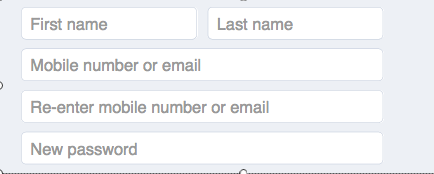
thanks
-- Joomla version -- : 3.4.3
-- PHP version -- : 5.5
-- Error-message(debug-mod must be tuned on) -- : none
hi
i would like to add default values to the registration field, could you guide me on the best way to do this? hoping to edit
components/com_users/models/forms/registration.xml
<field
name="name"
type="text"
description="COM_USERS_REGISTER_NAME_DESC"
filter="string"
label="COM_USERS_REGISTER_NAME_LABEL"
required="true"
size="30"
value="Select a nice username!"
/>
i dont know if this will result in an issue with hikashop? or it might get overridden.
Anyway something like below with default values
thanks
Please Log in or Create an account to join the conversation.

10 years 1 month ago - 10 years 1 month ago #248311
by lousyfool
Need help with customisations of layouts, style or other site development? PM me!
(Don't forget to turn on "E-mail notification of new messages" )
Replied by lousyfool on topic how to add default values to registration field
Hi,
Here's a neat little Joomla plugin that lets you override form XMLs: icueproject.com/downloads/override-xml-forms
I haven't tried it with Joomla 3.6.x, yet, but with previous versions it worked perfectly fine.
Hint: What you probably want isn't value but placeholder attributes, e.g. in the form
Here's a neat little Joomla plugin that lets you override form XMLs: icueproject.com/downloads/override-xml-forms
I haven't tried it with Joomla 3.6.x, yet, but with previous versions it worked perfectly fine.
Hint: What you probably want isn't value but placeholder attributes, e.g. in the form
Code:
placeholder="First name"
Need help with customisations of layouts, style or other site development? PM me!
(Don't forget to turn on "E-mail notification of new messages" )
Last edit: 10 years 1 month ago by lousyfool. Reason: w3schools link
The following user(s) said Thank You: ronron
Please Log in or Create an account to join the conversation.

10 years 1 month ago #248310
by Jerome
Jerome - Obsidev.com
HikaMarket & HikaSerial developer / HikaShop core dev team.
Replied by Jerome on topic how to add default values to registration field
Hi,
Please read the "custom field" documentation.
www.hikashop.com/support/documentation/i...ield-form.html#infos
Regards,
Please read the "custom field" documentation.
www.hikashop.com/support/documentation/i...ield-form.html#infos
Regards,
Jerome - Obsidev.com
HikaMarket & HikaSerial developer / HikaShop core dev team.
The following user(s) said Thank You: ronron
Please Log in or Create an account to join the conversation.
10 years 1 month ago - 10 years 1 month ago #248378
by ronron
Replied by ronron on topic how to add default values to registration field
hi lousyfool
thank you
i cant get it to work
this is the xml file i want to add placeholders
/components/com_users/models/forms/registration.xml
and i added it here
/templates/system/form/com_users/registration.xml
this is the override
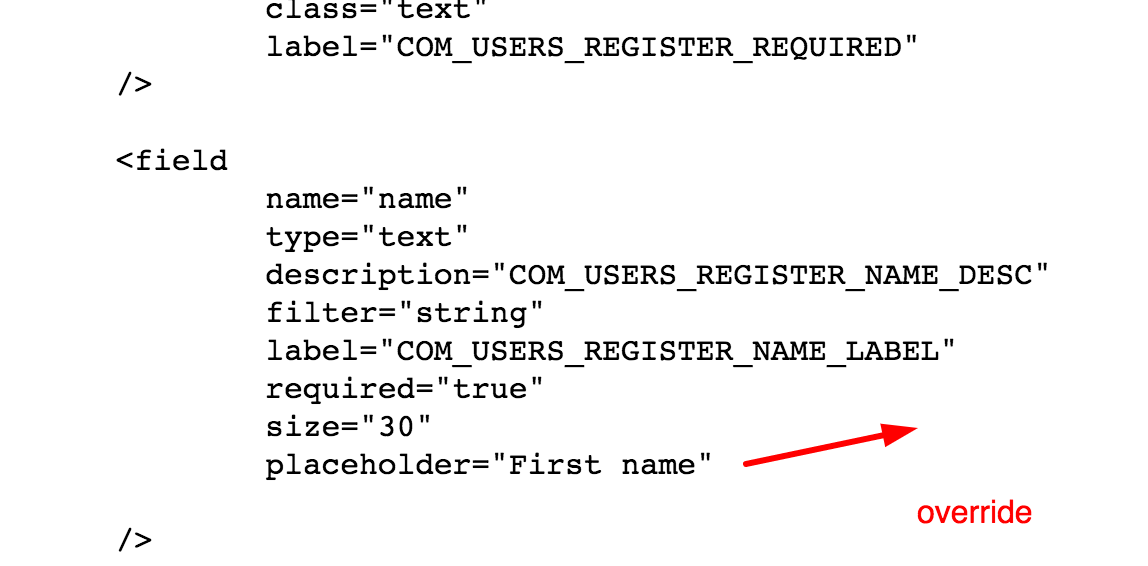
is this correct?
thank you
i cant get it to work
this is the xml file i want to add placeholders
/components/com_users/models/forms/registration.xml
and i added it here
/templates/system/form/com_users/registration.xml
this is the override
is this correct?
Last edit: 10 years 1 month ago by ronron.
Please Log in or Create an account to join the conversation.
10 years 1 month ago #248379
by ronron
Replied by ronron on topic how to add default values to registration field
thank jerome
i think this, above, is for custom fields
im trying to add a place holder to fields on the registration form
<input type="text" name="data[register][name]" id="register_name" value="" class="required" size="30" maxlength="50" aria-required="true" required="required" placeholder="nice name">
any tips to do this on hikashop?
thanks
Hi,
Please read the "custom field" documentation.
www.hikashop.com/support/documentation/i...ield-form.html#infos
Regards,
i think this, above, is for custom fields
im trying to add a place holder to fields on the registration form
<input type="text" name="data[register][name]" id="register_name" value="" class="required" size="30" maxlength="50" aria-required="true" required="required" placeholder="nice name">
any tips to do this on hikashop?
thanks
Please Log in or Create an account to join the conversation.
10 years 1 month ago #248380
by lousyfool
Need help with customisations of layouts, style or other site development? PM me!
(Don't forget to turn on "E-mail notification of new messages" )
Replied by lousyfool on topic how to add default values to registration field
Hi,
You seem to have found it already, but this is all I can point you at: icueproject.com/products/override-xml-forms
Make sure you got it all right.
It worked for me and, sorry, more I can't say without digging deeper into your site - not to mention that the HikaShop support forum isn't the place to go into more details of 3rd-party code.
You seem to have found it already, but this is all I can point you at: icueproject.com/products/override-xml-forms
Make sure you got it all right.
It worked for me and, sorry, more I can't say without digging deeper into your site - not to mention that the HikaShop support forum isn't the place to go into more details of 3rd-party code.
Need help with customisations of layouts, style or other site development? PM me!
(Don't forget to turn on "E-mail notification of new messages" )
The following user(s) said Thank You: ronron
Please Log in or Create an account to join the conversation.

10 years 1 month ago #248385
by nicolas
Replied by nicolas on topic how to add default values to registration field
Hi,
The code:
comes from the HikaShop registration form.
To add a place holder in there, you need to edit the file "registration" (or "registration_bootstrap" if the "use bootstrap design" setting is activated) via the menu Display>Views:
The code:
Code:
<input type="text" name="data[register][name]" id="register_name" value="" class="required" size="30" maxlength="50" aria-required="true" required="required" placeholder="nice name">
To add a place holder in there, you need to edit the file "registration" (or "registration_bootstrap" if the "use bootstrap design" setting is activated) via the menu Display>Views:
Code:
<input type="text" name="data[register][name]" id="register_name" value="<?php echo $this->escape($this->mainUser->get( 'name' ));?>" class="inputbox required" maxlength="50" /> *
The following user(s) said Thank You: ronron
Please Log in or Create an account to join the conversation.
Time to create page: 0.243 seconds