

- Posts: 52
- Thank you received: 0
sql error after update when copy product
10 years 1 week ago - 10 years 1 week ago #250808
by jafar007
sql error after update when copy product was created by jafar007
-- HikaShop version -- : 2.6.4
-- Joomla version -- : 3.6.2
-- PHP version -- : 5.6
-- Error-message(debug-mod must be tuned on) -- :
hi
when i update from 2.6.2 to 2.6.4 every thing is ok but in some product when i select a product and click on copy button it give me that error. and don't create a copy and the main product get lost.
(it happen in some product not all product . in new product after update and in old product before update give that error)
i remove cropped product manually in database in product table.
-- Joomla version -- : 3.6.2
-- PHP version -- : 5.6
-- Error-message(debug-mod must be tuned on) -- :
Code:
1064 You have an error in your SQL syntax; check the manual that corresponds to your MySQL server version for the right syntax to use near ''0','0','0'),('plextor_m8pe_128gb_nvm_express__ssd_m_2_pcie_gen_3_0_speed1600mb_' at line 1 SQL=INSERT IGNORE INTO #__hikashop_file (`file_name`,`file_description`,`file_path`,`file_type`,`file_ref_id`,`file_ordering`,`file_free_download`,`file_limit`) VALUES ('plextor_m8pe_128gb_nvm_express__ssd_m_2_pcie_gen_3_0_speed1600mb_write500mb_controller_marvell_88ss1093_nand_flash_toshiba_15nm_toggle_mlc_dram_cache_512mb-lpddr3_m_2_2280_nvme3_1155796225','','plextor_m8pe_128gb_nvm_express__ssd_m_2_pcie_gen_3_0_speed1600mb_write500mb_controller_marvell_88ss1093_nand_flash_toshiba_15nm_toggle_mlc_dram_cache_512mb-lpddr3_m_2_2280_nvme3_1155796225.jpg','product',,'0','0','0'),('plextor_m8pe_128gb_nvm_express__ssd_m_2_pcie_gen_3_0_speed1600mb_write500mb_controller_marvell_88ss1093_nand_flash_toshiba_15nm_toggle_mlc_dram_cache_512mb-lpddr3_m_2_2280_nvme4_1973255987','','plextor_m8pe_128gb_nvm_express__ssd_m_2_pcie_gen_3_0_speed1600mb_write500mb_controller_marvell_88ss1093_nand_flash_toshiba_15nm_toggle_mlc_dram_cache_512mb-lpddr3_m_2_2280_nvme4_1973255987.jpg','product',,'1','0','0'),('plextor_m8pe_128gb_nvm_express__ssd_m_2_pcie_gen_3_0_speed1600mb_write500mb_controller_marvell_88ss1093_nand_flash_toshiba_15nm_toggle_mlc_dram_cache_512mb-lpddr3_m_2_2280_nvme1_210542254','','plextor_m8pe_128gb_nvm_express__ssd_m_2_pcie_gen_3_0_speed1600mb_write500mb_controller_marvell_88ss1093_nand_flash_toshiba_15nm_toggle_mlc_dram_cache_512mb-lpddr3_m_2_2280_nvme1_210542254.jpg','product',,'2','0','0'),('plextor_m8pe_128gb_nvm_express__ssd_m_2_pcie_gen_3_0_speed1600mb_write500mb_controller_marvell_88ss1093_nand_flash_toshiba_15nm_toggle_mlc_dram_cache_512mb-lpddr3_m_2_2280_nvme2_1720384498','','plextor_m8pe_128gb_nvm_express__ssd_m_2_pcie_gen_3_0_speed1600mb_write500mb_controller_marvell_88ss1093_nand_flash_toshiba_15nm_toggle_mlc_dram_cache_512mb-lpddr3_m_2_2280_nvme2_1720384498.jpg','product',,'3','0','0')
hi
when i update from 2.6.2 to 2.6.4 every thing is ok but in some product when i select a product and click on copy button it give me that error. and don't create a copy and the main product get lost.
(it happen in some product not all product . in new product after update and in old product before update give that error)
i remove cropped product manually in database in product table.
Last edit: 10 years 1 week ago by Jerome. Reason: [code] is nice
Please Log in or Create an account to join the conversation.

10 years 1 week ago #250811
by nicolas
Replied by nicolas on topic sql error after update when copy product
Hi,
Try changing the line:
to:
in the file administrator/components/com_hikashop/helpers/import.php
Try changing the line:
Code:
$value = array($this->db->Quote($file->file_name),$this->db->Quote($file->file_description),$this->db->Quote($file->file_path),$this->db->Quote($db_type),$product->product_id,$this->db->Quote($file->file_ordering),$this->db->Quote($file->file_free_download),$this->db->Quote($file->file_limit));
Code:
$value = array($this->db->Quote($file->file_name),$this->db->Quote($file->file_description),$this->db->Quote($file->file_path),$this->db->Quote($db_type),(int)$product->product_id,$this->db->Quote($file->file_ordering),$this->db->Quote($file->file_free_download),$this->db->Quote($file->file_limit));
The following user(s) said Thank You: jafar007
Please Log in or Create an account to join the conversation.
10 years 1 week ago - 10 years 1 week ago #250874
by jafar007
Replied by jafar007 on topic sql error after update when copy product
i must change this line in every update?
i change that line but error change to this:
i change that line but error change to this:
Code:
1064 You have an error in your SQL syntax; check the manual that corresponds to your MySQL server version for the right syntax to use near '15),(46,,27)' at line 1 SQL=INSERT IGNORE INTO #__hikashop_product_category (`category_id`,`product_id`,`ordering`) VALUES (48,,15),(46,,27)
Last edit: 10 years 1 week ago by jafar007.
Please Log in or Create an account to join the conversation.
10 years 1 week ago #250881
by nicolas
Replied by nicolas on topic sql error after update when copy product
No. Let us know how it works. If that fixes the problem, we can include it for the next version of HikaShop.
Please Log in or Create an account to join the conversation.
10 years 4 days ago #251212
by jafar007
Replied by jafar007 on topic sql error after update when copy product
now,what shod i do?
Please Log in or Create an account to join the conversation.

10 years 3 days ago #251241
by Jerome
Jerome - Obsidev.com
HikaMarket & HikaSerial developer / HikaShop core dev team.
Replied by Jerome on topic sql error after update when copy product
Hi,
The error you got is another error ; but the problem is the exact same kind.
You can replace the line
By
In order to avoid the error.
But even if it will not generate an error ; the content is not correct and the fact that you have an error indicate that you do not have any "product ID" ; which is the source of the problem and the SQL error is just a side effect.
A product without ID is a product which is not in the database ; it is a product which has not been imported ; it is your real issue.
Regards,
The error you got is another error ; but the problem is the exact same kind.
You can replace the line
Code:
$value = array((int)$id,$product->product_id,$orderings[(int)$id]);
Code:
$value = array((int)$id,(int)$product->product_id,$orderings[(int)$id]);
But even if it will not generate an error ; the content is not correct and the fact that you have an error indicate that you do not have any "product ID" ; which is the source of the problem and the SQL error is just a side effect.
A product without ID is a product which is not in the database ; it is a product which has not been imported ; it is your real issue.
Regards,
Jerome - Obsidev.com
HikaMarket & HikaSerial developer / HikaShop core dev team.
The following user(s) said Thank You: jafar007
Please Log in or Create an account to join the conversation.
10 years 3 days ago #251276
by jafar007
Replied by jafar007 on topic sql error after update when copy product
i made change and i don't get any error but don't show any copied product .
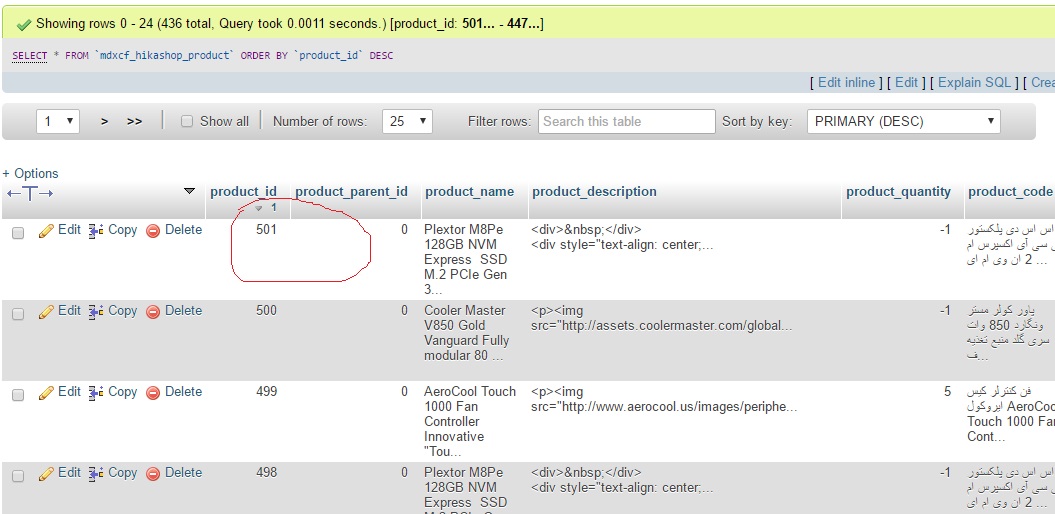
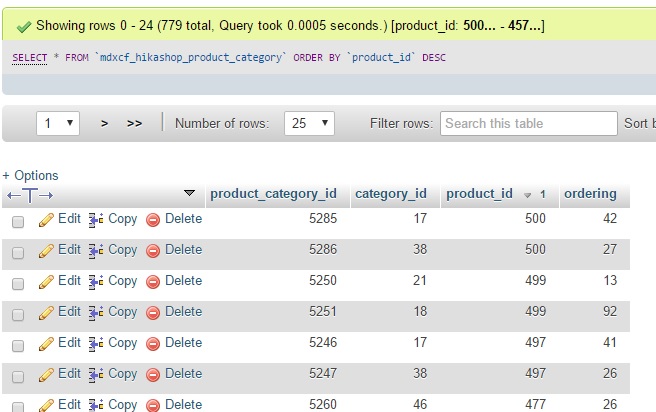
in database in hikashop_product table created product. but in hikashop_product_category don't create product ID
you can see my screen shot.
i must delete product manually in database.
some times when change something in product and save that every thing be ok and i can copy product correctly
in database in hikashop_product table created product. but in hikashop_product_category don't create product ID
you can see my screen shot.
i must delete product manually in database.
some times when change something in product and save that every thing be ok and i can copy product correctly
Please Log in or Create an account to join the conversation.
10 years 2 days ago #251280
by nicolas
Replied by nicolas on topic sql error after update when copy product
Hi,
If you don't have anything for the product in hikashop_product_category, click on the "check database" button of the HikaShop configuration. That will link automatically all the products without a category to the main category of your shop.
If you don't have anything for the product in hikashop_product_category, click on the "check database" button of the HikaShop configuration. That will link automatically all the products without a category to the main category of your shop.
The following user(s) said Thank You: jafar007
Please Log in or Create an account to join the conversation.
Time to create page: 0.235 seconds