

- Posts: 281
- Thank you received: 3
after update to hika3.0 distance between box
9 years 8 months ago #261198
by francota
after update to hika3.0 distance between box was created by francota
-- HikaShop version -- : 3.0.0
-- Joomla version -- : 3.6.5
Hello
I just updated one of my web site to hikashop 3.0
I dont understand how to encrease the distance between the box of the product, and than I changed some setting and the button style is different from my template.
I triyed to put all setting same before but maybe i am forgetting something
You can see here
goo.gl/lYcI7o
Thanks
Frank
-- Joomla version -- : 3.6.5
Hello
I just updated one of my web site to hikashop 3.0
I dont understand how to encrease the distance between the box of the product, and than I changed some setting and the button style is different from my template.
I triyed to put all setting same before but maybe i am forgetting something
You can see here
goo.gl/lYcI7o
Thanks
Frank
Please Log in or Create an account to join the conversation.
9 years 8 months ago - 9 years 8 months ago #261217
by francota
Replied by francota on topic after update to hika3.0 distance between box
OK I solved the problem about the button, I changed the setting of ladd to cart legacy now it is on YES.
But I am sad couse I like the new way to add product in the cart. How can I solve?
So as I sayd before I wuold like to have more sapece between the box of the product up and bottom.
I noted other things, when I resize the screen the box of the product are not same dimension, before the update they were :blush:
Thanks
Frank
But I am sad couse I like the new way to add product in the cart. How can I solve?
So as I sayd before I wuold like to have more sapece between the box of the product up and bottom.
I noted other things, when I resize the screen the box of the product are not same dimension, before the update they were :blush:
Thanks
Frank
Last edit: 9 years 8 months ago by francota.
Please Log in or Create an account to join the conversation.

9 years 8 months ago #261201
by Jerome
Jerome - Obsidev.com
HikaMarket & HikaSerial developer / HikaShop core dev team.
Replied by Jerome on topic after update to hika3.0 distance between box
Hi,
HikaShop 3 now include a responsive grid system and his CSS has been clean-up.
As usual, when you want to customize the design of HikaShop ; we recommend to check that documentation page :
www.hikashop.com/support/documentation/1...the-display.html#css
More about HikaShop 3 Release :
www.hikashop.com/blog/367-hikashop-3-0-out.html
Regards,
HikaShop 3 now include a responsive grid system and his CSS has been clean-up.
As usual, when you want to customize the design of HikaShop ; we recommend to check that documentation page :
www.hikashop.com/support/documentation/1...the-display.html#css
More about HikaShop 3 Release :
www.hikashop.com/blog/367-hikashop-3-0-out.html
Regards,
Jerome - Obsidev.com
HikaMarket & HikaSerial developer / HikaShop core dev team.
Please Log in or Create an account to join the conversation.
9 years 8 months ago #261250
by francota
Replied by francota on topic after update to hika3.0 distance between box
Hello
I followed your guide about the legacy mode, so I changed the setting:
Checkout legacy no
Add to cart legacy No
Backend dashboard legacy no
After that I see that hikashop doesn't follow any more the css of my template, as you can see in the image, the first one is in legacy mode, and the second one note legacy but it has some problem in the table, infact I dont see any more the head of the table and in bottom the total is not align with other item.
How can I solve for the table in checkout?
The template is compatible with hikashop infact with old version I didn't have any problem, than I attach the screen with list of product in resize more, why thay are not any more allign, before they were .
.
Thanks
Frank
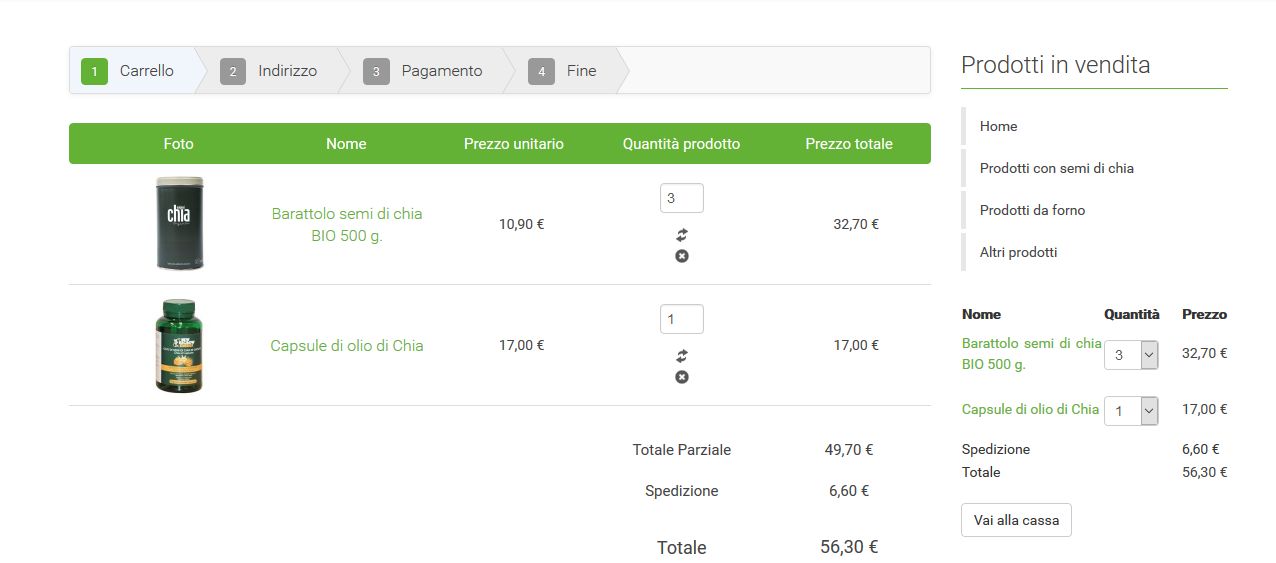
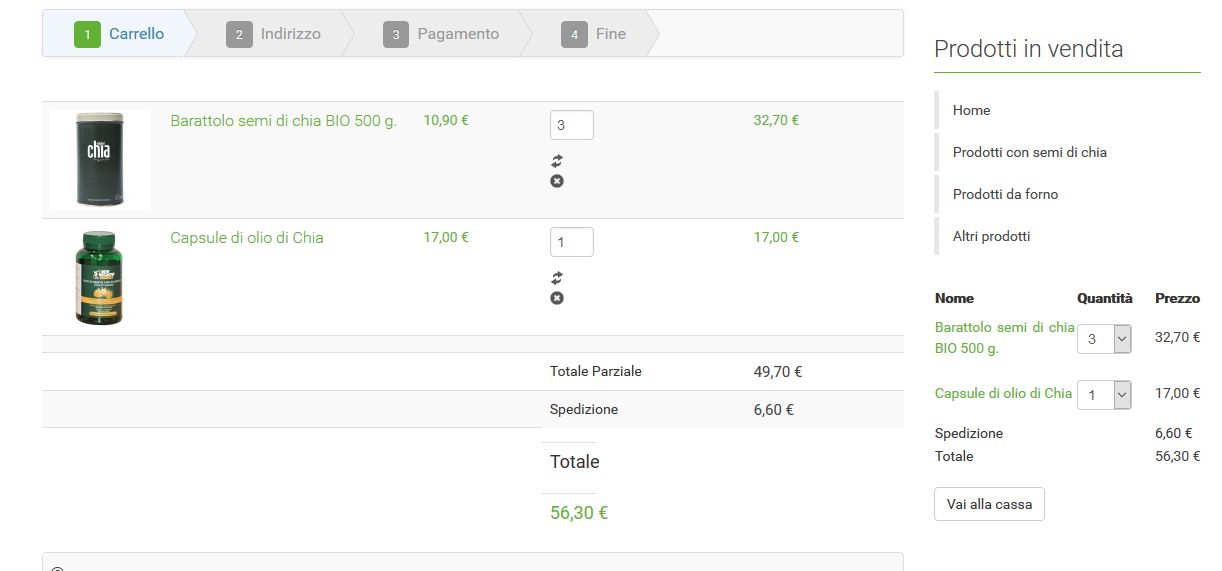

I followed your guide about the legacy mode, so I changed the setting:
Checkout legacy no
Add to cart legacy No
Backend dashboard legacy no
After that I see that hikashop doesn't follow any more the css of my template, as you can see in the image, the first one is in legacy mode, and the second one note legacy but it has some problem in the table, infact I dont see any more the head of the table and in bottom the total is not align with other item.
How can I solve for the table in checkout?
The template is compatible with hikashop infact with old version I didn't have any problem, than I attach the screen with list of product in resize more, why thay are not any more allign, before they were
.Thanks
Frank
Please Log in or Create an account to join the conversation.

9 years 8 months ago #261265
by nicolas
Replied by nicolas on topic after update to hika3.0 distance between box
Hi,
Well that's the problem. The CSS in your template to customize the display of the cart in the checkout is only partially compatible with the new checkout views of HikaShop 3.
Because of that, the titles' color is properly applied and becomes white, but the background-color is not and thus you get white on white.
You would have to add such CSS
.hikashop_checkout_cart tr{
background-color: green;
}
To get back a green background. I would recommend you to contact your template provider to notify them about the problem so that they can fix it properly in their template.
Well that's the problem. The CSS in your template to customize the display of the cart in the checkout is only partially compatible with the new checkout views of HikaShop 3.
Because of that, the titles' color is properly applied and becomes white, but the background-color is not and thus you get white on white.
You would have to add such CSS
.hikashop_checkout_cart tr{
background-color: green;
}
To get back a green background. I would recommend you to contact your template provider to notify them about the problem so that they can fix it properly in their template.
Please Log in or Create an account to join the conversation.
Time to create page: 0.174 seconds