
- Posts: 424
- Thank you received: 11
listing view not showing neatly
- BluepointWebdesign
-
 Topic Author
- Offline
Less
More
9 years 7 months ago #261966
by BluepointWebdesign
listing view not showing neatly was created by BluepointWebdesign
-- HikaShop version -- : 3.0.0
-- Joomla version -- : 3.6.5
-- PHP version -- : 6.x
-- Error-message(debug-mod must be tuned on) -- : view
Hello.
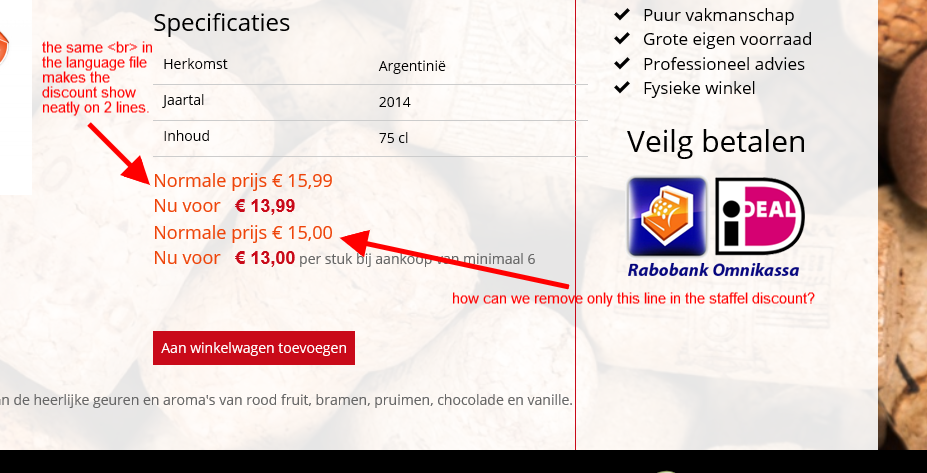
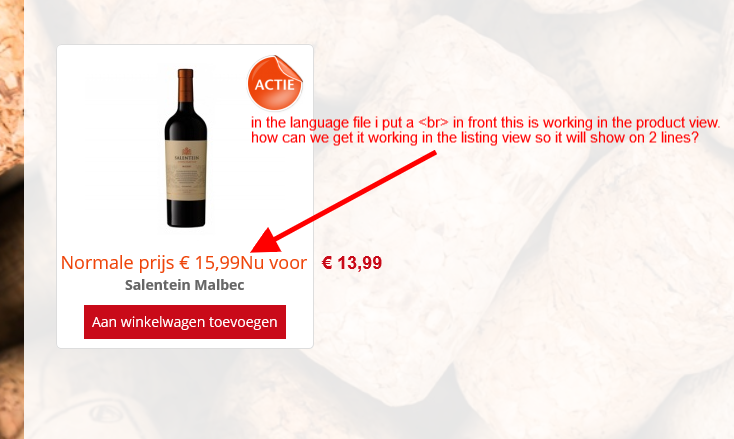
We are working on another nice webshop with of course hikashop. but we now get a strange view in the productlisting with the discount. the whole discount from amount to amount is on one line.. and out of the container. (see attachtment productlistingview.png. This is because i put a <br> in the language file before the price_discount_end now correctly in the product view and shows it on 2 lines. see attachtment productview.png
Thanks
-- Joomla version -- : 3.6.5
-- PHP version -- : 6.x
-- Error-message(debug-mod must be tuned on) -- : view
Hello.
We are working on another nice webshop with of course hikashop.
but we now get a strange view in the productlisting with the discount. the whole discount from amount to amount is on one line.. and out of the container. (see attachtment productlistingview.png. This is because i put a <br> in the language file before the price_discount_end now correctly in the product view and shows it on 2 lines. see attachtment productview.png Thanks
Please Log in or Create an account to join the conversation.

9 years 7 months ago #261975
by Jerome
Jerome - Obsidev.com
HikaMarket & HikaSerial developer / HikaShop core dev team.
Replied by Jerome on topic listing view not showing neatly
Hi,
I'm afraid that a "<br>" can't duplicate a content.
And regarding your screenshot, there is no content duplication, because the two "normal" prices are different !
Regards,
I'm afraid that a "<br>" can't duplicate a content.
And regarding your screenshot, there is no content duplication, because the two "normal" prices are different !
Regards,
Jerome - Obsidev.com
HikaMarket & HikaSerial developer / HikaShop core dev team.
Please Log in or Create an account to join the conversation.
- BluepointWebdesign
-
Topic Author
- Offline
Less
More
- Posts: 424
- Thank you received: 11
9 years 7 months ago #262106
by BluepointWebdesign
Replied by BluepointWebdesign on topic listing view not showing neatly
Hi,
Ik know that the <br> can not duplicate content. So let me try to explain it a bit better.
As you see in the product view image. THere we have the two lines. Normale Prijs 15.99 underneat because of the "<br>" in the languages file. Nu voor 13.99. In the second image of the product list before entering the product the same price only this will not go with the "<br>" on two lines and as you see it comes out of the box. How can we make it happen that it will go as in the product view.
I know it is somewhere in the product_listing_price
The other line with the diferent price is the price discount when people buy 6 pieces. But only the first line is the one we don't want to show. So only the line: Normale prijs 15.00 need to be not shown. so that we get in the product view only this.
Normale prijs 15.99
Nu voor 13.99
Nu voor 13.00 per stuk bij aankoop van minimaal 6
I hope i explained it a little better.
Regards.
Ik know that the <br> can not duplicate content. So let me try to explain it a bit better.
As you see in the product view image. THere we have the two lines. Normale Prijs 15.99 underneat because of the "<br>" in the languages file. Nu voor 13.99. In the second image of the product list before entering the product the same price only this will not go with the "<br>" on two lines and as you see it comes out of the box. How can we make it happen that it will go as in the product view.
I know it is somewhere in the product_listing_price
The other line with the diferent price is the price discount when people buy 6 pieces. But only the first line is the one we don't want to show. So only the line: Normale prijs 15.00 need to be not shown. so that we get in the product view only this.
Normale prijs 15.99
Nu voor 13.99
Nu voor 13.00 per stuk bij aankoop van minimaal 6
I hope i explained it a little better.
Regards.
Please Log in or Create an account to join the conversation.

9 years 7 months ago - 9 years 7 months ago #262119
by Philip
Replied by Philip on topic listing view not showing neatly
Hello,
If I understand you well, you have create some override view, and the display don't fit your needs, plus you want add some price information.
Please note that this forum aim is to help people to configure HikaShop, and of course we can give you some advice in order to achieve customization.
First step, in your product view I believe Css custom code must fit better to keep elements in product div instead of a <br>.
Something like :
Second step, same idea, remove your <br> an use some css as well in order to reorganize the elements like you needs, maybe with this same kind of Css code.
Hope this will help you.
Regards
If I understand you well, you have create some override view, and the display don't fit your needs, plus you want add some price information.
Please note that this forum aim is to help people to configure HikaShop, and of course we can give you some advice in order to achieve customization.
First step, in your product view I believe Css custom code must fit better to keep elements in product div instead of a <br>.
Something like :
Code:
div_product span_hikashop_product_price {
display : block;
}
Second step, same idea, remove your <br> an use some css as well in order to reorganize the elements like you needs, maybe with this same kind of Css code.
Hope this will help you.
Regards
Last edit: 9 years 7 months ago by Philip.
Please Log in or Create an account to join the conversation.
Time to create page: 0.197 seconds