
- Posts: 5
- Thank you received: 0
Add To Cart Not Working
- larrywilkens
-
 Topic Author
- Offline
Less
More
9 years 7 months ago #262719
by larrywilkens
Add To Cart Not Working was created by larrywilkens
When a customer clicks Add To Cart, the page just refreshes. There's not notice that anything was actually added to cart.
In addition, when clicking the View Cart / Checkout link the page just refreshes. You don't go to the cart/checkout page.
What's interesting is that I downloaded a copy of the site and ran it locally using WAMP and everything works properly.
Need assistance as this kills our ecommerce completely.
Thanks
In addition, when clicking the View Cart / Checkout link the page just refreshes. You don't go to the cart/checkout page.
What's interesting is that I downloaded a copy of the site and ran it locally using WAMP and everything works properly.
Need assistance as this kills our ecommerce completely.
Thanks
Please Log in or Create an account to join the conversation.

9 years 7 months ago #262733
by Jerome
Jerome - Obsidev.com
HikaMarket & HikaSerial developer / HikaShop core dev team.
Replied by Jerome on topic Add To Cart Not Working
Hi,
Because it was your first message in our forum, it needed to be approved (to avoid spam).
Unfortunately, the informations you gave via the forum are lost in that process (I hope that we will fix that issue soon).
Would it be possible to have more details about your website and the HikaShop version you're using ?
Can you please also check your Build number ?
www.hikashop.com/support/documentation/5...onfig.html#main_main
Regards,
Because it was your first message in our forum, it needed to be approved (to avoid spam).
Unfortunately, the informations you gave via the forum are lost in that process (I hope that we will fix that issue soon).
Would it be possible to have more details about your website and the HikaShop version you're using ?
Can you please also check your Build number ?
www.hikashop.com/support/documentation/5...onfig.html#main_main
Regards,
Jerome - Obsidev.com
HikaMarket & HikaSerial developer / HikaShop core dev team.
Please Log in or Create an account to join the conversation.
- larrywilkens
-
Topic Author
- Offline
Less
More
- Posts: 5
- Thank you received: 0
9 years 7 months ago #262782
by larrywilkens
Replied by larrywilkens on topic Add To Cart Not Working
Please Log in or Create an account to join the conversation.

9 years 7 months ago #262821
by nicolas
Replied by nicolas on topic Add To Cart Not Working
Hi,
This looks like a user session issue.
Try changing the "session handler" setting of the Joomla configuration.
Also, check with your hosting if you have Varnish and if you do, deactivate it, you use the integration with Joomla/HikaShop:
massivescale.net/varnish-joomla.html
Updating HikaShop to the latest version might help but that's not guaranteed so you might want to try on a test website before.
This looks like a user session issue.
Try changing the "session handler" setting of the Joomla configuration.
Also, check with your hosting if you have Varnish and if you do, deactivate it, you use the integration with Joomla/HikaShop:
massivescale.net/varnish-joomla.html
Updating HikaShop to the latest version might help but that's not guaranteed so you might want to try on a test website before.
Please Log in or Create an account to join the conversation.
- larrywilkens
-
Topic Author
- Offline
Less
More
- Posts: 5
- Thank you received: 0
9 years 7 months ago #262836
by larrywilkens
Replied by larrywilkens on topic Add To Cart Not Working
I tried changing the Session Handler from Database to None.
No difference.
I'm not sure if we have varnish. See the attached screenshot. Any thoughts?
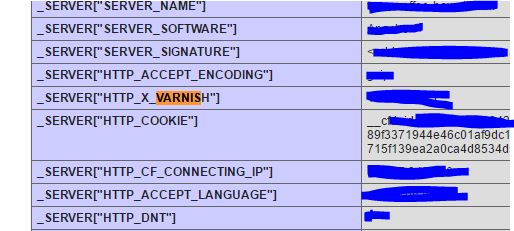
No difference.
I'm not sure if we have varnish. See the attached screenshot. Any thoughts?
Please Log in or Create an account to join the conversation.
9 years 7 months ago #262879
by nicolas
Replied by nicolas on topic Add To Cart Not Working
Hi,
So do you have the Joomla integration with Varnish that I talked about ?
If not, that could well be the problem. I would recommend to check with your hosting. Try deactivating it to see if that helps and if it does, then either keep it deactivated or see with your hosting/Varnish in order to add that integration.
So do you have the Joomla integration with Varnish that I talked about ?
If not, that could well be the problem. I would recommend to check with your hosting. Try deactivating it to see if that helps and if it does, then either keep it deactivated or see with your hosting/Varnish in order to add that integration.
Please Log in or Create an account to join the conversation.
- larrywilkens
-
Topic Author
- Offline
Less
More
- Posts: 5
- Thank you received: 0
9 years 7 months ago #263092
by larrywilkens
Replied by larrywilkens on topic Add To Cart Not Working
Hi Nicholas. I'm not understanding your suggestions re varnish.
It seems you first say that NOT having varnish could be the problem. Then it appears you say that if we have varnish we should deactivate it. So I'm confused.
I looked at this link:
massivescale.net/varnish-joomla.html
and from what I see that has to be installed manually. So we aren't using varnish cache.
This problem appeared without any changes on our part.
Any other suggestions?
It seems you first say that NOT having varnish could be the problem. Then it appears you say that if we have varnish we should deactivate it. So I'm confused.
I looked at this link:
massivescale.net/varnish-joomla.html
and from what I see that has to be installed manually. So we aren't using varnish cache.
This problem appeared without any changes on our part.
Any other suggestions?
Please Log in or Create an account to join the conversation.
9 years 7 months ago #263095
by nicolas
Replied by nicolas on topic Add To Cart Not Working
Hi,
No, I always meant to say that having Varnish could be the problem.
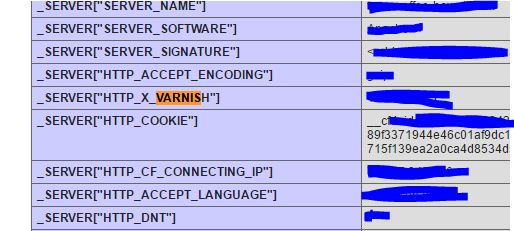
Your screenshot www.hikashop.com/media/kunena/attachments/48086/varnish.JPG seems to indicate that you do have Varnish on your hosting.
Which is why I recommended to either deactivate it or install the integration with Joomla in order to prevent that problem.
The problem could have happened suddenly if Varnish was added by your hosting.
No, I always meant to say that having Varnish could be the problem.
Your screenshot www.hikashop.com/media/kunena/attachments/48086/varnish.JPG seems to indicate that you do have Varnish on your hosting.
Which is why I recommended to either deactivate it or install the integration with Joomla in order to prevent that problem.
The problem could have happened suddenly if Varnish was added by your hosting.
The following user(s) said Thank You: larrywilkens
Please Log in or Create an account to join the conversation.
- larrywilkens
-
Topic Author
- Offline
Less
More
- Posts: 5
- Thank you received: 0
9 years 7 months ago #263210
by larrywilkens
Replied by larrywilkens on topic Add To Cart Not Working
Thank you Nicolas. Turning off Varnish did the trick! I appreciate your expertise and great help. Thank you again!
Please Log in or Create an account to join the conversation.
Time to create page: 0.188 seconds