

- Posts: 94
- Thank you received: 2
Pagenav buttons doesn't work anymore after updating 2.6 to 3.0.1
9 years 5 months ago #267823
by RustyHika
-- HikaShop version -- : 3.0.1
-- Joomla version -- : 3.6.5
-- PHP version -- : 5.6
-- Browser(s) name and version -- : chrome 57.0.2987.133 (64-bit)
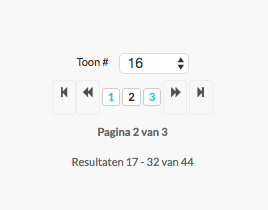
Pagenav buttons disappeared and mouse over hand doesn't work anymore after updating 2.6 to 3.0.1

-- Joomla version -- : 3.6.5
-- PHP version -- : 5.6
-- Browser(s) name and version -- : chrome 57.0.2987.133 (64-bit)
Pagenav buttons disappeared and mouse over hand doesn't work anymore after updating 2.6 to 3.0.1
Please Log in or Create an account to join the conversation.

9 years 5 months ago #267826
by nicolas
Replied by nicolas on topic Pagenav buttons doesn't work anymore after updating 2.6 to 3.0.1
Hi,
That's a problem with the pagination customization in your template. With recent versions of HikaShop, HikaShop uses the template's pagination so that it is better integrated. But in your case that causes the links to not work.
Rename the file templates/YOUR_TEMPLATE/html/pagination.php to deactivate the pagination override of your template and it should work again.
That's a problem with the pagination customization in your template. With recent versions of HikaShop, HikaShop uses the template's pagination so that it is better integrated. But in your case that causes the links to not work.
Rename the file templates/YOUR_TEMPLATE/html/pagination.php to deactivate the pagination override of your template and it should work again.
Please Log in or Create an account to join the conversation.
8 years 8 months ago #285737
by RustyHika
Replied by RustyHika on topic Pagenav buttons doesn't work anymore after updating 2.6 to 3.0.1
Hi Nicolas,
Sorry for the very very late response, but the file "templates/YOUR_TEMPLATE/html/pagination.php" doesn't exist in the Photon Rocket Theme template.
Sorry for the very very late response, but the file "templates/YOUR_TEMPLATE/html/pagination.php" doesn't exist in the Photon Rocket Theme template.
Please Log in or Create an account to join the conversation.
8 years 8 months ago #285740
by nicolas
Replied by nicolas on topic Pagenav buttons doesn't work anymore after updating 2.6 to 3.0.1
Hi,
I've checked on your link but the pagination seems to be working now as far as I can see.
And regarding the look of the pagination, I can see that you have the "style" setting under the "Display" tab of the hikashop configuration set to "none" instead of "default".
Set it to "default" and you'll get the styles of HikaShop on the pagination.
I've checked on your link but the pagination seems to be working now as far as I can see.
And regarding the look of the pagination, I can see that you have the "style" setting under the "Display" tab of the hikashop configuration set to "none" instead of "default".
Set it to "default" and you'll get the styles of HikaShop on the pagination.
Please Log in or Create an account to join the conversation.
Time to create page: 0.185 seconds