
- Posts: 92
- Thank you received: 3
Customer fields no longer visible on product listing since update
- ezomerdijk
-
 Topic Author
- Offline
Less
More
9 years 5 months ago #268747
by ezomerdijk
-- HikaShop version -- : 3.0.1
-- Joomla version -- : 3.7.0
-- PHP version -- : 7.0
-- Browser(s) name and version -- : safari 10.1
-- Error-message(debug-mod must be tuned on) -- : no errors
Since the latest Hikashop and joomla update I lost the customer fields on the product listing on the website.
I don't think I made any changes in css, but I am not sure.... What could be the problem?
-- Joomla version -- : 3.7.0
-- PHP version -- : 7.0
-- Browser(s) name and version -- : safari 10.1
-- Error-message(debug-mod must be tuned on) -- : no errors
Since the latest Hikashop and joomla update I lost the customer fields on the product listing on the website.
I don't think I made any changes in css, but I am not sure.... What could be the problem?
Please Log in or Create an account to join the conversation.

9 years 5 months ago #268748
by nicolas
Replied by nicolas on topic Customer fields no longer visible on product listing since update
Hi,
Edit your custom fields and make sure that the display settings for the custom fields are configured like you want and save them to make sure that the data in the database correspond to what you want for the custom field as we've changed things relative to the display of custom fields in previous versions of HikaShop.
Also, edit your menu item via the Joomla menu manager and under the "products options" tab, make sure that the display setting for custom item fields is activated.
Also, try switching to the default template of Joomla and see if that changes anything. It could be related to a view override you have on your template.
Finally, looking at your link, the products I have checked have an option plus a custom item field. And in that case, the add to cart and the custom fields won't display on the listing because the options are not supported on listings and thus it would mean that you would be able to add the product with the custom field without the options of the product selected and that's usually not something you want, so we've modified the system so that it handle that case properly now. So if you're talking about that behavior, I'm afraid that your problem is actually the result of fixing the system to work properly in such case.
Edit your custom fields and make sure that the display settings for the custom fields are configured like you want and save them to make sure that the data in the database correspond to what you want for the custom field as we've changed things relative to the display of custom fields in previous versions of HikaShop.
Also, edit your menu item via the Joomla menu manager and under the "products options" tab, make sure that the display setting for custom item fields is activated.
Also, try switching to the default template of Joomla and see if that changes anything. It could be related to a view override you have on your template.
Finally, looking at your link, the products I have checked have an option plus a custom item field. And in that case, the add to cart and the custom fields won't display on the listing because the options are not supported on listings and thus it would mean that you would be able to add the product with the custom field without the options of the product selected and that's usually not something you want, so we've modified the system so that it handle that case properly now. So if you're talking about that behavior, I'm afraid that your problem is actually the result of fixing the system to work properly in such case.
The following user(s) said Thank You: ezomerdijk
Please Log in or Create an account to join the conversation.
- ezomerdijk
-
Topic Author
- Offline
Less
More
- Posts: 92
- Thank you received: 3
9 years 5 months ago #268839
by ezomerdijk
Replied by ezomerdijk on topic Customer fields no longer visible on product listing since update
Thanks for your response!
Changing the display options of the custom field did the trick!
Was this available In earlier versions? I don't remember. But it is working correctly again.
Changing the display options of the custom field did the trick!
Was this available In earlier versions? I don't remember. But it is working correctly again.
Please Log in or Create an account to join the conversation.
- ezomerdijk
-
Topic Author
- Offline
Less
More
- Posts: 92
- Thank you received: 3
9 years 5 months ago #268843
by ezomerdijk
Replied by ezomerdijk on topic Customer fields no longer visible on product listing since update
Please Log in or Create an account to join the conversation.
9 years 4 months ago #268840
by nicolas
Replied by nicolas on topic Customer fields no longer visible on product listing since update
Hi,
We've added new display options on custom fields for a more fine grained control on them.
We've added new display options on custom fields for a more fine grained control on them.
Please Log in or Create an account to join the conversation.
- ezomerdijk
-
Topic Author
- Offline
Less
More
- Posts: 92
- Thank you received: 3
9 years 4 months ago - 9 years 4 months ago #268954
by ezomerdijk
Replied by ezomerdijk on topic Customer fields no longer visible on product listing since update
Hi, but that should also mean that every page looks te same right? It doesn't on my site... ?
It looks like new products (made after the update) have different margins on the product listing. Does that make any sense?
It looks like new products (made after the update) have different margins on the product listing. Does that make any sense?
Last edit: 9 years 4 months ago by ezomerdijk.
Please Log in or Create an account to join the conversation.
9 years 4 months ago #268972
by nicolas
Replied by nicolas on topic Customer fields no longer visible on product listing since update
Hi,
I don't understand what you mean.
There is no margin diference in your links.
The only thing is that the add to cart button on the left part of the product block take more width than the "choose options" button and thus, the left part needs more width. If you change the text of the "add to cart" button with a translation override for it to be smaller, you'll see that both display the same.
www.hikashop.com/download/languages.html#modify
I don't understand what you mean.
There is no margin diference in your links.
The only thing is that the add to cart button on the left part of the product block take more width than the "choose options" button and thus, the left part needs more width. If you change the text of the "add to cart" button with a translation override for it to be smaller, you'll see that both display the same.
www.hikashop.com/download/languages.html#modify
Please Log in or Create an account to join the conversation.
- ezomerdijk
-
Topic Author
- Offline
Less
More
- Posts: 92
- Thank you received: 3
9 years 4 months ago #269080
by ezomerdijk
Replied by ezomerdijk on topic Customer fields no longer visible on product listing since update
Ah ofcourse...
But than I don't understand how it is different for that 1 category/page. The translation should be for all the categories and products, right?
But than I don't understand how it is different for that 1 category/page. The translation should be for all the categories and products, right?
Please Log in or Create an account to join the conversation.

9 years 4 months ago - 9 years 4 months ago #269093
by Philip
Replied by Philip on topic Customer fields no longer visible on product listing since update
Hello,
As Nicolas told you the difference is the button width, see this screenshot WITH some Css order for keep the button in a small size :
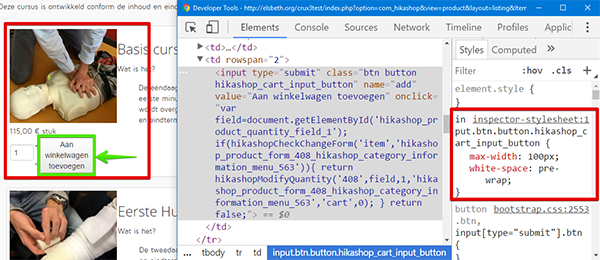
As you can see, if by a way or another the button is smaller everything is display as well in each case.
So, you can use a more small text for your add to cart OR some Css order like I Do
Regards
As Nicolas told you the difference is the button width, see this screenshot WITH some Css order for keep the button in a small size :
As you can see, if by a way or another the button is smaller everything is display as well in each case.
So, you can use a more small text for your add to cart OR some Css order like I Do
Regards
Last edit: 9 years 4 months ago by Philip.
Please Log in or Create an account to join the conversation.
- ezomerdijk
-
Topic Author
- Offline
Less
More
- Posts: 92
- Thank you received: 3
9 years 4 months ago #269181
by ezomerdijk
Replied by ezomerdijk on topic Customer fields no longer visible on product listing since update
Thanks for your clarification. I understood what Nicolas meant.
What I meant was, that is was strange that the text on the buttons was different in the first place ("choose options" and "add to chart").
But I see now that that was because the new products didn't have options to choose yet.
Now they have and now the buttons have the same text...
So the issue is solved.
What I meant was, that is was strange that the text on the buttons was different in the first place ("choose options" and "add to chart").
But I see now that that was because the new products didn't have options to choose yet.
Now they have and now the buttons have the same text...
So the issue is solved.
Please Log in or Create an account to join the conversation.
Time to create page: 0.226 seconds