
- Posts: 135
- Thank you received: 3
Update cart in 3.1.0 non-legacy mode does not work
- simonkloostra
-
 Topic Author
- Offline
Less
More
9 years 4 months ago #270510
by simonkloostra
Update cart in 3.1.0 non-legacy mode does not work was created by simonkloostra
-- HikaShop version -- : 3.1.0
-- Joomla version -- : 3.7.2
-- PHP version -- : 7.0
-- Browser(s) name and version -- : Any
-- Error-message(debug-mod must be tuned on) -- : example.com/webshop/product/updatecart/add-1/cid-1?tmpl=ajax 403 ()
(anonymous) @ VM4843:1
xRequest @ hikashop.js?v=310:217
addToCart @ hikashop.js?v=310:885
onclick @ strassburg-sock:444
I am cuurently testing my site on a test domain to prepare for Hikashop 3.1.0. In legacy mode all seems to work (except that I cannot empty the cart), but my main problem shows when I use the non-legacy Add to cart functionality.
Then nothing happens and a Javascript error is shown in my inspector:
Failed to load resource: the server responded with a status of 403 ()
POST example.com/webshop/productupdatecart/add-1/cid-1?tmpl=ajax 403 ()
(anonymous) @ VM4843:1
xRequest @ hikashop.js?v=310:217
addToCart @ hikashop.js?v=310:885
onclick @ strassburg-sock:444
Note that the site is in an .htaccess protected area, so let me know how to give you access if needed. (and I tested whether the .htaccess is not actually responsible for the error, which it isn't)
-- Joomla version -- : 3.7.2
-- PHP version -- : 7.0
-- Browser(s) name and version -- : Any
-- Error-message(debug-mod must be tuned on) -- : example.com/webshop/product/updatecart/add-1/cid-1?tmpl=ajax 403 ()
(anonymous) @ VM4843:1
xRequest @ hikashop.js?v=310:217
addToCart @ hikashop.js?v=310:885
onclick @ strassburg-sock:444
I am cuurently testing my site on a test domain to prepare for Hikashop 3.1.0. In legacy mode all seems to work (except that I cannot empty the cart), but my main problem shows when I use the non-legacy Add to cart functionality.
Then nothing happens and a Javascript error is shown in my inspector:
Failed to load resource: the server responded with a status of 403 ()
POST example.com/webshop/productupdatecart/add-1/cid-1?tmpl=ajax 403 ()
(anonymous) @ VM4843:1
xRequest @ hikashop.js?v=310:217
addToCart @ hikashop.js?v=310:885
onclick @ strassburg-sock:444
Note that the site is in an .htaccess protected area, so let me know how to give you access if needed. (and I tested whether the .htaccess is not actually responsible for the error, which it isn't)
Please Log in or Create an account to join the conversation.

9 years 4 months ago #270511
by Jerome
Jerome - Obsidev.com
HikaMarket & HikaSerial developer / HikaShop core dev team.
Replied by Jerome on topic Update cart in 3.1.0 non-legacy mode does not work
Hello
Please check that you do not have AdminTool or any other security system which would block queries with the parameter "tmpl=ajax".
Regards,
Please check that you do not have AdminTool or any other security system which would block queries with the parameter "tmpl=ajax".
Regards,
Jerome - Obsidev.com
HikaMarket & HikaSerial developer / HikaShop core dev team.
Please Log in or Create an account to join the conversation.
- simonkloostra
-
Topic Author
- Offline
Less
More
- Posts: 135
- Thank you received: 3
9 years 4 months ago #270575
by simonkloostra
Replied by simonkloostra on topic Update cart in 3.1.0 non-legacy mode does not work
Hi Jerome, perfect, that was the issue. I have now added ajax to the List of allowed tmpl= keywords in Admintools and all seems to work really nice mow, including the emptying of the cart.
Just one thing that users might miss: I am working on a pretty wide screen now and the notifications in the upper-right corner coulkd easily be missed. Especially showing errormessages should really be more obvious I think. See attached the screenprint of an action where the user needs to select a size for the product. I really think users could miss this:
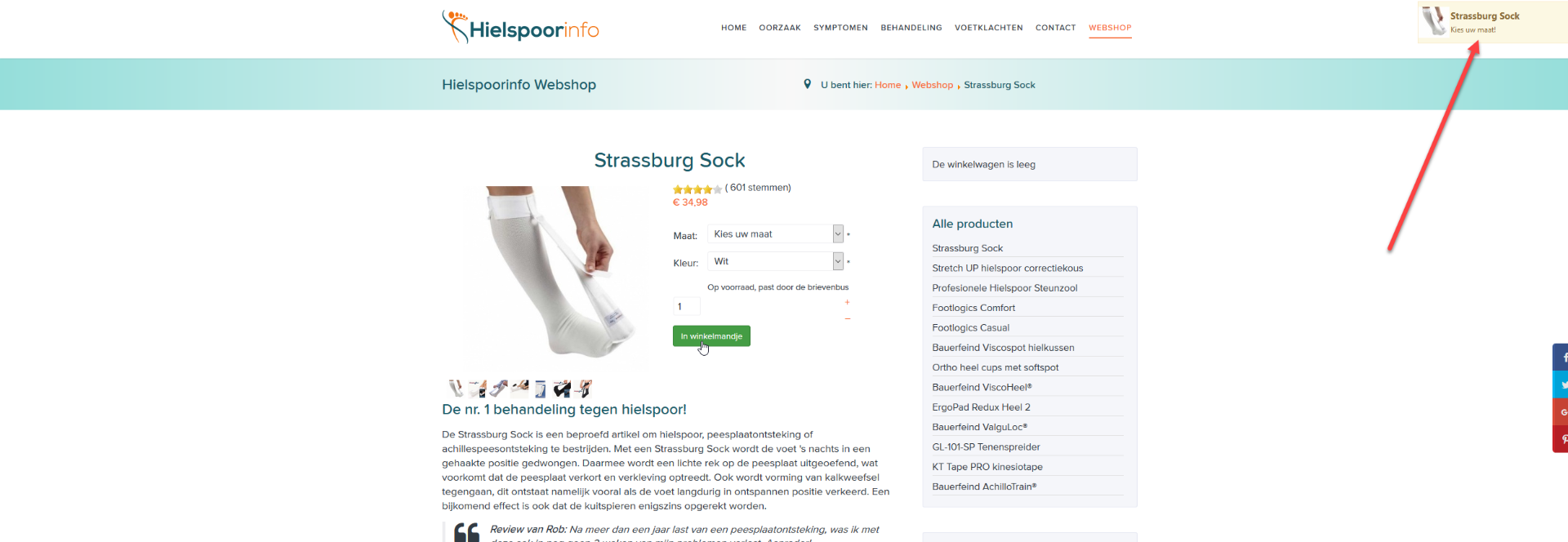
I checked the configuration for options to configure how errormessages are displayed, but I could not find any.
Just one thing that users might miss: I am working on a pretty wide screen now and the notifications in the upper-right corner coulkd easily be missed. Especially showing errormessages should really be more obvious I think. See attached the screenprint of an action where the user needs to select a size for the product. I really think users could miss this:
I checked the configuration for options to configure how errormessages are displayed, but I could not find any.
Please Log in or Create an account to join the conversation.
9 years 4 months ago #270576
by Jerome
Jerome - Obsidev.com
HikaMarket & HikaSerial developer / HikaShop core dev team.
Replied by Jerome on topic Update cart in 3.1.0 non-legacy mode does not work
Hello,
That display is made by a plugin (HikaShop / Cartnotify) ; you need to configure it in the Joomla plugin manager in order to change the position or use the "popup" mode.
In the future, more notification plugin might be available.
www.hikashop.com/home/blog/367-hikashop-3-0-out.html
Regards,
That display is made by a plugin (HikaShop / Cartnotify) ; you need to configure it in the Joomla plugin manager in order to change the position or use the "popup" mode.
In the future, more notification plugin might be available.
www.hikashop.com/home/blog/367-hikashop-3-0-out.html
Regards,
Jerome - Obsidev.com
HikaMarket & HikaSerial developer / HikaShop core dev team.
The following user(s) said Thank You: simonkloostra
Please Log in or Create an account to join the conversation.
- simonkloostra
-
Topic Author
- Offline
Less
More
- Posts: 135
- Thank you received: 3
9 years 4 months ago #270640
by simonkloostra
Replied by simonkloostra on topic Update cart in 3.1.0 non-legacy mode does not work
Ok, thanks for clarifying, pop-up mode works fine for me. Thanks for clarifying, all set to upgrade now 
Please Log in or Create an account to join the conversation.
Time to create page: 0.214 seconds