

- Posts: 281
- Thank you received: 3
size font in the cart with new hika and old template
9 years 3 months ago #270645
by francota
size font in the cart with new hika and old template was created by francota
-- HikaShop version -- : 3.1.0
-- Joomla version -- : 3.6.5
Hello
I am testing hika3.0.1 and change something on my template to make it compatible.
I want reduce the size of font in the module cart, so I added this in the custom css to reduce the font for name of product
.hikashop_cart_module_product_name_value a{
font-size:10px;
}
and this for the price
.hikashop_product_price_full span {
font-size:10px;
}
But it reduces the font of price and not the IVA
Can I know what is the correct selector to reduce price+ivaplease?? orthere is a easyer way to select priduct name+price and iva??
Other strange thing is that when I add a product with characteristic it shows the popup that say the product is added to the cart, but when I add a product with no characteristic it doesn't show any pop up...it is normal?
Thanks
FRank
-- Joomla version -- : 3.6.5
Hello
I am testing hika3.0.1 and change something on my template to make it compatible.
I want reduce the size of font in the module cart, so I added this in the custom css to reduce the font for name of product
.hikashop_cart_module_product_name_value a{
font-size:10px;
}
and this for the price
.hikashop_product_price_full span {
font-size:10px;
}
But it reduces the font of price and not the IVA
Can I know what is the correct selector to reduce price+ivaplease?? orthere is a easyer way to select priduct name+price and iva??
Other strange thing is that when I add a product with characteristic it shows the popup that say the product is added to the cart, but when I add a product with no characteristic it doesn't show any pop up...it is normal?
Thanks
FRank
Please Log in or Create an account to join the conversation.

9 years 3 months ago #270647
by nicolas
Replied by nicolas on topic size font in the cart with new hika and old template
Hi,
Please provide a link to the page where you want to do that.
Without knowing how you configured the shop, and what is the CSS of template and the custom CSS you already added, we can't say anything precise.
And regarding the popup, it's probably due to some view customization. Try with the default template of Joomla and if it works the same, then it would confirm that.
Please provide a link to the page where you want to do that.
Without knowing how you configured the shop, and what is the CSS of template and the custom CSS you already added, we can't say anything precise.
And regarding the popup, it's probably due to some view customization. Try with the default template of Joomla and if it works the same, then it would confirm that.
Please Log in or Create an account to join the conversation.
9 years 3 months ago #270733
by francota
Replied by francota on topic size font in the cart with new hika and old template
Sorry You right...
this is the url:
goo.gl/QFq8rD
About the popup, I changed the setting in "Add to cart legacy" from not to yes, and now it looks to work.
Do you think that could be the problem??
Let me know about the css for cart module please
Thanks
Frank
this is the url:
goo.gl/QFq8rD
About the popup, I changed the setting in "Add to cart legacy" from not to yes, and now it looks to work.
Do you think that could be the problem??
Let me know about the css for cart module please
Thanks
Frank
Please Log in or Create an account to join the conversation.

9 years 3 months ago - 9 years 3 months ago #270753
by Philip
Replied by Philip on topic size font in the cart with new hika and old template
Hello,
From what I see in your cart configuration, you can create your custom css WITH more specific selector.
For this, you can use your navigator inspector tool (with right click), and look for your elements you want modify, like this :
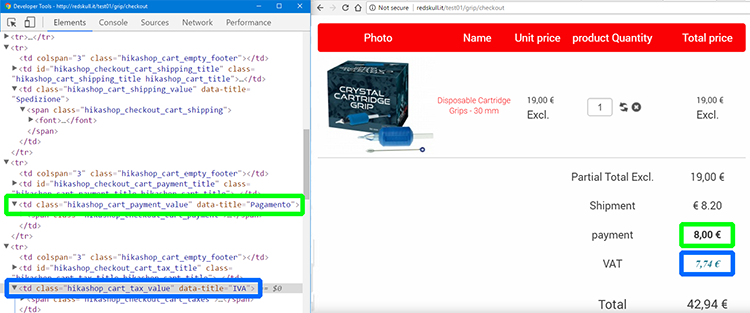
And so this of Css code may do the trick :
Hope this will help you.
Regards
From what I see in your cart configuration, you can create your custom css WITH more specific selector.
For this, you can use your navigator inspector tool (with right click), and look for your elements you want modify, like this :
And so this of Css code may do the trick :
Code:
specific_td_class1,
specific_td_class2,
specific_td_classX {
font_size_command: your_required_parameters
}
Hope this will help you.
Regards
Last edit: 9 years 3 months ago by Philip.
Please Log in or Create an account to join the conversation.
9 years 3 months ago - 9 years 3 months ago #270946
by francota
Replied by francota on topic size font in the cart with new hika and old template
Hello
Sorry but I was talking about the cart module on the right side "carrello"
I Reduced the font text of the product and the price but not for the IVA, but I wuold like have the right css selector to reduce all the possible voice of the cart.
thanks
Frank
Sorry but I was talking about the cart module on the right side "carrello"
I Reduced the font text of the product and the price but not for the IVA, but I wuold like have the right css selector to reduce all the possible voice of the cart.
thanks
Frank
Last edit: 9 years 3 months ago by francota.
Please Log in or Create an account to join the conversation.
9 years 3 months ago #270952
by nicolas
Replied by nicolas on topic size font in the cart with new hika and old template
Hi,
The solution is the same as Phlip described for the cart module.
For example:
.hikashop_cart_module_product_total_value {
font-size: 5px;
}
The solution is the same as Phlip described for the cart module.
For example:
.hikashop_cart_module_product_total_value {
font-size: 5px;
}
Please Log in or Create an account to join the conversation.
9 years 3 months ago #271028
by francota
Replied by francota on topic size font in the cart with new hika and old template
Ok ok
Yhanks you
Yhanks you
Please Log in or Create an account to join the conversation.
Time to create page: 0.210 seconds