

- Posts: 64
- Thank you received: 0
Problems after update to 3.1.1
9 years 3 months ago #271303
by Scott2451
Problems after update to 3.1.1 was created by Scott2451
I had the client test it after the update and I was told the following:
"It doesn’t work and it deleted my box where I collect the test address above the add to cart button on the product pages. It also gets stuck adding anything to the cart."
I only updated on our DEV site version. I've not updated on the Production version. Any suggestions as to why it broke?
"It doesn’t work and it deleted my box where I collect the test address above the add to cart button on the product pages. It also gets stuck adding anything to the cart."
I only updated on our DEV site version. I've not updated on the Production version. Any suggestions as to why it broke?
Please Log in or Create an account to join the conversation.

9 years 3 months ago #271307
by Jerome
Jerome - Obsidev.com
HikaMarket & HikaSerial developer / HikaShop core dev team.
Replied by Jerome on topic Problems after update to 3.1.1
Hello,
I'm sorry but we are not able to understand the issue you're talking about.
Regards,
I'm sorry but we are not able to understand the issue you're talking about.
Regards,
Jerome - Obsidev.com
HikaMarket & HikaSerial developer / HikaShop core dev team.
Please Log in or Create an account to join the conversation.
9 years 3 months ago #271390
by Scott2451
Replied by Scott2451 on topic Problems after update to 3.1.1
Sorry you're not able to understand the issues.
I had the client test it after the update and I was told the following:
"It doesn’t work and it deleted my box where I collect the test address above the add to cart button on the product pages. It also gets stuck adding anything to the cart." I only updated on our DEV site version. I've not updated on the Production version. Any suggestions as to why it broke?
After I updated Hikashop to the latest version from the 2.x version, the owner of the site logged in to see if everything still worked as it did with v2.x and it didn't. They told me this:
"It doesn’t work and it deleted my box where I collect the test address above the add to cart button on the product pages. It also gets stuck adding anything to the cart."
I had the client test it after the update and I was told the following:
"It doesn’t work and it deleted my box where I collect the test address above the add to cart button on the product pages. It also gets stuck adding anything to the cart." I only updated on our DEV site version. I've not updated on the Production version. Any suggestions as to why it broke?
After I updated Hikashop to the latest version from the 2.x version, the owner of the site logged in to see if everything still worked as it did with v2.x and it didn't. They told me this:
"It doesn’t work and it deleted my box where I collect the test address above the add to cart button on the product pages. It also gets stuck adding anything to the cart."
Please Log in or Create an account to join the conversation.

9 years 3 months ago #271392
by nicolas
Replied by nicolas on topic Problems after update to 3.1.1
Hi,
Ok, but that's the same message, so it doesn't help.
What exact problem do you have ?
Are you able to reproduce it ?
If yes, could you provide a link to the page with the issue and provide the instructions in order to reproduce the problem ?
Ok, but that's the same message, so it doesn't help.
What exact problem do you have ?
Are you able to reproduce it ?
If yes, could you provide a link to the page with the issue and provide the instructions in order to reproduce the problem ?
Please Log in or Create an account to join the conversation.
9 years 3 months ago #271490
by Scott2451
Replied by Scott2451 on topic Problems after update to 3.1.1
All I can send you is what the client sent me after they tried it after I updated it which you've already read.
"It doesn’t work and it deleted my box where I collect the test address above the add to cart button on the product pages. It also gets stuck adding anything to the cart."
Do you want the URL so you can try it for yourself?
"It doesn’t work and it deleted my box where I collect the test address above the add to cart button on the product pages. It also gets stuck adding anything to the cart."
Do you want the URL so you can try it for yourself?
Please Log in or Create an account to join the conversation.
9 years 3 months ago #271491
by Jerome
Jerome - Obsidev.com
HikaMarket & HikaSerial developer / HikaShop core dev team.
Replied by Jerome on topic Problems after update to 3.1.1
Hi
I guess that you already have your answer :
Regards,
I guess that you already have your answer :
Ok, but that's the same message, so it doesn't help.
What exact problem do you have ?
Are you able to reproduce it ?
If yes, could you provide a link to the page with the issue and provide the instructions in order to reproduce the problem ?
Regards,
Jerome - Obsidev.com
HikaMarket & HikaSerial developer / HikaShop core dev team.
Please Log in or Create an account to join the conversation.
9 years 3 months ago #271551
by Scott2451
Replied by Scott2451 on topic Problems after update to 3.1.1
The problem is what I copied and pasted in my previous messages that the owner of the site sent me when they tried using the new version after the upgrade. Nothing more that I can tell you.
If you want to try it yourself based on the errors was getting go to
dev.radata.com then from the navigation hover over Radon and from the dropdown, Buy Radon Test Kits.
If you want to try it yourself based on the errors was getting go to
dev.radata.com then from the navigation hover over Radon and from the dropdown, Buy Radon Test Kits.
Please Log in or Create an account to join the conversation.
9 years 3 months ago #271575
by Jerome
Jerome - Obsidev.com
HikaMarket & HikaSerial developer / HikaShop core dev team.
Replied by Jerome on topic Problems after update to 3.1.1
Hello,
I'm afraid that it's working fine ; except that you have a redirection for your checkout which send to the production website instead of staying in the development one.
So product you have added into the cart are not in the production website cart.
Regards,
I'm afraid that it's working fine ; except that you have a redirection for your checkout which send to the production website instead of staying in the development one.
So product you have added into the cart are not in the production website cart.
Regards,
Jerome - Obsidev.com
HikaMarket & HikaSerial developer / HikaShop core dev team.
Please Log in or Create an account to join the conversation.
9 years 3 months ago #271693
by Scott2451
Replied by Scott2451 on topic Problems after update to 3.1.1
I sent my client what you said and they replied with this:
That’s odd because the field that was missing occurs before adding the item to the cart so I don’t see how it could have possibly been there.
I didn’t see it and I was looking for it. It was not there.
That’s odd because the field that was missing occurs before adding the item to the cart so I don’t see how it could have possibly been there.
I didn’t see it and I was looking for it. It was not there.
Please Log in or Create an account to join the conversation.
9 years 3 months ago #271763
by Jerome
Jerome - Obsidev.com
HikaMarket & HikaSerial developer / HikaShop core dev team.
Replied by Jerome on topic Problems after update to 3.1.1
Hello,
What field ?
Please be more precise for the issue description.
In my previous message I told you that I can add a product into the cart without problem ; but when I tried to go in the checkout, it redirect the customer to the production website so for sure, that's not the same website, not the same session so not the same cart.
Regards,
What field ?
Please be more precise for the issue description.
In my previous message I told you that I can add a product into the cart without problem ; but when I tried to go in the checkout, it redirect the customer to the production website so for sure, that's not the same website, not the same session so not the same cart.
Regards,
Jerome - Obsidev.com
HikaMarket & HikaSerial developer / HikaShop core dev team.
Please Log in or Create an account to join the conversation.
9 years 3 months ago #271769
by Scott2451
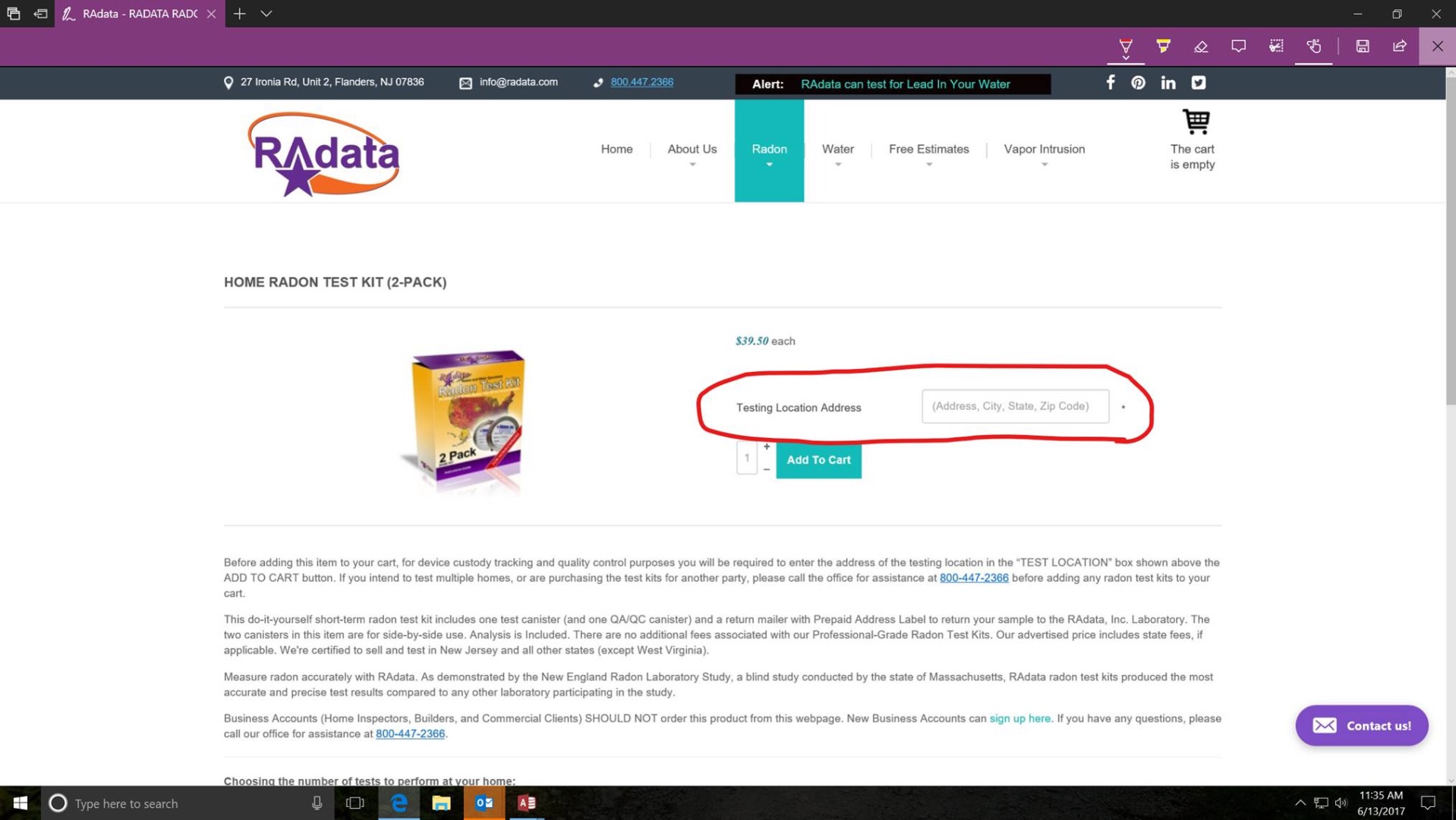
See the attached. Its what the client sent me.
Replied by Scott2451 on topic Problems after update to 3.1.1
See the attached. Its what the client sent me.
Please Log in or Create an account to join the conversation.
9 years 3 months ago #271771
by Jerome
Jerome - Obsidev.com
HikaMarket & HikaSerial developer / HikaShop core dev team.
Replied by Jerome on topic Problems after update to 3.1.1
Hello,
See : pasteboard.co/i6aWwVWyQ.png
I'm afraid that I have to re-quote the same message:
Regards,
See : pasteboard.co/i6aWwVWyQ.png
I'm afraid that I have to re-quote the same message:
Ok, but that's the same message, so it doesn't help.
What exact problem do you have ?
Are you able to reproduce it ?
If yes, could you provide a link to the page with the issue and provide the instructions in order to reproduce the problem ?
Regards,
Jerome - Obsidev.com
HikaMarket & HikaSerial developer / HikaShop core dev team.
Please Log in or Create an account to join the conversation.
9 years 3 months ago #271843
by Scott2451
Replied by Scott2451 on topic Problems after update to 3.1.1
It will work if you use the Production site, radata.com because its the old version.
Use the DEV site, dev.radata.com because on it is the upgraded newer version of Hikashop and per the client its broken.
Use the DEV site, dev.radata.com because on it is the upgraded newer version of Hikashop and per the client its broken.
Please Log in or Create an account to join the conversation.
9 years 3 months ago #271850
by nicolas
Replied by nicolas on topic Problems after update to 3.1.1
Hi,
The display options of the custom fields have changed since HikaShop 2.6.0
So please edit the custom field via the menu Display>Custom fields, check that the display settings are configured like you want and save them once. It should display display properly.
If not, then it means that there is an old view override of the product page layouts which is based on the old code of HikaShop and which creates the problem. In that case, try renaming the folder templates/YOUR_TEMPLATE/html/com_hikashop/product/ and try again. If it works, it will mean that it indeed comes from a view override in the template.
The display options of the custom fields have changed since HikaShop 2.6.0
So please edit the custom field via the menu Display>Custom fields, check that the display settings are configured like you want and save them once. It should display display properly.
If not, then it means that there is an old view override of the product page layouts which is based on the old code of HikaShop and which creates the problem. In that case, try renaming the folder templates/YOUR_TEMPLATE/html/com_hikashop/product/ and try again. If it works, it will mean that it indeed comes from a view override in the template.
Please Log in or Create an account to join the conversation.
Time to create page: 0.431 seconds