

- Posts: 86
- Thank you received: 11
Edit product form layout and sizes of containers
9 years 3 months ago - 9 years 3 months ago #272336
by simplecms
Edit product form layout and sizes of containers was created by simplecms
-- HikaShop version -- : 3.1.1
-- Joomla version -- : 3.7.2
I am wanting to make the product editing process as simple and clean as possible for my client and need help to edit the product form in the backend. I'm attaching an image that shows how messy my form looks.
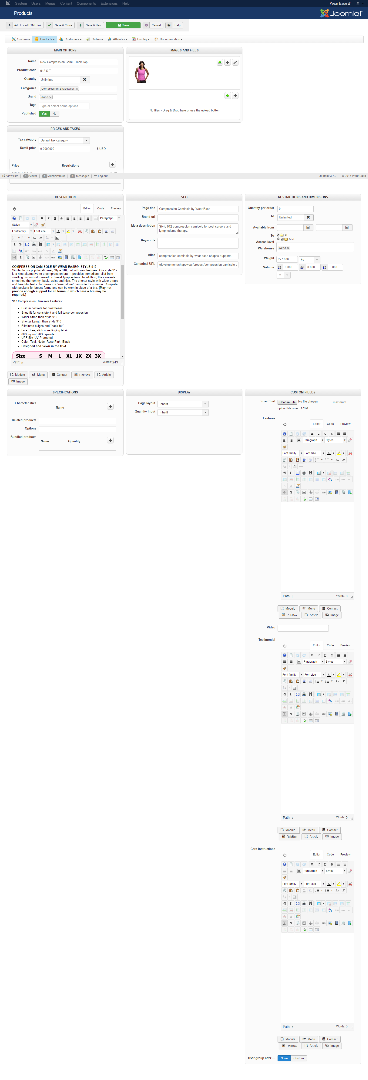
As you can see all the boxes don't line up nicely and some need to be wider like description. I see some of this is managed in the CSS for responsive purposes but you also have .hkc-lg-clear sporadically that breaks the columns up weirdly. I would also like to be able to make the description 100% wide. Lastly how can I put the custom fields into separate containers?
-- Joomla version -- : 3.7.2
I am wanting to make the product editing process as simple and clean as possible for my client and need help to edit the product form in the backend. I'm attaching an image that shows how messy my form looks.
As you can see all the boxes don't line up nicely and some need to be wider like description. I see some of this is managed in the CSS for responsive purposes but you also have .hkc-lg-clear sporadically that breaks the columns up weirdly. I would also like to be able to make the description 100% wide. Lastly how can I put the custom fields into separate containers?
Last edit: 9 years 3 months ago by simplecms.
Please Log in or Create an account to join the conversation.

9 years 3 months ago #272385
by Jerome
Jerome - Obsidev.com
HikaMarket & HikaSerial developer / HikaShop core dev team.
Replied by Jerome on topic Edit product form layout and sizes of containers
Hello,
I can see that you have a lot of WYSIWYG editors as custom fields.
At this moment, it would be easier to change the size of the "custom field" block and make it larger.
You can do that using some CSS (using the ID of the block to force the width instead of the hkc-md-4 class).
Otherwise you can use a view override which would allow you to move some blocks too and reorganize them as you want.
www.hikashop.com/support/documentation/1...the-display.html#css
Regards,
I can see that you have a lot of WYSIWYG editors as custom fields.
At this moment, it would be easier to change the size of the "custom field" block and make it larger.
You can do that using some CSS (using the ID of the block to force the width instead of the hkc-md-4 class).
Otherwise you can use a view override which would allow you to move some blocks too and reorganize them as you want.
www.hikashop.com/support/documentation/1...the-display.html#css
Regards,
Jerome - Obsidev.com
HikaMarket & HikaSerial developer / HikaShop core dev team.
Please Log in or Create an account to join the conversation.
9 years 3 months ago #272422
by simplecms
Replied by simplecms on topic Edit product form layout and sizes of containers
Doing the CSS overrides is no problem. What is a problem is the random clear:both calls in the layout. What file shows these so that I can remove them?
Please Log in or Create an account to join the conversation.

9 years 3 months ago #272428
by nicolas
Replied by nicolas on topic Edit product form layout and sizes of containers
Hi,
With HikaShopb 3.1.1, we've added the "Display view files" setting in the HikaShop configuration. Activate it and you can easily see which view file is used so that you can edit it via the menu Display>Views.
With HikaShopb 3.1.1, we've added the "Display view files" setting in the HikaShop configuration. Activate it and you can easily see which view file is used so that you can edit it via the menu Display>Views.
Please Log in or Create an account to join the conversation.
9 years 3 months ago #272525
by simplecms
Replied by simplecms on topic Edit product form layout and sizes of containers
Holy cow. That is arguably the smartest and best feature any developer has ever added to a Joomla component. Very well done. Thank you for this.
Please Log in or Create an account to join the conversation.
Time to create page: 0.177 seconds