
VAT price separate styling

9 years 2 months ago #273734
by renem
VAT price separate styling was created by renem
-- HikaShop version -- : 3.1.1
I like to have a separate class for the VAT price. For now on the price with and without VAT is on one line.
How can this be done?
Kind regards René.
I like to have a separate class for the VAT price. For now on the price with and without VAT is on one line.
How can this be done?
Kind regards René.
Please Log in or Create an account to join the conversation.

9 years 2 months ago #273738
by Jerome
Jerome - Obsidev.com
HikaMarket & HikaSerial developer / HikaShop core dev team.
Replied by Jerome on topic VAT price separate styling
Hello,
You'll need to perform a view override to change how the "listing price" is made.
When you want to perform an override and you don't know which view is concerned, the best is to use the "view files" advanced setting :
www.hikashop.com/support/documentation/5...g.html#advanced_main
Regards,
You'll need to perform a view override to change how the "listing price" is made.
When you want to perform an override and you don't know which view is concerned, the best is to use the "view files" advanced setting :
www.hikashop.com/support/documentation/5...g.html#advanced_main
Regards,
Jerome - Obsidev.com
HikaMarket & HikaSerial developer / HikaShop core dev team.
Please Log in or Create an account to join the conversation.
9 years 2 months ago #273769
by renem
Replied by renem on topic VAT price separate styling
Hi Jerome
I already did, but the code is complicated. I only need an class for the VAT prices, any suggestion?
Kind regards René
I already did, but the code is complicated. I only need an class for the VAT prices, any suggestion?
Kind regards René
Please Log in or Create an account to join the conversation.

9 years 2 months ago - 9 years 2 months ago #273793
by Philip
Replied by Philip on topic VAT price separate styling
Hello,
You have to know that html & php knowledge, in order to guide you, follow these steps :
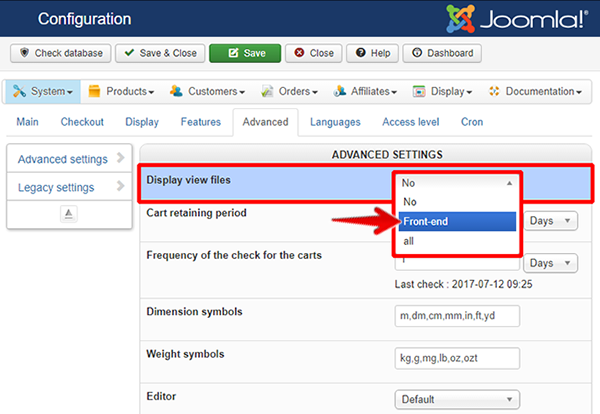
- Go to Main HikaShop Configuration (in Components => HikaShop => Configuration), and in Advanced tab, set this :
- Go to your concerned front-end page, put your mouse on your element and right click, then select inspect (or inspector tool change from navigator)
=> You will be able to see your Html element and sometimes, existing class, copy your it and look for it in your code view (Ctrl + F), that will help you to find your element to modify.
Note : This tutorial will help you.
Regards
You have to know that html & php knowledge, in order to guide you, follow these steps :
- Go to Main HikaShop Configuration (in Components => HikaShop => Configuration), and in Advanced tab, set this :
- Go to your concerned front-end page, put your mouse on your element and right click, then select inspect (or inspector tool change from navigator)
=> You will be able to see your Html element and sometimes, existing class, copy your it and look for it in your code view (Ctrl + F), that will help you to find your element to modify.
Note : This tutorial will help you.
Regards
Last edit: 9 years 2 months ago by Philip.
Please Log in or Create an account to join the conversation.
9 years 2 months ago #273837
by renem
Replied by renem on topic VAT price separate styling
Hi Philip it is clear to me witch file is responsible for the price output, but i tried a lot but with no luck.
But i can't find a way to assign a separate class to the Ex VAT price......
Please give me a hint and you make my day
Kind regards René
Code:
<span class="hikashop_product_price_full<?php echo $class; ?>"><?php
Please give me a hint and you make my day
Kind regards René
Please Log in or Create an account to join the conversation.
9 years 2 months ago #273849
by Jerome
Jerome - Obsidev.com
HikaMarket & HikaSerial developer / HikaShop core dev team.
Replied by Jerome on topic VAT price separate styling
Hello,
No, you need to change the " $classes " variable just before that line :
And you need to do it only if the price will be display with taxes.
But if all your prices will be display with taxes, you can directly put your extra class in the mentioned line.
Regards,
No, you need to change the " $classes " variable just before that line :
Code:
echo '<span class="'.implode(' ',$classes).'"'.$attributes.'>';
But if all your prices will be display with taxes, you can directly put your extra class in the mentioned line.
Regards,
Jerome - Obsidev.com
HikaMarket & HikaSerial developer / HikaShop core dev team.
Please Log in or Create an account to join the conversation.
9 years 2 months ago #273941
by renem
Replied by renem on topic VAT price separate styling
Hi Jerome,
When i look in de source is see this:
What i want to achieve is this:
The code is to complex for me, i'm just a stupid Dutchman
regards René
When i look in de source is see this:
Code:
<span class="hikashop_product_price_full"><span class="hikashop_product_price hikashop_product_price_0" itemprop="price" content="24.2">€ 24,20 incl. BTW (€ 20,00 ex. BTW) </span>
What i want to achieve is this:
Code:
<span class="hikashop_product_price_full"><span class="hikashop_product_price hikashop_product_price_0" itemprop="price" content="24.2">€ 24,20 incl. BTW</span> <span class="withvat"> (€ 20,00 ex. BTW) </span>[
The code is to complex for me, i'm just a stupid Dutchman
regards René
Please Log in or Create an account to join the conversation.
9 years 2 months ago #273943
by Jerome
Jerome - Obsidev.com
HikaMarket & HikaSerial developer / HikaShop core dev team.
Replied by Jerome on topic VAT price separate styling
Hello,
You can add the closing and opening span directly in the translations.
Please note that for HTML content, you need to not use double quotes but simple quotes instead.
Regards,
Code:
PRICE_BEFORE_TAX=" ("
PRICE_AFTER_TAX=" excl VAT) "
Please note that for HTML content, you need to not use double quotes but simple quotes instead.
Regards,
Jerome - Obsidev.com
HikaMarket & HikaSerial developer / HikaShop core dev team.
Please Log in or Create an account to join the conversation.
Time to create page: 0.222 seconds