

- Posts: 254
- Thank you received: 2
Problem with upgrade to joomla 3.8.1
8 years 11 months ago #280467
by bigfoot
Problem with upgrade to joomla 3.8.1 was created by bigfoot
-- url of the page with the problem -- :
www.honeyflowfarm.com/testing.com/candle...candles-pillars.html
-- HikaShop version -- : 3.2.0
-- Joomla version -- : 3.8.1
-- PHP version -- : 7.1.1
-- Browser(s) name and version -- : chrome
When I upgraded my site to joomla 3.8.1 - some of the hikashop store links do not work. www.honeyflowfarm.com/testing.com/candle...candles-pillars.html -- This is a test site that I am trying to get to work - password = pillars, pw = smoking
I had to revert my live site www.beeswaxcandleshop.com/Beeswax-Candles/category.html - back to joomla 3.8.0 to get the links working again.
Any ideas? (I have had a problem with the tag links not working also - don't know if it is connected)
-- HikaShop version -- : 3.2.0
-- Joomla version -- : 3.8.1
-- PHP version -- : 7.1.1
-- Browser(s) name and version -- : chrome
When I upgraded my site to joomla 3.8.1 - some of the hikashop store links do not work. www.honeyflowfarm.com/testing.com/candle...candles-pillars.html -- This is a test site that I am trying to get to work - password = pillars, pw = smoking
I had to revert my live site www.beeswaxcandleshop.com/Beeswax-Candles/category.html - back to joomla 3.8.0 to get the links working again.
Any ideas? (I have had a problem with the tag links not working also - don't know if it is connected)
Please Log in or Create an account to join the conversation.

8 years 11 months ago #280495
by Jerome
Jerome - Obsidev.com
HikaMarket & HikaSerial developer / HikaShop core dev team.
Replied by Jerome on topic Problem with upgrade to joomla 3.8.1
Hello,
The link you gave have some content, so I don't understand the issue you're talking about.
But I can see an error message within the page, message which is not related with HikaShop at all :
Afterwards, the links between 3.8.1 and 3.8.0 are totally different so I'm afraid it's not possible to compare them !
So we will need a lot more details to understand the problem you have and to see what's the relation with HikaShop.
Regards,
The link you gave have some content, so I don't understand the issue you're talking about.
But I can see an error message within the page, message which is not related with HikaShop at all :
Code:
<b>Warning</b>: Class '\Joomla\CMS\Document\Renderer\Html\ModulesRenderer' not found in <b>/home/honeyflo/public_html/testing.com/candleshop-test/libraries/loader.php</b> on line <b>648</b><br />
Afterwards, the links between 3.8.1 and 3.8.0 are totally different so I'm afraid it's not possible to compare them !
So we will need a lot more details to understand the problem you have and to see what's the relation with HikaShop.
Regards,
Jerome - Obsidev.com
HikaMarket & HikaSerial developer / HikaShop core dev team.
Please Log in or Create an account to join the conversation.
8 years 11 months ago #280510
by bigfoot
Replied by bigfoot on topic Problem with upgrade to joomla 3.8.1
Here are some links off the hikashop store page that do not work - If I went back to joomla 3.8.0 they work - do I have hikashop set up wrong?
www.honeyflowfarm.com/testing.com/candle...nt&view=article&id=3
Try going to this page www.honeyflowfarm.com/testing.com/candle...nimal-figurines.html
and click on the Frog - All the links that do not work go to the same bad page - www.honeyflowfarm.com/testing.com/candle...nt&view=article&id=3
All the other links on the page go to other wrong links - not the hikahop page
www.honeyflowfarm.com/testing.com/candle...nt&view=article&id=3
Try going to this page www.honeyflowfarm.com/testing.com/candle...nimal-figurines.html
and click on the Frog - All the links that do not work go to the same bad page - www.honeyflowfarm.com/testing.com/candle...nt&view=article&id=3
All the other links on the page go to other wrong links - not the hikahop page
Please Log in or Create an account to join the conversation.

8 years 11 months ago #280521
by nicolas
Replied by nicolas on topic Problem with upgrade to joomla 3.8.1
Hi,
This looks like a SEF URL issue.
The fact that it works for some links and not others tends to indicate that there is a problem with the way the SEF is configured but hard to say much more as we don't know how you're handling your SEF URLs. For example, it would be possible to get such result by using sh404SEF and canonical URLs in some of HikaShop's products. If you clear the cache of sh404sef in that case after the update to Joomla 3.8.1, the products with a canonical URL will use the URL directly without asking sh404sef to reprocess it. Thus, when then using the link, sh404sef won't be able to parse the URL as it won't have it in its cache. But for products without canonical URL set, that wouldn't happen.
That's just an example I can think of off the top of my head so it's potentially something else.
This looks like a SEF URL issue.
The fact that it works for some links and not others tends to indicate that there is a problem with the way the SEF is configured but hard to say much more as we don't know how you're handling your SEF URLs. For example, it would be possible to get such result by using sh404SEF and canonical URLs in some of HikaShop's products. If you clear the cache of sh404sef in that case after the update to Joomla 3.8.1, the products with a canonical URL will use the URL directly without asking sh404sef to reprocess it. Thus, when then using the link, sh404sef won't be able to parse the URL as it won't have it in its cache. But for products without canonical URL set, that wouldn't happen.
That's just an example I can think of off the top of my head so it's potentially something else.
Please Log in or Create an account to join the conversation.
8 years 11 months ago - 8 years 11 months ago #280630
by bigfoot
Replied by bigfoot on topic Problem with upgrade to joomla 3.8.1
I have been having lots of link problems on this site - In this copy I was trying to remove every extension I can to fix the problem with not luck.
1 - Is it possible to install a fresh copy of joomla (that is easy) and then move every hikashop file to the new joomla. I want to keep my setup and all the order files? This would hopefully get rid of all link issues (new joomla & old hikashop)
Also can I copy individual order files to a hikashop install? Such as I receive and order and then have to use akeeba to go back to an earlier file and I have lost this order in the hikashop system. Can I reinstall this order in the recovered hikashop.
Or more to the point - IF I installed a new joomla version and am working on it in test folder AND was able to transfer All my old hikashop files to it (still in working folder) and was working at making it look like live version ---- If I get orders can I move them from live site to test site?
1 - Is it possible to install a fresh copy of joomla (that is easy) and then move every hikashop file to the new joomla. I want to keep my setup and all the order files? This would hopefully get rid of all link issues (new joomla & old hikashop)
Also can I copy individual order files to a hikashop install? Such as I receive and order and then have to use akeeba to go back to an earlier file and I have lost this order in the hikashop system. Can I reinstall this order in the recovered hikashop.
Or more to the point - IF I installed a new joomla version and am working on it in test folder AND was able to transfer All my old hikashop files to it (still in working folder) and was working at making it look like live version ---- If I get orders can I move them from live site to test site?
Last edit: 8 years 11 months ago by bigfoot. Reason: more info
Please Log in or Create an account to join the conversation.
8 years 11 months ago #280636
by nicolas
Replied by nicolas on topic Problem with upgrade to joomla 3.8.1
Hi,
Yes it's possible.
Migrating the HikaShop data is easy. You can export/import the hikashop_ tables in the database with PHPMyAdmin and copy the content of media/com_hikashop/upload and images/com_hikashop/upload via FTP.
The only things then is to migrate your Joomla user accounts if your shop has login/registration activated. You'll find several Joomla extensions for that.
For individual orders, it's not impossible but would require to run a few MySQL queries. So you'll likely need the help of an expert as there is no easy interface for it.
Yes it's possible.
Migrating the HikaShop data is easy. You can export/import the hikashop_ tables in the database with PHPMyAdmin and copy the content of media/com_hikashop/upload and images/com_hikashop/upload via FTP.
The only things then is to migrate your Joomla user accounts if your shop has login/registration activated. You'll find several Joomla extensions for that.
For individual orders, it's not impossible but would require to run a few MySQL queries. So you'll likely need the help of an expert as there is no easy interface for it.
Please Log in or Create an account to join the conversation.
8 years 11 months ago #280743
by bigfoot
Replied by bigfoot on topic Problem with upgrade to joomla 3.8.1
Thanks - I have already installed a new clean test site - I assume I need to install Hikashop first? I do not have any joomla user accounts - I always use Guest.
Please Log in or Create an account to join the conversation.
8 years 11 months ago #280747
by nicolas
Replied by nicolas on topic Problem with upgrade to joomla 3.8.1
Hi,
You don't necessarily need to install HikaShop first. If you do, you'll have to delete the tables added by default, in order to import the ones from your other website in their place. So I would actually install HikaShop after import the tables.
You don't necessarily need to install HikaShop first. If you do, you'll have to delete the tables added by default, in order to import the ones from your other website in their place. So I would actually install HikaShop after import the tables.
Please Log in or Create an account to join the conversation.
8 years 11 months ago #280805
by bigfoot
Replied by bigfoot on topic Problem with upgrade to joomla 3.8.1
Thank you for your help. I have moved the HIkashop database files to the new site and Hikashop is installed.
I still have a small problem that I should be able to resolve but I have a brain fart.
I cannot seem to create an associated module to show the products? Is something missing? The categories are showing up fine -
www.honeyflowfarm.com/testing.com/new-ca...test/index.php/store - but I cannot get to the product pages.
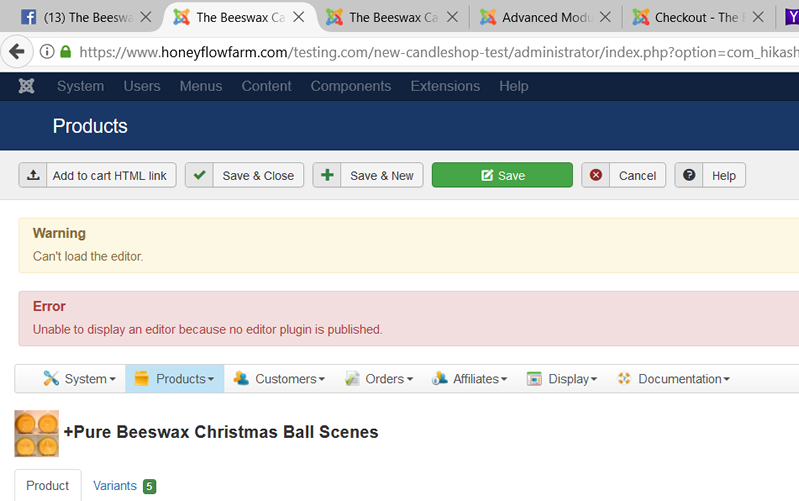
Also I get a "can't load the editor error" - what is this - image attached.
www.honeyflowfarm.com/testing.com/new-ca...roduct&task=edit&cid []=317
I want to do it right make sure I do not have any more issues with links.
username = pillars
pw = smoking
Thanks - Bill
I still have a small problem that I should be able to resolve but I have a brain fart.
I cannot seem to create an associated module to show the products? Is something missing? The categories are showing up fine -
www.honeyflowfarm.com/testing.com/new-ca...test/index.php/store - but I cannot get to the product pages.
Also I get a "can't load the editor error" - what is this - image attached.
www.honeyflowfarm.com/testing.com/new-ca...roduct&task=edit&cid []=317
I want to do it right make sure I do not have any more issues with links.
username = pillars
pw = smoking
Thanks - Bill
Please Log in or Create an account to join the conversation.
8 years 11 months ago #280814
by nicolas
Replied by nicolas on topic Problem with upgrade to joomla 3.8.1
Hi,
I do see the products when I click on a category:
monosnap.com/file/1w6oyCwFWU1Z5la5DmAyuUDYdrOYbF
And regarding the products itself, that's probably because you had set canonical URLs in the products, but since you didn't create menu items with the same structure as before, the links are not valid anymore.
I would recommend emptying the product_canonical field of your products with a mass action via the menu System>Mass actions.
Regarding the editor error, it's probably because the editor that you had selected in the "editor" setting of the HikaShop configuration isn't installed on your new website. So go there and select another one, or install the one you were using on the other website.
I do see the products when I click on a category:
monosnap.com/file/1w6oyCwFWU1Z5la5DmAyuUDYdrOYbF
And regarding the products itself, that's probably because you had set canonical URLs in the products, but since you didn't create menu items with the same structure as before, the links are not valid anymore.
I would recommend emptying the product_canonical field of your products with a mass action via the menu System>Mass actions.
Regarding the editor error, it's probably because the editor that you had selected in the "editor" setting of the HikaShop configuration isn't installed on your new website. So go there and select another one, or install the one you were using on the other website.
Please Log in or Create an account to join the conversation.
8 years 11 months ago #281032
by bigfoot
Replied by bigfoot on topic Problem with upgrade to joomla 3.8.1
Thank you for your help - I am moving along fine on new test install and running into a linking problem. I do not think I have ever been linking correctly from a joomla menu.
What link do I use to a subcategory to put on a joomla menu. I want to put sub menus under my "store" menu to the subcategories and I am not doing it properly and they do not always work right.
There is no SEF or anything on this site - I want to keep it as simple as possible.
Thanks - Bill
What link do I use to a subcategory to put on a joomla menu. I want to put sub menus under my "store" menu to the subcategories and I am not doing it properly and they do not always work right.
There is no SEF or anything on this site - I want to keep it as simple as possible.
Thanks - Bill
Please Log in or Create an account to join the conversation.
8 years 11 months ago #281083
by nicolas
Replied by nicolas on topic Problem with upgrade to joomla 3.8.1
Hi,
I'm sorry but I don't understand what you mean.
Could you provide some precise example of what you want ?
I'm sorry but I don't understand what you mean.
Could you provide some precise example of what you want ?
Please Log in or Create an account to join the conversation.
Time to create page: 0.237 seconds