

- Posts: 254
- Thank you received: 2
"Back" button not working correctly on cart
8 years 10 months ago #282119
by bigfoot
"Back" button not working correctly on cart was created by bigfoot
-- url of the page with the problem -- :
www.beeswaxcandleshop.com/
-- HikaShop version -- : 3.2.0
-- Joomla version -- : 3.8.2
-- PHP version -- : 7.1.11
Thank you for your previous help on this site. This was a site I re-created to simplify and get rid of some errors.
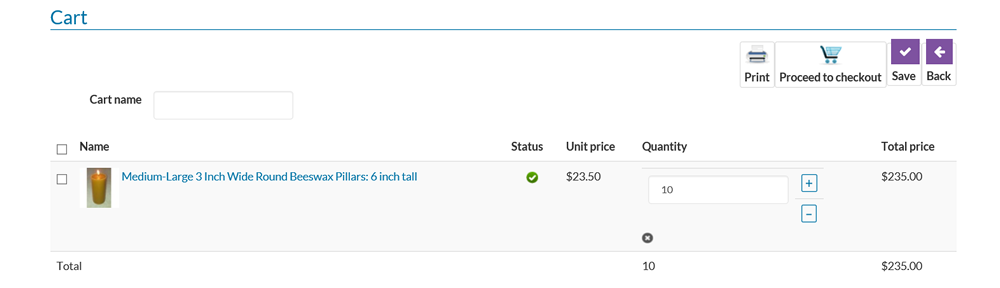
In my shopping cart, The "Back" button goes to a wrong page asking fo a login - which I do not use on the site.
How can I make it go back to the previous page - or just remove the whole button.
-- HikaShop version -- : 3.2.0
-- Joomla version -- : 3.8.2
-- PHP version -- : 7.1.11
Thank you for your previous help on this site. This was a site I re-created to simplify and get rid of some errors.
In my shopping cart, The "Back" button goes to a wrong page asking fo a login - which I do not use on the site.
How can I make it go back to the previous page - or just remove the whole button.
Please Log in or Create an account to join the conversation.

8 years 10 months ago #282127
by nicolas
Replied by nicolas on topic "Back" button not working correctly on cart
Hi,
That's a good catch. The back button should only appear when you're logged in since it's going back to the user control panel or the listing of carts which is accessible only when you're logged in.
We'll add some code for that.
Edit the file "show" of the view "cart" via the menu Display>Views and remove that bit:
That's a good catch. The back button should only appear when you're logged in since it's going back to the user control panel or the listing of carts which is accessible only when you're logged in.
We'll add some code for that.
Edit the file "show" of the view "cart" via the menu Display>Views and remove that bit:
Code:
<td>
<a href="<?php echo $link; ?>">
<span class="icon-32-back" title="<?php echo JText::_('HIKA_BACK'); ?>"></span> <?php echo JText::_('HIKA_BACK'); ?>
</a>
</td>
Please Log in or Create an account to join the conversation.
Time to create page: 0.137 seconds