
- Posts: 4
- Thank you received: 0
Update Failure
- AndrewHastie
-
 Topic Author
- Offline
Less
More
8 years 9 months ago - 8 years 9 months ago #284890
by AndrewHastie
Update Failure was created by AndrewHastie
-- HikaShop version -- : 3.2.2
-- Joomla version -- : Joomla! 2.5.14
-- PHP version -- : Php5
-- Browser(s) name and version -- : firefox quantum 57.0.2
-- Error-message(debug-mod must be tuned on) -- :
Website was functioning perfectly but needed to edit the emails so I purchased the Business edition. After deploying the package the website no longer works giving a 500 error on the index.php
-- Joomla version -- : Joomla! 2.5.14
-- PHP version -- : Php5
-- Browser(s) name and version -- : firefox quantum 57.0.2
-- Error-message(debug-mod must be tuned on) -- :
Code:
1 JSite->render() /services/webpages/d/u/dundasmodels.co.uk/public/webstore/index.php:48
2 JDocumentHTML->render() /services/webpages/d/u/dundasmodels.co.uk/public/webstore/includes/application.php:271
3 JDocumentHTML->_renderTemplate() /services/webpages/d/u/dundasmodels.co.uk/public/webstore/libraries/joomla/document/html/html.php:433
4 JDocumentHTML->getBuffer() /services/webpages/d/u/dundasmodels.co.uk/public/webstore/libraries/joomla/document/html/html.php:655
5 JDocumentRendererModules->render() /services/webpages/d/u/dundasmodels.co.uk/public/webstore/libraries/joomla/document/html/html.php:371
6 JDocumentRendererModule->render() /services/webpages/d/u/dundasmodels.co.uk/public/webstore/libraries/joomla/document/html/renderer/modules.php:39
7 JModuleHelper::renderModule() /services/webpages/d/u/dundasmodels.co.uk/public/webstore/libraries/joomla/document/html/renderer/module.php:107
8 include() /services/webpages/d/u/dundasmodels.co.uk/public/webstore/libraries/joomla/application/module/helper.php:175
9 hikashop_getLayout() /services/webpages/d/u/dundasmodels.co.uk/public/webstore/modules/mod_hikashop/mod_hikashop.php:73
10 hikashopBridgeController->getNewView() /services/webpages/d/u/dundasmodels.co.uk/public/webstore/administrator/components/com_hikashop/helpers/helper.php:812
11 JController->getView() /services/webpages/d/u/dundasmodels.co.uk/public/webstore/administrator/components/com_hikashop/helpers/helper.php:1598
12 JError::raiseError() /services/webpages/d/u/dundasmodels.co.uk/public/webstore/libraries/joomla/application/component/controller.php:903
13 JError::raise() /services/webpages/d/u/dundasmodels.co.uk/public/webstore/libraries/joomla/error/error.php:251
Website was functioning perfectly but needed to edit the emails so I purchased the Business edition. After deploying the package the website no longer works giving a 500 error on the index.php
Last edit: 8 years 9 months ago by Jerome. Reason: Adding [code] for trace log
Please Log in or Create an account to join the conversation.

8 years 9 months ago #284892
by Jerome
Jerome - Obsidev.com
HikaMarket & HikaSerial developer / HikaShop core dev team.
Replied by Jerome on topic Update Failure
Hello,
Thanks for the report.
Please re-download the HikaShop package in order to get the fix regarding Joomla 2.5
Regards,
Thanks for the report.
Please re-download the HikaShop package in order to get the fix regarding Joomla 2.5
Regards,
Jerome - Obsidev.com
HikaMarket & HikaSerial developer / HikaShop core dev team.
Please Log in or Create an account to join the conversation.
- AndrewHastie
-
Topic Author
- Offline
Less
More
- Posts: 4
- Thank you received: 0
8 years 9 months ago #284940
by AndrewHastie
Replied by AndrewHastie on topic Update Failure
Having problems with the new zip. Failing to upload and giving an"Unable to find install package" error. Manual install is also very error prone, Sorry.
Please Log in or Create an account to join the conversation.
- AndrewHastie
-
Topic Author
- Offline
Less
More
- Posts: 4
- Thank you received: 0
8 years 9 months ago - 8 years 9 months ago #284942
by AndrewHastie
Replied by AndrewHastie on topic Update Failure
Having 3 main errors
1. Your language file is not up to date. Load the latest version from our server : Persists even after new language file installed ;
2.The HikaShop user synchronization plugin has been either removed or disabled from the website. It is a critical part of HikaShop and should not be disabled if you're using HikaShop on your website.Please enable that plugin via the Joomla plugins manager and then logout/login from the backend.
: file does not seem to exist on the server :' HikaShop joomla user account link plugin' is there and active but error persists
3. Created custom fields in the user database are not showing on the user profile form
1. Your language file is not up to date. Load the latest version from our server : Persists even after new language file installed ;
2.The HikaShop user synchronization plugin has been either removed or disabled from the website. It is a critical part of HikaShop and should not be disabled if you're using HikaShop on your website.Please enable that plugin via the Joomla plugins manager and then logout/login from the backend.
: file does not seem to exist on the server :' HikaShop joomla user account link plugin' is there and active but error persists
3. Created custom fields in the user database are not showing on the user profile form
Last edit: 8 years 9 months ago by AndrewHastie.
Please Log in or Create an account to join the conversation.

8 years 9 months ago #284944
by nicolas
Replied by nicolas on topic Update Failure
Hi,
1. Did you manually copy the file from our language download area to your language folder via FTP ?
www.hikashop.com/download/languages.html
That should remove the message.
2. and 3. Both are the same issue. It's the user synchronization plugin which adds the custom user fields on the user profile page.
Without that plugin it's normal that the custom fields don't appear.
Make sure that the folder plugins/system is writable as well as its subfolders and the files in them and install the install package again. It should automatically add it back.
1. Did you manually copy the file from our language download area to your language folder via FTP ?
www.hikashop.com/download/languages.html
That should remove the message.
2. and 3. Both are the same issue. It's the user synchronization plugin which adds the custom user fields on the user profile page.
Without that plugin it's normal that the custom fields don't appear.
Make sure that the folder plugins/system is writable as well as its subfolders and the files in them and install the install package again. It should automatically add it back.
Please Log in or Create an account to join the conversation.
- AndrewHastie
-
Topic Author
- Offline
Less
More
- Posts: 4
- Thank you received: 0
8 years 9 months ago #284966
by AndrewHastie
Replied by AndrewHastie on topic Update Failure
I manually uploaded the language file chmod'ed the dir and tried a manual reinstall
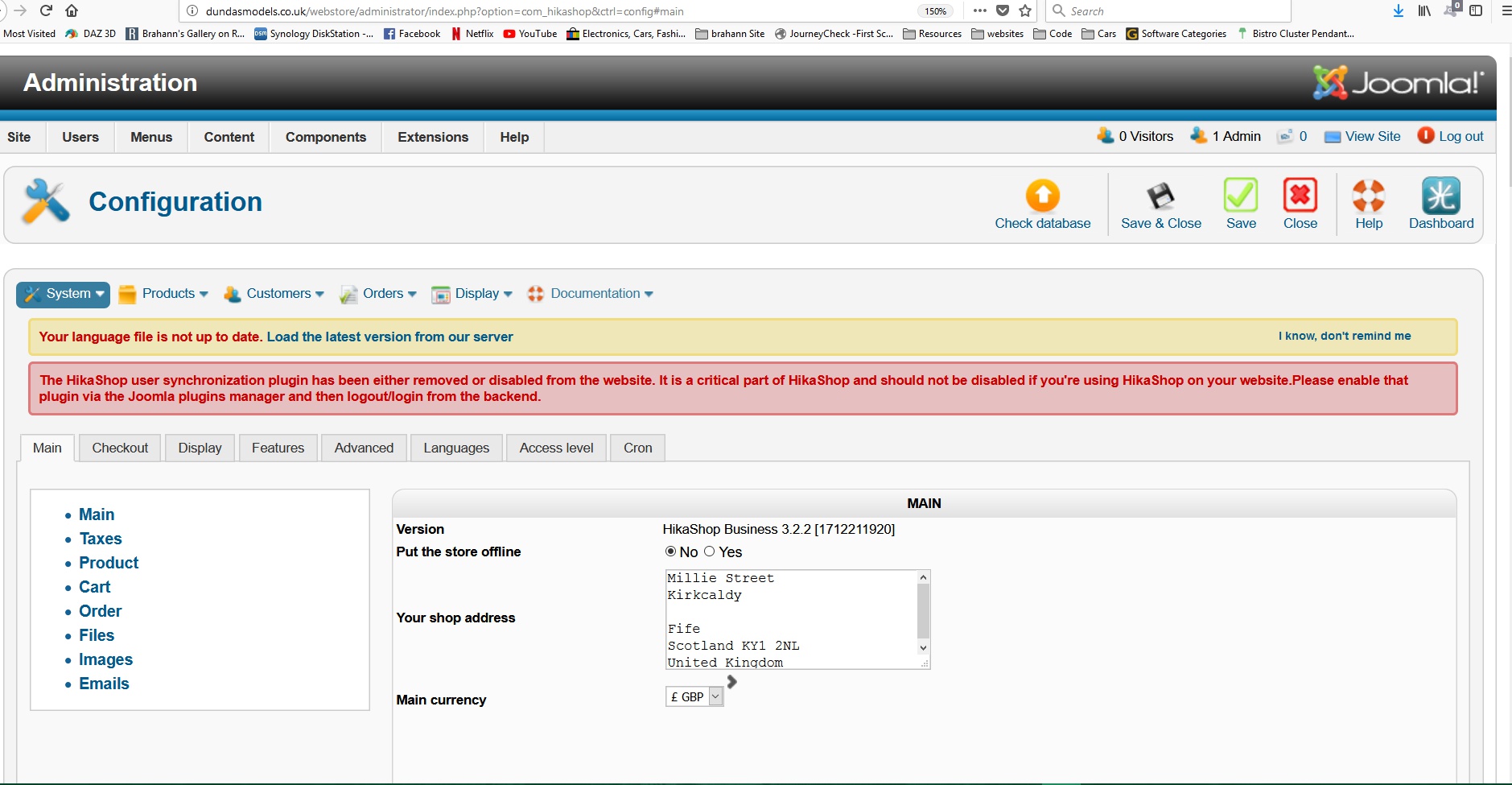
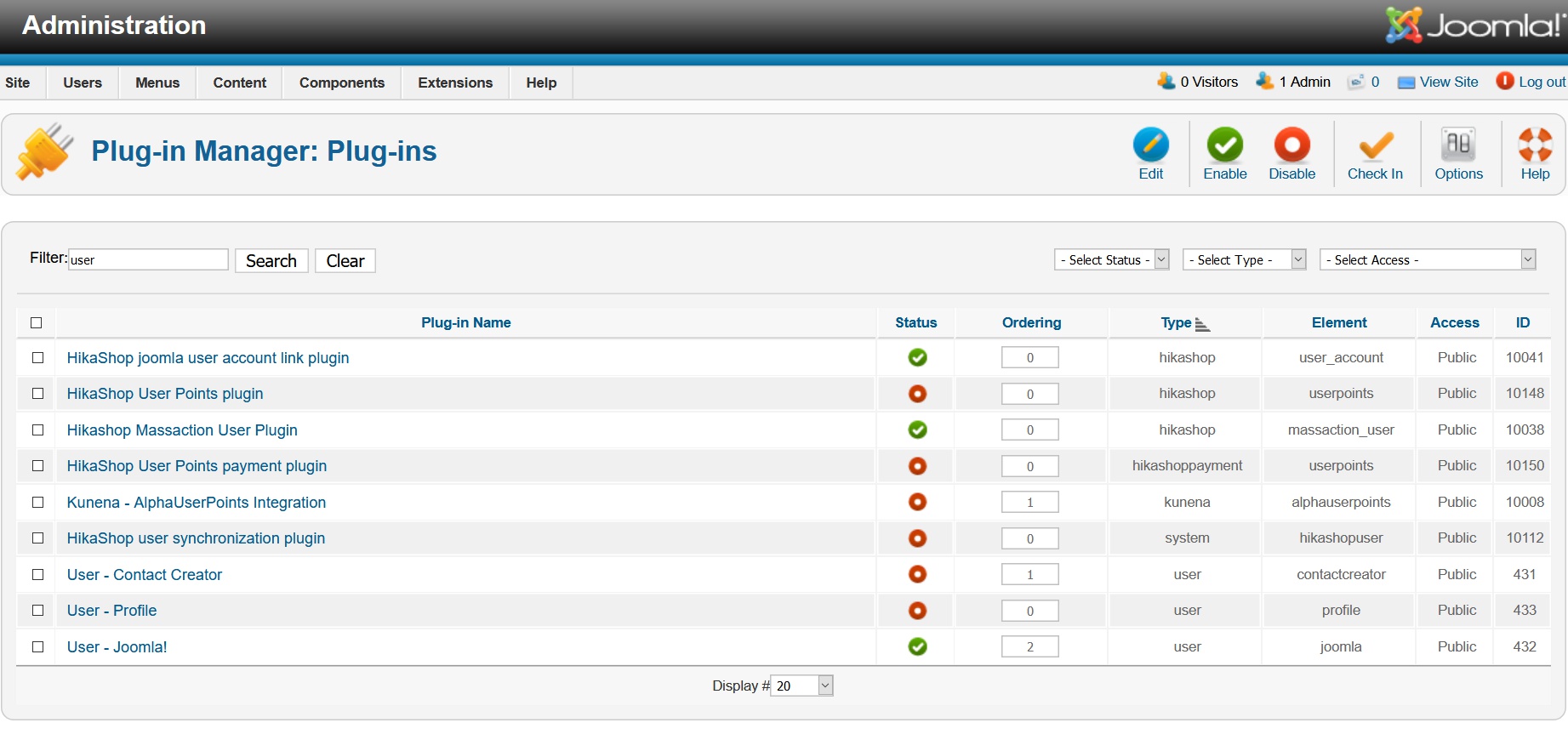 . no change whatsoever.
Please Log in or Create an account to join the conversation.
8 years 9 months ago #284968
by Jerome
Jerome - Obsidev.com
HikaMarket & HikaSerial developer / HikaShop core dev team.
Replied by Jerome on topic Update Failure
Hello,
1 - Please check the language file content. The version number information is at the end of the file.
2 - Your screenshot show that the plugin "HikaShop user synchronization plugin" is not published (id 10112) ; just as the error message is telling you.
Regards,
1 - Please check the language file content. The version number information is at the end of the file.
2 - Your screenshot show that the plugin "HikaShop user synchronization plugin" is not published (id 10112) ; just as the error message is telling you.
Regards,
Jerome - Obsidev.com
HikaMarket & HikaSerial developer / HikaShop core dev team.
Please Log in or Create an account to join the conversation.
Time to create page: 0.207 seconds