

- Posts: 254
- Thank you received: 2
Issue with Stripe plugin
8 years 7 months ago #287546
by bigfoot
Issue with Stripe plugin was created by bigfoot
-- url of the page with the problem -- :
www.beeswaxcandleshop.com/
-- HikaShop version -- : 3.3.0
-- Joomla version -- : 3.8.5
-- PHP version -- : 7.1.14
-- Browser(s) name and version -- : Chrome
I just installed the Stripe plugin - it is working ok but I have a few questions.
The previous extension I used was authorize.net and customers entered credit card info directly on the same page.
With stripe the credit card info is submitted on a few pages further in the system and "after the order is created". This can allow the order to be submitted without payment (I did this on a test order). Is there a way to change the page order so the card info is asked for directly on the next page? And then the order is submitted.
-- HikaShop version -- : 3.3.0
-- Joomla version -- : 3.8.5
-- PHP version -- : 7.1.14
-- Browser(s) name and version -- : Chrome
I just installed the Stripe plugin - it is working ok but I have a few questions.
The previous extension I used was authorize.net and customers entered credit card info directly on the same page.
With stripe the credit card info is submitted on a few pages further in the system and "after the order is created". This can allow the order to be submitted without payment (I did this on a test order). Is there a way to change the page order so the card info is asked for directly on the next page? And then the order is submitted.
Please Log in or Create an account to join the conversation.

Less
More
- Posts: 12953
- Thank you received: 1778
8 years 7 months ago #287551
by Mohamed Thelji
Replied by Mohamed Thelji on topic Issue with Stripe plugin
Hello,
What do you exactly mean by the next page ? Are you referring to the last checkout step ? Showing us some screenshots of what you exactly want will help us to understand what you need.
Thank you.
What do you exactly mean by the next page ? Are you referring to the last checkout step ? Showing us some screenshots of what you exactly want will help us to understand what you need.
Thank you.
Please Log in or Create an account to join the conversation.
8 years 7 months ago #287664
by bigfoot
Replied by bigfoot on topic Issue with Stripe plugin
1 - An order gets submitted ok
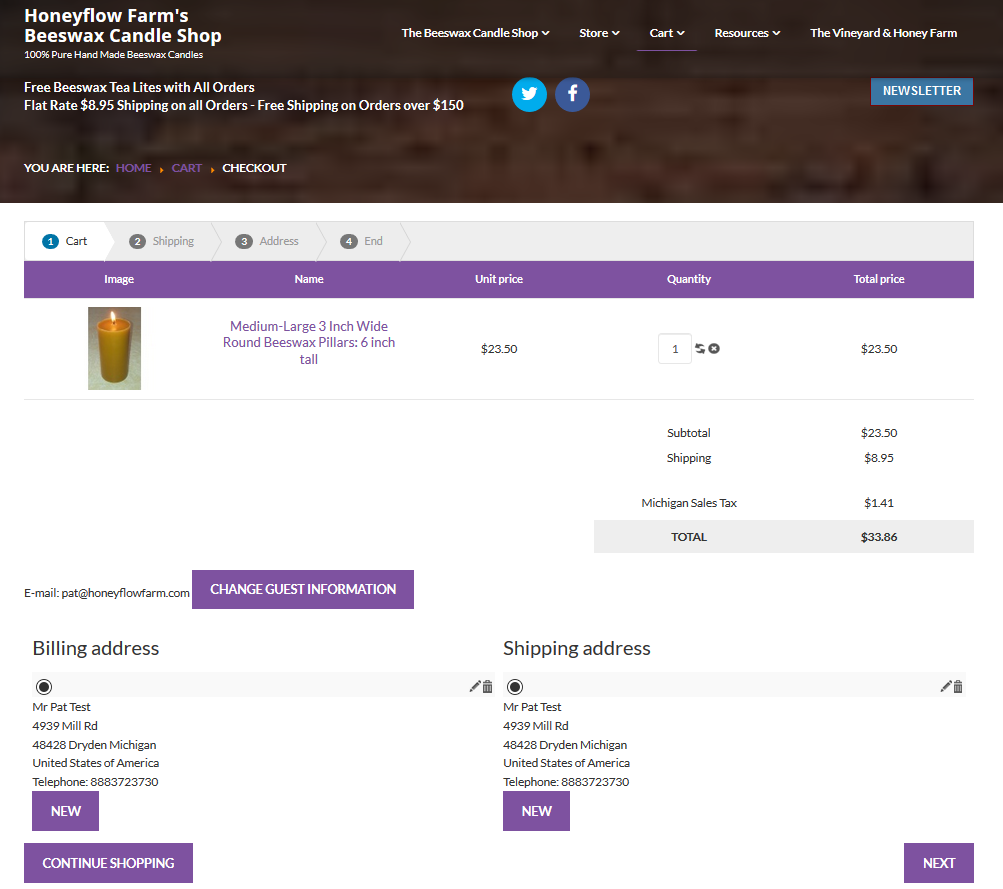
2 - Customer selects Stripe as Payment method
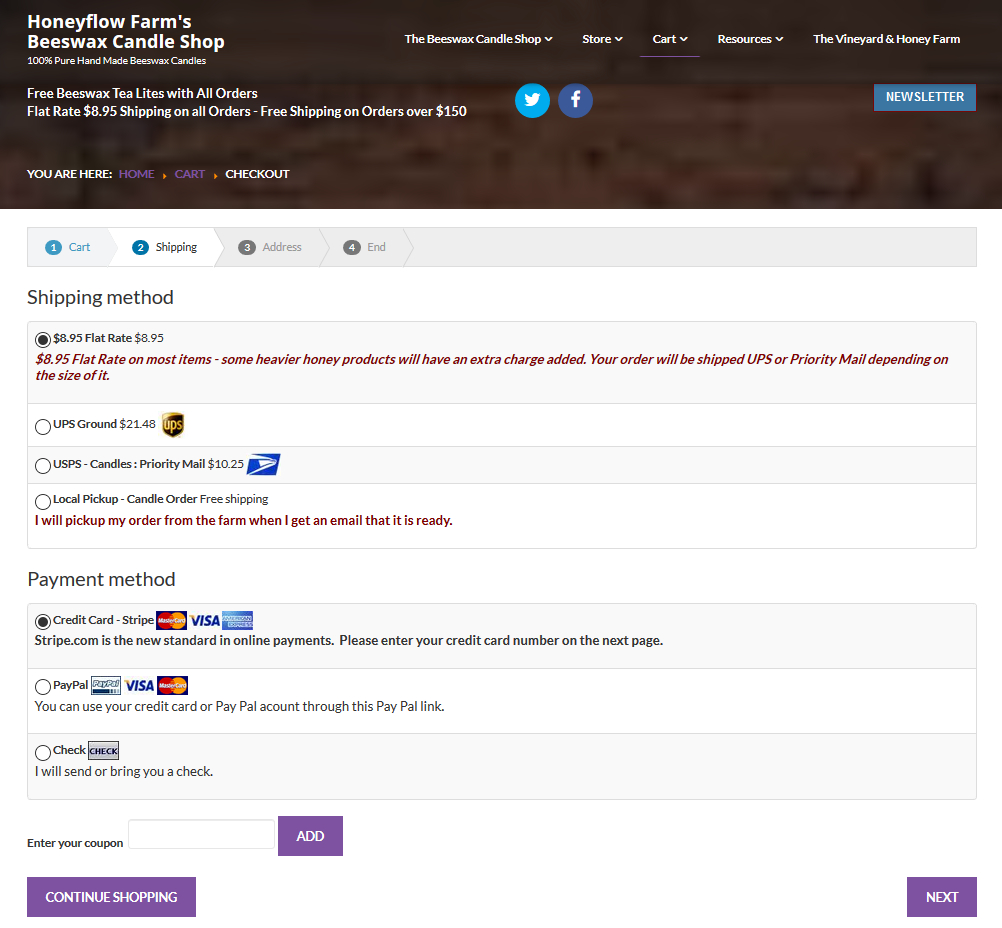
++++++++++++++++++++++++++++++++++++++++++
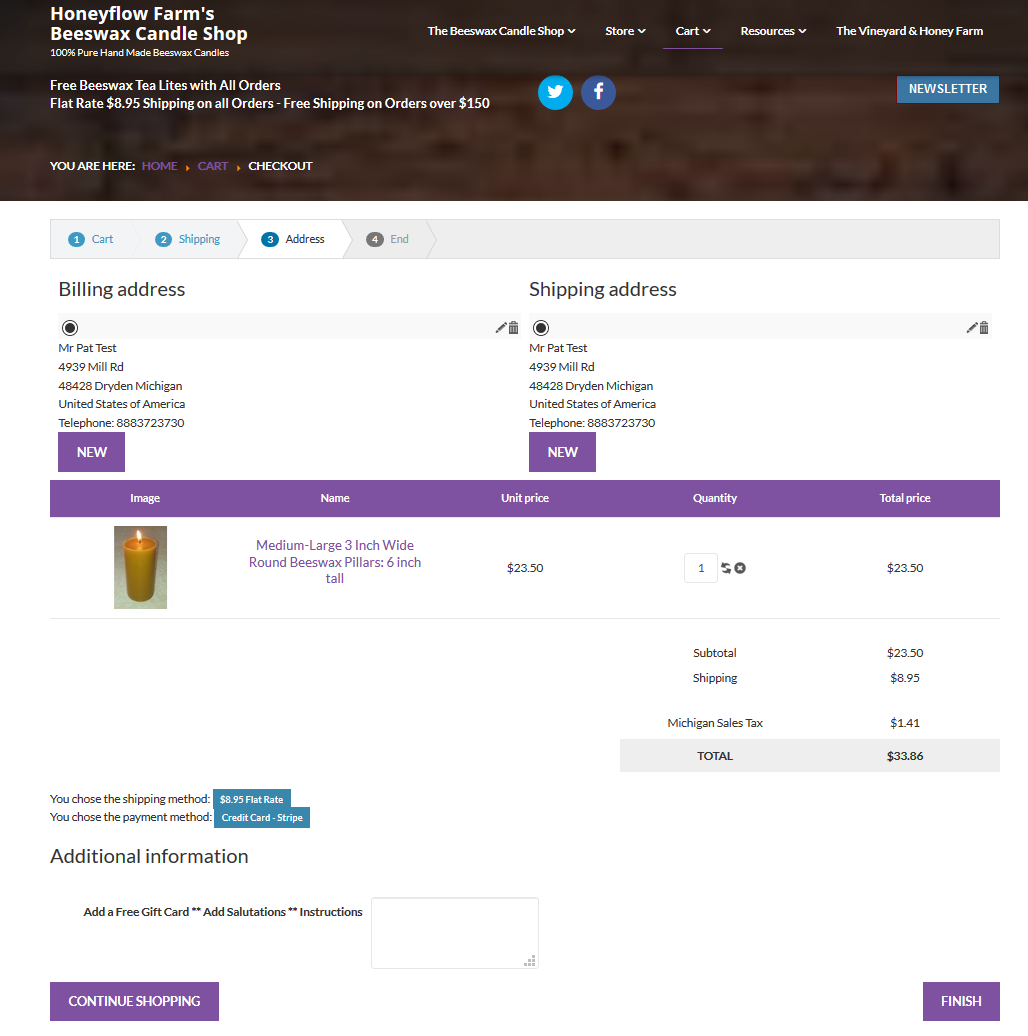
3 - So far the customer has had no opportunity to enter card info. When he selects "finish" the order goes through and I receive it even without payment.
The next screen below comes up after "finishing" the order.
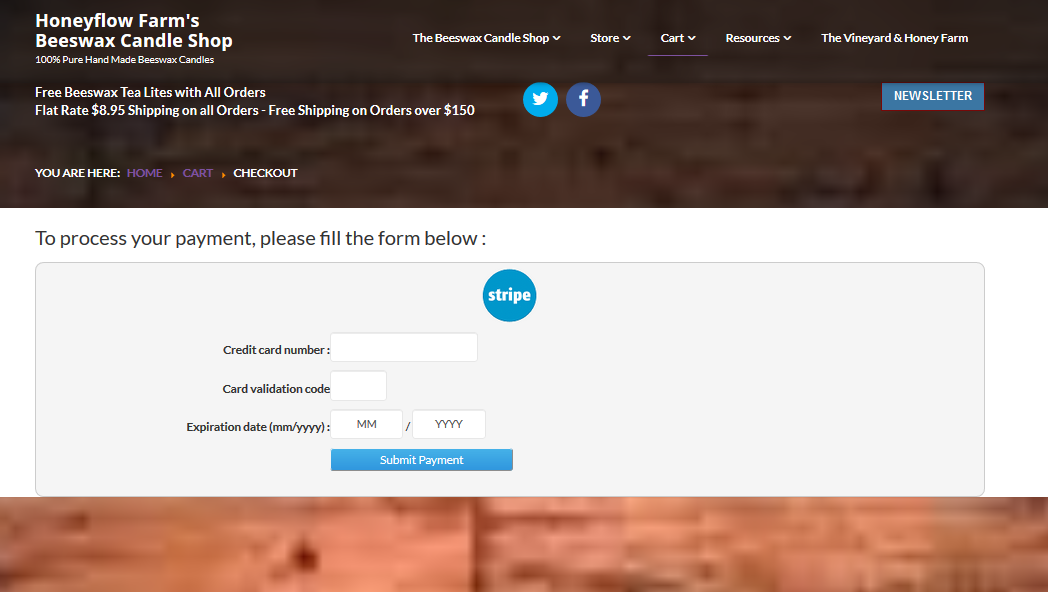
After customer enters info the customer receives the "Thank you for your order" screen and I get a message from Stripe saying payment has been made. Everything is working.
++++++++++++++++++++++++++++++++++++++++++
THE ISSUE: When the customer sees the screen below with these blue boxes on it and enters "finish" The order is completed BUT IT IS NOT (no payment yet. I think the Stripe credit card info screen should come up right before this one below..
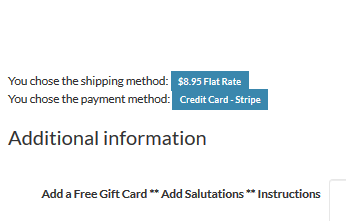
This is similar to how the paypal plugin works. I can live with it if it cannot be easily changed but if the card data page can me moved the plugin would be better.
2 - Customer selects Stripe as Payment method
++++++++++++++++++++++++++++++++++++++++++
3 - So far the customer has had no opportunity to enter card info. When he selects "finish" the order goes through and I receive it even without payment.
The next screen below comes up after "finishing" the order.
After customer enters info the customer receives the "Thank you for your order" screen and I get a message from Stripe saying payment has been made. Everything is working.
++++++++++++++++++++++++++++++++++++++++++
THE ISSUE: When the customer sees the screen below with these blue boxes on it and enters "finish" The order is completed BUT IT IS NOT (no payment yet. I think the Stripe credit card info screen should come up right before this one below..
This is similar to how the paypal plugin works. I can live with it if it cannot be easily changed but if the card data page can me moved the plugin would be better.
Please Log in or Create an account to join the conversation.

8 years 7 months ago #287708
by Jerome
Jerome - Obsidev.com
HikaMarket & HikaSerial developer / HikaShop core dev team.
Replied by Jerome on topic Issue with Stripe plugin
Hello,
I'm sorry ; you wrote a big message but I'm not able to understand what you want to say.
I don't know if your screenshots are in the wrong order or if you do not know how to explain what is your issue.. If there is an issue.
Please understand that we can't provide support for payment gateway and we are not responsible of how the payment gateways are working.
Some need to let HikaShop collect the credit cart directly in the "payment" block of the checkout ; some don't.
Regards,
I'm sorry ; you wrote a big message but I'm not able to understand what you want to say.
I don't know if your screenshots are in the wrong order or if you do not know how to explain what is your issue.. If there is an issue.
Please understand that we can't provide support for payment gateway and we are not responsible of how the payment gateways are working.
Some need to let HikaShop collect the credit cart directly in the "payment" block of the checkout ; some don't.
Regards,
Jerome - Obsidev.com
HikaMarket & HikaSerial developer / HikaShop core dev team.
Please Log in or Create an account to join the conversation.
8 years 7 months ago #287730
by bigfoot
Replied by bigfoot on topic Issue with Stripe plugin
The problem was that the entering of credit card data came up AFTER the order was submitted - But I have decided to leave that alone.
I did just noticed that if a customer enters a WRONG credit card number the order becomes cancelled and the shopping cart is cleared. The customer must resubmit the order.
Since the shopping cart is now cleared this becomes a problem if the customer had multiple items in it.
Is there some way the cart info can remain for a while so the customer can submit a successful card transaction?
I did just noticed that if a customer enters a WRONG credit card number the order becomes cancelled and the shopping cart is cleared. The customer must resubmit the order.
Since the shopping cart is now cleared this becomes a problem if the customer had multiple items in it.
Is there some way the cart info can remain for a while so the customer can submit a successful card transaction?
Please Log in or Create an account to join the conversation.

8 years 7 months ago - 8 years 7 months ago #287762
by Philip
Replied by Philip on topic Issue with Stripe plugin
Hello,
Ok I get it, and I believe I have your solution, for this follow these steps :
- Go to Main HikaShop Configuration => In Main tab => Cart Part
- Find "Clean cart when order is" => Confirmed.

If I'm right the cart will be clean only when order reach Confirmed status and in your case that may do the trick.
Hope this will fit your needs.
Regards
Ok I get it, and I believe I have your solution, for this follow these steps :
- Go to Main HikaShop Configuration => In Main tab => Cart Part
- Find "Clean cart when order is" => Confirmed.
If I'm right the cart will be clean only when order reach Confirmed status and in your case that may do the trick.
Hope this will fit your needs.
Regards
Last edit: 8 years 7 months ago by Philip.
The following user(s) said Thank You: jimphillips
Please Log in or Create an account to join the conversation.
8 years 7 months ago #287797
by bigfoot
Replied by bigfoot on topic Issue with Stripe plugin
Thank you - I checked and the system was already set to "clean cart when confirmed". I tried going to the Strip plugin and changed the invalid status to "pending" and tried a test order. Same thing happened with bad pin number - the screen just went to home page - no notice of order not going through exept now an email said "Stripe payment pending" and "order is pending". -- and the cart is cleared - NOT GOOD FOR CUSTOMERS.
Please Log in or Create an account to join the conversation.
8 years 7 months ago - 8 years 7 months ago #287839
by Philip
Replied by Philip on topic Issue with Stripe plugin
Hello,
Sorry I did some some test and make by error an order, so you can delete it (with guest mode and user email phil@yopmail.com).
Sorry for this...
To resume the subject can you provide your Order Status configuration and your stripe configuration screenshot please.


Awaiting news from you.
Regards
Sorry I did some some test and make by error an order, so you can delete it (with guest mode and user email phil@yopmail.com).
Sorry for this...
To resume the subject can you provide your Order Status configuration and your stripe configuration screenshot please.
Awaiting news from you.
Regards
Last edit: 8 years 7 months ago by Philip.
Please Log in or Create an account to join the conversation.
8 years 7 months ago #287862
by bigfoot
Replied by bigfoot on topic Issue with Stripe plugin
Here are the two screenshots. Go ahead and try another test order - using a card with an incorrect pin number and you will see NOTHING happen - order just disappears.
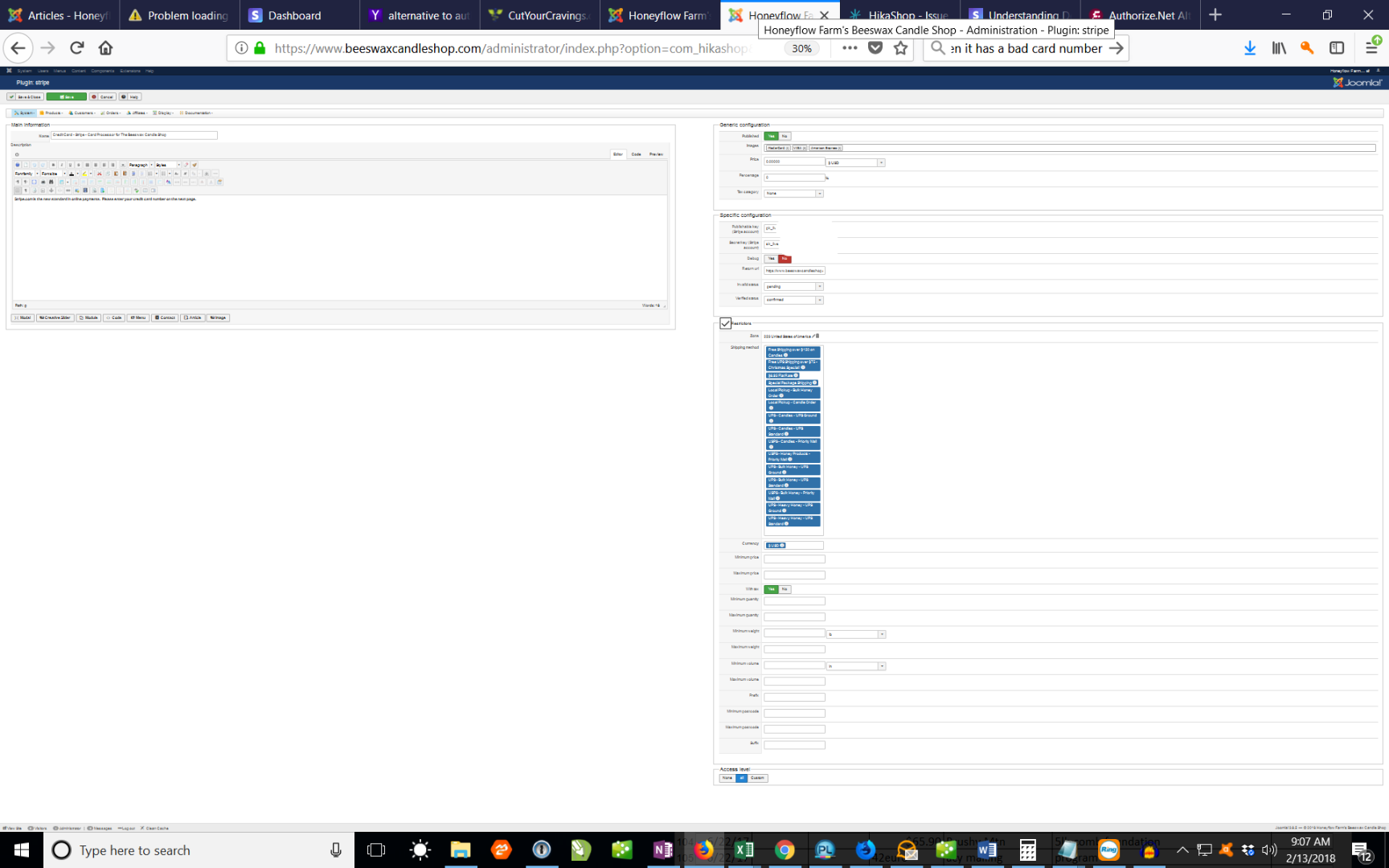
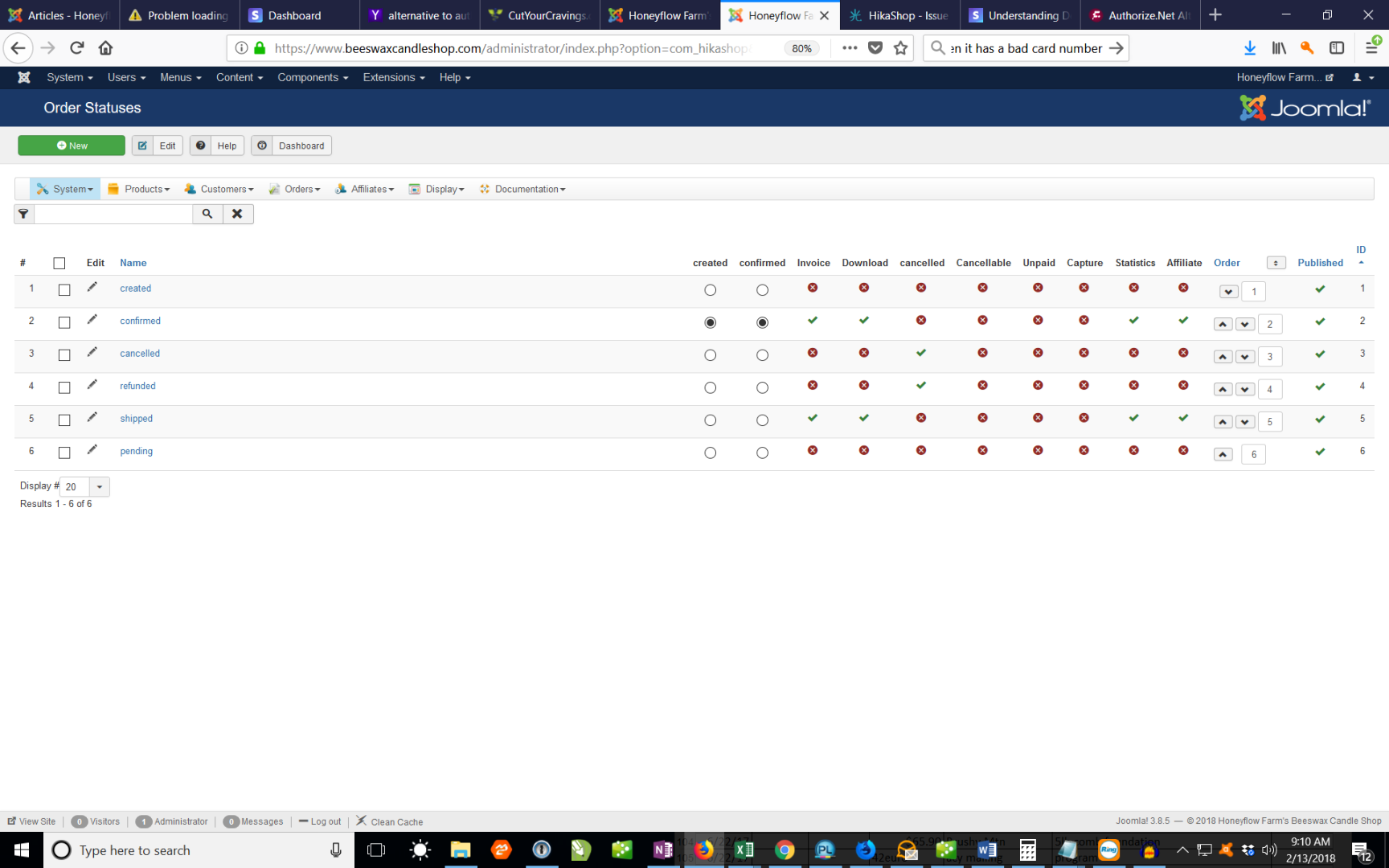
Please Log in or Create an account to join the conversation.

8 years 7 months ago #287865
by nicolas
Replied by nicolas on topic Issue with Stripe plugin
Hi,
You've configured the "confirmed" order status in the "created" column of the listing.
This means that the order is directly created with the confirmed status and thus the cart is directly cleared (as per the option).
You're supposed to set the "created" status in that "created" column so that it works like that:
- the user click on finish
- the order is created with the status created
- the payment is done
- the status is changed to confirmed
- the cart is cleared.
Doing it like that has two advantages:
- it's possible to cancel the order if the payment is invalid and return the customer to the checkout since the cart is not yet cleared.
- you can make the difference between an order that has been paid and one that hasn't thanks to the order status.
If you use payment methods like authorize.net in AIM mode, where the credit card is asked during the checkout, then you don't necessarily need that since the order is created just after the payment.
But with Stripe or most payment plugins, the order is created before the payment is made and thus that mechanism of order statuses is necessary.
You've configured the "confirmed" order status in the "created" column of the listing.
This means that the order is directly created with the confirmed status and thus the cart is directly cleared (as per the option).
You're supposed to set the "created" status in that "created" column so that it works like that:
- the user click on finish
- the order is created with the status created
- the payment is done
- the status is changed to confirmed
- the cart is cleared.
Doing it like that has two advantages:
- it's possible to cancel the order if the payment is invalid and return the customer to the checkout since the cart is not yet cleared.
- you can make the difference between an order that has been paid and one that hasn't thanks to the order status.
If you use payment methods like authorize.net in AIM mode, where the credit card is asked during the checkout, then you don't necessarily need that since the order is created just after the payment.
But with Stripe or most payment plugins, the order is created before the payment is made and thus that mechanism of order statuses is necessary.
The following user(s) said Thank You: bigfoot
Please Log in or Create an account to join the conversation.
8 years 7 months ago - 8 years 7 months ago #287925
by bigfoot
Replied by bigfoot on topic Issue with Stripe plugin
Thank you - that was the problem - all ok now
One more quick question - When I made a test order and entered wrong card data - a nice message came up saying:
"Your card does not support this type of purchase" --- How do I edit this text.
Thanks - bill
One more quick question - When I made a test order and entered wrong card data - a nice message came up saying:
"Your card does not support this type of purchase" --- How do I edit this text.
Thanks - bill
Last edit: 8 years 7 months ago by bigfoot. Reason: another question
Please Log in or Create an account to join the conversation.
8 years 7 months ago #287930
by Philip
Replied by Philip on topic Issue with Stripe plugin
Hello,
This message come from Stripe servers, so I think that if you want edit it you have to ask this with Stripe support.
Can't be more specific as I can perform test to see the context.
Regards
This message come from Stripe servers, so I think that if you want edit it you have to ask this with Stripe support.
Can't be more specific as I can perform test to see the context.
Regards
Please Log in or Create an account to join the conversation.
8 years 7 months ago #288051
by bigfoot
Replied by bigfoot on topic Issue with Stripe plugin
Before I check with Stripe support I wanted to show you the message since it looks like a typical joomla message.
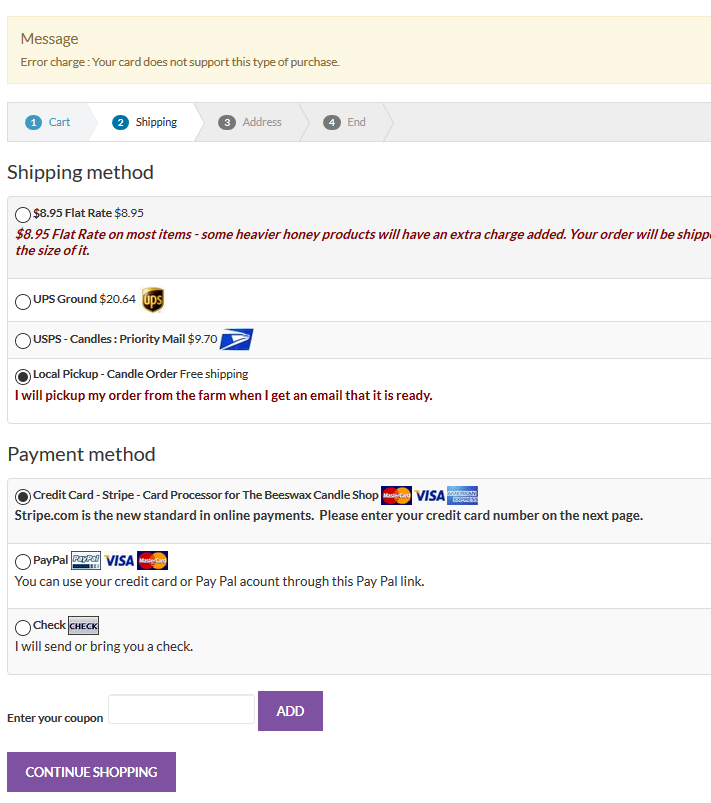
Is this a joomla message?
Is this a joomla message?
Please Log in or Create an account to join the conversation.
8 years 7 months ago #288052
by Jerome
Jerome - Obsidev.com
HikaMarket & HikaSerial developer / HikaShop core dev team.
Replied by Jerome on topic Issue with Stripe plugin
Hello,
Here a part of the plugin source code :
When the Stripe lib generate an exception, the message is retrieve and send to the Joomla error system.
But the source of the message is related to the Stripe payment gateway and the plugin just got the information via the lib to display it.
It's just the messenger !
Here a part of the plugin source code :
Code:
catch(Exception $e)
{
$this->modifyOrder($order_id, $this->payment_params->invalid_status, true, true);
$this->app->redirect($cancel_url, 'Error charge : '.$e->getMessage());
But the source of the message is related to the Stripe payment gateway and the plugin just got the information via the lib to display it.
It's just the messenger !
Jerome - Obsidev.com
HikaMarket & HikaSerial developer / HikaShop core dev team.
Please Log in or Create an account to join the conversation.
Time to create page: 0.311 seconds