

- Posts: 156
- Thank you received: 0
Error during CSV importing
8 years 6 months ago #290151
by SuX
Error during CSV importing was created by SuX
-- HikaShop version -- : 3.3.2
-- Joomla version -- : 3.8.6
-- PHP version -- : 5.6
The column are exactly those of hikashop + some custom fields.
After the importing I get:
The column "" is twice in your CSV. Only the second column data will be taken into account.
What does it means? How to fix? I have some excel cells empty and some excel cells filled. Some column unused and same used.
Then I get:
The product 254121 should have an empty value instead of the value 89142 in the field product_parent_id as it is a main product (not a variant) and thus doesn't have any parent.
The product 254122 should have an empty value instead of the value 89142 in the field product_parent_id as it is a main product (not a variant) and thus doesn't have any parent.
But I followed al the rules (
(
-- Joomla version -- : 3.8.6
-- PHP version -- : 5.6
The column are exactly those of hikashop + some custom fields.
After the importing I get:
The column "" is twice in your CSV. Only the second column data will be taken into account.
What does it means? How to fix? I have some excel cells empty and some excel cells filled. Some column unused and same used.
Then I get:
The product 254121 should have an empty value instead of the value 89142 in the field product_parent_id as it is a main product (not a variant) and thus doesn't have any parent.
The product 254122 should have an empty value instead of the value 89142 in the field product_parent_id as it is a main product (not a variant) and thus doesn't have any parent.
But I followed al the rules
(Please Log in or Create an account to join the conversation.

8 years 6 months ago #290157
by Jerome
Jerome - Obsidev.com
HikaMarket & HikaSerial developer / HikaShop core dev team.
Replied by Jerome on topic Error during CSV importing
Hello,
You should take a look at the column names.
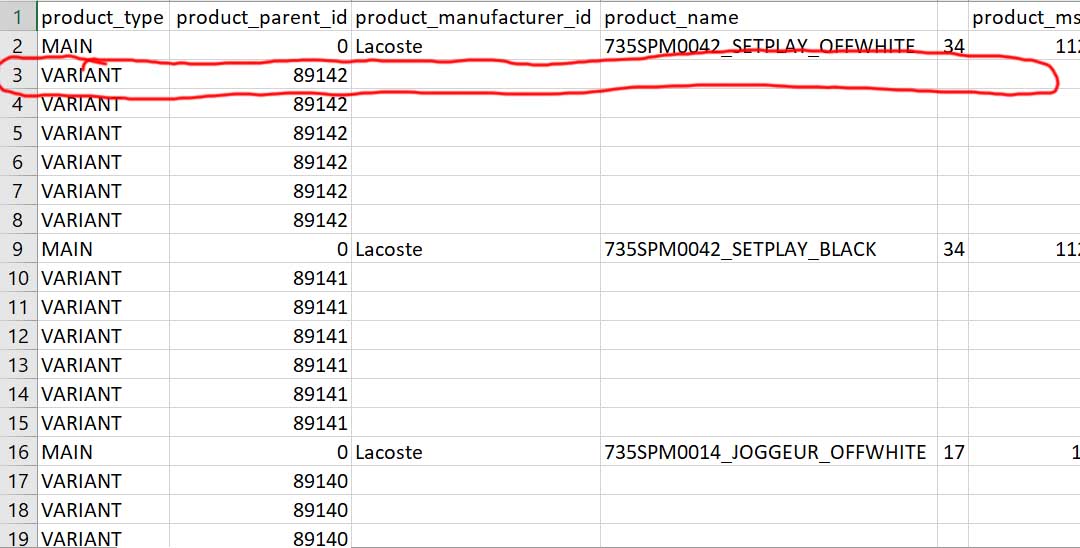
Between "product_name" and "product_msrp", you have a column with an empty name.
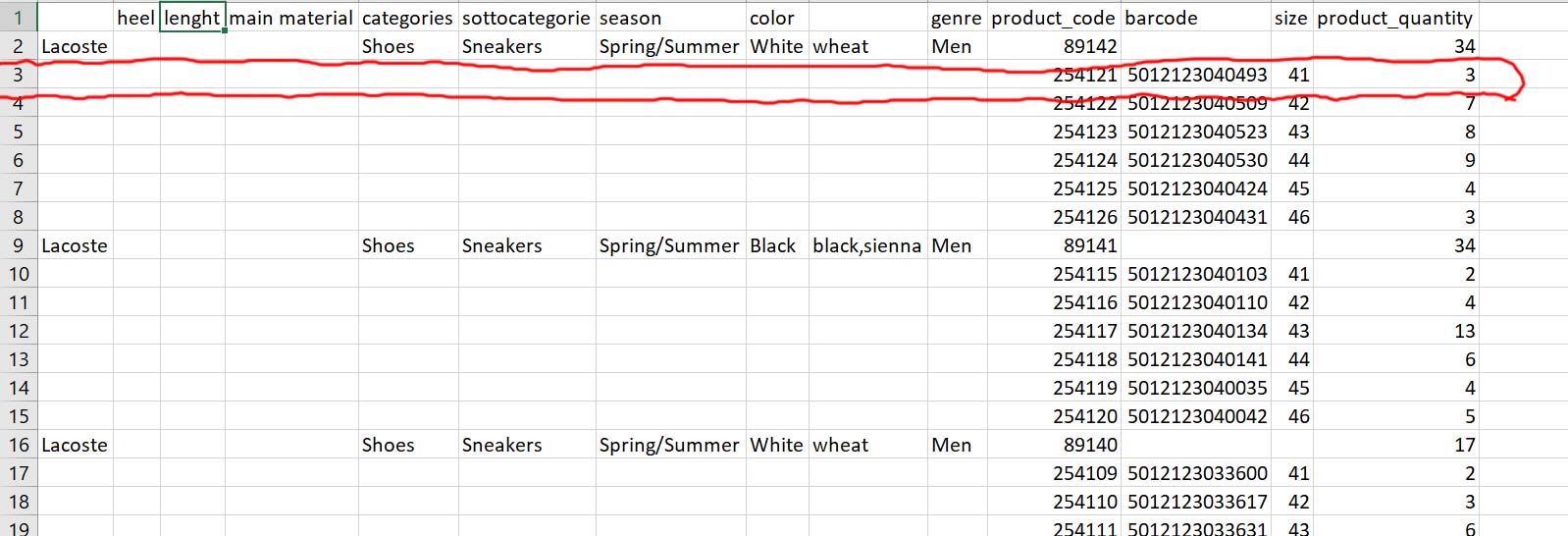
And between "color" and "genre", you also have a column with an empty name.
It would be interesting and necessary to have more details about what these columns are exactly and from where the content (of these columns) is coming from.
Regards,
You should take a look at the column names.
Between "product_name" and "product_msrp", you have a column with an empty name.
And between "color" and "genre", you also have a column with an empty name.
It would be interesting and necessary to have more details about what these columns are exactly and from where the content (of these columns) is coming from.
Regards,
Jerome - Obsidev.com
HikaMarket & HikaSerial developer / HikaShop core dev team.
Please Log in or Create an account to join the conversation.
8 years 6 months ago #290182
by SuX
QUESTIONS:
1) Do you mean I cannot have hempty colums. I thought that you could also have empty columns and that these were ignored during the import process
2) I attached the full columns. As you can see I have the "PRODUCT_PARENT_ID", the "PRODUCT_TYPE" and the "PRODUCT_CODE" all with right rules.
I don't know why the import of variant failed and they are imported as main product.
I get:
The product 254121 should have an empty value instead of the value 89142 in the field product_parent_id as it is a main product (not a variant) and thus doesn't have any parent.
The product 254122 should have an empty value instead of the value 89142 in the field product_parent_id as it is a main product (not a variant) and thus doesn't have any parent.
The product 254123 should have an empty value instead of the value 89142 in the field product_parent_id as it is a main product (not a variant) and thus doesn't have any parent.
The product 254124 should have an empty value instead of the value 89142 in the field product_parent_id as it is a main product (not a variant) and thus doesn't have any parent.
AND SO ON...

Replied by SuX on topic Error during CSV importing
Jerome wrote: Hello,
You should take a look at the column names.
Between "product_name" and "product_msrp", you have a column with an empty name.
And between "color" and "genre", you also have a column with an empty name.
It would be interesting and necessary to have more details about what these columns are exactly and from where the content (of these columns) is coming from.
Regards,
QUESTIONS:
1) Do you mean I cannot have hempty colums. I thought that you could also have empty columns and that these were ignored during the import process
2) I attached the full columns. As you can see I have the "PRODUCT_PARENT_ID", the "PRODUCT_TYPE" and the "PRODUCT_CODE" all with right rules.
I don't know why the import of variant failed and they are imported as main product.
I get:
The product 254121 should have an empty value instead of the value 89142 in the field product_parent_id as it is a main product (not a variant) and thus doesn't have any parent.
The product 254122 should have an empty value instead of the value 89142 in the field product_parent_id as it is a main product (not a variant) and thus doesn't have any parent.
The product 254123 should have an empty value instead of the value 89142 in the field product_parent_id as it is a main product (not a variant) and thus doesn't have any parent.
The product 254124 should have an empty value instead of the value 89142 in the field product_parent_id as it is a main product (not a variant) and thus doesn't have any parent.
AND SO ON...
Please Log in or Create an account to join the conversation.
8 years 6 months ago #290225
by SuX
Anyone can explain why I get those errors?
I will be tuned because I need to solve the problem quickly.
Replied by SuX on topic Error during CSV importing
SuX wrote:
Jerome wrote: Hello,
You should take a look at the column names.
Between "product_name" and "product_msrp", you have a column with an empty name.
And between "color" and "genre", you also have a column with an empty name.
It would be interesting and necessary to have more details about what these columns are exactly and from where the content (of these columns) is coming from.
Regards,
QUESTIONS:
1) Do you mean I cannot have hempty colums. I thought that you could also have empty columns and that these were ignored during the import process
2) I attached the full columns. As you can see I have the "PRODUCT_PARENT_ID", the "PRODUCT_TYPE" and the "PRODUCT_CODE" all with right rules.
I don't know why the import of variant failed and they are imported as main product.
I get:
The product 254121 should have an empty value instead of the value 89142 in the field product_parent_id as it is a main product (not a variant) and thus doesn't have any parent.
The product 254122 should have an empty value instead of the value 89142 in the field product_parent_id as it is a main product (not a variant) and thus doesn't have any parent.
The product 254123 should have an empty value instead of the value 89142 in the field product_parent_id as it is a main product (not a variant) and thus doesn't have any parent.
The product 254124 should have an empty value instead of the value 89142 in the field product_parent_id as it is a main product (not a variant) and thus doesn't have any parent.
AND SO ON...
Anyone can explain why I get those errors?
I will be tuned because I need to solve the problem quickly.
Please Log in or Create an account to join the conversation.

8 years 6 months ago #290241
by nicolas
Replied by nicolas on topic Error during CSV importing
Hi,
1. They will be ignored yes. Still the import system display that message so that you know about it.
2. The text should be "main" or "variant" and not "MAIN" or "VARIANT".
Because you don't use the exact same values, all your rows are treated with the type "main".
1. They will be ignored yes. Still the import system display that message so that you know about it.
2. The text should be "main" or "variant" and not "MAIN" or "VARIANT".
Because you don't use the exact same values, all your rows are treated with the type "main".
Please Log in or Create an account to join the conversation.
8 years 6 months ago - 8 years 6 months ago #290259
by SuX
So, it is not necessary to delete the columns. if I do not need, I can leave them. Right? P.S. But during the import, I'll get however a message regarding it.
Do you mean I should replace with lowercase words (MAIN/VARIANT--->main/variant) and I will be able to solve?
Replied by SuX on topic Error during CSV importing
nicolas wrote: Hi,
1. They will be ignored yes. Still the import system display that message so that you know about it.
So, it is not necessary to delete the columns. if I do not need, I can leave them. Right? P.S. But during the import, I'll get however a message regarding it.
nicolas wrote: 2. The text should be "main" or "variant" and not "MAIN" or "VARIANT".
Because you don't use the exact same values, all your rows are treated with the type "main".
Do you mean I should replace with lowercase words (MAIN/VARIANT--->main/variant) and I will be able to solve?
Last edit: 8 years 6 months ago by SuX.
Please Log in or Create an account to join the conversation.
8 years 6 months ago #290260
by nicolas
Replied by nicolas on topic Error during CSV importing
Hi,
1. and 2. Yes, exactely.
1. and 2. Yes, exactely.
Please Log in or Create an account to join the conversation.
8 years 6 months ago #290363
by SuX
Sorry but I did not understand the answer to the first question.
I have the csv file and for me it would be better not to be forced to delete the columns that I don't need to import. Because is better to make less changes, as possible, to the csv file.
Replied by SuX on topic Error during CSV importing
nicolas wrote: Hi,
1. and 2. Yes, exactely.
Sorry but I did not understand the answer to the first question.
I have the csv file and for me it would be better not to be forced to delete the columns that I don't need to import. Because is better to make less changes, as possible, to the csv file.
Please Log in or Create an account to join the conversation.
8 years 6 months ago #290379
by nicolas
Replied by nicolas on topic Error during CSV importing
HI,
I don't see what is not clear.
You asked:
if I do not need, I can leave them. Right?
And I replied:
Yes, eactly.
So you can leave the columns, you don't have to delete them. They will just be skipped and a message will be displayed to you that the column is skipped.
I don't see what is not clear.
You asked:
if I do not need, I can leave them. Right?
And I replied:
Yes, eactly.
So you can leave the columns, you don't have to delete them. They will just be skipped and a message will be displayed to you that the column is skipped.
Please Log in or Create an account to join the conversation.
Time to create page: 0.220 seconds