

- Posts: 64
- Thank you received: 0
Not showing on page.
8 years 4 months ago #292892
by Scott2451
Not showing on page. was created by Scott2451
-- Joomla version -- : 3.8.7
-- PHP version -- : 7
-- Browser(s) name and version -- : Firefox
-- Error-message(debug-mod must be tuned on) -- : Not showing on page.
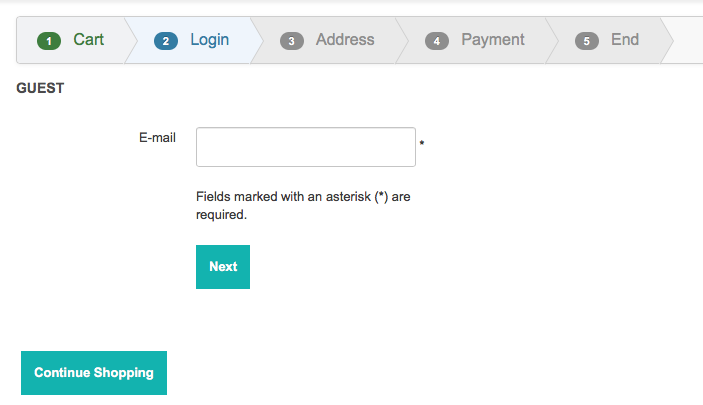
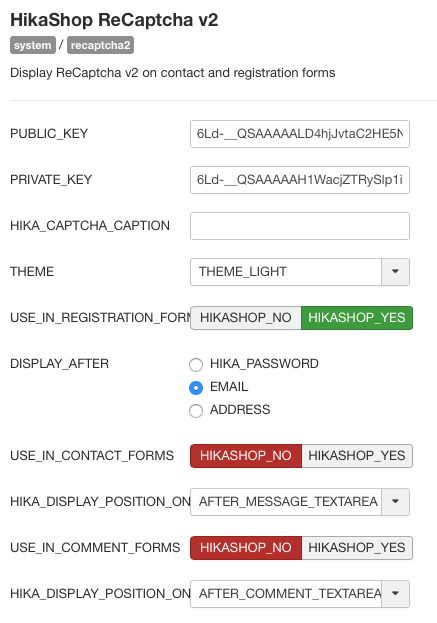
It won't appear on the page, see attached. Its installed and enabled and set to appear under Email.

-- PHP version -- : 7
-- Browser(s) name and version -- : Firefox
-- Error-message(debug-mod must be tuned on) -- : Not showing on page.
It won't appear on the page, see attached. Its installed and enabled and set to appear under Email.
Please Log in or Create an account to join the conversation.

8 years 4 months ago #292897
by nicolas
Replied by nicolas on topic Not showing on page.
Hi,
Please turn off the "checkout legacy" setting of the HikaShop configuration in order to use the new checkout of HikaShop 3 and try again.
Please turn off the "checkout legacy" setting of the HikaShop configuration in order to use the new checkout of HikaShop 3 and try again.
Please Log in or Create an account to join the conversation.
8 years 4 months ago #292917
by Scott2451
Replied by Scott2451 on topic Not showing on page.
The version that's being used is 2.6.0
Please Log in or Create an account to join the conversation.

8 years 4 months ago #292924
by Jerome
Jerome - Obsidev.com
HikaMarket & HikaSerial developer / HikaShop core dev team.
Replied by Jerome on topic Not showing on page.
Hello,
Please understand that HikaShop 2.6.0 has been release in 2015 and that this version cannot be supported anymore by our team.
The issue you got is most likely fixed in current version, as other issues :
www.hikashop.com/support/documentation/5...ashop-changelog.html
Regards
Please understand that HikaShop 2.6.0 has been release in 2015 and that this version cannot be supported anymore by our team.
The issue you got is most likely fixed in current version, as other issues :
www.hikashop.com/support/documentation/5...ashop-changelog.html
Regards
Jerome - Obsidev.com
HikaMarket & HikaSerial developer / HikaShop core dev team.
Please Log in or Create an account to join the conversation.
8 years 4 months ago #292927
by Scott2451
Replied by Scott2451 on topic Not showing on page.
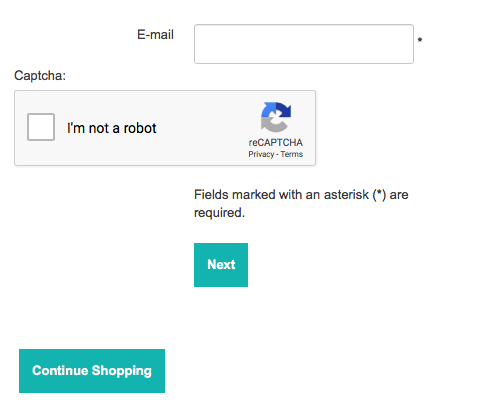
We've not upgraded to the latest version from the current one because who knows what will break and not work anymore. We decided to leave things as they are, Attached is a screen shot that does show the reCaptcha and its working.
Please Log in or Create an account to join the conversation.
Time to create page: 0.205 seconds