

- Posts: 224
- Thank you received: 8
Hikashop Modal CSS causing conflict with modal login form and other modals
8 years 4 months ago - 8 years 4 months ago #293470
by oloccina
-- url of the page with the problem -- :
accademiainfinita.it/meditazioni-guidate
Hello,
I just noticed that for some screen sizes (i-pad to phone) this css
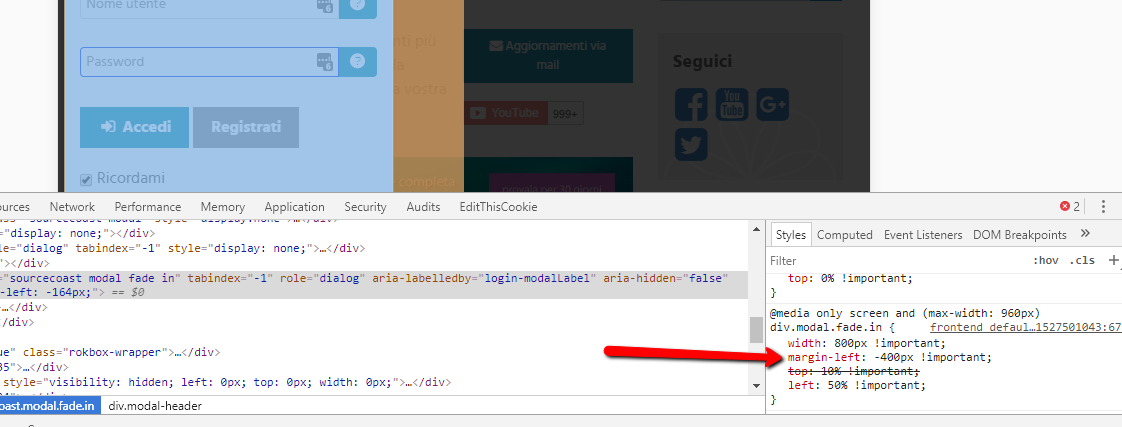
is causing issues with my modal login form, causing it to open on the left of the page instead that centered, because the rule has !important applied it overwrites the login modal style which would be
I know that I can change hikashop css via my custom css file, but I don't want to risk breaking things in the shop, can you tell me what that css rule applies to (term and conditions popup?) and what would happen if I change it to this?
thank you
Hello,
I just noticed that for some screen sizes (i-pad to phone) this css
Code:
@media only screen and (max-width: 960px)
div.modal.fade.in {
margin-left: -400px !important;
}
is causing issues with my modal login form, causing it to open on the left of the page instead that centered, because the rule has !important applied it overwrites the login modal style which would be
Code:
style="display: block; margin-left: -164px;"
I know that I can change hikashop css via my custom css file, but I don't want to risk breaking things in the shop, can you tell me what that css rule applies to (term and conditions popup?) and what would happen if I change it to this?
Code:
@media only screen and (max-width: 960px)
div.modal.fade.in {
margin-left: -164px !important;
}
thank you
Last edit: 8 years 4 months ago by oloccina.
Please Log in or Create an account to join the conversation.
8 years 4 months ago #293472
by oloccina
Replied by oloccina on topic Hikashop Modal CSS causing conflict with modal login form and other modals
Ok I solved lilke this
still, why margin-left: -400px ?
Code:
div.sourcecoast.modal[style] {margin-left: -164px !important;}
still, why margin-left: -400px ?
Please Log in or Create an account to join the conversation.

8 years 4 months ago #293471
by nicolas
Replied by nicolas on topic Hikashop Modal CSS causing conflict with modal login form and other modals
Hi,
This CSS is for the popup system of Joomla.
If you use the "vex" choice in the "popup mode" setting of the HikaShop configuration, then that CSS is not used by HikaShop and you can override it without worry.
We highly recommend to use vex instead of bootstrap or mootools.
This CSS is for the popup system of Joomla.
If you use the "vex" choice in the "popup mode" setting of the HikaShop configuration, then that CSS is not used by HikaShop and you can override it without worry.
We highly recommend to use vex instead of bootstrap or mootools.
Please Log in or Create an account to join the conversation.
Time to create page: 0.166 seconds