

- Posts: 637
- Thank you received: 26
VAT 0% on normal invoice
8 years 3 months ago #293990
by Lumiga
Kind regards,
Lumiga
VAT 0% on normal invoice was created by Lumiga
-- HikaShop version -- : 3.4.0
-- Joomla version -- : 3.8.8
-- PHP version -- : 7.
Hi Supportteam,
I like to have VAT 0% on my invoice (not the PDF invoice)
Because it's mandatory in the Netherlands to have 0% VAT on foreign invoices with the text line:
Intra-Community supply - Article 138, Paragraph 1, Directive 2006/112 - VAT 0%
So I created a TAX rate with this text line and a TAX Rule for all companies with Tax number for all countries in Europe (exempt Netherlands).
And changed the view order / invoice.php
From this code:
to this code:
But as you can see in the screenshot the Tax Namekey is very long.
How can we changed the code so this line would be right aligned and doesn't affect the column with the quantity?
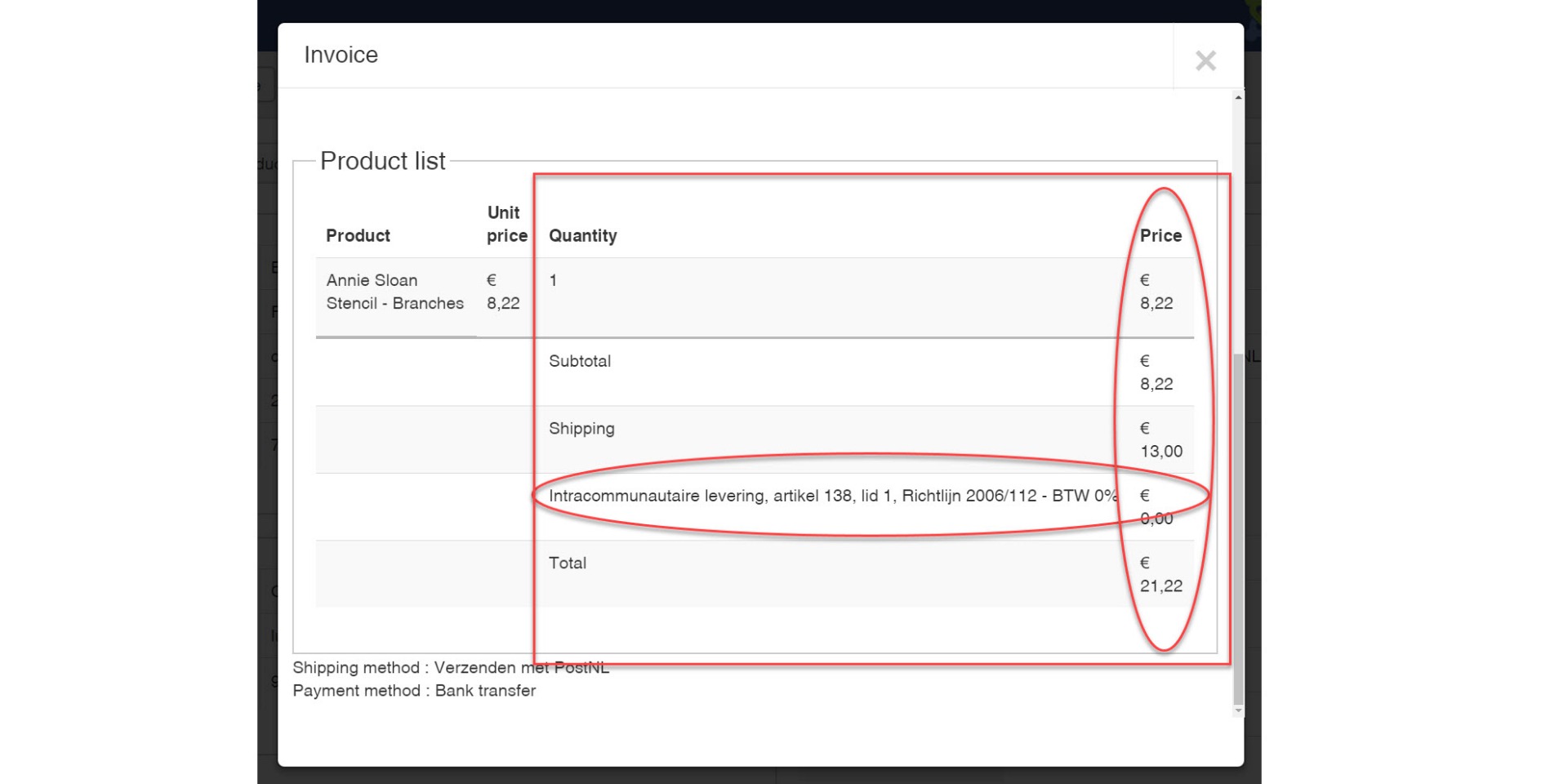
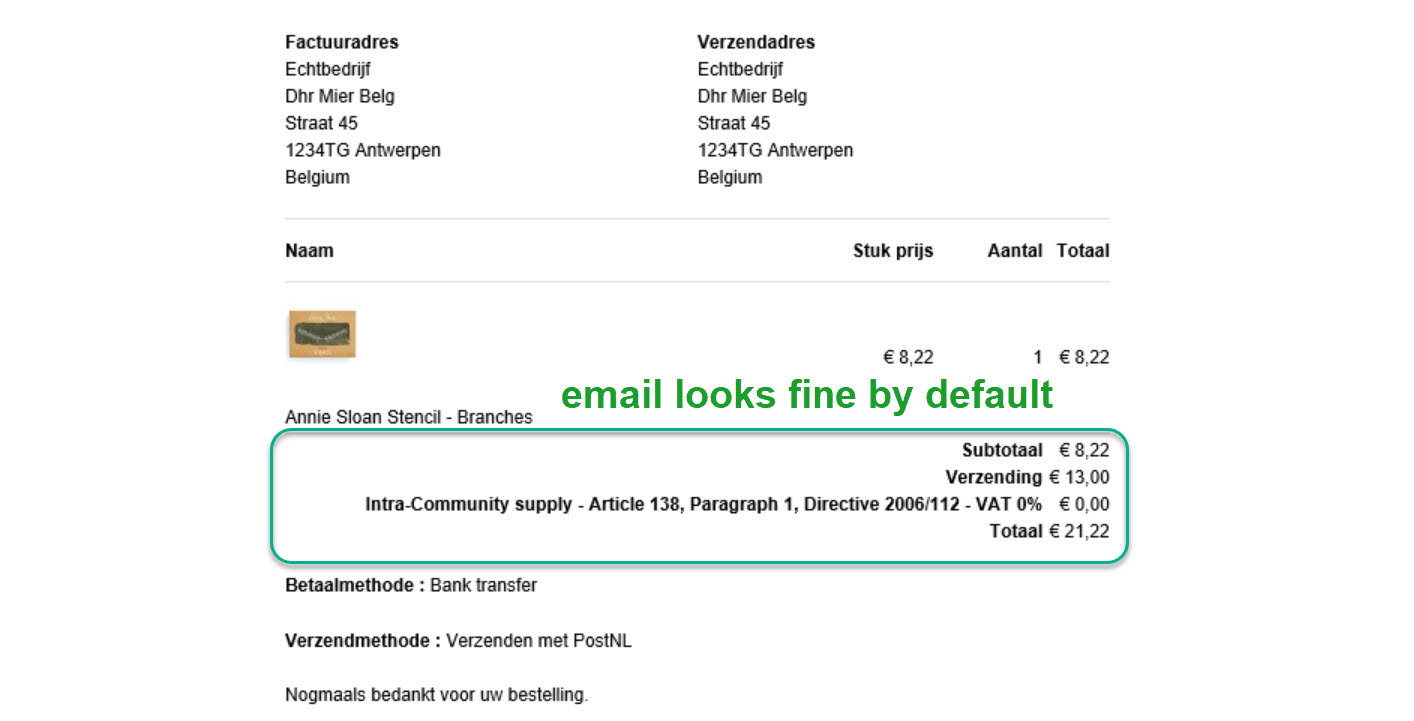
In other the e-mail view this is no issue and works fine by default, except for the invoice.
Kind regards,
Lumiga
-- Joomla version -- : 3.8.8
-- PHP version -- : 7.
Hi Supportteam,
I like to have VAT 0% on my invoice (not the PDF invoice)
Because it's mandatory in the Netherlands to have 0% VAT on foreign invoices with the text line:
Intra-Community supply - Article 138, Paragraph 1, Directive 2006/112 - VAT 0%
So I created a TAX rate with this text line and a TAX Rule for all companies with Tax number for all countries in Europe (exempt Netherlands).
And changed the view order / invoice.php
From this code:
Code:
if($taxes != 0){
Code:
if($taxes >= 0){
But as you can see in the screenshot the Tax Namekey is very long.
How can we changed the code so this line would be right aligned and doesn't affect the column with the quantity?
In other the e-mail view this is no issue and works fine by default, except for the invoice.
Kind regards,
Lumiga
Kind regards,
Lumiga
Please Log in or Create an account to join the conversation.

8 years 3 months ago #294003
by nicolas
Replied by nicolas on topic VAT 0% on normal invoice
Hi,
Change the code:
to:
and that should do it (two places in the view file).
We'll do a more complex version on our end for the next version of HikaShop.
Change the code:
Code:
<td colspan="<?php echo $colspan; ?>">
</td>
<td class="hikashop_order_tax_title key">
Code:
<td style="text-align:right;" class="hikashop_order_tax_title key" colspan="<?php echo ($colspan+1); ?>">
We'll do a more complex version on our end for the next version of HikaShop.
Please Log in or Create an account to join the conversation.
8 years 1 month ago - 8 years 1 month ago #297350
by Lumiga
Kind regards,
Lumiga
Replied by Lumiga on topic VAT 0% on normal invoice
Hi Nicolas,
In which version do you expect this more complex code on your end?
I'm talking about the back-end invoice (not the front-end which looks fine)
I see you didn't add this to update 3.5.1
For now, I can't find this code in 3.5.0 or 3.5.1 in the invoice view.
Your 3.5.1. code looks like this, so I can't find the code you meant.
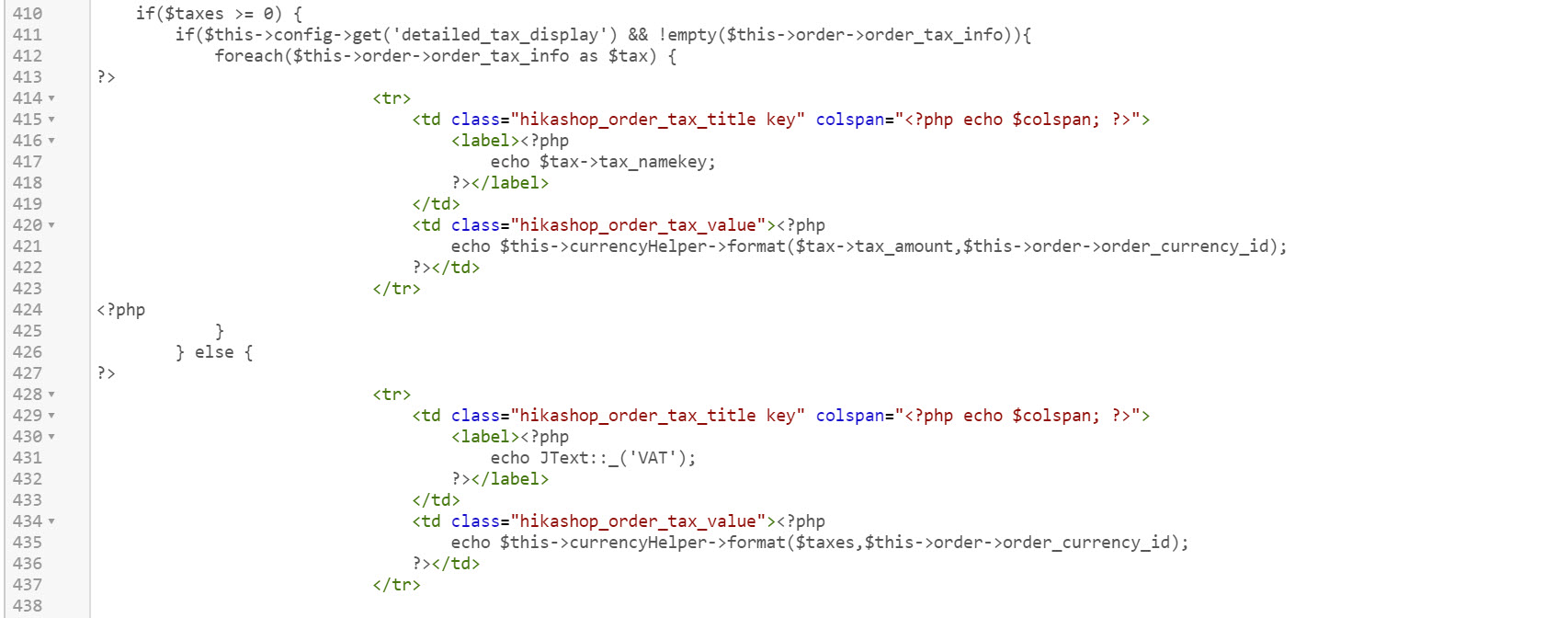
Hope to hear from you.
Kind regards,
Lumiga
In which version do you expect this more complex code on your end?
I'm talking about the back-end invoice (not the front-end which looks fine)
I see you didn't add this to update 3.5.1
For now, I can't find this code in 3.5.0 or 3.5.1 in the invoice view.
Your 3.5.1. code looks like this, so I can't find the code you meant.
Hope to hear from you.
Kind regards,
Lumiga
Kind regards,
Lumiga
Last edit: 8 years 1 month ago by Lumiga.
Please Log in or Create an account to join the conversation.
8 years 1 month ago #297352
by nicolas
Replied by nicolas on topic VAT 0% on normal invoice
Hi,
The most complex version was added to the 3.5.1.
And I can see you have it in your screenshot too.
The change was about removing the axtre td tag which handled the colspan to integrate the colspan directly in the td of the label:
monosnap.com/file/aswrKXO06SoC52ekz2rBg0RxC6wgmk
That way the td of the label can use the full width available.
The most complex version was added to the 3.5.1.
And I can see you have it in your screenshot too.
The change was about removing the axtre td tag which handled the colspan to integrate the colspan directly in the td of the label:
monosnap.com/file/aswrKXO06SoC52ekz2rBg0RxC6wgmk
That way the td of the label can use the full width available.
The following user(s) said Thank You: Lumiga
Please Log in or Create an account to join the conversation.
Time to create page: 0.254 seconds