
- Posts: 143
- Thank you received: 9
Serch results URLs
- ButterflyPixel
-
 Topic Author
- Offline
Less
More
8 years 2 months ago - 8 years 2 months ago #295196
by ButterflyPixel
Serch results URLs was created by ButterflyPixel
-- HikaShop version -- : 3.5.0
-- Joomla version -- : 3.8.10
-- PHP version -- : 5.6
Hi,
We want to have on URL of the search results, the category alias, and the product alias:
sitename.com/hikashop-category-alias/product-alias
Right now in the result page, all products have this:
../hikashop-menu-for-categories-listing/product-alias
Thanks
-- Joomla version -- : 3.8.10
-- PHP version -- : 5.6
Hi,
We want to have on URL of the search results, the category alias, and the product alias:
sitename.com/hikashop-category-alias/product-alias
Right now in the result page, all products have this:
../hikashop-menu-for-categories-listing/product-alias
Thanks
Last edit: 8 years 2 months ago by ButterflyPixel.
Please Log in or Create an account to join the conversation.

8 years 2 months ago #295204
by nicolas
Replied by nicolas on topic Serch results URLs
Hi,
There is no way to have the category alias in the URL of product pages, regardless of whether it's the search results or normal listings.
It's only possible to have:
menu-item-alias/product-sef-name/product-alias
The product-sef-name can be removed with the "product SEF name" setting of the HikaShop configuration.
And then, if you configure correctly your menu items structure, you can have a way to have menu item aliases which correspond to the category aliases and reach the result you want.
If you're able to reach the result you want on the product listings, then just enter that URL in the "canonical URL" setting of the products, and then activate the "force canonical URLs on listings" setting. That way, the search results will also use these canonical URLs.
There is no way to have the category alias in the URL of product pages, regardless of whether it's the search results or normal listings.
It's only possible to have:
menu-item-alias/product-sef-name/product-alias
The product-sef-name can be removed with the "product SEF name" setting of the HikaShop configuration.
And then, if you configure correctly your menu items structure, you can have a way to have menu item aliases which correspond to the category aliases and reach the result you want.
If you're able to reach the result you want on the product listings, then just enter that URL in the "canonical URL" setting of the products, and then activate the "force canonical URLs on listings" setting. That way, the search results will also use these canonical URLs.
Please Log in or Create an account to join the conversation.
8 years 2 months ago #295296
by alisse
Replied by alisse on topic Serch results URLs
the configuration of "product SEF name" is correct
This changed after the update
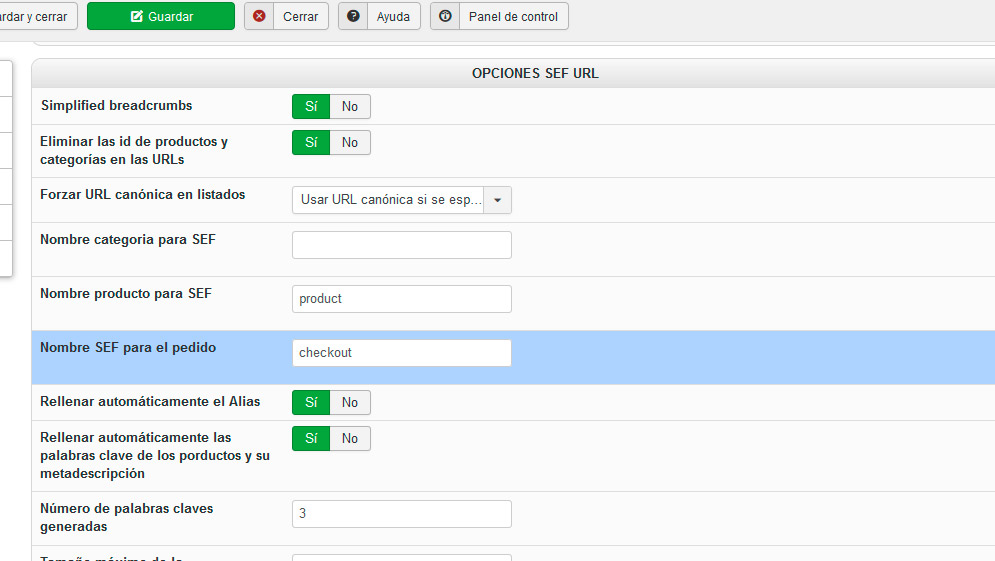
This changed after the update
Please Log in or Create an account to join the conversation.
8 years 2 months ago #295297
by alisse
Replied by alisse on topic Serch results URLs
I had to force the canonical url of the categories, removing the id manually, but the products are many and I can not fix the address manually
Please Log in or Create an account to join the conversation.
8 years 2 months ago #295313
by nicolas
Replied by nicolas on topic Serch results URLs
Hi,
The update won't change the way the setting is configured or the menu item which is used in the search results.
If you don't have a canonical URL for the products, then the search results will use the menu item configured in the settings of the HikaShop products search plugins. So maybe the menu item you want is not configured there.
You're now talking about the id in the URLs. If you now get the ids while before you didn't, then maybe it's because of a bug that we patched on the 4th of July. To get that patch, just download again the install package on our website in the menu My account>My subscriptions and install it on yours.
The update won't change the way the setting is configured or the menu item which is used in the search results.
If you don't have a canonical URL for the products, then the search results will use the menu item configured in the settings of the HikaShop products search plugins. So maybe the menu item you want is not configured there.
You're now talking about the id in the URLs. If you now get the ids while before you didn't, then maybe it's because of a bug that we patched on the 4th of July. To get that patch, just download again the install package on our website in the menu My account>My subscriptions and install it on yours.
Please Log in or Create an account to join the conversation.
- ButterflyPixel
-
Topic Author
- Offline
Less
More
- Posts: 143
- Thank you received: 9
8 years 2 months ago #295339
by ButterflyPixel
Replied by ButterflyPixel on topic Serch results URLs
OK
I will try to do it with "Canonical URL" as a test I made worked fine, not only in Search results but also in Tags results, so I have a unique URL for products regardless where I am landing from.
My question is:
1. How to make a mass action to have as canonical URL this: category-alias/product-alias
2. Taking into account that I have multiple categories for some products what it will be the "category-alias"? The 1st category selected in the product or what?
Thanks
I will try to do it with "Canonical URL" as a test I made worked fine, not only in Search results but also in Tags results, so I have a unique URL for products regardless where I am landing from.
My question is:
1. How to make a mass action to have as canonical URL this: category-alias/product-alias
2. Taking into account that I have multiple categories for some products what it will be the "category-alias"? The 1st category selected in the product or what?
Thanks
Please Log in or Create an account to join the conversation.
8 years 2 months ago #295341
by nicolas
Replied by nicolas on topic Serch results URLs
Hi,
You'll have to run one mass action for each category. You would then have one filter on the category, and one action "update the values" on the column canonical URL as an operation with the text:
concat('XXX', product.product_alias)
where XXX is the alias of the category selected in the filter.
You'll have to run one mass action for each category. You would then have one filter on the category, and one action "update the values" on the column canonical URL as an operation with the text:
concat('XXX', product.product_alias)
where XXX is the alias of the category selected in the filter.
Please Log in or Create an account to join the conversation.
- ButterflyPixel
-
Topic Author
- Offline
Less
More
- Posts: 143
- Thank you received: 9
8 years 2 months ago - 8 years 2 months ago #295380
by ButterflyPixel
Replied by ButterflyPixel on topic Serch results URLs
Hi
I tried your proposition that will give me the solution that I was looking for, but I can not make the mass action to give the result I want.
Please see the attached image.
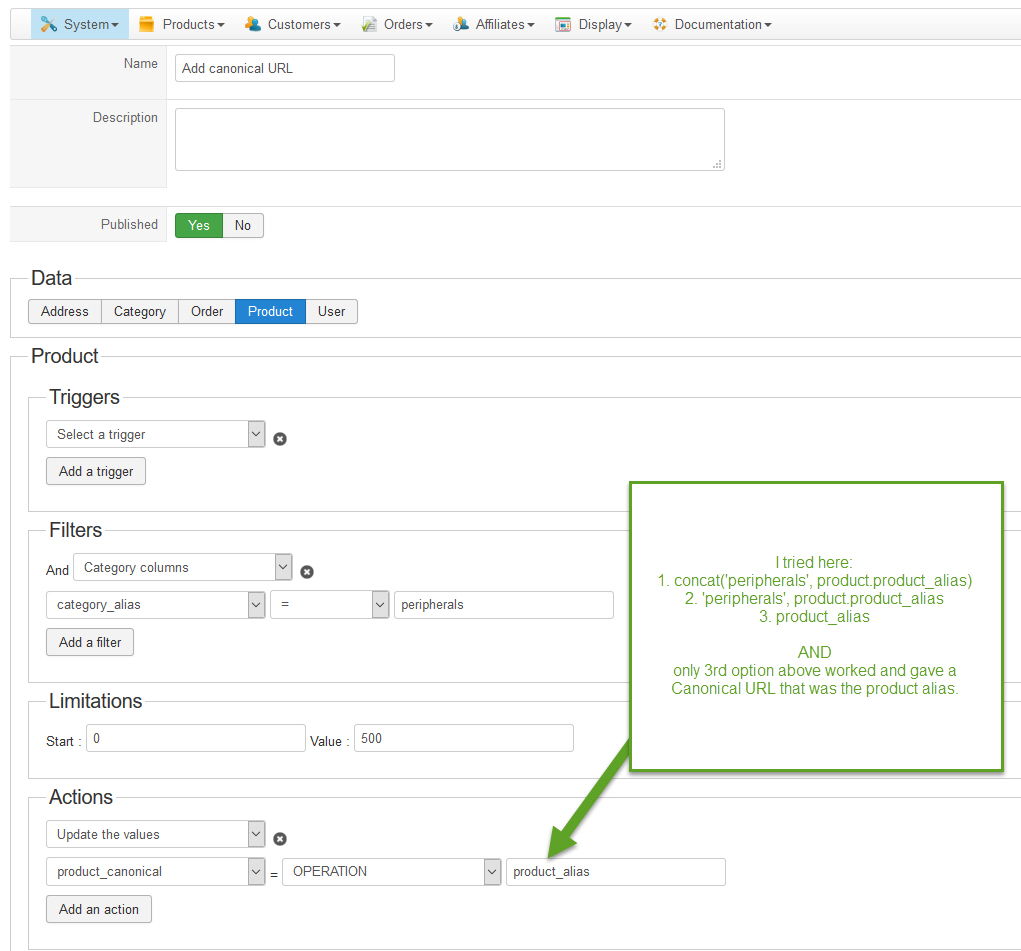
Any help?
To remind you, I want to have a canonical URL that will be: "category-alias/product-alias"
Thank you
I tried your proposition that will give me the solution that I was looking for, but I can not make the mass action to give the result I want.
Please see the attached image.
Any help?
To remind you, I want to have a canonical URL that will be: "category-alias/product-alias"
Thank you
Last edit: 8 years 2 months ago by ButterflyPixel.
Please Log in or Create an account to join the conversation.
8 years 2 months ago #295401
by nicolas
Replied by nicolas on topic Serch results URLs
Hi,
I forgot the / it should be like that:
concat('XXX/', product.product_alias)
I forgot the / it should be like that:
concat('XXX/', product.product_alias)
Please Log in or Create an account to join the conversation.
- ButterflyPixel
-
Topic Author
- Offline
Less
More
- Posts: 143
- Thank you received: 9
8 years 2 months ago #295409
by ButterflyPixel
Replied by ButterflyPixel on topic Serch results URLs
Hi
I did that but I have this message;
"Message
Successfully Saved
The table product does not exist"
See attached my settings
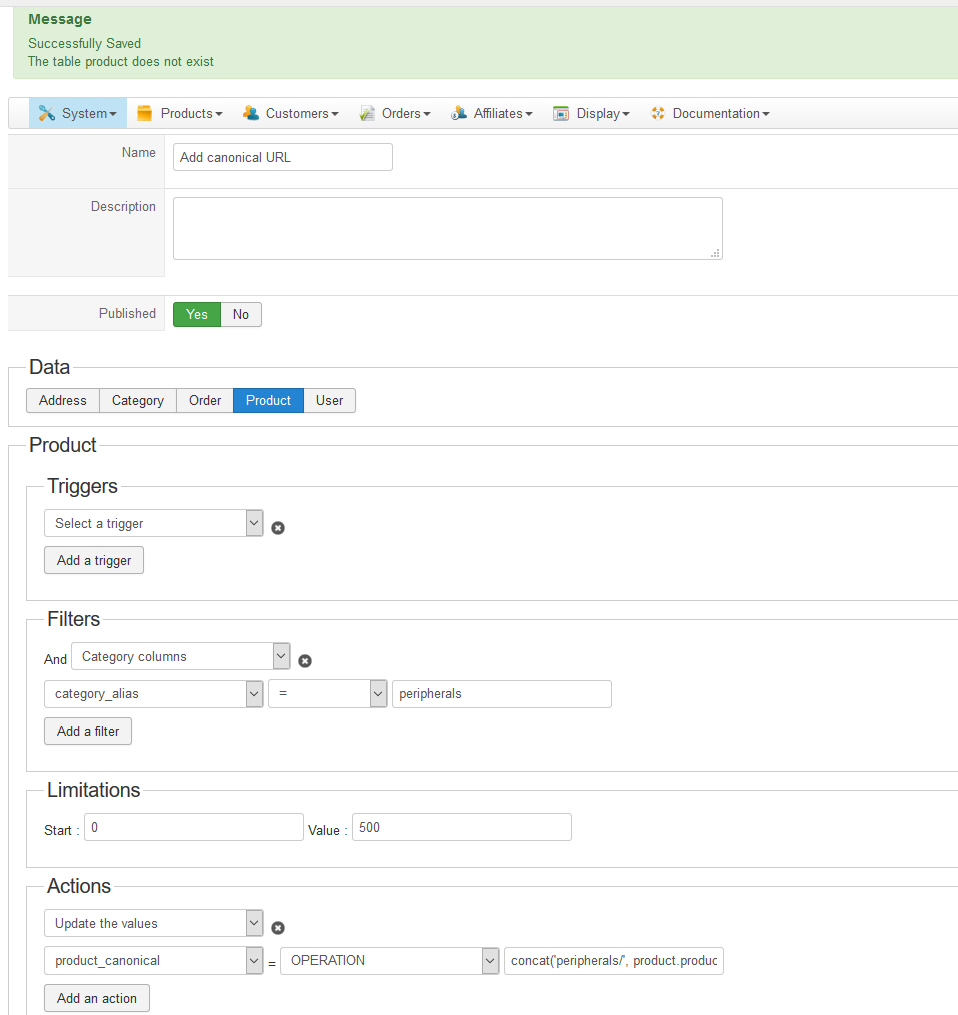
I did that but I have this message;
"Message
Successfully Saved
The table product does not exist"
See attached my settings
Please Log in or Create an account to join the conversation.
- ButterflyPixel
-
Topic Author
- Offline
Less
More
- Posts: 143
- Thank you received: 9
8 years 2 months ago #295410
by ButterflyPixel
Replied by ButterflyPixel on topic Serch results URLs
Well, I delete the space before "product" and worked!!!
concat('XXX/',product.product_alias)
Just let you know, make sense?
concat('XXX/',product.product_alias)
Just let you know, make sense?
The following user(s) said Thank You: nicolas
Please Log in or Create an account to join the conversation.
Time to create page: 0.296 seconds