

- Posts: 36
- Thank you received: 4
Swap buttons in checkout
8 years 1 month ago #296760
by hkeyzer
Swap buttons in checkout was created by hkeyzer
-- url of the page with the problem -- :
joomla-support.co.nz/index.php
-- HikaShop version -- : 3.5.1
-- Joomla version -- : 3.8.11
-- PHP version -- : 7.0.29
-- Browser(s) name and version -- : firefox 59.0.1
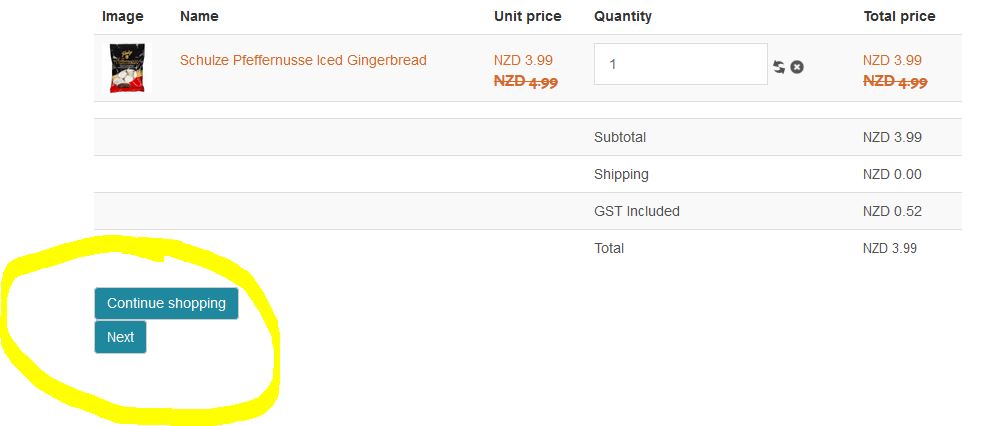
How do I swap the "Continue Shopping" and "Next" Buttons on the checkout pages.
Which specific file?
Refer image
Thanks
-- HikaShop version -- : 3.5.1
-- Joomla version -- : 3.8.11
-- PHP version -- : 7.0.29
-- Browser(s) name and version -- : firefox 59.0.1
How do I swap the "Continue Shopping" and "Next" Buttons on the checkout pages.
Which specific file?
Refer image
Thanks
Please Log in or Create an account to join the conversation.

8 years 1 month ago #296766
by Jerome
Jerome - Obsidev.com
HikaMarket & HikaSerial developer / HikaShop core dev team.
Replied by Jerome on topic Swap buttons in checkout
Hello,
The next button is generally at the right of the page ; you have a customized front-end CSS for HikaShop which do not include the rules for these buttons.
www.hikashop.com/support/documentation/1...ize-the-display.html
Regards,
The next button is generally at the right of the page ; you have a customized front-end CSS for HikaShop which do not include the rules for these buttons.
www.hikashop.com/support/documentation/1...ize-the-display.html
Regards,
Jerome - Obsidev.com
HikaMarket & HikaSerial developer / HikaShop core dev team.
The following user(s) said Thank You: hkeyzer
Please Log in or Create an account to join the conversation.
8 years 1 month ago #296795
by hkeyzer
Replied by hkeyzer on topic Swap buttons in checkout
Thanks with info provided was able to adjust button layout.
Please Log in or Create an account to join the conversation.
Time to create page: 0.174 seconds