

- Posts: 73
- Thank you received: 9
Thumbnails images invisible after update
7 years 3 months ago #307464
by Wella
Thumbnails images invisible after update was created by Wella
-- HikaShop version -- : 4.1.0
-- Joomla version -- : 3.9.6
-- PHP version -- : 7.2.7
Hi,
After updating HIkashop into 4.1.0 version, thumbnails/product images are gone except for the category listing images. I have browsed the Hikashop forum related to this topic, I renamed the map instead of deleting it (in case of…) and the system did make automatically a new map, I could see that there are “jpg” and “webp” images inside the map. But I cannot get the thumbnails of the product pages back to normal.
What I’ve noticed is, most location at the forum is described as:
/images/com_hikashop/upload/........
but in firebug it displays like this:
/media/com_hikashop/upload/thumbnails/260x500sO/xxxx.jpg
Please help me with this problem.
Regards,
Wella
-- Joomla version -- : 3.9.6
-- PHP version -- : 7.2.7
Hi,
After updating HIkashop into 4.1.0 version, thumbnails/product images are gone except for the category listing images. I have browsed the Hikashop forum related to this topic, I renamed the map instead of deleting it (in case of…) and the system did make automatically a new map, I could see that there are “jpg” and “webp” images inside the map. But I cannot get the thumbnails of the product pages back to normal.
What I’ve noticed is, most location at the forum is described as:
/images/com_hikashop/upload/........
but in firebug it displays like this:
/media/com_hikashop/upload/thumbnails/260x500sO/xxxx.jpg
Please help me with this problem.
Regards,
Wella
Please Log in or Create an account to join the conversation.
7 years 3 months ago - 7 years 3 months ago #307470
by Wella
Replied by Wella on topic Thumbnails images invisible after update
Found it on IIS server, I have added the:
File name extension: .webp
and the
MIME type: image/webp
File name extension: .webp
and the
MIME type: image/webp
Last edit: 7 years 3 months ago by Wella.
Please Log in or Create an account to join the conversation.

7 years 3 months ago #307709
by Lumiga
Kind regards,
Lumiga
Replied by Lumiga on topic Thumbnails images invisible after update
For people with Admin Tool .htaccess maker:
Just Add in Upper and Lower case, webp and WEBP to your allowed file formats area.
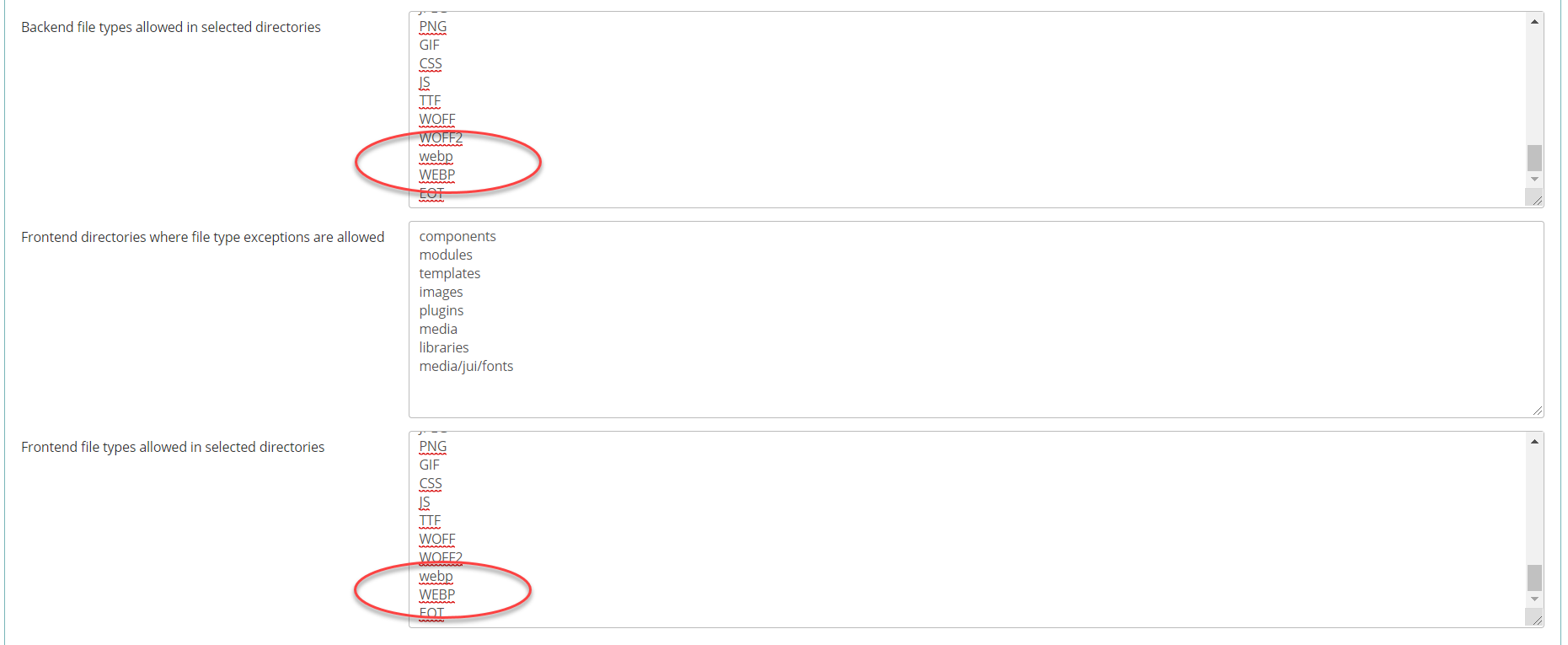
Just Add in Upper and Lower case, webp and WEBP to your allowed file formats area.
Kind regards,
Lumiga
Please Log in or Create an account to join the conversation.
Time to create page: 0.196 seconds