
- Posts: 1
- Thank you received: 0
Fatal error on Config and Products edition
- GiovannyS10
-
 Topic Author
- Offline
Less
More
7 years 3 months ago #308191
by GiovannyS10
Fatal error on Config and Products edition was created by GiovannyS10
Hello everyone!
I just installed Hikashop and it looks great except for the products and configuration pages. It seems that it just does not have an style (css) file and load just the html like in the picture attached. I already reinstalled it several times but without success. I tried remove it directly from module folder and reinstall, same error... I don't know what to do. There's a way to remove it completely, without leave anything behind and reinstall? Is there a way to solve it?
Thank you very much!
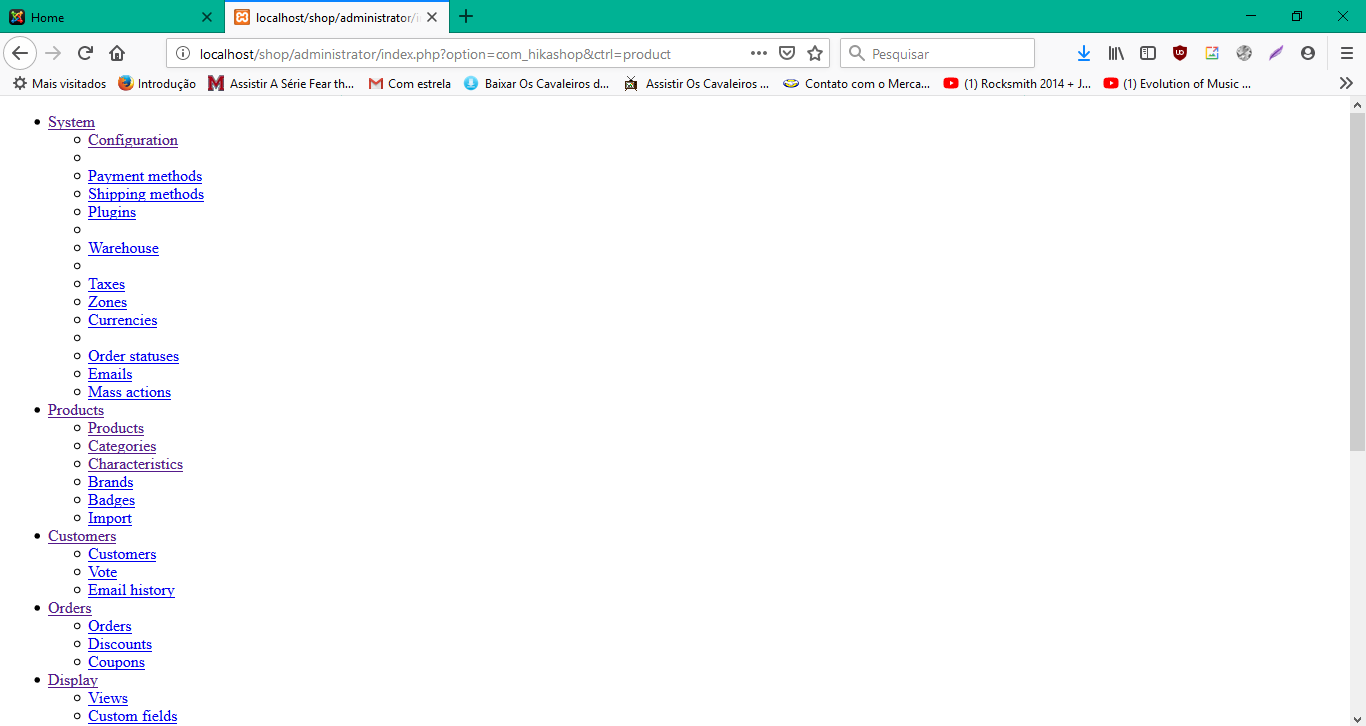
I just installed Hikashop and it looks great except for the products and configuration pages. It seems that it just does not have an style (css) file and load just the html like in the picture attached. I already reinstalled it several times but without success. I tried remove it directly from module folder and reinstall, same error... I don't know what to do. There's a way to remove it completely, without leave anything behind and reinstall? Is there a way to solve it?
Thank you very much!
Please Log in or Create an account to join the conversation.

7 years 3 months ago #308210
by nicolas
Replied by nicolas on topic Fatal error on Config and Products edition
Hi,
Delete the folders administrator/components/com_hikashop and components/com_hikashop via FTP and install again the install package via the Joomla installer and it will rerun the install process.
However, if you still have the problem, activate the "error reporting" and "debug mode" settings of the Joomla configuration and access that page again. At the bottom of the page you should see the error message which would help us understand the current situation you're in and provide a solution.
Delete the folders administrator/components/com_hikashop and components/com_hikashop via FTP and install again the install package via the Joomla installer and it will rerun the install process.
However, if you still have the problem, activate the "error reporting" and "debug mode" settings of the Joomla configuration and access that page again. At the bottom of the page you should see the error message which would help us understand the current situation you're in and provide a solution.
The following user(s) said Thank You: GiovannyS10
Please Log in or Create an account to join the conversation.
Time to create page: 0.130 seconds