

- Posts: 23
- Thank you received: 0
CSS for the add to cart alert RESOLVED
6 years 5 months ago - 6 years 5 months ago #317665
by nomadd
CSS for the add to cart alert RESOLVED was created by nomadd
-- HikaShop version -- : 4.2.3 [2004031657]
-- Joomla version -- : 3.9.16
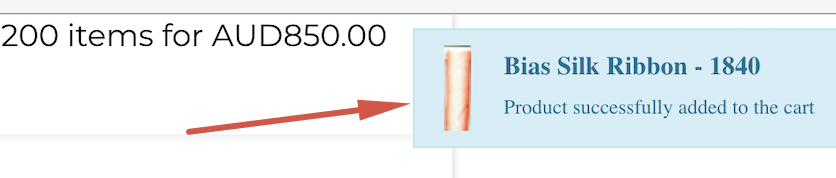
Where is the styling for the popup as per the image located?
Thanks
-- Joomla version -- : 3.9.16
Where is the styling for the popup as per the image located?
Thanks
Last edit: 6 years 5 months ago by nomadd.
Please Log in or Create an account to join the conversation.

6 years 5 months ago #317670
by nicolas
Replied by nicolas on topic CSS for the add to cart alert
Hi,
You'll find the CSS of that notification box in media/com_hikashop/css/notify-metro.css
Ideally, I would recommend to override the CSS in your template CSS, or in the "style for the frontend" setting of the Hikashop configuration so that you won't loose the changes when you update HikaShop.
Note also that in the Joomla plugins manager, you can edit the settings of the HikaShop cart notification plugin to increase the duration the notification box is displayed so that you can more easily analyse its CSS with your browser's inspector tool.
You'll find the CSS of that notification box in media/com_hikashop/css/notify-metro.css
Ideally, I would recommend to override the CSS in your template CSS, or in the "style for the frontend" setting of the Hikashop configuration so that you won't loose the changes when you update HikaShop.
Note also that in the Joomla plugins manager, you can edit the settings of the HikaShop cart notification plugin to increase the duration the notification box is displayed so that you can more easily analyse its CSS with your browser's inspector tool.
The following user(s) said Thank You: nomadd
Please Log in or Create an account to join the conversation.
6 years 5 months ago #317688
by nomadd
Replied by nomadd on topic CSS for the add to cart alert
Brilliant stuff.
Thank you so much
Thank you so much
Please Log in or Create an account to join the conversation.
Time to create page: 0.167 seconds