

- Posts: 5
- Thank you received: 1
Missing Icons and Options
6 years 5 months ago #318331
by georget3
Missing Icons and Options was created by georget3
-- HikaShop version -- : 4.3.0
-- Joomla version -- : 3.9.4
-- PHP version -- : 7.2.30
-- Browser(s) name and version -- : all, chrome and edge
Hi, I have two issues in the backend. The first is the icons are not showing, and just showing blue boxes. The second is that I have no options at all for the Prices and Taxes to edit or delete Restrictions. - image attached
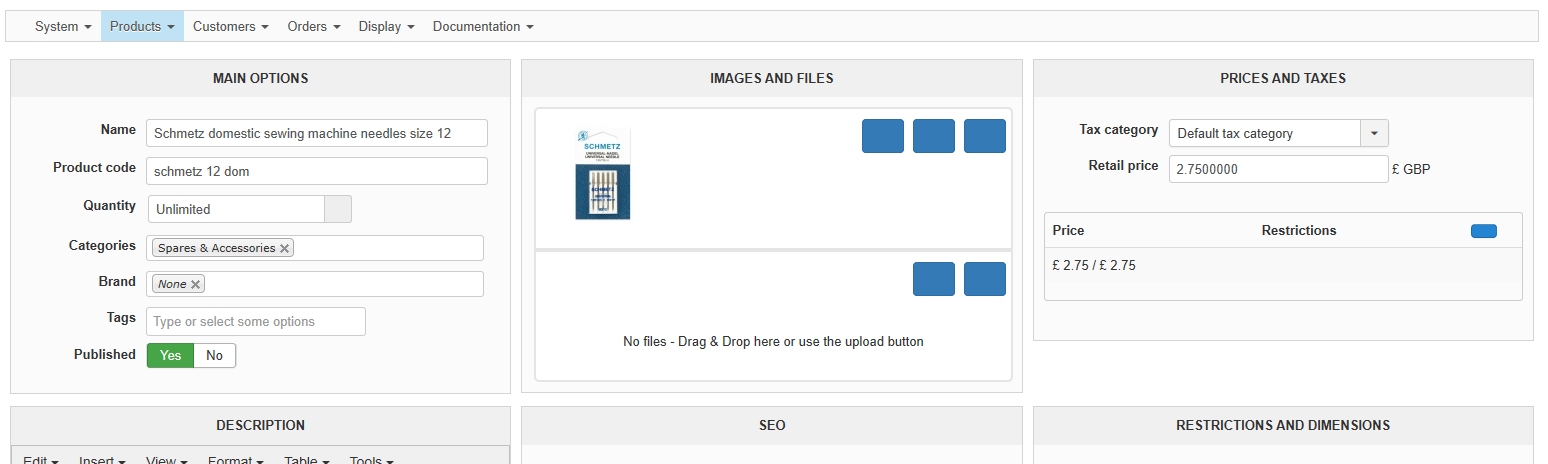
Grateful for any help.
regards George
-- Joomla version -- : 3.9.4
-- PHP version -- : 7.2.30
-- Browser(s) name and version -- : all, chrome and edge
Hi, I have two issues in the backend. The first is the icons are not showing, and just showing blue boxes. The second is that I have no options at all for the Prices and Taxes to edit or delete Restrictions. - image attached
Grateful for any help.
regards George
Please Log in or Create an account to join the conversation.

6 years 5 months ago #318333
by nicolas
Replied by nicolas on topic Missing Icons and Options
Hi,
It's one and the same issue.
This is caused by the font-awesome library not being loaded on the page. That's the library used by HikaShop to display the icons of the buttons and edition links that you don't see anymore.
Now why font-awesome is not loaded I don't know.
I would need a backend access to check the situation on the page to be able to tell you.
I suppose it's linked to another extension or even the template you're using which has its own font-awesome which breaks ours, or you have modified the HikaShop database to remove font-awesome for some reason ( www.hikashop.com/forum/2-general-talk-ab...s-and-js.html#300026 )
It's one and the same issue.
This is caused by the font-awesome library not being loaded on the page. That's the library used by HikaShop to display the icons of the buttons and edition links that you don't see anymore.
Now why font-awesome is not loaded I don't know.
I would need a backend access to check the situation on the page to be able to tell you.
I suppose it's linked to another extension or even the template you're using which has its own font-awesome which breaks ours, or you have modified the HikaShop database to remove font-awesome for some reason ( www.hikashop.com/forum/2-general-talk-ab...s-and-js.html#300026 )
Please Log in or Create an account to join the conversation.
6 years 5 months ago #318398
by georget3
Replied by georget3 on topic Missing Icons and Options
Many thanks for your reply.
I checked the setting in the database, unpublished ALL modules, disabled ALL plugins and deleted all but the default Joomla templates and the issue is still there. Will work my way through the components next.
I checked the setting in the database, unpublished ALL modules, disabled ALL plugins and deleted all but the default Joomla templates and the issue is still there. Will work my way through the components next.
Please Log in or Create an account to join the conversation.
Less
More
- Posts: 36
- Thank you received: 1
6 years 5 months ago #318659
by ImageVillage
Replied by ImageVillage on topic Missing Icons and Options
Did you find a solution to this I have the same problem?
Please Log in or Create an account to join the conversation.
6 years 5 months ago #318672
by georget3
Replied by georget3 on topic Missing Icons and Options
Alas No. I disabled everything including Components and the problem is still there.
Please Log in or Create an account to join the conversation.
Less
More
- Posts: 36
- Thank you received: 1
6 years 5 months ago - 6 years 5 months ago #318673
by ImageVillage
Replied by ImageVillage on topic Missing Icons and Options
What I find utterly absurd is that there seems to be many people with this problem yet not a single member of Hikashop support wishes to help resolve it. Ok, there may be, certainly in my case, FA conflicts due to outdated templates, etc but surely coding Hikashop so that it does not cause conflict would be a far better way forward or at least assist in helping to fix it. What annoys me is that I have more than one client using the Business and Subscription paid versions and I don't even get any level of actual support, it's kind of "oh you have a problem" "yeah we agree that's a problem" and that's that, not a single active support member who helps you resolve the problem and helps the community to rectify it or even try to understand it or even provide steps to resolve it.
I have reached out to another developer I know and even he has said this is ridiculous and despite who's fault it is Hikashop should at least attemt to resolve a clearly growing number of cases seeing this problem and there are many posts regarding it.
If I get a resolve I will certainly try and help you. Stay safe.
I have reached out to another developer I know and even he has said this is ridiculous and despite who's fault it is Hikashop should at least attemt to resolve a clearly growing number of cases seeing this problem and there are many posts regarding it.
If I get a resolve I will certainly try and help you. Stay safe.
Last edit: 6 years 5 months ago by ImageVillage.
Please Log in or Create an account to join the conversation.

6 years 5 months ago #318680
by Jerome
Jerome - Obsidev.com
HikaMarket & HikaSerial developer / HikaShop core dev team.
Replied by Jerome on topic Missing Icons and Options
Hello,
Nicolas wrote
In HikaShop, the font-awesome lib can be include from the local CSS file (from the HikaShop package) or using the font-awesome CDN.
Depending the selected solution, it can be related to "cors" rules, to CSS conflict, to browser add-on, etc.
For example, an add-on like "ghostery" or "privacy badger" can block the loading of font-awesome via the CDN.
"CORS" rules can also be restrictive and ask the browser to not load not authorized ressources.
That's why we choose to include the font-awesome lib in HikaShop package but even in local mode, several reason could explain such kind of issue.
But since we cannot reproduce it in our test websites, we need to analyse the situation on a website with the issue to be able to provide some answers.
Now, it's not that we don't want to solve the issue but we need backend credentials to move in the right direction.
We are still waiting for that to continue the investigation and fix the problem.
Regards,
Nicolas wrote
Unfortunately, we did not receive a backend access to be able to observe the issue.I would need a backend access to check the situation on the page to be able to tell you.
In HikaShop, the font-awesome lib can be include from the local CSS file (from the HikaShop package) or using the font-awesome CDN.
Depending the selected solution, it can be related to "cors" rules, to CSS conflict, to browser add-on, etc.
For example, an add-on like "ghostery" or "privacy badger" can block the loading of font-awesome via the CDN.
"CORS" rules can also be restrictive and ask the browser to not load not authorized ressources.
That's why we choose to include the font-awesome lib in HikaShop package but even in local mode, several reason could explain such kind of issue.
But since we cannot reproduce it in our test websites, we need to analyse the situation on a website with the issue to be able to provide some answers.
Now, it's not that we don't want to solve the issue but we need backend credentials to move in the right direction.
We are still waiting for that to continue the investigation and fix the problem.
Regards,
Jerome - Obsidev.com
HikaMarket & HikaSerial developer / HikaShop core dev team.
Please Log in or Create an account to join the conversation.
6 years 5 months ago #318750
by georget3
Replied by georget3 on topic Missing Icons and Options
Hi All,
I do appreciate everyones efforts to resolve this and the offer of help.
Sadly, for security reasons there is no way I can allow backend or FTP access
I was just hoping that this would be a common problem (and it seems there are others with the same problem) with an easy fix. I get that its a Fontawesome issue, but not sure how that is that case when i have disabled all possible conflicts, templates, plugins etc back to an almost vanilla installation.
Ive updated to the latest shop version, and applied the changes to the config table but no change.
Are there any other pointers or possible files I could check please?
Much appreciated.
I do appreciate everyones efforts to resolve this and the offer of help.
Sadly, for security reasons there is no way I can allow backend or FTP access
I was just hoping that this would be a common problem (and it seems there are others with the same problem) with an easy fix. I get that its a Fontawesome issue, but not sure how that is that case when i have disabled all possible conflicts, templates, plugins etc back to an almost vanilla installation.
Ive updated to the latest shop version, and applied the changes to the config table but no change.
Are there any other pointers or possible files I could check please?
Much appreciated.
Please Log in or Create an account to join the conversation.

6 years 5 months ago #318770
by Ch3vr0n
Replied by Ch3vr0n on topic Missing Icons and Options
Well you want help, but you're not willing to offer the access needed to GET the help you want. You're in a catch-22. If you're that paranoid. Make a backup of your site and restore it if you think something's "wrong". No this isn't a common one, it's a very uncommon / rare one.
Please Log in or Create an account to join the conversation.
6 years 5 months ago #318759
by nicolas
Replied by nicolas on topic Missing Icons and Options
Hi,
So far only you and ImageVillage have reported the problem. And we couldn't get any FTP access from any of you so we couldn't check the situation.
So we still don't know why you would get that problem and thus it's hard to say.
If I had a backend and a FTP access, the first thing I would do is to check the file administrator/components/com_hikashop/helpers/helper.php
That's the main file of HikaShop.
There, you should find this line, which asks the loading of the font-awesome library:
And this code, which actually loads the font-awesome library in the document object of Joomla:
I would first check that this code is there and corresponds to what I just posted above.
Then, I would add some echo code to make sure that the variables $fa_type and $fa have the correct value that the line $doc->addStyleSheet(HIKASHOP_CSS.'font-awesome.css?v=5.2.0'); is called.
If that's the case, then HikaShop loads font-awesome in the page, and something else removes it from the page. I would think that it would be a system plugin, probably installed together with the template (although I'm just speculating here).
If that's not the case, then that means that the entries with the namekey font-awesome and font-awesome-type don't have the correct value in the hikashop_config table. And thus I would update them in the hikashop_config table with the correct value (font-awesome's value needs to be 'local' or 'cdn', and font-awesome-type's value needs to be 'admin' or empty).
So far only you and ImageVillage have reported the problem. And we couldn't get any FTP access from any of you so we couldn't check the situation.
So we still don't know why you would get that problem and thus it's hard to say.
If I had a backend and a FTP access, the first thing I would do is to check the file administrator/components/com_hikashop/helpers/helper.php
That's the main file of HikaShop.
There, you should find this line, which asks the loading of the font-awesome library:
Code:
hikashop_loadJslib('font-awesome');
Code:
case 'font-awesome':
if($css) {
$admin = hikashop_isClient('administrator');
$fa_type = $config->get('font-awesome-type', '');
if(empty($fa_type) || ($admin && $fa_type == 'admin') || (!$admin && $fa_type == 'front')) {
$fa = $config->get('font-awesome', 'local');
if($fa == 'local')
$doc->addStyleSheet(HIKASHOP_CSS.'font-awesome.css?v=5.2.0');
if($fa == 'cdn')
$doc->addStyleSheet('https://use.fontawesome.com/releases/v5.2.0/css/all.css');
}
}
$ret = true;
Then, I would add some echo code to make sure that the variables $fa_type and $fa have the correct value that the line $doc->addStyleSheet(HIKASHOP_CSS.'font-awesome.css?v=5.2.0'); is called.
If that's the case, then HikaShop loads font-awesome in the page, and something else removes it from the page. I would think that it would be a system plugin, probably installed together with the template (although I'm just speculating here).
If that's not the case, then that means that the entries with the namekey font-awesome and font-awesome-type don't have the correct value in the hikashop_config table. And thus I would update them in the hikashop_config table with the correct value (font-awesome's value needs to be 'local' or 'cdn', and font-awesome-type's value needs to be 'admin' or empty).
Please Log in or Create an account to join the conversation.
6 years 4 months ago #318791
by georget3
Replied by georget3 on topic Missing Icons and Options
Nicolas, many thanks for taking the time to update this problem.
I followed your advice, and echoed the variables, which both turned out to be blank. This is confusing as I have checked the values in the database and they are there and correct, so I will need to find the reason why.
If I hardcode the following into the helper.php file then the backend icons work correctly.
$fa_type = "backend";
$doc->addStyleSheet(' use.fontawesome.com/releases/v5.2.0/css/all.css ');
Obviously not a permanent fix, as need to establish the reasons why, but thank you for getting us in the right direction.
Cheers.
I followed your advice, and echoed the variables, which both turned out to be blank. This is confusing as I have checked the values in the database and they are there and correct, so I will need to find the reason why.
If I hardcode the following into the helper.php file then the backend icons work correctly.
$fa_type = "backend";
$doc->addStyleSheet(' use.fontawesome.com/releases/v5.2.0/css/all.css ');
Obviously not a permanent fix, as need to establish the reasons why, but thank you for getting us in the right direction.
Cheers.
The following user(s) said Thank You: nicolas
Please Log in or Create an account to join the conversation.
Time to create page: 0.289 seconds