

- Posts: 90
- Thank you received: 2
Choosing payment methode gets you to the next page
6 years 4 months ago #319113
by gielhier
Choosing payment methode gets you to the next page was created by gielhier
-- url of the page with the problem -- :
jetsebremer.nl
-- HikaShop version -- : 4.3.0
-- Joomla version -- : 3.9.18
-- PHP version -- : 7.3
-- Browser(s) name and version -- : Chrome
Hi,
If I choose the payment methode I am directly transfered to the next page before I can choose my shipping option.
How can I resolve that?
-- HikaShop version -- : 4.3.0
-- Joomla version -- : 3.9.18
-- PHP version -- : 7.3
-- Browser(s) name and version -- : Chrome
Hi,
If I choose the payment methode I am directly transfered to the next page before I can choose my shipping option.
How can I resolve that?
Please Log in or Create an account to join the conversation.

6 years 4 months ago - 6 years 4 months ago #319116
by Philip
Replied by Philip on topic Choosing payment methode gets you to the next page
Hello,
In order to better understand what's going on can you provide these elements, please :
- Your Checkout Workflow configuration screenshot
- A step by step process in order to reproduce your issue (and every required elements for it, direct link, access references...)
Other thing you can try, to see if that solve your issue, process a test with a default template (like ProtoStar)
Awaiting news from you to progress on your subject.
Regards
In order to better understand what's going on can you provide these elements, please :
- Your Checkout Workflow configuration screenshot
- A step by step process in order to reproduce your issue (and every required elements for it, direct link, access references...)
Other thing you can try, to see if that solve your issue, process a test with a default template (like ProtoStar)
Awaiting news from you to progress on your subject.
Regards
Last edit: 6 years 4 months ago by Philip.
Please Log in or Create an account to join the conversation.
6 years 4 months ago #319161
by gielhier
Replied by gielhier on topic Choosing payment methode gets you to the next page
Hello Phillipe,
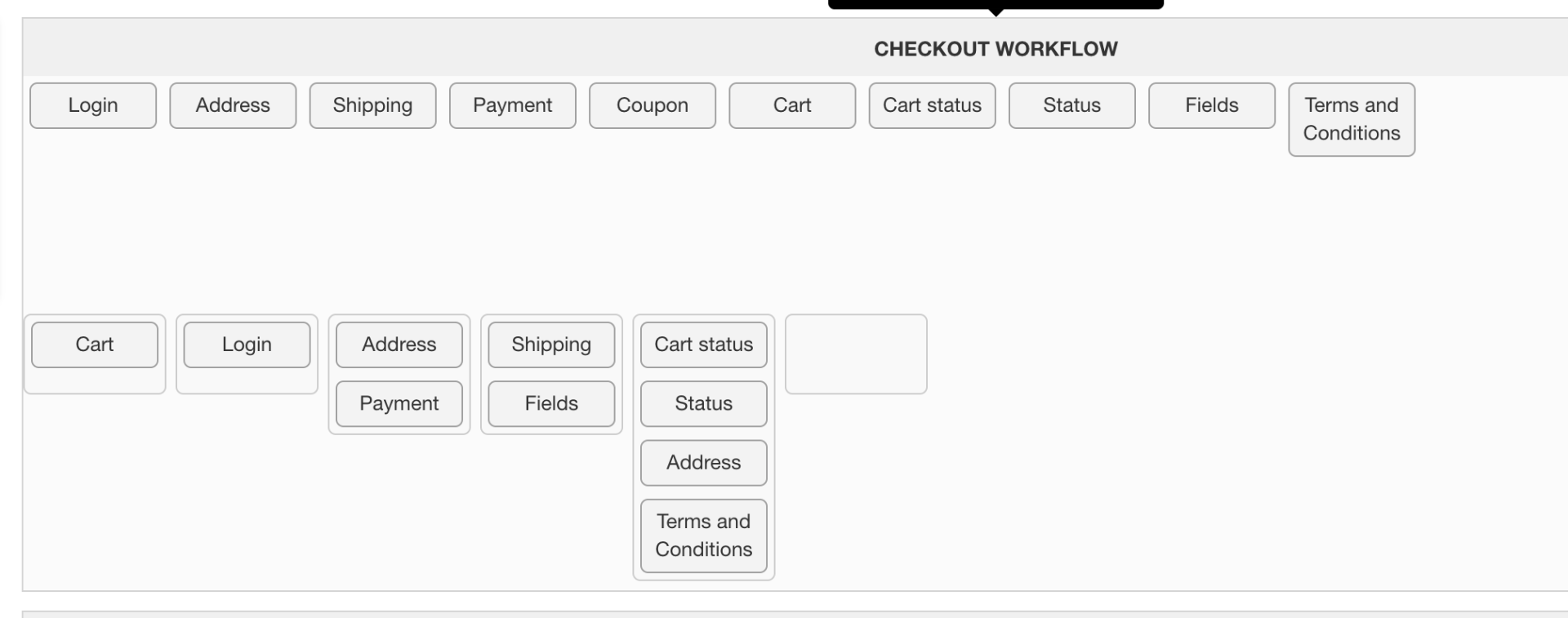
I have changed the workflow now and seperated the payment from the sending as in screenshot. Now it is working.
Questions
I made a custom field for comments by Verzenden and now it shows 2x text. 1 from the label and the other one comes from? I only want Aanvullende informatie. See screenshot.
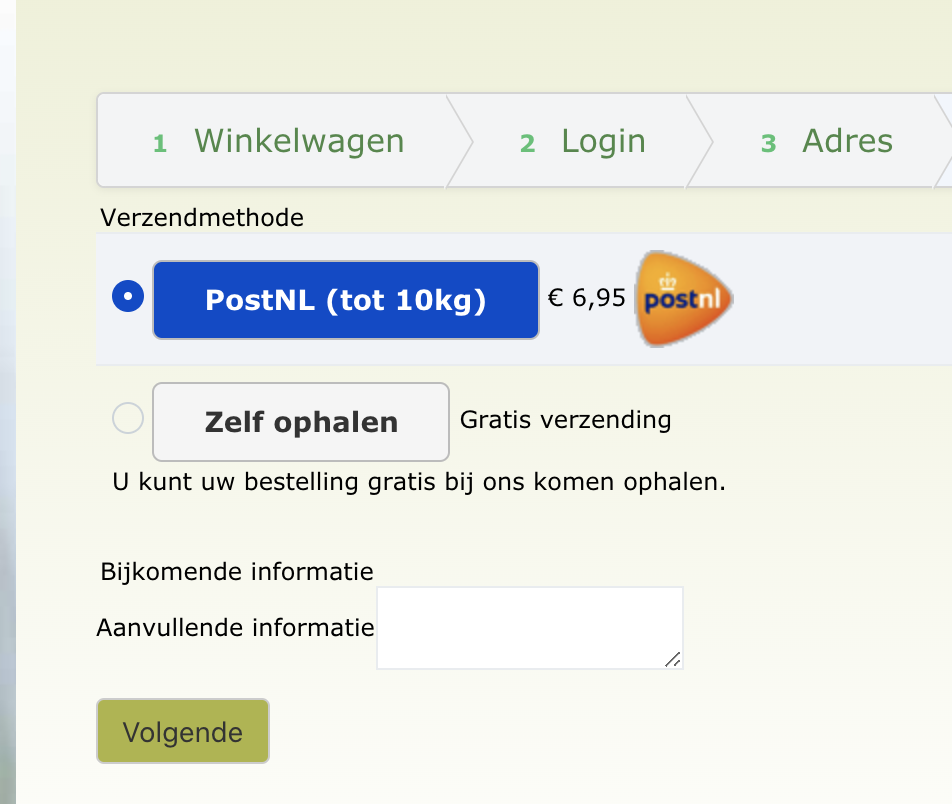
1 Bijkomende informatie
2 Aanvullende informatie
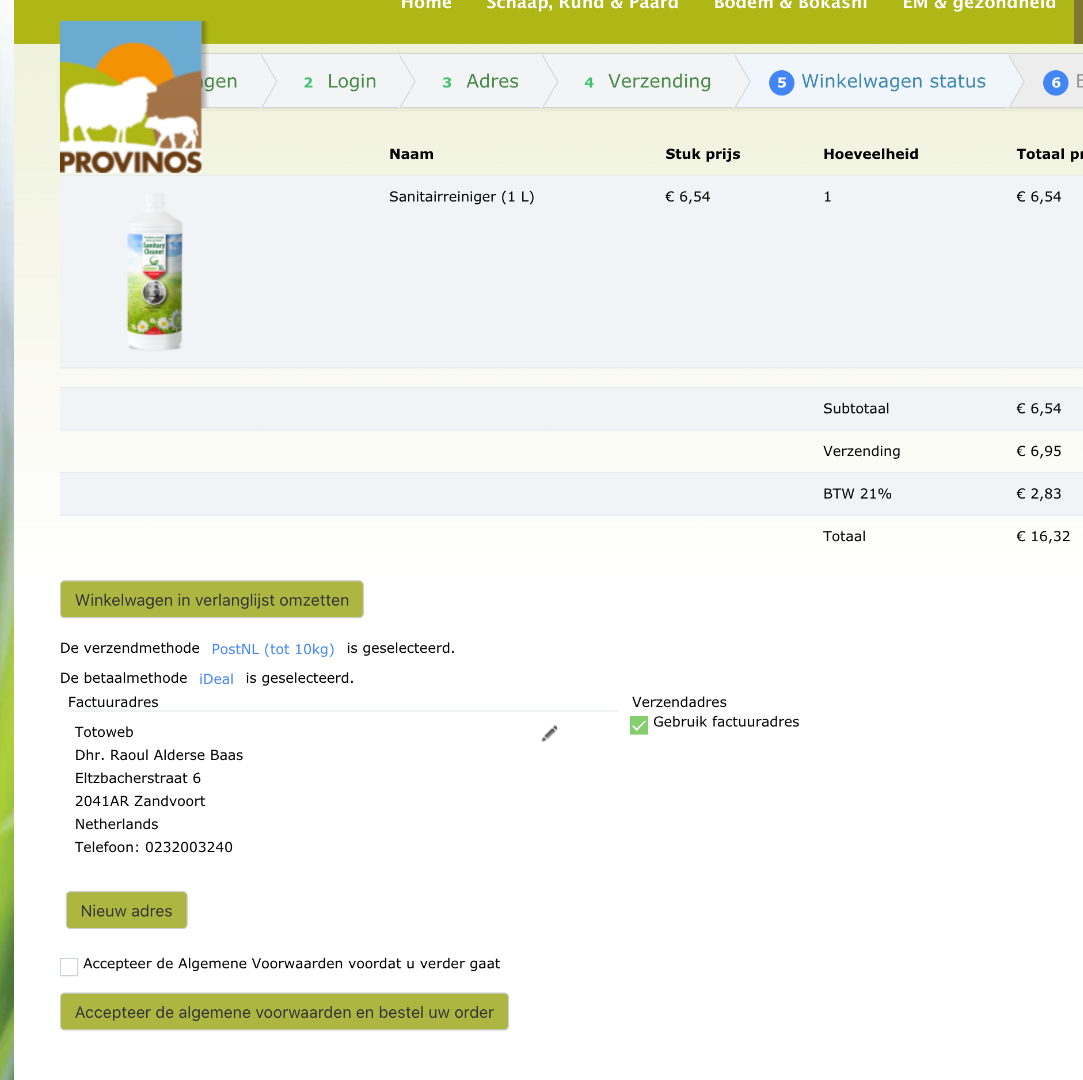
2 In step 5 there is still a possibility to add a new address. This is not on the demo site. How can I disable this?
Kind regards,
Raoul
I have changed the workflow now and seperated the payment from the sending as in screenshot. Now it is working.
Questions
I made a custom field for comments by Verzenden and now it shows 2x text. 1 from the label and the other one comes from? I only want Aanvullende informatie. See screenshot.
1 Bijkomende informatie
2 Aanvullende informatie
2 In step 5 there is still a possibility to add a new address. This is not on the demo site. How can I disable this?
Kind regards,
Raoul
Please Log in or Create an account to join the conversation.

Less
More
- Posts: 12953
- Thank you received: 1778
6 years 4 months ago #319164
by Mohamed Thelji
Replied by Mohamed Thelji on topic Choosing payment methode gets you to the next page
Hello Raoul,
"Bijkomende informatie" seems to be the title of the custom field section, you can hide it :
- using the "display:none" CSS code property
www.hikashop.com/support/documentation/1...the-display.html#css
Or
- by removing the value of the translation key "ADDITIONAL_INFORMATION"
2. What do you mean by add another address ? Can you give us more information about what you want to achieve ? Thank you.
Kind regards,
Mohamed.
"Bijkomende informatie" seems to be the title of the custom field section, you can hide it :
- using the "display:none" CSS code property
www.hikashop.com/support/documentation/1...the-display.html#css
Or
- by removing the value of the translation key "ADDITIONAL_INFORMATION"
2. What do you mean by add another address ? Can you give us more information about what you want to achieve ? Thank you.
Kind regards,
Mohamed.
Please Log in or Create an account to join the conversation.
6 years 4 months ago #319397
by gielhier
Replied by gielhier on topic Choosing payment methode gets you to the next page
Hi Mohammed,
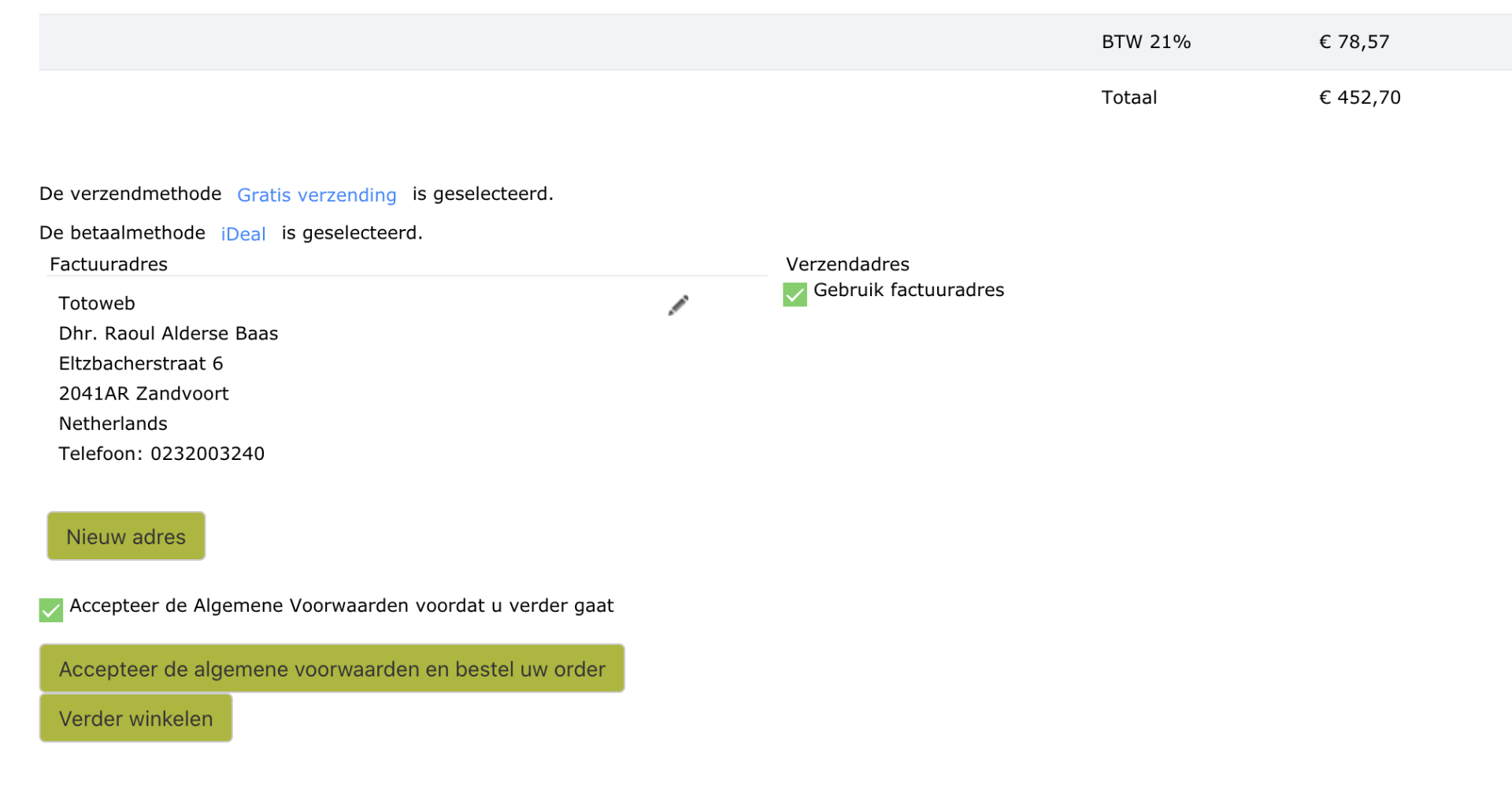
As you can see in the overview page in the checkout there is also a possibility there to add a new address. This is not so in you Demo website.
Also the chosen payment method and send method are not so clear. I want to change the layout of this view. Where can I find this? It is the step where you place the order.
Regards,
Raoul
As you can see in the overview page in the checkout there is also a possibility there to add a new address. This is not so in you Demo website.
Also the chosen payment method and send method are not so clear. I want to change the layout of this view. Where can I find this? It is the step where you place the order.
Regards,
Raoul
Please Log in or Create an account to join the conversation.

6 years 4 months ago #319403
by nicolas
Replied by nicolas on topic Choosing payment methode gets you to the next page
Hi,
Before you do anything else, I would recommend to turn off the "checkout legacy" setting of the HikaShop configuration in order to use the new checkout system. You're now using the old one from HikaShop 1.x and 2.x.
With the new checkout, you'll see that you don't have the system going to the next page when you change the payment method selection.
Also, if you check the "checkout workflow" setting, you'll now see a whole new interface, with many more settings.
And in the "address" view, you'll see the setting "Allow multiple addresses" that you can disable to remove the "new" button.
Then, if you want to customize the view files used on the checkout, you can edit them via the menu Display>Views. To know which view file corresponds to what, you can temporarily activate the "Display view files" setting of the HikaShop configuration.
Before you do anything else, I would recommend to turn off the "checkout legacy" setting of the HikaShop configuration in order to use the new checkout system. You're now using the old one from HikaShop 1.x and 2.x.
With the new checkout, you'll see that you don't have the system going to the next page when you change the payment method selection.
Also, if you check the "checkout workflow" setting, you'll now see a whole new interface, with many more settings.
And in the "address" view, you'll see the setting "Allow multiple addresses" that you can disable to remove the "new" button.
Then, if you want to customize the view files used on the checkout, you can edit them via the menu Display>Views. To know which view file corresponds to what, you can temporarily activate the "Display view files" setting of the HikaShop configuration.
Please Log in or Create an account to join the conversation.
Time to create page: 0.217 seconds