
- Posts: 220
- Thank you received: 0
Can't change quantities
- clairewang
-
 Topic Author
- Offline
Less
More
6 years 4 months ago #319832
by clairewang
Can't change quantities was created by clairewang
Hi,
The order can't be changed quantities, customers complain so they stop buying. Do you know how to fix it? Thank you a lot. See attachment.
The order can't be changed quantities, customers complain so they stop buying. Do you know how to fix it? Thank you a lot. See attachment.
Please Log in or Create an account to join the conversation.

6 years 4 months ago #319834
by nicolas
Replied by nicolas on topic Can't change quantities
Hi,
Wouldn't that be because you've activated the "ready only" setting of the "cart" view in the "checkout workflow" option, under the "Checkout" tab of the HikaShop configuration ?
Wouldn't that be because you've activated the "ready only" setting of the "cart" view in the "checkout workflow" option, under the "Checkout" tab of the HikaShop configuration ?
Please Log in or Create an account to join the conversation.
- clairewang
-
Topic Author
- Offline
Less
More
- Posts: 220
- Thank you received: 0
6 years 4 months ago #319886
by clairewang
Replied by clairewang on topic Can't change quantities
Sorry I don't understand. See attachement. Also I can't get email alert after your reply.
Please Log in or Create an account to join the conversation.

6 years 4 months ago - 6 years 4 months ago #319891
by Philip
Replied by Philip on topic Can't change quantities
Hello,
Note that we don't see your attachement, but on my side I will try to illustrate what Nicolas said, follow me step by step :
1. Go to Main HikaShop Configuration, from Components => HikaShop => Configuration
2. Click on Checkout tab, then have a look on Checkout Workflow part

Hope this will help you to solve your issue.
Regards
Note that we don't see your attachement, but on my side I will try to illustrate what Nicolas said, follow me step by step :
1. Go to Main HikaShop Configuration, from Components => HikaShop => Configuration
2. Click on Checkout tab, then have a look on Checkout Workflow part
Hope this will help you to solve your issue.
Regards
Last edit: 6 years 4 months ago by Philip.
Please Log in or Create an account to join the conversation.
- clairewang
-
Topic Author
- Offline
Less
More
- Posts: 220
- Thank you received: 0
6 years 4 months ago #319945
by clairewang
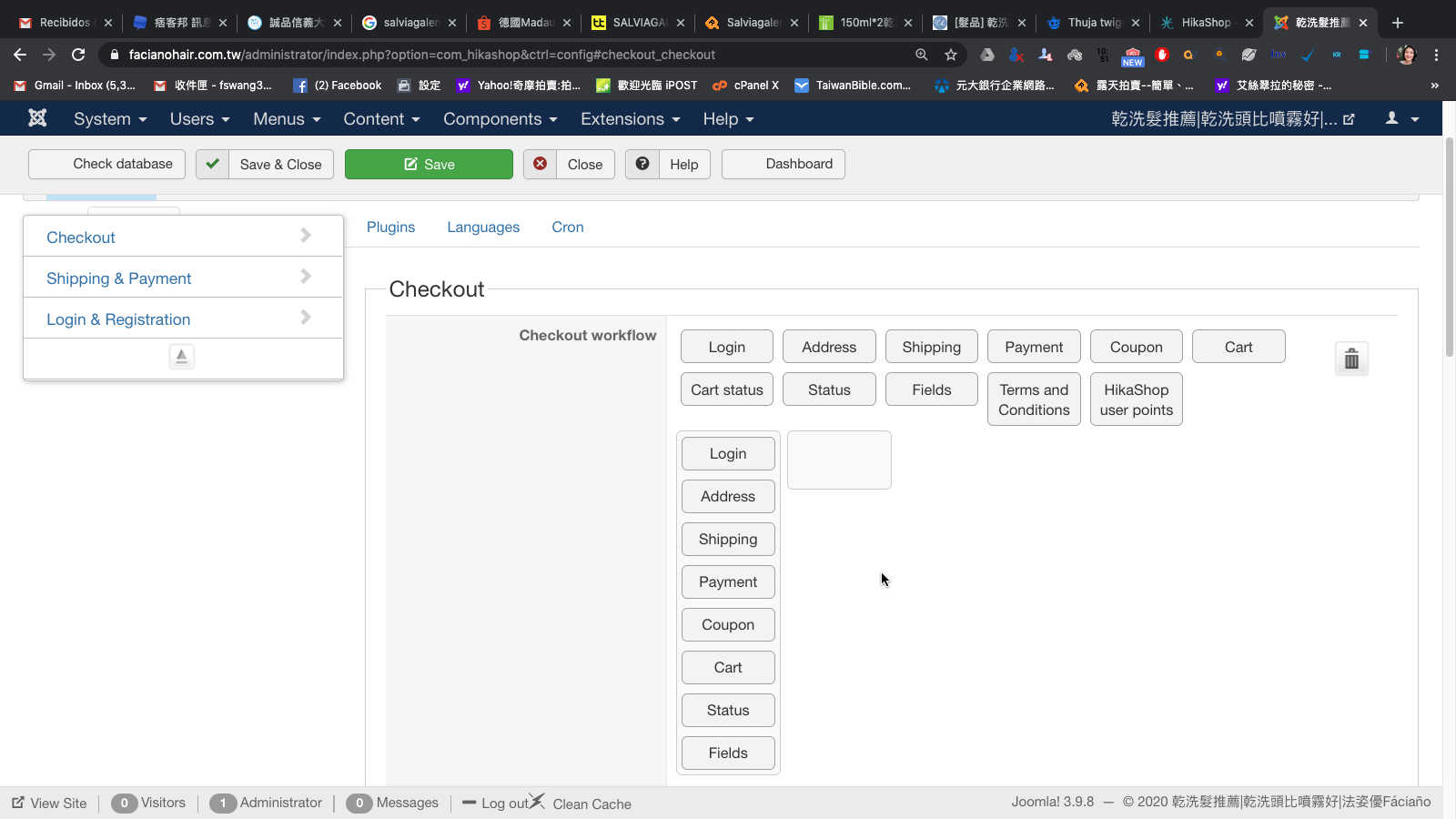
I don't have this, what can I do now? Also I don't receive emails when you guys reply me, how to fix it? Appreciate that.
Replied by clairewang on topic Can't change quantities
I don't have this, what can I do now? Also I don't receive emails when you guys reply me, how to fix it? Appreciate that.
Please Log in or Create an account to join the conversation.
6 years 4 months ago #319949
by nicolas
Replied by nicolas on topic Can't change quantities
Hi,
Ah I see, you're actually using the old checkout system from HikaShop 1.x and 2.x.
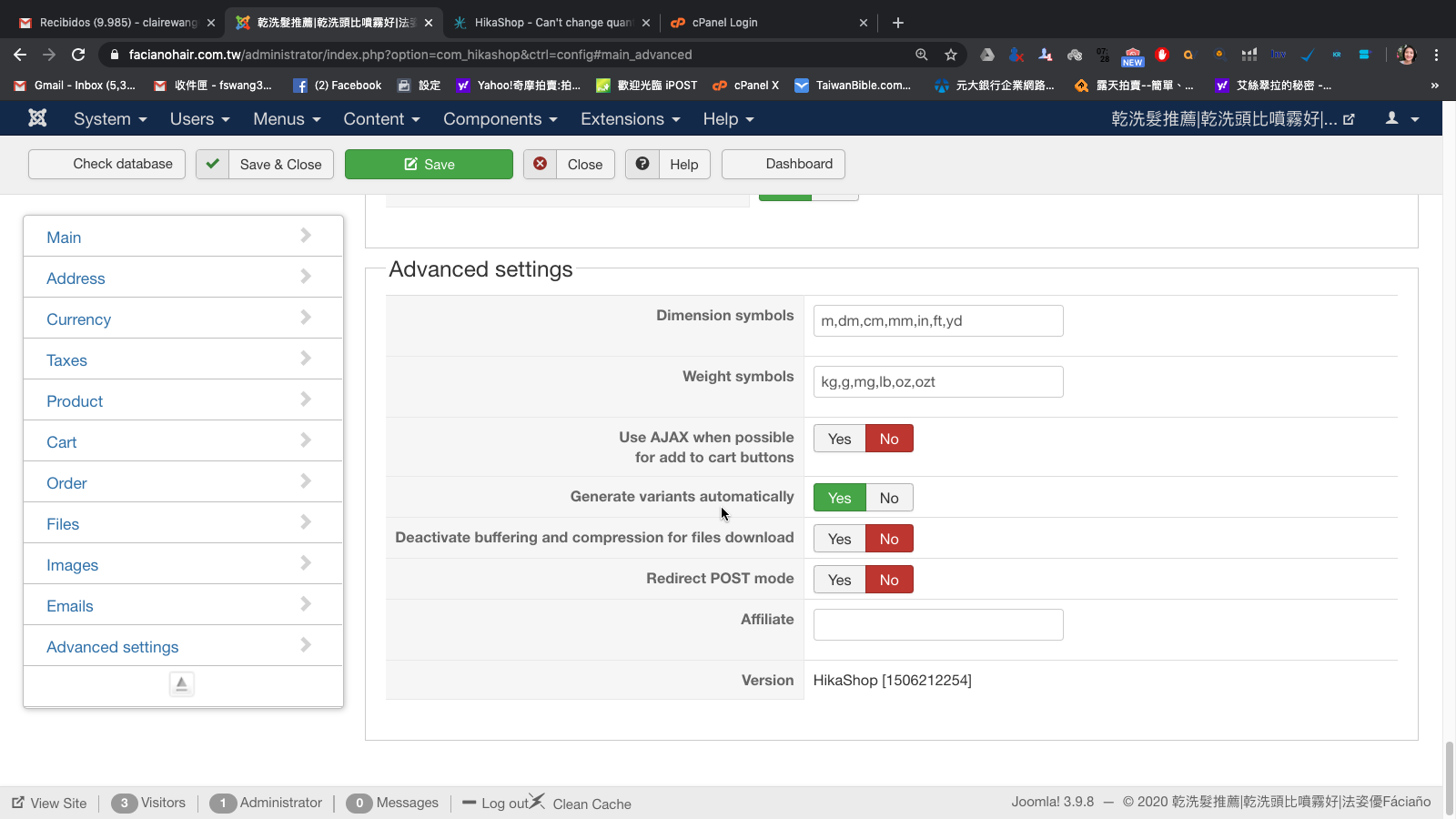
Go under the "Advanced" tab of the HikaShop configuration and turn off the "checkout legacy" setting.
That will switch you to the new checkout system and you'll see the same interface. And just changing that option might actually fix the problem.
Ah I see, you're actually using the old checkout system from HikaShop 1.x and 2.x.
Go under the "Advanced" tab of the HikaShop configuration and turn off the "checkout legacy" setting.
That will switch you to the new checkout system and you'll see the same interface. And just changing that option might actually fix the problem.
Please Log in or Create an account to join the conversation.
- clairewang
-
Topic Author
- Offline
Less
More
- Posts: 220
- Thank you received: 0
6 years 4 months ago #320027
by clairewang
Replied by clairewang on topic Can't change quantities
There is no checkout legacy option.....
Please Log in or Create an account to join the conversation.
6 years 4 months ago #320044
by nicolas
Replied by nicolas on topic Can't change quantities
Hi,
Ah, you're using a really old version of HikaShop. That's why you don't have it.
Which version of HikaShop are you using ?
And which version of Joomla and PHP are you on ?
And could you provide a link to the shop ?
Ah, you're using a really old version of HikaShop. That's why you don't have it.
Which version of HikaShop are you using ?
And which version of Joomla and PHP are you on ?
And could you provide a link to the shop ?
Please Log in or Create an account to join the conversation.
- clairewang
-
Topic Author
- Offline
Less
More
- Posts: 220
- Thank you received: 0
6 years 4 months ago #320068
by clairewang
Replied by clairewang on topic Can't change quantities
Hikashop version is 2.5, Joomla is 3.9.8, PHP is 7.0.33
The link is facianohair.com.tw/%E7%B7%9A%E4%B8%8A%E8%A8%82%E8%B3%BC.html
The link is facianohair.com.tw/%E7%B7%9A%E4%B8%8A%E8%A8%82%E8%B3%BC.html
Please Log in or Create an account to join the conversation.
6 years 4 months ago #320073
by nicolas
Replied by nicolas on topic Can't change quantities
Hi,
I don't see what it could be.
I would recommend updating your HikaShop and turning off that "checkout legacy" setting after you do.
It should definitely fix the problem.
I don't see what it could be.
I would recommend updating your HikaShop and turning off that "checkout legacy" setting after you do.
It should definitely fix the problem.
Please Log in or Create an account to join the conversation.
Time to create page: 0.226 seconds