
Time not visible in date-time picker on product Available from and to

5 years 11 months ago #325390
by Rixters
-- HikaShop version -- : 4.4.0
-- Joomla version -- : 3.9.22
Hi,
The time is not visible in the "Available From" - "To" Date/Time picker on the product view in the backend, The styling seems to be wrong.
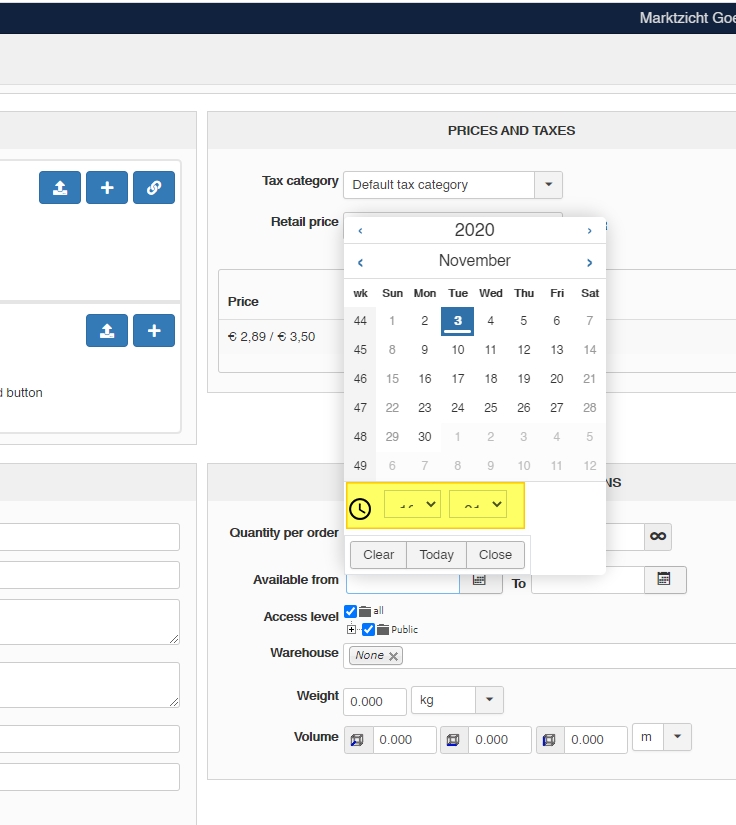
I fixed if for now by adding a custom.css file in the /css folder of the Isis template with the code:
Would be nice if this was fixed.
Thanks!
-- Joomla version -- : 3.9.22
Hi,
The time is not visible in the "Available From" - "To" Date/Time picker on the product view in the backend, The styling seems to be wrong.
I fixed if for now by adding a custom.css file in the /css folder of the Isis template with the code:
Code:
select.time.time-hours,
select.time.time-minutes {
padding: 0;
}
Would be nice if this was fixed.
Thanks!
Please Log in or Create an account to join the conversation.

5 years 11 months ago #325397
by Philip
Replied by Philip on topic Time not visible in date-time picker on product Available from and to
Hello,
Thanks for your returns, consider it already done !
We will push some modifications in our backend css file.
Regards.
Thanks for your returns, consider it already done !
We will push some modifications in our backend css file.
Regards.
Please Log in or Create an account to join the conversation.
5 years 11 months ago #325474
by Rixters
Replied by Rixters on topic Time not visible in date-time picker on product Available from and to
Same problem with the custom fields values for option lists
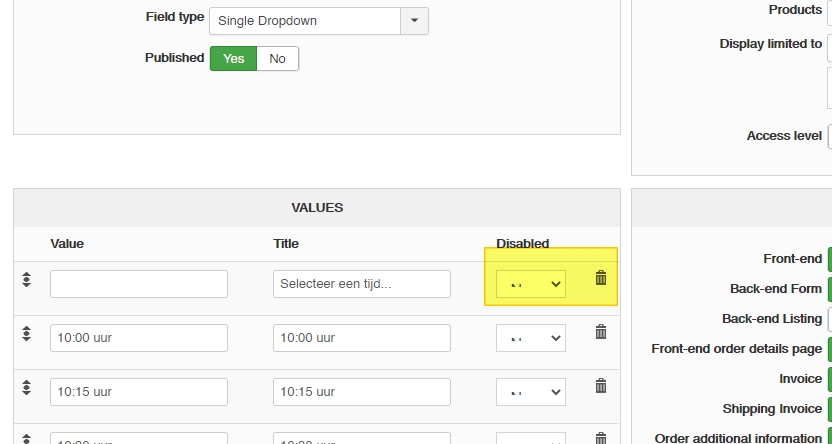
The following user(s) said Thank You: Philip
Please Log in or Create an account to join the conversation.
5 years 11 months ago - 5 years 11 months ago #325480
by Philip
Replied by Philip on topic Time not visible in date-time picker on product Available from and to
Hello,
Thanks for this return too, but this time we have already correct this, I will guide you correct this as well in order to be able to wait while waiting for the next version.
Go to edit your bakend file css (from Main HikaShop Configuration => Display tab, then Css part).
Around line 3266, you have this :
Remove in the selector this : ".hikashop_main_content input, .hikashop_main_content select" to have finally this :
Hope this will solve your issue.
Regards
Thanks for this return too, but this time we have already correct this, I will guide you correct this as well in order to be able to wait while waiting for the next version.
Go to edit your bakend file css (from Main HikaShop Configuration => Display tab, then Css part).
Around line 3266, you have this :
Code:
.hika_j4 input, .hika_j4 .nameboxes, .hikashop_main_content input, .hikashop_main_content select {
padding: 0.6rem 0.6rem;
font-size: 1rem;
line-height: 1.5;
color: #495057;
border: 1px solid #ced4da;
border-radius: 0;
transition: border-color 0.15s ease-in-out, box-shadow 0.15s ease-in-out;
}
Remove in the selector this : ".hikashop_main_content input, .hikashop_main_content select" to have finally this :
Code:
.hika_j4 input, .hika_j4 .nameboxes {
padding: 0.6rem 0.6rem;
font-size: 1rem;
line-height: 1.5;
color: #495057;
border: 1px solid #ced4da;
border-radius: 0;
transition: border-color 0.15s ease-in-out, box-shadow 0.15s ease-in-out;
}
Regards
Last edit: 5 years 11 months ago by Philip.
Please Log in or Create an account to join the conversation.
Time to create page: 0.176 seconds