
- Posts: 121
- Thank you received: 2
Currency confusion
- andrewwinkler
-
 Topic Author
- Offline
Less
More
5 years 8 months ago - 5 years 8 months ago #328748
by andrewwinkler
Currency confusion was created by andrewwinkler
-- HikaShop version -- : 4.4.0
-- Joomla version -- : 3.9.23
-- PHP version -- : 7.3.25
-- Browser(s) name and version -- : Firefox
The site needs to work in two currencies. Three product categories (Hosting, Development, Extensions) are sold in USD, one product group (technology) in AUD. Currentely, on the hosting product pages, the products are displayed in both currency, USD and AUD, which wouldn't be a problem if the amounts displayed were correct, but they are not.
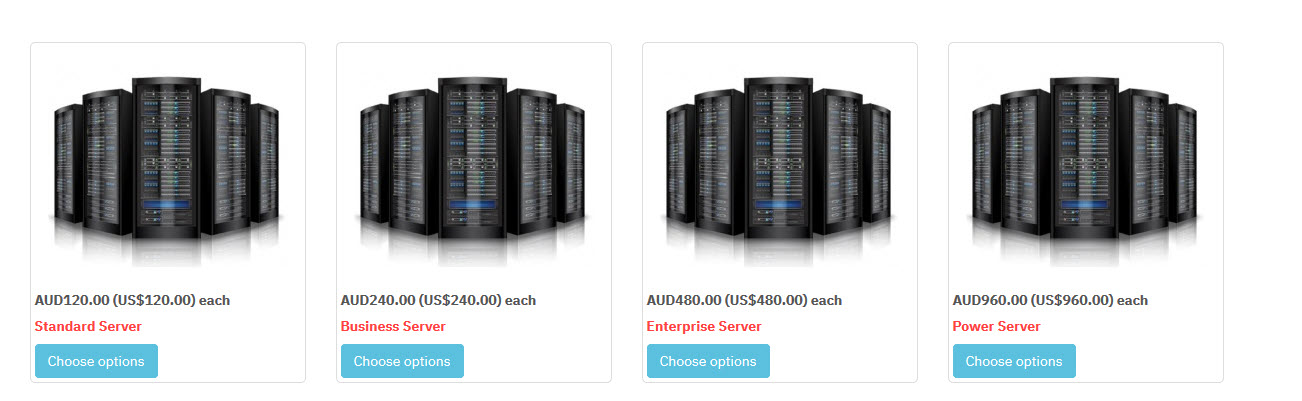
It looks like the exchange rate used by the system is 1 USD = 1 AUD, which is not right.
-- Joomla version -- : 3.9.23
-- PHP version -- : 7.3.25
-- Browser(s) name and version -- : Firefox
The site needs to work in two currencies. Three product categories (Hosting, Development, Extensions) are sold in USD, one product group (technology) in AUD. Currentely, on the hosting product pages, the products are displayed in both currency, USD and AUD, which wouldn't be a problem if the amounts displayed were correct, but they are not.
It looks like the exchange rate used by the system is 1 USD = 1 AUD, which is not right.
Last edit: 5 years 8 months ago by andrewwinkler.
Please Log in or Create an account to join the conversation.

5 years 8 months ago #328751
by nicolas
Replied by nicolas on topic Currency confusion
Hi,
By default when you install HikaShop, all the currency rates are set to 1.
You can go in the menu System>Currencies and edit your currencies to set the rate manually and HikaShop will then use that rate to convert the prices.
On the currencies listing you also have an "update rates" button if the HikaShop rates auto update plugin is activated.
You can configure this plugin via the Joomla plugins manager to setup how the currency rates are updated when you click on that button, and you can also have that plugin update the rates periodically via the cron task.
You can read more about all this here:
www.hikashop.com/support/documentation/2...ies-in-hikashop.html
By default when you install HikaShop, all the currency rates are set to 1.
You can go in the menu System>Currencies and edit your currencies to set the rate manually and HikaShop will then use that rate to convert the prices.
On the currencies listing you also have an "update rates" button if the HikaShop rates auto update plugin is activated.
You can configure this plugin via the Joomla plugins manager to setup how the currency rates are updated when you click on that button, and you can also have that plugin update the rates periodically via the cron task.
You can read more about all this here:
www.hikashop.com/support/documentation/2...ies-in-hikashop.html
The following user(s) said Thank You: andrewwinkler
Please Log in or Create an account to join the conversation.
Time to create page: 0.168 seconds