

- Posts: 44
- Thank you received: 3
Cart image not aligned
5 years 3 months ago #333385
by dean
Cart image not aligned was created by dean
-- url of the page with the problem -- :
www.xyznetworks.com.au/index.php/hikasho...for-products-listing
-- HikaShop version -- : 4.4.3
-- Joomla version -- : 3.9.27
-- Browser(s) name and version -- : All
Image attached. Not sure wh
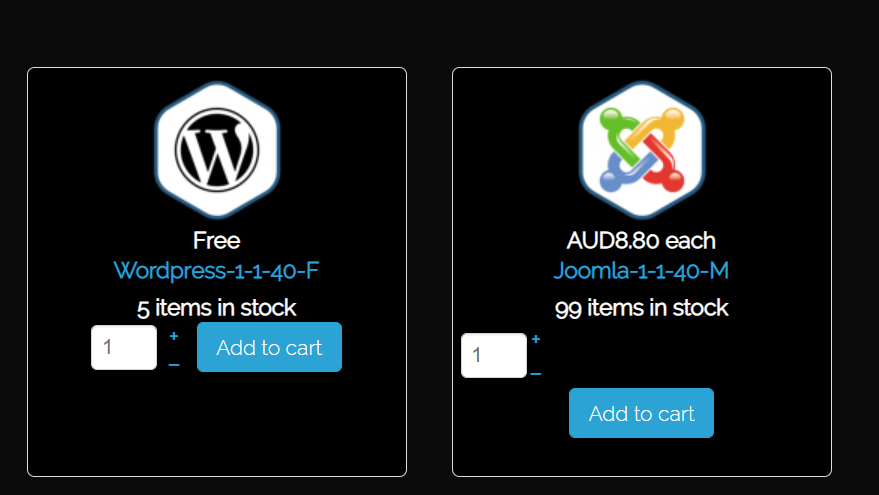 y one "Add to cart" button is sitting lower than the others
-- HikaShop version -- : 4.4.3
-- Joomla version -- : 3.9.27
-- Browser(s) name and version -- : All
Image attached. Not sure wh
Please Log in or Create an account to join the conversation.

5 years 3 months ago - 5 years 3 months ago #333404
by Philip
Replied by Philip on topic Cart image not aligned
hello,
That's a side effect of the fact that you define the quantity input for "default", instead of "inherit", that leads to display a different quantity input specific for this specific product.

All have a div to build the quantity input, and for "Joomla-1-1-40-m" it's a table, and so that's leads to some side effect, with different css command.
I allow myself to correct this settings, and you can see that this leads to a more homogeneous result.
Hope this will help you to better understand the situation.
Regards
That's a side effect of the fact that you define the quantity input for "default", instead of "inherit", that leads to display a different quantity input specific for this specific product.
All have a div to build the quantity input, and for "Joomla-1-1-40-m" it's a table, and so that's leads to some side effect, with different css command.
I allow myself to correct this settings, and you can see that this leads to a more homogeneous result.
Hope this will help you to better understand the situation.
Regards
Last edit: 5 years 3 months ago by Philip.
Please Log in or Create an account to join the conversation.
Time to create page: 0.156 seconds