

- Posts: 3
- Thank you received: 0
Why"Related products" are visible in SUB-category
15 years 9 months ago - 15 years 9 months ago #2939
by smjork
Why"Related products" are visible in SUB-category was created by smjork
Hello. 1st, we are talking about the Free version of HikaShop, which I try to test out as much as possible.
Now, the case:
I have a "shop" with several nested subcategories.
Like: Root
........Main Shop
............Category#1
................Sub-category#1-1
...................Product#1-1 <-- which is related to "Product#1-2" and "Product#3-1"
...................Product#1-2
...................Product#1-3
................Sub-category#2-1
...................Product#2-1
................Sub-category#3-1
............Category#2
................Sub-category#2-1
................Sub-category#2-2
............Category#3
................Product#3-1
................Product#3-2
................etc...
I have a "menu listing category" so each time I click on a category, the subcategories appear in the "central area" of the page, and so on, until I reach the "Products list" for that particular sub-category.
Now... instead of seeing the "related products" ONLY when I get to that particular product's page, I get the very same list of products TWICE (no matter if they are related or not), each time I watch a sub-category page
For example, when I click on "Sub-category#1-1", the "central area" of the page shows
a. The products that belong to "Sub-category#1-1" (which is perfectly correct)
AND UNDERNEATH (because my "banner" pos happened to be there)
b. the VERY SAME PRODUCTS, shown once again as part of the "related products" module
Now, don't get me wrong, if I click on and reach/view a particular product's page, the related products show Ok (the module filters what needs to filtered and shows what needs to be shown, as related to the currently shown product).
How I (not) made it:
I simply created a new mod_hikashop module, with the following:
Content on product page = "Related products"
Published = YES
Synchronized with currently...= YES
Columns = 3
Question is: how do I fix that or what am I doing wrong ? Because this "related products view" SHOULD only be visible WHEN I REACH that particular product's page, NOT the sub-category listing ... (not to mention it has no point, there is absolutely no relation)
Now, the case:
I have a "shop" with several nested subcategories.
Like: Root
........Main Shop
............Category#1
................Sub-category#1-1
...................Product#1-1 <-- which is related to "Product#1-2" and "Product#3-1"
...................Product#1-2
...................Product#1-3
................Sub-category#2-1
...................Product#2-1
................Sub-category#3-1
............Category#2
................Sub-category#2-1
................Sub-category#2-2
............Category#3
................Product#3-1
................Product#3-2
................etc...
I have a "menu listing category" so each time I click on a category, the subcategories appear in the "central area" of the page, and so on, until I reach the "Products list" for that particular sub-category.
Now... instead of seeing the "related products" ONLY when I get to that particular product's page, I get the very same list of products TWICE (no matter if they are related or not), each time I watch a sub-category page
For example, when I click on "Sub-category#1-1", the "central area" of the page shows
a. The products that belong to "Sub-category#1-1" (which is perfectly correct)
AND UNDERNEATH (because my "banner" pos happened to be there)
b. the VERY SAME PRODUCTS, shown once again as part of the "related products" module
Now, don't get me wrong, if I click on and reach/view a particular product's page, the related products show Ok (the module filters what needs to filtered and shows what needs to be shown, as related to the currently shown product).
How I (not) made it:
I simply created a new mod_hikashop module, with the following:
Content on product page = "Related products"
Published = YES
Synchronized with currently...= YES
Columns = 3
Question is: how do I fix that or what am I doing wrong ? Because this "related products view" SHOULD only be visible WHEN I REACH that particular product's page, NOT the sub-category listing ... (not to mention it has no point, there is absolutely no relation)
Last edit: 15 years 9 months ago by smjork. Reason: corrections...
Please Log in or Create an account to join the conversation.

15 years 9 months ago #2944
by nicolas
Replied by nicolas on topic Re: Why"Related products" are visible in SUB-category
You should unpublish that related products module so that joomla won't display it.
Then, in the configuration, under the tab Display, you have the option "Modules under the product page" for which you can select modules which will be shown only on product pages. There, you can select your module and, regardless of its published state, it will be displayed under the product page.
Then, in the configuration, under the tab Display, you have the option "Modules under the product page" for which you can select modules which will be shown only on product pages. There, you can select your module and, regardless of its published state, it will be displayed under the product page.
Please Log in or Create an account to join the conversation.
15 years 9 months ago #2962
by smjork
Replied by smjork on topic Re: Why"Related products" are visible in SUB-category
Ok, I think I made it, although this is NOT very intuitive.
I mean the option is indeed there, in the "System -> Configuration -> Display -> Modules under the current page -> Select" but dear, oh dear, it took a looong time to figure out that the settings actually work like in a special way. Normally, if you just take a look at it one may easily think it provides nothing special and that all those settings in the modal popup can be modified using the normal module approach.
This has to be highlighted somehow in the next versions of HikaShop because it's a tricky one, to eliminate the confusion.
And some other noob question:
So, I have that "Related products" module shown BUT the module title does not appear, although it's Enabled. Any other special place I should look upon ?
I mean the option is indeed there, in the "System -> Configuration -> Display -> Modules under the current page -> Select" but dear, oh dear, it took a looong time to figure out that the settings actually work like in a special way. Normally, if you just take a look at it one may easily think it provides nothing special and that all those settings in the modal popup can be modified using the normal module approach.
This has to be highlighted somehow in the next versions of HikaShop because it's a tricky one, to eliminate the confusion.
And some other noob question:
So, I have that "Related products" module shown BUT the module title does not appear, although it's Enabled. Any other special place I should look upon ?
Please Log in or Create an account to join the conversation.
15 years 9 months ago #3023
by nicolas
Replied by nicolas on topic Re: Why"Related products" are visible in SUB-category
There is indeed a problem with related modules title display. We fixed the problem on our end.
You can change the code
to
in the file components/com_hikashop/views/product/tmpl/listing.php near line 25 to fix the problem, or wait for the next release.
You can change the code
Code:
if(!$this->module && !empty($use_module)){
$name = $this->params->get('title');
}else{
$name = $this->params->get('page_title');
}
Code:
$name = $this->params->get('page_title');
if((!$this->module && !empty($use_module)) || empty($name)){
$name = $this->params->get('title');
}
Please Log in or Create an account to join the conversation.
14 years 8 months ago #35381
by owen100
Replied by owen100 on topic Re: Why"Related products" are visible in SUB-category
I have the same problem I'm using version 1.5.5 and don't see that code in my file to change???
Please Log in or Create an account to join the conversation.
14 years 8 months ago #35414
by nicolas
Replied by nicolas on topic Re: Why"Related products" are visible in SUB-category
That problem was 1 year ago and has been fixed in HikaShop.
So you're probably don't have the same problem.
Please explain your problem with links and/or screenshots so that we can see what you did and tell you how to configure your module properly.
So you're probably don't have the same problem.
Please explain your problem with links and/or screenshots so that we can see what you did and tell you how to configure your module properly.
Please Log in or Create an account to join the conversation.
14 years 8 months ago #35426
by owen100
Replied by owen100 on topic Re: Why"Related products" are visible in SUB-category
When I select a category, all the items appear as related products (produntos similares) and then again below the same.
latiendademascotas.com/index.php/shop-on...2-accesorios-aquario
If you go to the link above then select the first item, "Kit Aquario de 60 litros" on the detail view it all appears perfectly. The problem only appears in category view.
latiendademascotas.com/index.php/shop-on...2-accesorios-aquario
If you go to the link above then select the first item, "Kit Aquario de 60 litros" on the detail view it all appears perfectly. The problem only appears in category view.
Please Log in or Create an account to join the conversation.
14 years 8 months ago #35455
by nicolas
Replied by nicolas on topic Re: Why"Related products" are visible in SUB-category
I couldn't see the problem as your link only allow access with an account and I couldn't find where to create one.
Coudld you provide also an account so that we can see the problem ?
Coudld you provide also an account so that we can see the problem ?
Please Log in or Create an account to join the conversation.
14 years 8 months ago #35475
by owen100
Replied by owen100 on topic Re: Why"Related products" are visible in SUB-category
Of course, sorry - I forgot
user - Hika
pass - Hika
user - Hika
pass - Hika
Please Log in or Create an account to join the conversation.
14 years 8 months ago #35520
by nicolas
Replied by nicolas on topic Re: Why"Related products" are visible in SUB-category
Please follow our tutorial on creating a related products module:
www.hikashop.com/en/support/documentatio...ct-form.html#related
You didn't do like explained there in order to setup your related products module, that's why it's displaying under the products listing instead of being only under the product page.
www.hikashop.com/en/support/documentatio...ct-form.html#related
You didn't do like explained there in order to setup your related products module, that's why it's displaying under the products listing instead of being only under the product page.
Please Log in or Create an account to join the conversation.
14 years 8 months ago #35557
by owen100
Replied by owen100 on topic Re: Why"Related products" are visible in SUB-category
I tired a couple of times and got it wrong so under the content modules options I deleted what I thought were just the modules I created but I must have deleted something important, the default module that displays products in a category.
Now when I go to my shop no products are displayed for any category???
Now when I go to my shop no products are displayed for any category???
Please Log in or Create an account to join the conversation.
14 years 8 months ago #35591
by nicolas
Replied by nicolas on topic Re: Why"Related products" are visible in SUB-category
That's because you were using the same module for the related products and the category listing menu.
You should create a new menu and the associated products listing module will be automatically created by HikaShop.
Then, create a new HikaShop content module for your related products as explained in the documentation.
Note that modules you see are in fact only instances of modules and that you can create new instances in the joomla modules manager, so it's not a problem if you deleted one.
You should create a new menu and the associated products listing module will be automatically created by HikaShop.
Then, create a new HikaShop content module for your related products as explained in the documentation.
Note that modules you see are in fact only instances of modules and that you can create new instances in the joomla modules manager, so it's not a problem if you deleted one.
Please Log in or Create an account to join the conversation.
14 years 8 months ago - 14 years 8 months ago #35593
by owen100
Replied by owen100 on topic Re: Why"Related products" are visible in SUB-category
Thank You!!
I got my main module back.
I followed the instructions in the documentation but when I enter a category, if I have 10 items displayed then the same 10 items are displayed as similar products.
Once I select one item then the display corrects and only those items related are displayed.
So the problem I still have is when browsing items in a category, the same items are repeated as related products.
I got my main module back.
I followed the instructions in the documentation but when I enter a category, if I have 10 items displayed then the same 10 items are displayed as similar products.
Once I select one item then the display corrects and only those items related are displayed.
So the problem I still have is when browsing items in a category, the same items are repeated as related products.
Last edit: 14 years 8 months ago by owen100.
Please Log in or Create an account to join the conversation.
14 years 8 months ago #35640
by nicolas
Replied by nicolas on topic Re: Why"Related products" are visible in SUB-category
That's because you missed one point in the documentation.
You should disable the products related module in the modules manager of Joomla.
Then, in the "Modules under the product page" option of the Display tab of the configuration of HikaShop, you need to enable that related module.
That way, your related module will only display under the product page instead of having it under all the pages.
You should disable the products related module in the modules manager of Joomla.
Then, in the "Modules under the product page" option of the Display tab of the configuration of HikaShop, you need to enable that related module.
That way, your related module will only display under the product page instead of having it under all the pages.
Please Log in or Create an account to join the conversation.
14 years 8 months ago #35649
by owen100
Replied by owen100 on topic Re: Why"Related products" are visible in SUB-category
I saw that and thought I had done it correctly.
I don't see the option "Modules under the product page" in the display tab, instead I see "content modules", maybe I am looking in the wrong place?
See attached
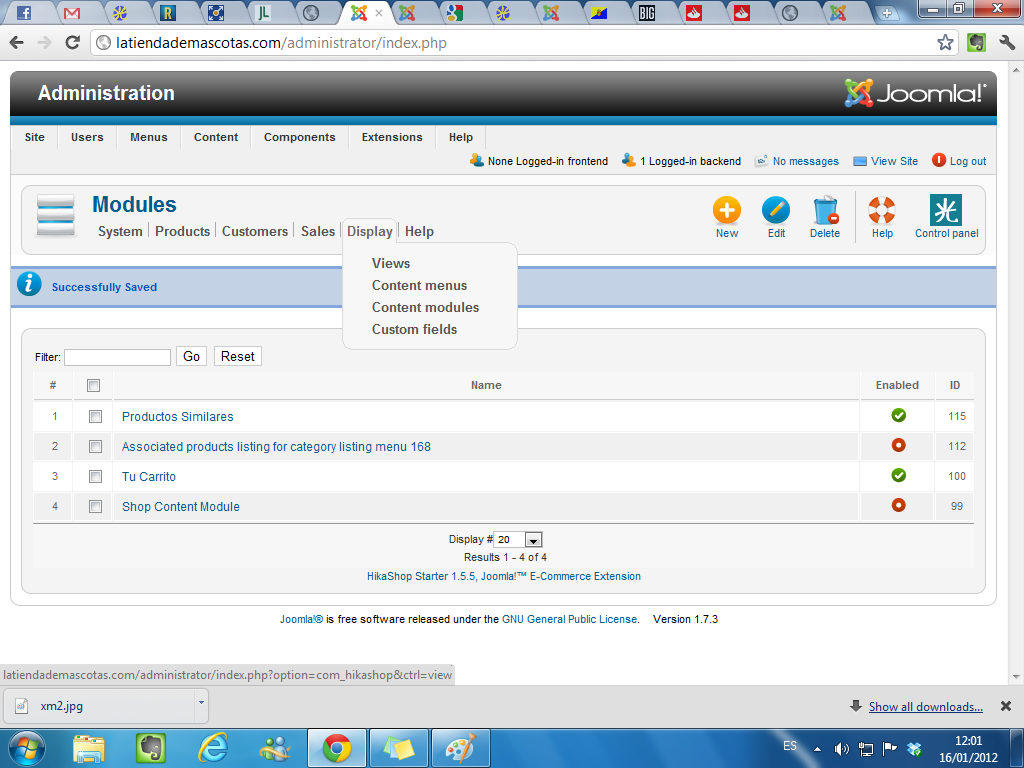
I don't see the option "Modules under the product page" in the display tab, instead I see "content modules", maybe I am looking in the wrong place?
See attached
Please Log in or Create an account to join the conversation.
14 years 8 months ago #35709
by nicolas
Replied by nicolas on topic Re: Why"Related products" are visible in SUB-category
That's the menu Display you're looking at.
I'm talking about the Display tab in your HikaShop configuration page:
www.hikashop.com/media/doc/config_form_main.png
I'm talking about the Display tab in your HikaShop configuration page:
www.hikashop.com/media/doc/config_form_main.png
Please Log in or Create an account to join the conversation.
14 years 8 months ago #35731
by owen100
Replied by owen100 on topic Re: Why"Related products" are visible in SUB-category
OK - but I don't see in your image an option to set the related module to published?
Can I message you access to my shop to do it for me?
Can I message you access to my shop to do it for me?
Please Log in or Create an account to join the conversation.
14 years 8 months ago #35804
by nicolas
Replied by nicolas on topic Re: Why"Related products" are visible in SUB-category
What I wanted to show you in that screenshot is the "Display" tab of the configuration at the top of the screenshot.
Click on it and you will see the option "modules under the product page" with a select button on which you can click to enable your related products module.
Click on it and you will see the option "modules under the product page" with a select button on which you can click to enable your related products module.
Please Log in or Create an account to join the conversation.
14 years 8 months ago #35805
by owen100
Replied by owen100 on topic Re: Why"Related products" are visible in SUB-category
Ahhh, finally I got it - yes, now it's all displaying perfectly.
Thanks!!
Thanks!!
Please Log in or Create an account to join the conversation.
Time to create page: 0.348 seconds