

- Posts: 45
- Thank you received: 0
Little CSS Bug - FB iframe Social Plugin [SOLVED]
14 years 10 months ago #31190
by Karloz
Little CSS Bug - FB iframe Social Plugin [SOLVED] was created by Karloz
hi, just want to let you know a little bug i found in commas which doesnt read css correctly for fb iframce in hikashop social plugin
plugins/content/hikashopsocial/hikashopsocial.php
line 141 & 142:
if($plugin->params==1){ $sizes='class="hikashop_social_fb_button_count'; }
if($plugin->params==2){ $sizes='class="hikashop_social_fb_box_count'; }
i changed to:
if($plugin->params==1){ $sizes='class="hikashop_social_fb_button_count"'; }
if($plugin->params==2){ $sizes='class="hikashop_social_fb_box_count"'; }
(missing comma after class name)
and line 151:
style="border:none; overflow:hidden; '.$sizes.'"
i changed to:
style="border:none; overflow:hidden;" '.$sizes.'
hope its ok, now its displaying in code correctly and can tweak via css file
plugins/content/hikashopsocial/hikashopsocial.php
line 141 & 142:
if($plugin->params==1){ $sizes='class="hikashop_social_fb_button_count'; }
if($plugin->params==2){ $sizes='class="hikashop_social_fb_box_count'; }
i changed to:
if($plugin->params==1){ $sizes='class="hikashop_social_fb_button_count"'; }
if($plugin->params==2){ $sizes='class="hikashop_social_fb_box_count"'; }
(missing comma after class name)
and line 151:
style="border:none; overflow:hidden; '.$sizes.'"
i changed to:
style="border:none; overflow:hidden;" '.$sizes.'
hope its ok, now its displaying in code correctly and can tweak via css file
Please Log in or Create an account to join the conversation.

14 years 10 months ago #31217
by nicolas
Replied by nicolas on topic Re: Little CSS Bug - FB iframe Social Plugin [SOLVED]
Thank you for your feedback.
We'll change that for next version !
We'll change that for next version !
Please Log in or Create an account to join the conversation.
14 years 9 months ago #34376
by Bugger101
Replied by Bugger101 on topic Re: Little CSS Bug - FB iframe Social Plugin [SOLVED]
Hi,
Is this why the buttons look like this:
Do I need to upload the plugin again?
Cheers
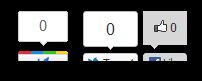
Is this why the buttons look like this:
Do I need to upload the plugin again?
Cheers
Please Log in or Create an account to join the conversation.
14 years 9 months ago #34409
by nicolas
Replied by nicolas on topic Re: Little CSS Bug - FB iframe Social Plugin [SOLVED]
It's not because of that. You should edit the front end CSS file of HikaShop via the Display tab of the configuraiton and change that code to increase a bit the height:
#hikashop_social iframe{
height: 50px !important;
}
#hikashop_social iframe{
height: 50px !important;
}
Please Log in or Create an account to join the conversation.
14 years 9 months ago #34494
by Bugger101
Replied by Bugger101 on topic Re: Little CSS Bug - FB iframe Social Plugin [SOLVED]
Thanks
Please Log in or Create an account to join the conversation.
Time to create page: 0.196 seconds