
- Posts: 90
- Thank you received: 0
problem with product export
- tanyatanya
-
 Topic Author
- Offline
Less
More
14 years 8 months ago #35803
by tanyatanya
problem with product export was created by tanyatanya
hello,
I'm trying to export my products to excel, however they don't seem to be seperated properly. for example some of the product descriptions can be found in the product id collumn when i view them in excel. this is happening with other collums too. i've set the seperator to comma (in the configuration menu), and i've set the excel file import seperator to comma too when i import the file. is there something i'm missing...? any help would be much appreciated
Tanya
I'm trying to export my products to excel, however they don't seem to be seperated properly. for example some of the product descriptions can be found in the product id collumn when i view them in excel. this is happening with other collums too. i've set the seperator to comma (in the configuration menu), and i've set the excel file import seperator to comma too when i import the file. is there something i'm missing...? any help would be much appreciated
Tanya
Please Log in or Create an account to join the conversation.

14 years 8 months ago #35807
by nicolas
Replied by nicolas on topic Re: problem with product export
Hi,
Could you switch to semi colon for both HikaShop and Excel and try again ?
Could you switch to semi colon for both HikaShop and Excel and try again ?
Please Log in or Create an account to join the conversation.
- tanyatanya
-
Topic Author
- Offline
Less
More
- Posts: 90
- Thank you received: 0
14 years 8 months ago #35872
by tanyatanya
Replied by tanyatanya on topic Re: problem with product export
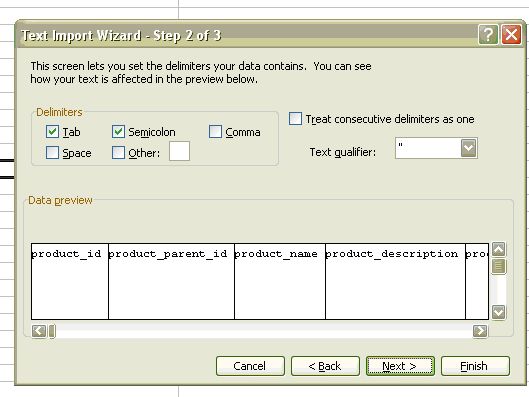
ok thanks for getting back to me - i've tried that but it still won't work. i've attached a pic of what the text import wizard looks like on my end. I've also tried it on my home computer (newer version of excel on it) but it still mixes up the data.
Please Log in or Create an account to join the conversation.
14 years 8 months ago #35875
by nicolas
Replied by nicolas on topic Re: problem with product export
Could you give the CSV so that we can check it ?
Please Log in or Create an account to join the conversation.
- tanyatanya
-
Topic Author
- Offline
Less
More
- Posts: 90
- Thank you received: 0
14 years 8 months ago #35878
by tanyatanya
Replied by tanyatanya on topic Re: problem with product export
hi,
yes i can give you the csv - just warning you though that its very large so you can't just click on it to open it. i had to import it manually using the data import options in excel (fits over more than one worksheet). its still set at semi colon for the separator.
Tanya
yes i can give you the csv - just warning you though that its very large so you can't just click on it to open it. i had to import it manually using the data import options in excel (fits over more than one worksheet). its still set at semi colon for the separator.
Tanya
Please Log in or Create an account to join the conversation.
- tanyatanya
-
Topic Author
- Offline
Less
More
- Posts: 90
- Thank you received: 0
14 years 8 months ago - 14 years 8 months ago #35879
by tanyatanya
Replied by tanyatanya on topic Re: problem with product export
hi,
yes i can give you the csv - just warning you though that its very large so you can't just click on it to open it. i had to import it manually using the data import options in excel (fits over more than one worksheet). its still set at semi colon for the separator.
Tanya
yes i can give you the csv - just warning you though that its very large so you can't just click on it to open it. i had to import it manually using the data import options in excel (fits over more than one worksheet). its still set at semi colon for the separator.
Tanya
Last edit: 14 years 8 months ago by tanyatanya.
Please Log in or Create an account to join the conversation.
- tanyatanya
-
Topic Author
- Offline
Less
More
- Posts: 90
- Thank you received: 0
14 years 8 months ago #35881
by tanyatanya
Replied by tanyatanya on topic Re: problem with product export
sorry i can't get it to attach - maybe its too large...the page just keeps loading and as you can see it didn't attach to the message. can i send it to you in an email?
Please Log in or Create an account to join the conversation.
14 years 8 months ago #35940
by nicolas
Replied by nicolas on topic Re: problem with product export
Sure. You can send it to nicolas at hikashop dot com.
Please Log in or Create an account to join the conversation.
14 years 8 months ago #36063
by nicolas
Replied by nicolas on topic Re: problem with product export
I've opened your CSV on my end with open office calc ( I don't have excel. That's a free equivalent to excel ) and it's displaying fine. So It must be excel not interpreting properly the CSV.
I see that you ticked tab as a delimiter when opening the CSV. You might want to try again with that option unticked. That might help Excel.
I see that you ticked tab as a delimiter when opening the CSV. You might want to try again with that option unticked. That might help Excel.
Please Log in or Create an account to join the conversation.
- tanyatanya
-
Topic Author
- Offline
Less
More
- Posts: 90
- Thank you received: 0
14 years 8 months ago #36356
by tanyatanya
Replied by tanyatanya on topic Re: problem with product export
ok I'll try that, if that doesn't work I'll try using the open office calc (I have that on my computer too).
thanks,
Tanya
thanks,
Tanya
Please Log in or Create an account to join the conversation.
14 years 5 months ago #45580
by PhilP
Replied by PhilP on topic Re: problem with product export
I am also having problems with the export function.
I am using semicolon as the CSV separator but can see on a single product export test that the field order in the file is disturbed when I read it back into Excel.
The problem appears to be connected to the product description field, where I think that a character or string in the product description is causing a a new line to be started.
In the attached file, if I do the following:
1. Import the csv file into Excel
2. Take all the data on the line after the field "xxTest_Product_Top" (which is the text product code)
3. Move that data so that it starts in the correct field (product_code)
then the remaining data items will then be placed in the correct fields.
I have attached the data file so that you can see the problem.
My original objective was simply to check product names, codes, prices, tax status etc. I do not need the product description in order to do this. Is there any way to select which data items I want to appear in the exported CSV file (without using a SQL query?) so that I do not export the product description?
Regards
PhilP
I am using semicolon as the CSV separator but can see on a single product export test that the field order in the file is disturbed when I read it back into Excel.
The problem appears to be connected to the product description field, where I think that a character or string in the product description is causing a a new line to be started.
In the attached file, if I do the following:
1. Import the csv file into Excel
2. Take all the data on the line after the field "xxTest_Product_Top" (which is the text product code)
3. Move that data so that it starts in the correct field (product_code)
then the remaining data items will then be placed in the correct fields.
I have attached the data file so that you can see the problem.
My original objective was simply to check product names, codes, prices, tax status etc. I do not need the product description in order to do this. Is there any way to select which data items I want to appear in the exported CSV file (without using a SQL query?) so that I do not export the product description?
Regards
PhilP
Please Log in or Create an account to join the conversation.
14 years 5 months ago #45812
by nicolas
Replied by nicolas on topic Re: problem with product export
Having several lines in a CSV field is not a problem.
Could you try to open your CSV with libreoffice (openoffice) calc ? It should work better than with Excel.
Excel has sometimes troubles to open CSV files properly...
There is no option to only export some fields.
Could you try to open your CSV with libreoffice (openoffice) calc ? It should work better than with Excel.
Excel has sometimes troubles to open CSV files properly...
There is no option to only export some fields.
Please Log in or Create an account to join the conversation.
14 years 5 months ago #45849
by PhilP
Replied by PhilP on topic Re: problem with product export
Ok Nicolas - thanks. I'll try that.
PhilP
PhilP
Please Log in or Create an account to join the conversation.
Time to create page: 0.316 seconds