
- Posts: 23
- Thank you received: 0
Loading currency converter module in checkout page
- harsha1415
-
 Topic Author
- Offline
Less
More
14 years 8 months ago #36119
by harsha1415
Loading currency converter module in checkout page was created by harsha1415
Hi
i want to load currency converter module into payment method selection (html div) in the checkout page,
currently i have the currency converter module in the right panel of the template.
is there any way to load module into joomla component menu item page
Thank you
i want to load currency converter module into payment method selection (html div) in the checkout page,
currently i have the currency converter module in the right panel of the template.
is there any way to load module into joomla component menu item page
Thank you
Please Log in or Create an account to join the conversation.

14 years 8 months ago #36123
by nicolas
Replied by nicolas on topic Re: Loading currency converter module in checkout page
Hi,
Displaying it there is not too difficult as you can use Module AnyWhere to load it there:
extensions.joomla.org/extensions/core-en...embed-a-include/6402
However, since that module uses a form html tag and that there is already a form html tag around the checkout page, browsers won't like that and it won't work properly. You would have to edit the code of the module to do the display of the dropdown differently.
Displaying it there is not too difficult as you can use Module AnyWhere to load it there:
extensions.joomla.org/extensions/core-en...embed-a-include/6402
However, since that module uses a form html tag and that there is already a form html tag around the checkout page, browsers won't like that and it won't work properly. You would have to edit the code of the module to do the display of the dropdown differently.
Please Log in or Create an account to join the conversation.
- harsha1415
-
Topic Author
- Offline
Less
More
- Posts: 23
- Thank you received: 0
14 years 8 months ago #36362
by harsha1415
Replied by harsha1415 on topic Re: Loading currency converter module in checkout page
Hi
i can use moduleanywhere if it is article something like that, but hikashop checkout page is not an article,it is component menu page i can't create that in article manager, i can only create through menu,here is the image so that u can understand my problem easily.
i want to change the currency converter module in the payment method options in check out page
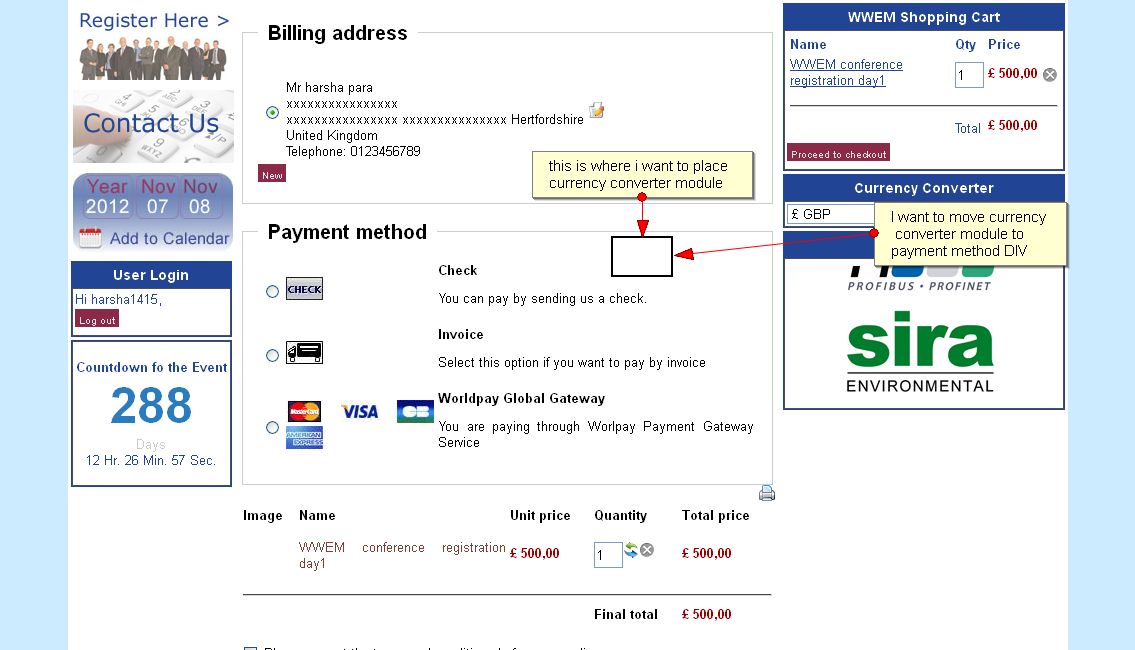
i can use moduleanywhere if it is article something like that, but hikashop checkout page is not an article,it is component menu page i can't create that in article manager, i can only create through menu,here is the image so that u can understand my problem easily.
i want to change the currency converter module in the payment method options in check out page
Please Log in or Create an account to join the conversation.
14 years 8 months ago #36430
by nicolas
Replied by nicolas on topic Re: Loading currency converter module in checkout page
Yes, I understand that.
As I told you in my previous message, that won't work even if you put it there (which would require to edit the corresponding view file to add some code to it).
It would require that you modify the code of the module to make it work.
As I told you in my previous message, that won't work even if you put it there (which would require to edit the corresponding view file to add some code to it).
It would require that you modify the code of the module to make it work.
Please Log in or Create an account to join the conversation.
- harsha1415
-
Topic Author
- Offline
Less
More
- Posts: 23
- Thank you received: 0
14 years 8 months ago - 14 years 8 months ago #36487
by harsha1415
Replied by harsha1415 on topic Re: Loading currency converter module in checkout page
Hi nicolas
i tried to move the position of the currency converter module to checkout page which is the below one, i have added the below code in the payment.php file
jimport( 'joomla.application.module.helper' );
$module =& JModuleHelper::getModule('mod_hikashop_currency', 'Currency Converter');
$document = &JFactory::getDocument();
$renderer = $document->loadRenderer('module');
echo $renderer->render($module);
C:\xampp\htdocs\wwem\components\com_hikashop\views\checkout\tmpl\payment.php
after adding the above code i can able to see the html of the module but the functionality is not working
i have attached the image aswell
can please help me this out what i can do now
thank you
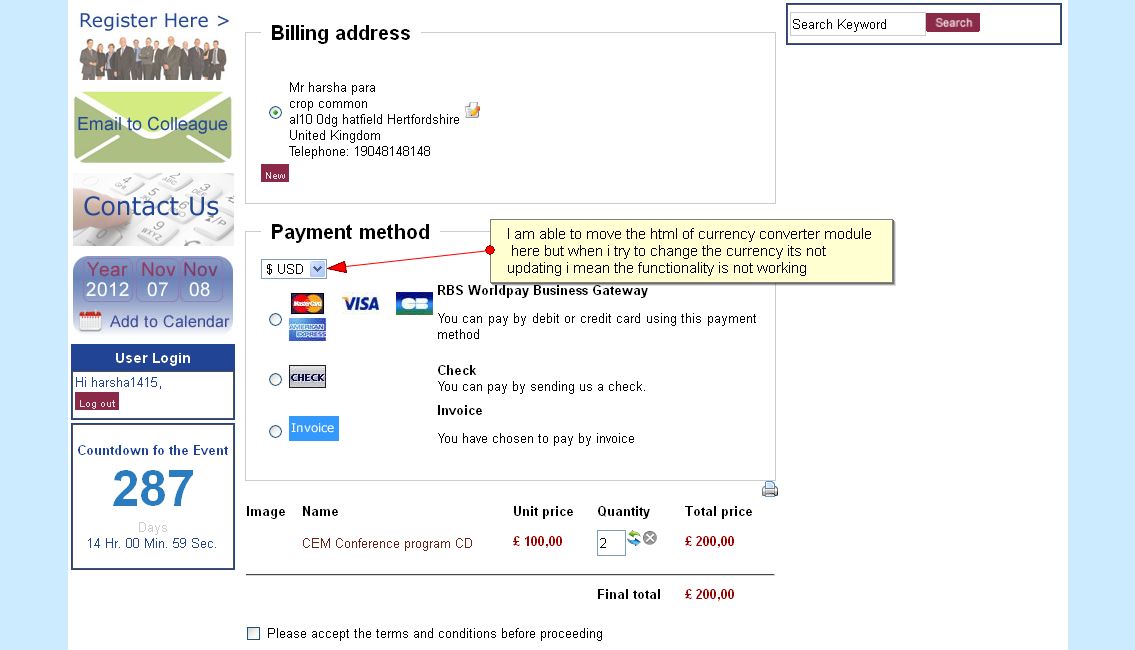
i tried to move the position of the currency converter module to checkout page which is the below one, i have added the below code in the payment.php file
jimport( 'joomla.application.module.helper' );
$module =& JModuleHelper::getModule('mod_hikashop_currency', 'Currency Converter');
$document = &JFactory::getDocument();
$renderer = $document->loadRenderer('module');
echo $renderer->render($module);
C:\xampp\htdocs\wwem\components\com_hikashop\views\checkout\tmpl\payment.php
after adding the above code i can able to see the html of the module but the functionality is not working
i have attached the image aswell
can please help me this out what i can do now
thank you
Last edit: 14 years 8 months ago by harsha1415. Reason: got error of image not loaded properly
Please Log in or Create an account to join the conversation.
14 years 8 months ago #36494
by nicolas
Replied by nicolas on topic Re: Loading currency converter module in checkout page
Hi,
Yes, that's what I told you would happen
It doesn't work because the form of the module conflicts with the form of the checkout.
To make it work, you will have to edit the file modules/mod_hikashop_currency/tmpl/default.php and change the code there so that it doesn't use an html form and instead does some javascript to do a redirect via a window.location.
Yes, that's what I told you would happen
It doesn't work because the form of the module conflicts with the form of the checkout.
To make it work, you will have to edit the file modules/mod_hikashop_currency/tmpl/default.php and change the code there so that it doesn't use an html form and instead does some javascript to do a redirect via a window.location.
Please Log in or Create an account to join the conversation.
- harsha1415
-
Topic Author
- Offline
Less
More
- Posts: 23
- Thank you received: 0
14 years 8 months ago #36495
by harsha1415
Replied by harsha1415 on topic Re: Loading currency converter module in checkout page
Hi nicolas
i am unable to work it out(i have tried what i can), is there anyway can u please help this out for me
Thank you
i am unable to work it out(i have tried what i can), is there anyway can u please help this out for me
Thank you
Please Log in or Create an account to join the conversation.
14 years 8 months ago #36540
by nicolas
Replied by nicolas on topic Re: Loading currency converter module in checkout page
Hi,
You should try to replace the code:
by:
You should try to replace the code:
Code:
echo $currency->display('hikashopcurrency',hikashop_getCurrency(),'onchange="document.hikashop_currency_form.submit();"');
by:
Code:
$url = hikashop_completeLink('currency&task=update&return_url='.urlencode($redirectUrl));
if(strpos($url,'?')) $url .='&hikashopcurrency=';
else $url .='?hikashopcurrency=';
echo $currency->display('hikashopcurrency',hikashop_getCurrency(),'onchange="window.location=\''.$url.'\'+this.value;return false;"');
Please Log in or Create an account to join the conversation.
- harsha1415
-
Topic Author
- Offline
Less
More
- Posts: 23
- Thank you received: 0
14 years 8 months ago - 14 years 8 months ago #36640
by harsha1415
Replied by harsha1415 on topic Re: Loading currency converter module in checkout page
Hi nicolas
after i replacing the code like u said
before i try to changing the currency the url is like below
http://localhost/wwem/index.php/aboutus/wwem-shopping-products/checkout
after i try to changing the currency the url is like below, the url is exactly changing like below and i is giving blank screen nothing is happening
http://localhost/wwem/index.php/aboutus/wwem-shopping-products/currency/update/return_url-http-/localhost/wwem/index.php/aboutus/wwem-shopping-products/http-
after i replacing the code like u said
before i try to changing the currency the url is like below
http://localhost/wwem/index.php/aboutus/wwem-shopping-products/checkout
after i try to changing the currency the url is like below, the url is exactly changing like below and i is giving blank screen nothing is happening
http://localhost/wwem/index.php/aboutus/wwem-shopping-products/currency/update/return_url-http-/localhost/wwem/index.php/aboutus/wwem-shopping-products/http-
Last edit: 14 years 8 months ago by harsha1415.
Please Log in or Create an account to join the conversation.
14 years 8 months ago #36693
by nicolas
Replied by nicolas on topic Re: Loading currency converter module in checkout page
Hi,
Could you deactivate SEF and try again ?
I suspect that because the return_url is directly in the URL your SEF system breaks the URL.
Could you deactivate SEF and try again ?
I suspect that because the return_url is directly in the URL your SEF system breaks the URL.
Please Log in or Create an account to join the conversation.
- harsha1415
-
Topic Author
- Offline
Less
More
- Posts: 23
- Thank you received: 0
14 years 8 months ago #36821
by harsha1415
Replied by harsha1415 on topic Re: Loading currency converter module in checkout page
Hi nicolas
i have tried by deactivating the SEF urls, but this time there is nothing wrong with the URL,but when i try to changing the currency, the currency is not updating, the page is just refreshing that's it.
waiting for your reply
i have tried by deactivating the SEF urls, but this time there is nothing wrong with the URL,but when i try to changing the currency, the currency is not updating, the page is just refreshing that's it.
waiting for your reply
Please Log in or Create an account to join the conversation.
14 years 8 months ago #36931
by nicolas
Replied by nicolas on topic Re: Loading currency converter module in checkout page
Hi,
Please try with that code instead then:
Please try with that code instead then:
Code:
$url = hikashop_completeLink('currency&task=update');
echo $currency->display('hikashopcurrency',hikashop_getCurrency(),'onchange="window.location=\''.$url.'&hikashopcurrency=\'+this.value+\'&return_url='.urlencode($redirectUrl).'\';return false;"');
Please Log in or Create an account to join the conversation.
- harsha1415
-
Topic Author
- Offline
Less
More
- Posts: 23
- Thank you received: 0
14 years 8 months ago - 14 years 8 months ago #36972
by harsha1415
Replied by harsha1415 on topic Re: Loading currency converter module in checkout page
Hi nicolas
great, it working now
thank you so much for your help
but i want to enable the SEF urls in the live website,our website is marketing website & we need SEO ,so is it possible to make it work this by acivating the SEF urls
Thank you
great, it working now
thank you so much for your help
but i want to enable the SEF urls in the live website,our website is marketing website & we need SEO ,so is it possible to make it work this by acivating the SEF urls
Thank you
Last edit: 14 years 8 months ago by harsha1415.
Please Log in or Create an account to join the conversation.
14 years 8 months ago #37085
by nicolas
Replied by nicolas on topic Re: Loading currency converter module in checkout page
Replace:
$url = hikashop_completeLink('currency&task=update');
by:
and it should work better with SEF activated.
$url = hikashop_completeLink('currency&task=update');
by:
Code:
$url = 'http://yourwebsite.com/index.php?option=com_hikashop&ctrl=currency&task=update';
Please Log in or Create an account to join the conversation.
- harsha1415
-
Topic Author
- Offline
Less
More
- Posts: 23
- Thank you received: 0
14 years 7 months ago #37415
by harsha1415
Replied by harsha1415 on topic Re: Loading currency converter module in checkout page
Hi nicolas
checkout page is working with the latest url with activation of sef urls
but after selecting payment method and then i click next button , after that its not redirecting to related payment interface the url is changing as below
' yourwebsite.com/wwem-products/checkout/step/step-1
before hitting next button the url is like ' yourwebsite.com/wwem-products/checkout/
and the it is giving the confirmation like Thank you for your purchase.
iam not geting the related payment interface
checkout page is working with the latest url with activation of sef urls
but after selecting payment method and then i click next button , after that its not redirecting to related payment interface the url is changing as below
' yourwebsite.com/wwem-products/checkout/step/step-1
before hitting next button the url is like ' yourwebsite.com/wwem-products/checkout/
and the it is giving the confirmation like Thank you for your purchase.
iam not geting the related payment interface
Please Log in or Create an account to join the conversation.
14 years 7 months ago #37531
by nicolas
Replied by nicolas on topic Re: Loading currency converter module in checkout page
Hi,
I don't see the link with the currency dropdown modification.
Is that related ?
If you don't see any payment redirection at the end of the checkout, make sure that you didn't remove the "payment" view from the "checkout workflow" option of the Checkout tab of the configuration.
If not, please provide a link to your shop so that we can see your checkout.
I don't see the link with the currency dropdown modification.
Is that related ?
If you don't see any payment redirection at the end of the checkout, make sure that you didn't remove the "payment" view from the "checkout workflow" option of the Checkout tab of the configuration.
If not, please provide a link to your shop so that we can see your checkout.
Please Log in or Create an account to join the conversation.
- harsha1415
-
Topic Author
- Offline
Less
More
- Posts: 23
- Thank you received: 0
14 years 7 months ago - 14 years 7 months ago #37581
by harsha1415
Replied by harsha1415 on topic Re: Loading currency converter module in checkout page
hi
payment option is there in the checkout workflow
payment redirection at the check out is working fine when i turn off the currency switcher in the payment DIV, but its not working when i turn on the currency switcher ,
why iam mentioning in payment DIV is, payment redirection is working when the currency switcher is on the right side of the template, but when i move the currency switcher in the payment DIV payment redirecion is not working
so i think its because of the currency drop down modification
unfortunately the website which i am working currently is in my localhost, once everything is ready then i need to make it live, so i can't provide any links
waiting for your reply
thank you
payment option is there in the checkout workflow
payment redirection at the check out is working fine when i turn off the currency switcher in the payment DIV, but its not working when i turn on the currency switcher ,
why iam mentioning in payment DIV is, payment redirection is working when the currency switcher is on the right side of the template, but when i move the currency switcher in the payment DIV payment redirecion is not working
so i think its because of the currency drop down modification
unfortunately the website which i am working currently is in my localhost, once everything is ready then i need to make it live, so i can't provide any links
waiting for your reply
thank you
Last edit: 14 years 7 months ago by harsha1415.
Please Log in or Create an account to join the conversation.
14 years 7 months ago #37701
by nicolas
Replied by nicolas on topic Re: Loading currency converter module in checkout page
Make sure that you removed the form tags in the module layout. Otherwise it will interfer with the checkout.
Please Log in or Create an account to join the conversation.
- harsha1415
-
Topic Author
- Offline
Less
More
- Posts: 23
- Thank you received: 0
14 years 7 months ago #37838
by harsha1415
Replied by harsha1415 on topic Re: Loading currency converter module in checkout page
Hi Nicolas
its working perfect now , i have taken off the form tags, previously i didn't takeoff the form tags
anyways thank you so much for your help
Cheers
its working perfect now , i have taken off the form tags, previously i didn't takeoff the form tags
anyways thank you so much for your help
Cheers
Please Log in or Create an account to join the conversation.
- harsha1415
-
Topic Author
- Offline
Less
More
- Posts: 23
- Thank you received: 0
14 years 7 months ago #38112
by harsha1415
Replied by harsha1415 on topic Re: Loading currency converter module in checkout page
Hi Nicolas
i Just found a bug, the currency switcher module which i loaded in checkout is not working in IE7/IE8
currency switcher is loading but when i try to change the currencies the dropdown box is not working,its not showing the drop down values
is there any fix available for that
its working in all other browsers like firefox/chrome/safari
Thank you
i Just found a bug, the currency switcher module which i loaded in checkout is not working in IE7/IE8
currency switcher is loading but when i try to change the currencies the dropdown box is not working,its not showing the drop down values
is there any fix available for that
its working in all other browsers like firefox/chrome/safari
Thank you
Please Log in or Create an account to join the conversation.
Time to create page: 0.354 seconds