
- Posts: 5
- Thank you received: 0
Removing link on product in the checkout?
- BismuthBullion
-
 Topic Author
- Offline
Less
More
14 years 8 months ago #36145
by BismuthBullion
Removing link on product in the checkout? was created by BismuthBullion
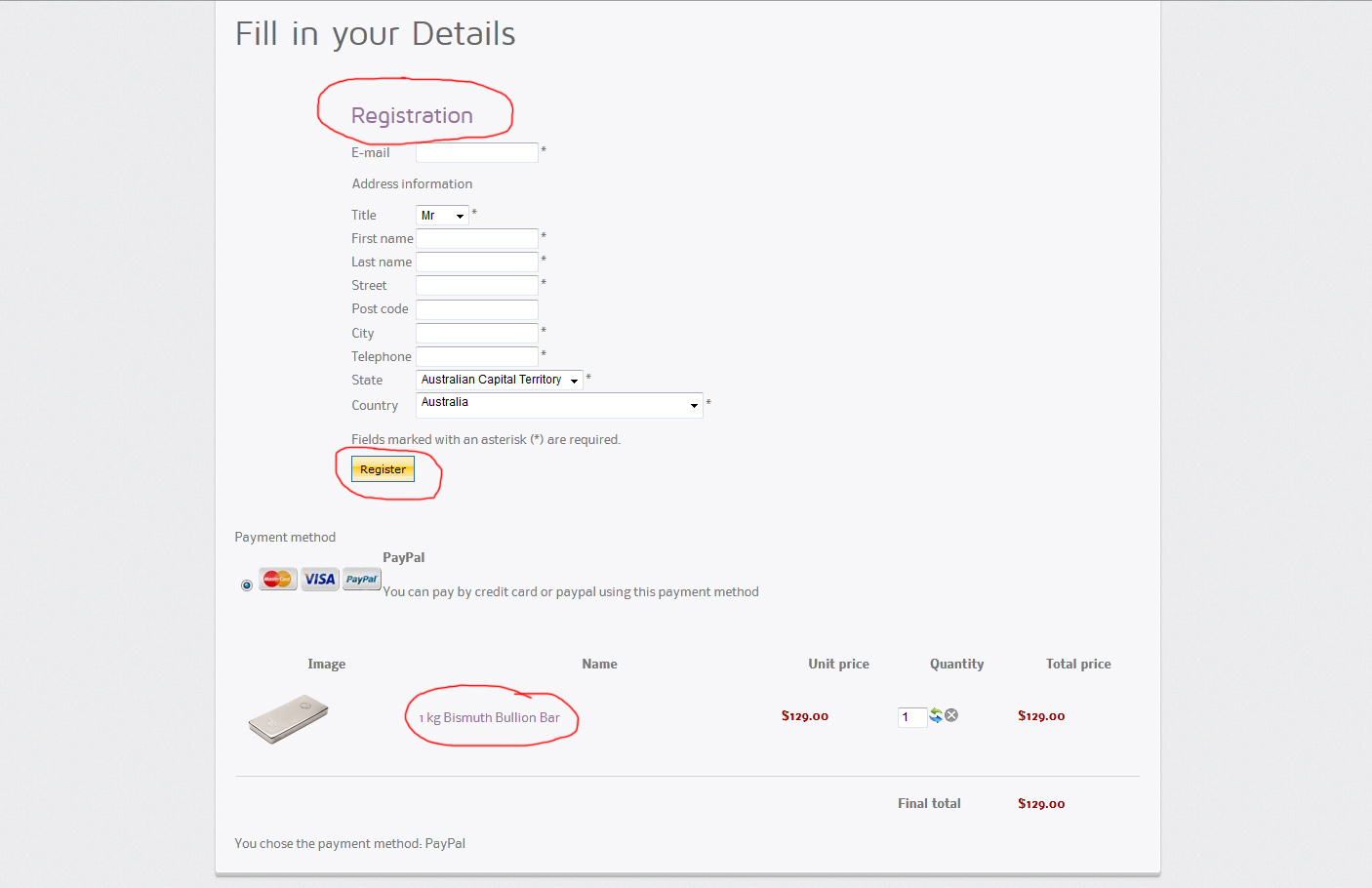
Hi, I will start off by saying how impressed I am with Hikashop! It's exactly what I was after! I have two questions. The first is; is it possible to remove the product link on the checkout page. If so how? The second is how do I change what the "registration" button says? I have attached a picture to show you what I mean.
Please Log in or Create an account to join the conversation.

14 years 8 months ago #36190
by nicolas
Replied by nicolas on topic Re: Removing link on product in the checkout?
Hi,
1. Yes, edit the file "cart" of the view "checkout" via the menu Display->Views and change the line:
<a href="<?php echo hikashop_completeLink('product&task=show&cid='.$row->product_id.$url_itemid);?>" ><?php echo $row->product_name; ?></a>
by:
<?php echo $row->product_name; ?>
2. You can change any text in HikaShop via a translation override:
www.hikashop.com/en/download/languages.html#modify
1. Yes, edit the file "cart" of the view "checkout" via the menu Display->Views and change the line:
<a href="<?php echo hikashop_completeLink('product&task=show&cid='.$row->product_id.$url_itemid);?>" ><?php echo $row->product_name; ?></a>
by:
<?php echo $row->product_name; ?>
2. You can change any text in HikaShop via a translation override:
www.hikashop.com/en/download/languages.html#modify
Please Log in or Create an account to join the conversation.
- BismuthBullion
-
Topic Author
- Offline
Less
More
- Posts: 5
- Thank you received: 0
14 years 8 months ago #36198
by BismuthBullion
Replied by BismuthBullion on topic Re: Removing link on product in the checkout?
Thanks for your quick reply. I completely removed that bit of code but it didn't seem to do anything. Was I supposed to change it to something in particular?
Please Log in or Create an account to join the conversation.
14 years 8 months ago #36235
by nicolas
Replied by nicolas on topic Re: Removing link on product in the checkout?
If that didn't change anything, it means that you edited that view file for another template than the template you're using on your front end. Please edit the correct view file and it will work.
Please Log in or Create an account to join the conversation.
- BismuthBullion
-
Topic Author
- Offline
Less
More
- Posts: 5
- Thank you received: 0
14 years 8 months ago #36255
by BismuthBullion
Replied by BismuthBullion on topic Re: Removing link on product in the checkout?
THANKS!! Worked perfectly like you said! I have one last question. Is it possible to change the size of the thumbnail? Thanks so much for your help!
Please Log in or Create an account to join the conversation.
14 years 8 months ago #36298
by nicolas
Replied by nicolas on topic Re: Removing link on product in the checkout?
There is no option for that.
You would have to edit the file "cart" of the view "checkout" via the menu Display->Views and change the line:
<?php echo $this->image->display($image->file_path,true,$image->file_name,'style="margin-top:10px;margin-bottom:10px;display:inline-block;vertical-align:middle"'); ?>
to:
<?php echo $this->image->display($image->file_path,true,$image->file_name,'style="margin-top:10px;margin-bottom:10px;display:inline-block;vertical-align:middle"', '' , XXX, YYY); ?>
where XXX and YYY are the size in pixel of your thumbnails.
You would have to edit the file "cart" of the view "checkout" via the menu Display->Views and change the line:
<?php echo $this->image->display($image->file_path,true,$image->file_name,'style="margin-top:10px;margin-bottom:10px;display:inline-block;vertical-align:middle"'); ?>
to:
<?php echo $this->image->display($image->file_path,true,$image->file_name,'style="margin-top:10px;margin-bottom:10px;display:inline-block;vertical-align:middle"', '' , XXX, YYY); ?>
where XXX and YYY are the size in pixel of your thumbnails.
Please Log in or Create an account to join the conversation.
14 years 6 months ago #43552
by ALEXIAC
Replied by ALEXIAC on topic Re: Removing link on product in the checkout?
Hello, I am posting my question here because it's related to this subject.
When I go to checkout, the price of the product is also displayed at the end of the product name, in addition with the Unit Price of the product. How can I remove this?
Thanks
When I go to checkout, the price of the product is also displayed at the end of the product name, in addition with the Unit Price of the product. How can I remove this?
Thanks
Please Log in or Create an account to join the conversation.
14 years 6 months ago #43738
by nicolas
Replied by nicolas on topic Re: Removing link on product in the checkout?
Could you give a link to your shop so that we can see that ?
Please Log in or Create an account to join the conversation.
14 years 6 months ago #43854
by ALEXIAC
Replied by ALEXIAC on topic Re: Removing link on product in the checkout?
Of course Nicolas. I am PM you the link.
Thanks
Thanks
Please Log in or Create an account to join the conversation.
14 years 6 months ago #44041
by nicolas
Replied by nicolas on topic Re: Removing link on product in the checkout?
Turn off the option "group options with products" in the Checkout tab of the configuration and that shoudl solve the problem.
The following user(s) said Thank You: ALEXIAC
Please Log in or Create an account to join the conversation.
14 years 6 months ago #44070
by ALEXIAC
Replied by ALEXIAC on topic Re: Removing link on product in the checkout?
That solved the problem.. Thank you Nicolas!
Please Log in or Create an account to join the conversation.
Time to create page: 0.198 seconds