

- Posts: 72
- Thank you received: 3
Textarea custom field not showing correct
14 years 6 months ago #42093
by Huub
Textarea custom field not showing correct was created by Huub
I have added a custom field to the productdetail page it is a textarea where a customer should be able to give additional information if needed when buying the product .... a kind of comment-field for customers.
The textarea is defined as being several rows but it allways shows as only one line .... it is possible to drag it bigger with the mouse but thats not how it is supposed to work. I want to see the number of columns and rows as defined.
In de picture attached you can see what i mean. How do i solve this?
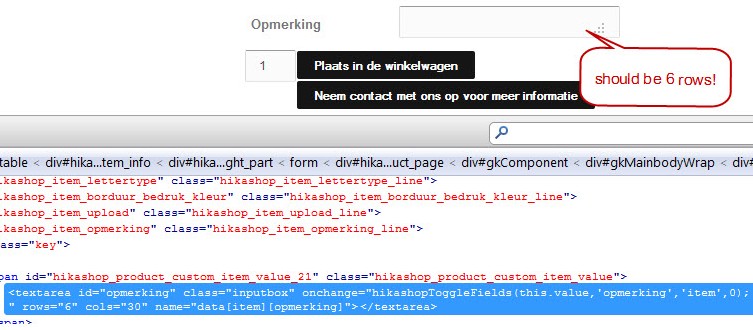
The textarea is defined as being several rows but it allways shows as only one line .... it is possible to drag it bigger with the mouse but thats not how it is supposed to work. I want to see the number of columns and rows as defined.
In de picture attached you can see what i mean. How do i solve this?
Please Log in or Create an account to join the conversation.

14 years 6 months ago #42297
by nicolas
Replied by nicolas on topic Re: Textarea custom field not showing correct
It's probably your template CSS which overrides the rows/columns set in the field.
Please give a link to that page so that we can look at the CSS applied on that textarea.
Please give a link to that page so that we can look at the CSS applied on that textarea.
Please Log in or Create an account to join the conversation.
14 years 6 months ago - 14 years 6 months ago #42305
by Huub
Replied by Huub on topic Re: Textarea custom field not showing correct
the url is this
Last edit: 14 years 6 months ago by Huub.
Please Log in or Create an account to join the conversation.
14 years 6 months ago #42466
by nicolas
Replied by nicolas on topic Re: Textarea custom field not showing correct
I can see that you already found out what CSS to use you avoid that:
input[type="password"], input[type="text"], input[type="email"], input[type="www"], input[type="tel"], input[type="url"], input[type="search"], select, .inputbox {
height: auto!important;
line-height: 16px;
}
input[type="password"], input[type="text"], input[type="email"], input[type="www"], input[type="tel"], input[type="url"], input[type="search"], select, .inputbox {
height: auto!important;
line-height: 16px;
}
Please Log in or Create an account to join the conversation.
14 years 6 months ago #42476
by Huub
Replied by Huub on topic Re: Textarea custom field not showing correct
I was experimenting with it and got help from the creators of the template.
It does seem to be the solution.
It does seem to be the solution.
Please Log in or Create an account to join the conversation.
Time to create page: 0.199 seconds