
- Posts: 90
- Thank you received: 0
content modules
- tanyatanya
-
 Topic Author
- Offline
Less
More
14 years 4 months ago #50260
by tanyatanya
content modules was created by tanyatanya
hello,
on my website I like everything to have a black background. I have changed every module I can find on the site so that the background is set to black, yet when I do a product search and then click on to a category, all the items have a grey background. I have gone through every module twice to see check that they are all set to black, which they are. i have gone through all the display>content modules, and looked everywhere I can think off such as extensions>module manager, display>content menus, but still the background is grey:
www.spaldingfasteners.co.uk/index.php/co...s-rivet-nuts-a-tools
is there anywhere else I can look? do you have any suggestions?
kind regards,
Tanya
on my website I like everything to have a black background. I have changed every module I can find on the site so that the background is set to black, yet when I do a product search and then click on to a category, all the items have a grey background. I have gone through every module twice to see check that they are all set to black, which they are. i have gone through all the display>content modules, and looked everywhere I can think off such as extensions>module manager, display>content menus, but still the background is grey:
www.spaldingfasteners.co.uk/index.php/co...s-rivet-nuts-a-tools
is there anywhere else I can look? do you have any suggestions?
kind regards,
Tanya
Please Log in or Create an account to join the conversation.

Less
More
- Posts: 12953
- Thank you received: 1778
14 years 4 months ago - 14 years 4 months ago #50285
by Mohamed Thelji
Replied by Mohamed Thelji on topic Re: content modules
Hello Tanya,
Did you set your "Item box background color" to #000000 (black) in the "HikaShop Content Module" (Hikashop -> Display -> Content modules -> "HikaShop Content Module" ) ?
Did you set your "Item box background color" to #000000 (black) in the "HikaShop Content Module" (Hikashop -> Display -> Content modules -> "HikaShop Content Module" ) ?
Last edit: 14 years 4 months ago by Mohamed Thelji.
Please Log in or Create an account to join the conversation.
- tanyatanya
-
Topic Author
- Offline
Less
More
- Posts: 90
- Thank you received: 0
14 years 4 months ago #50288
by tanyatanya
Replied by tanyatanya on topic Re: content modules
hello,
thank you for your reply.
my hikashop does not have a hikashop content module.
when i go (hikashop>display>content modules) the screw looks like this:
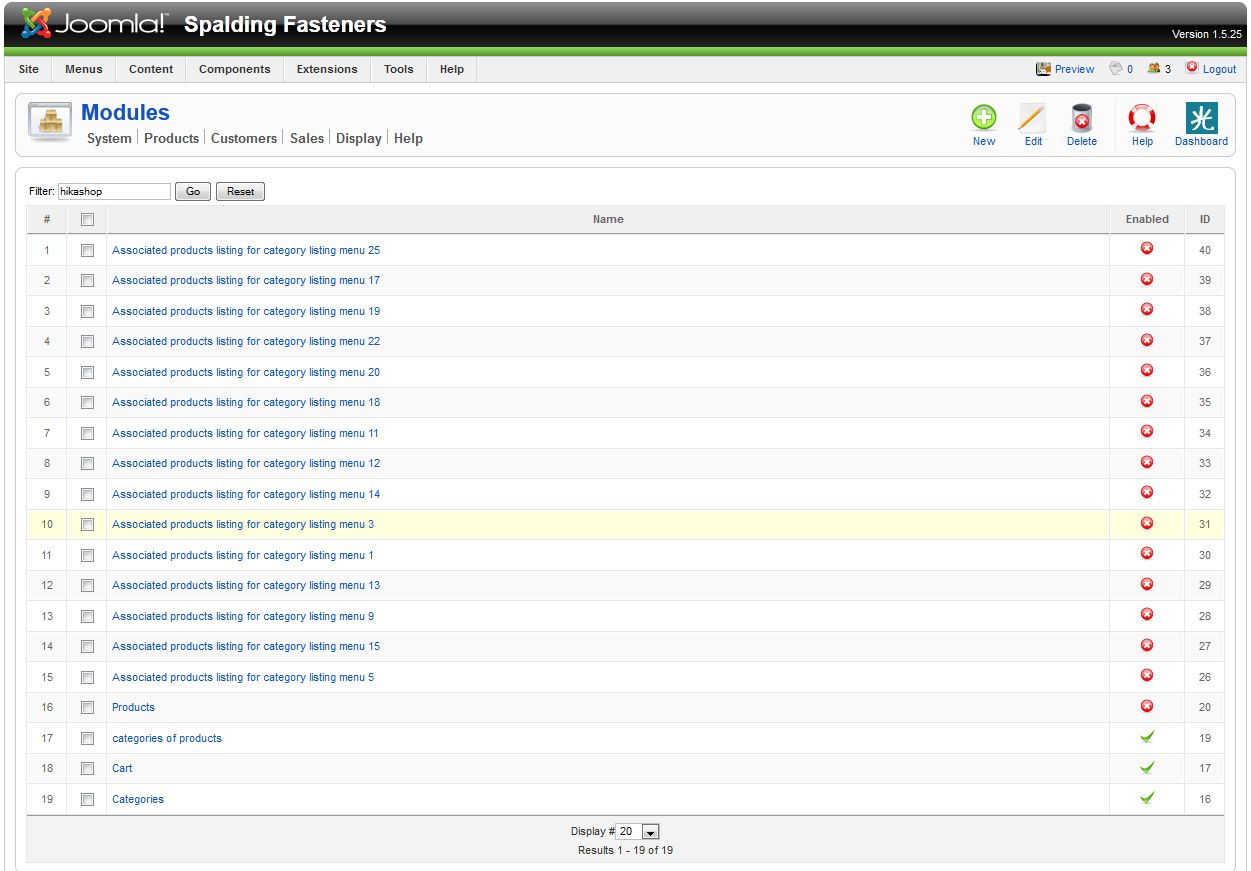
on the list of modules that you see, every one has been changed to the black background colour.
thank you for your reply.
my hikashop does not have a hikashop content module.
when i go (hikashop>display>content modules) the screw looks like this:
on the list of modules that you see, every one has been changed to the black background colour.
Please Log in or Create an account to join the conversation.

14 years 4 months ago #50329
by Xavier
Replied by Xavier on topic Re: content modules
Hi tanyatanya,
You have to edit the "Assiociated products listing for categories listing menu ..." corresponding for the good menu.
And then set background-color to #000000 like Mohamed said.
You have to edit the "Assiociated products listing for categories listing menu ..." corresponding for the good menu.
And then set background-color to #000000 like Mohamed said.
The following user(s) said Thank You: Mohamed Thelji
Please Log in or Create an account to join the conversation.
- tanyatanya
-
Topic Author
- Offline
Less
More
- Posts: 90
- Thank you received: 0
14 years 4 months ago #50421
by tanyatanya
Replied by tanyatanya on topic breadcrumb
ok thank you I got there in the end!
I now have another problem regarding breadcrumb.
if you search for a product e.g 'brass' on my website www.spaldingfasteners.co.uk
click on one of the results, then try and follow the breadcrumb link back to the relevant category. the links don't work - any ideas?
kind regards,
Tanya
I now have another problem regarding breadcrumb.
if you search for a product e.g 'brass' on my website www.spaldingfasteners.co.uk
click on one of the results, then try and follow the breadcrumb link back to the relevant category. the links don't work - any ideas?
kind regards,
Tanya
Please Log in or Create an account to join the conversation.

14 years 4 months ago #50424
by nicolas
Replied by nicolas on topic Re: breadcrumb
You need to enter a category listing menu's id in the item id option of your search plugin.
The following user(s) said Thank You: tanyatanya
Please Log in or Create an account to join the conversation.
Time to create page: 0.198 seconds