

- Posts: 3
- Thank you received: 0
After last update shop doesn´t work
14 years 3 months ago #52741
by Pokorný
After last update shop doesn´t work was created by Pokorný
Hi I´d need to help. I updated starter version for new versin yesterday and after this step, shop doesn´t work without changes in options.
Thanx for support
Mike
Thanx for support
Mike
Please Log in or Create an account to join the conversation.
14 years 3 months ago #52742
by Pokorný
Replied by Pokorný on topic Re: After last update shop doesn´t work
After reinstalation for 1.5.7. is everythink OK. What it happend? :S M
Please Log in or Create an account to join the conversation.

14 years 3 months ago #52856
by nicolas
Replied by nicolas on topic Re: After last update shop doesn´t work
What didn't work ?
Did you get an error ? What was it ?
Did you try to turn on the debug mode of the joomla configuration ? It might be that error you faced:
www.hikashop.com/en/support/documentatio...lity-issues.html#SQL
Did you get an error ? What was it ?
Did you try to turn on the debug mode of the joomla configuration ? It might be that error you faced:
www.hikashop.com/en/support/documentatio...lity-issues.html#SQL
Please Log in or Create an account to join the conversation.
14 years 3 months ago #52860
by Pokorný
Replied by Pokorný on topic Re: After last update shop doesn´t work
Without error. Message about correct update. As usually I updated version and after that a have seen only heading. No categories, no products, no pictures, nothing in front-end. I didn´t try to turn on debug mode, next time. M
Please Log in or Create an account to join the conversation.
14 years 3 months ago - 14 years 3 months ago #52861
by avillegas
Replied by avillegas on topic After last update, somethig doesn't work
Hi.
we have intalled the actualization yesterday and we have an issue in the main product page regarding the products in the same category.
We were showing the products of the category in the module that was below the product main page. Before the actualization it was showing it properly, but after the actualization it doesn't appear anymore. We didn't make any change in the configuration, it is tha same as before the actualization.
Im attaching images of the problem.
This is the category page

These are the products in the category

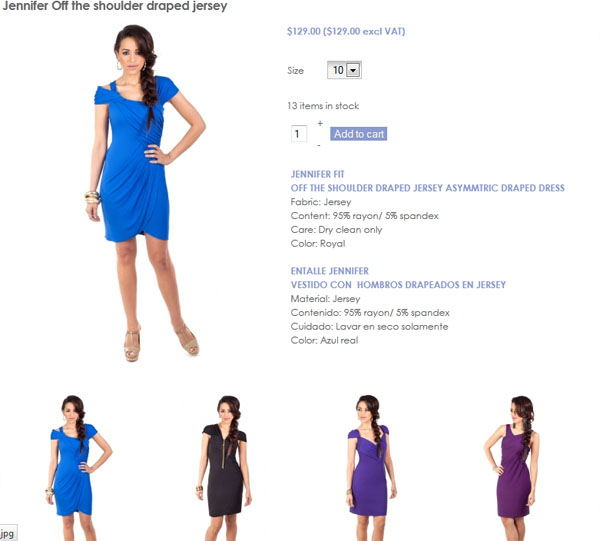
This is how is supossed to look the main product page (before actualization)
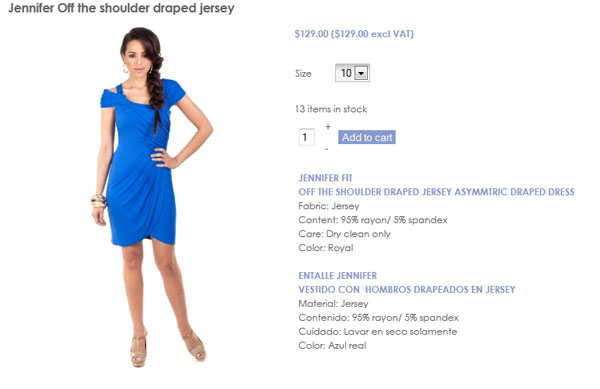
This is how is showed after the actualization.
we have intalled the actualization yesterday and we have an issue in the main product page regarding the products in the same category.
We were showing the products of the category in the module that was below the product main page. Before the actualization it was showing it properly, but after the actualization it doesn't appear anymore. We didn't make any change in the configuration, it is tha same as before the actualization.
Im attaching images of the problem.
This is the category page
These are the products in the category
This is how is supossed to look the main product page (before actualization)
This is how is showed after the actualization.
Last edit: 14 years 3 months ago by avillegas. Reason: add titles to the photos
Please Log in or Create an account to join the conversation.
14 years 3 months ago #52977
by nicolas
Replied by nicolas on topic Re: After last update, somethig doesn't work
@Pokorný Ok. So far, no one had such problem with the update. But I'm thinking that you have maybe that problem:
www.hikashop.com/en/support/documentatio...lity-issues.html#SQL
@avillegas Could you do a screenshot of the hikashop options of that module so that we can try to reproduce the problem ?
www.hikashop.com/en/support/documentatio...lity-issues.html#SQL
@avillegas Could you do a screenshot of the hikashop options of that module so that we can try to reproduce the problem ?
Please Log in or Create an account to join the conversation.
14 years 3 months ago #53170
by avillegas
Replied by avillegas on topic Re: After last update, somethig doesn't work
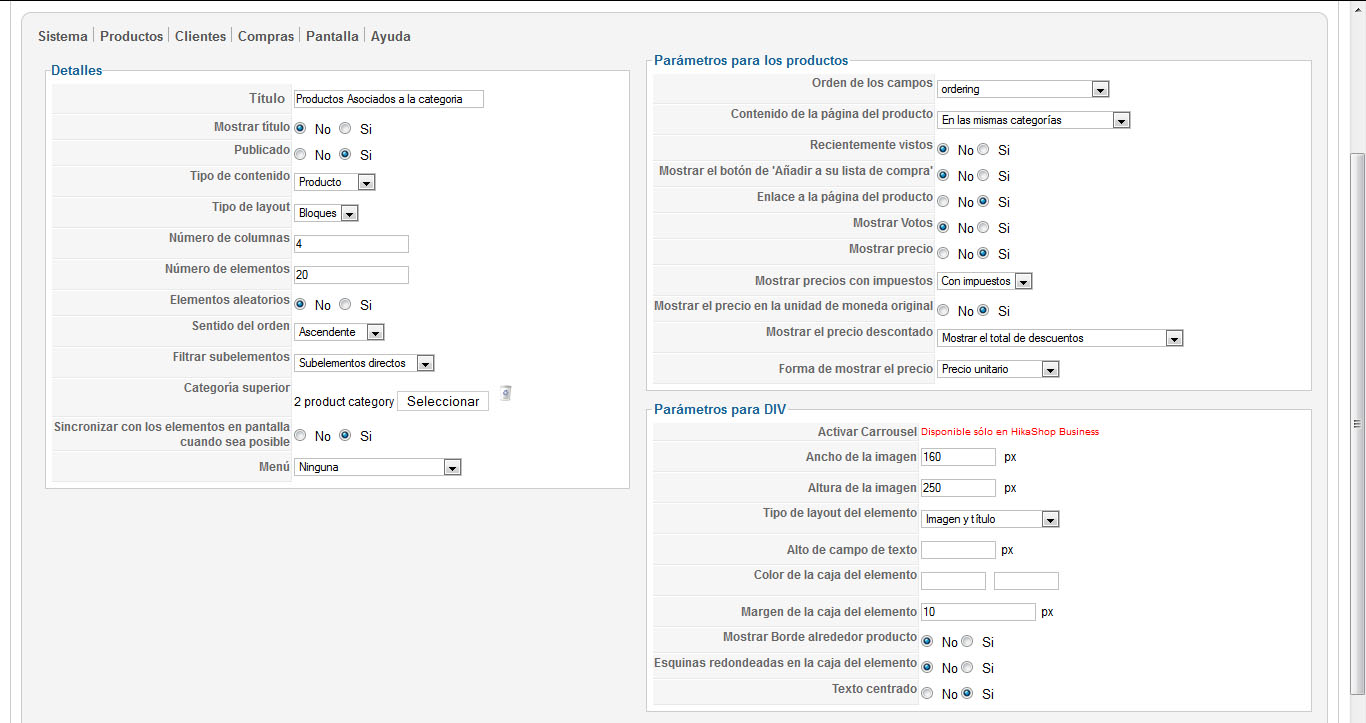
Hi, These are the configuration pages (they are in spanish sorry about that).
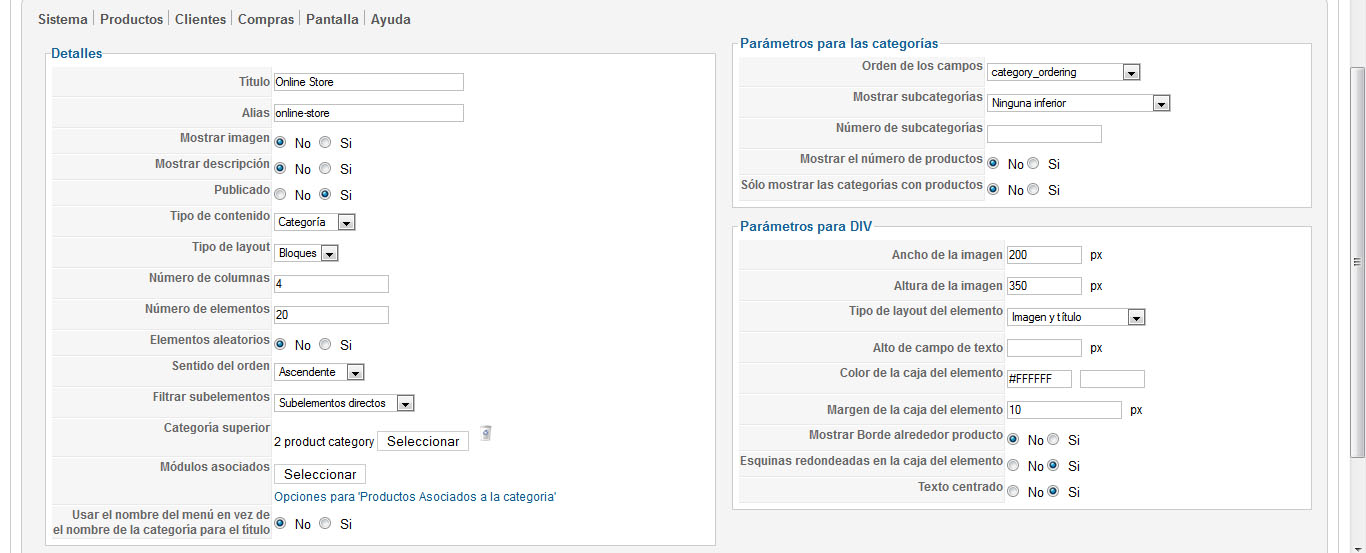
This is the menu configuration:
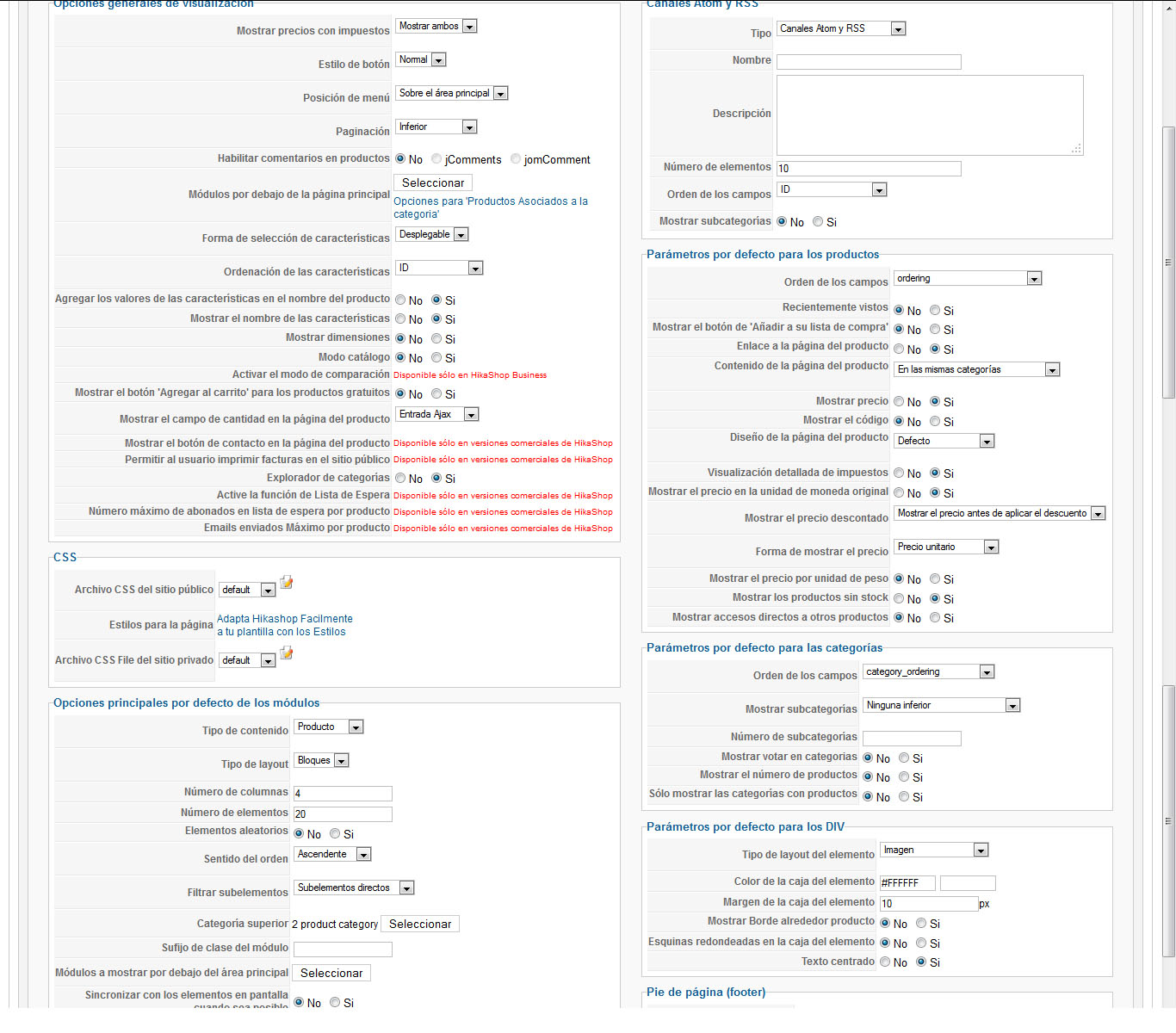
This is the dysplay configuration:
and this is the module configuration:
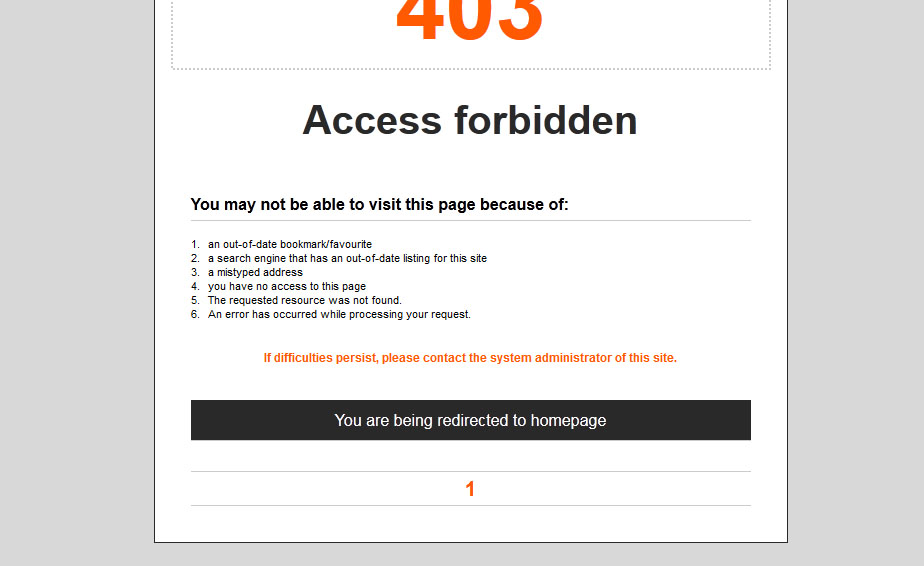
Also, we find another problem with a user registry, when you go to customer account/my addresses/.. and when you select any of the addresses, an 403 error page appears, here is a screenshot of the problem.
We try to verify if our problem was the same you send us (ALTER Issue), but since we do not know almost anything about mysql, we could't use the solution you explain in the post.
Thank you for your support.
This is the menu configuration:
This is the dysplay configuration:
and this is the module configuration:
Also, we find another problem with a user registry, when you go to customer account/my addresses/.. and when you select any of the addresses, an 403 error page appears, here is a screenshot of the problem.
We try to verify if our problem was the same you send us (ALTER Issue), but since we do not know almost anything about mysql, we could't use the solution you explain in the post.
Thank you for your support.
Please Log in or Create an account to join the conversation.
14 years 3 months ago #53202
by kito
Replied by kito on topic Re: After last update, somethig doesn't work
Had the same probblem. Update ok no error.
Now cant save the images on the products
Some kind stronge
Now cant save the images on the products
Some kind stronge
Please Log in or Create an account to join the conversation.
14 years 3 months ago #53317
by nicolas
Replied by nicolas on topic Re: After last update, somethig doesn't work
@avillegas In the configuration page, I can see that you added your module in the option "modules under the main area".
However, you should keep it unpublished there and instead publish it in the option "modules under the product page".
Regarding the address selection error, please download again HikaShop on our website and install it over your current version and that will fix the problem.
@kito There are three problems described by the other users on that thread. None of them talks about images not saving. So That's definitely NOT the same problem. Please give more information on the problem. Do you get an error when you save the image ? What if you activate the debug mode of the joomla configuration ?
However, you should keep it unpublished there and instead publish it in the option "modules under the product page".
Regarding the address selection error, please download again HikaShop on our website and install it over your current version and that will fix the problem.
@kito There are three problems described by the other users on that thread. None of them talks about images not saving. So That's definitely NOT the same problem. Please give more information on the problem. Do you get an error when you save the image ? What if you activate the debug mode of the joomla configuration ?
Please Log in or Create an account to join the conversation.
14 years 3 months ago #53373
by avillegas
Replied by avillegas on topic Re: After last update, somethig doesn't work
Hi.
We do as you say and nothing happen, the same problem no products are showed under the product page.
We do a test configuring the module under the product page (image).
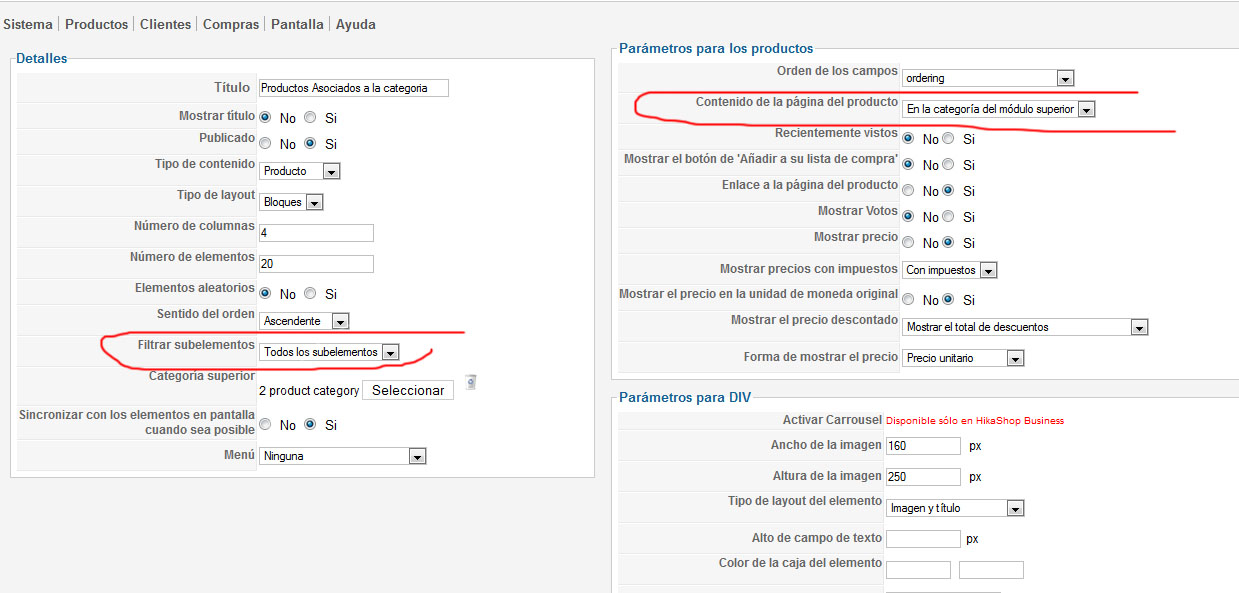
It shows the products where we wnat, but it shows all the products on all categories, not the products under the same category. It is there where we need to display the products but only the selected ones.
The other issue was fixed as you say with a new installation.
BTW Thanks for the great support, we love your product and all the help you guys bring.
We do as you say and nothing happen, the same problem no products are showed under the product page.
We do a test configuring the module under the product page (image).
It shows the products where we wnat, but it shows all the products on all categories, not the products under the same category. It is there where we need to display the products but only the selected ones.
The other issue was fixed as you say with a new installation.
BTW Thanks for the great support, we love your product and all the help you guys bring.
Please Log in or Create an account to join the conversation.
14 years 3 months ago #53472
by nicolas
Replied by nicolas on topic Re: After last update, somethig doesn't work
The module is well configured. It comes from the option "Modules under the product page" of the configuration. Please double check that you have your module enabled there and not in the "Modules under the main area" which is another option of the Display tab of the configuration.
Please Log in or Create an account to join the conversation.
14 years 3 months ago #53482
by kito
Replied by kito on topic Re: After last update, somethig doesn't work
@Nicolas
No i don't get an error when i save the picture, it simply doesn't stay there!
I think i'm going to unistall the hikashop and do everything from the beginning.
From the server i've got the the response that the ALTER permissions where on.
wish me luck
No i don't get an error when i save the picture, it simply doesn't stay there!
I think i'm going to unistall the hikashop and do everything from the beginning.
From the server i've got the the response that the ALTER permissions where on.
wish me luck
Please Log in or Create an account to join the conversation.
14 years 3 months ago #53519
by kito
Replied by kito on topic Re: After last update, somethig doesn't work
Solved the problem
I'm better now!
I'm better now!
Please Log in or Create an account to join the conversation.
14 years 3 months ago #55855
by avillegas
Replied by avillegas on topic Re: After last update, somethig doesn't work
Hi.
We do everything you say but the problem persist...
We do everything you say but the problem persist...
Please Log in or Create an account to join the conversation.
14 years 2 months ago #55905
by nicolas
Replied by nicolas on topic Re: After last update, somethig doesn't work
Please download HikaShop on our website again and install it over your current version.
I recall that we found a problem recently related to the display of such module on the product page that we fixed on our end.
That should help if everything is configured properly on your website.
I recall that we found a problem recently related to the display of such module on the product page that we fixed on our end.
That should help if everything is configured properly on your website.
Please Log in or Create an account to join the conversation.
Time to create page: 0.267 seconds