

- Posts: 40
- Thank you received: 0
Importing Images
14 years 3 months ago #55253
by kizza2
Importing Images was created by kizza2
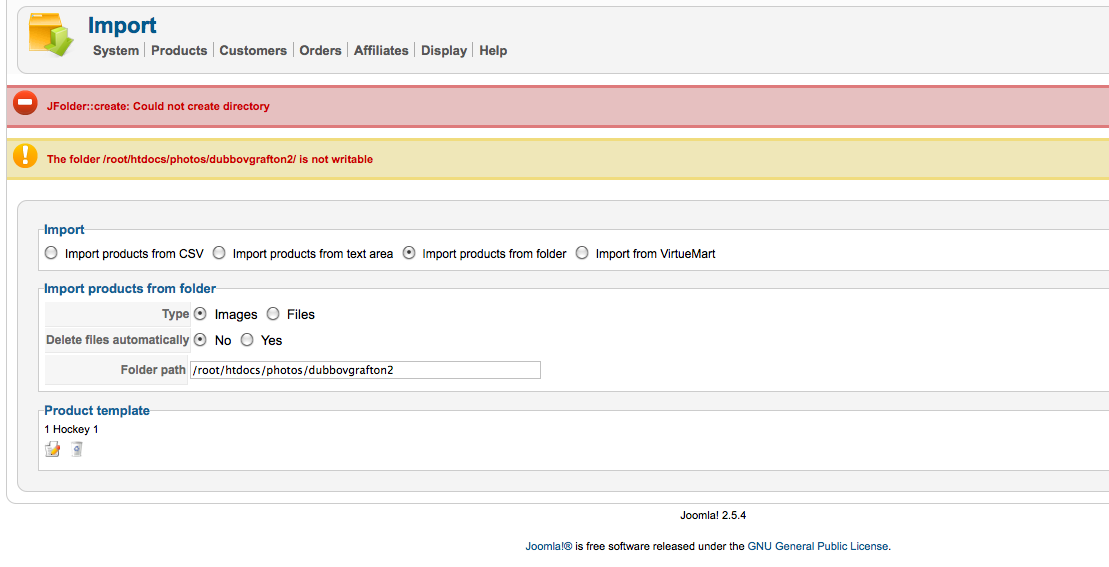
I am trying to import photos to products without success. I have uploaded all my photos via ftp and ensured all files and folders are writable. I have attached a screenshot of the message i keep getting and the info i am entering. Thnaks
Please Log in or Create an account to join the conversation.

14 years 3 months ago #55310
by nicolas
Replied by nicolas on topic Re: Importing Images
Please make sure that you didn't upload the images in the same folder than the folder you set in the "upload folder path" option of the configuration of HikaShop.
Also, turning off the FTP layer of joomla in the configuration of joomla might help.
Also, turning off the FTP layer of joomla in the configuration of joomla might help.
Please Log in or Create an account to join the conversation.
14 years 3 months ago #55352
by kizza2
Replied by kizza2 on topic Re: Importing Images
The upload folder path in Hikashop is media/com_hikashop/upload/ which is different to where i have placed my images (/root/htdocs/photos/dubbovgrafton2). My ftp setting is also set to No. Thanks
Please Log in or Create an account to join the conversation.
14 years 3 months ago #55437
by kizza2
Replied by kizza2 on topic Re: Importing Images
Just so you know I am using filezilla to upload my images because I have so many.
Please Log in or Create an account to join the conversation.
14 years 3 months ago #55514
by nicolas
Replied by nicolas on topic Re: Importing Images
Then try to change the permissions of that /root/htdocs/photos/dubbovgrafton2 folder to 777. That should hopefully avoid the problem.
Please Log in or Create an account to join the conversation.
14 years 3 months ago #55538
by kizza2
Replied by kizza2 on topic Re: Importing Images
I have the permissions of that folder also set to 777 and its still not working?
Please Log in or Create an account to join the conversation.
14 years 3 months ago #55541
by nicolas
Replied by nicolas on topic Re: Importing Images
There is still a problem with that folder. If joomla says it can't write in it, then it means that there is a permission issue on the folder. There is no other reasons I can think of.
Let's go around the problem and change the line:
if(!$fileClass->checkFolder($uploadFolder)){
to:
if($delete && !$fileClass->checkFolder($uploadFolder)){
in the file administrator/components/com_hikashop/helpers/import.php
That should avoid the problem.
Let's go around the problem and change the line:
if(!$fileClass->checkFolder($uploadFolder)){
to:
if($delete && !$fileClass->checkFolder($uploadFolder)){
in the file administrator/components/com_hikashop/helpers/import.php
That should avoid the problem.
Please Log in or Create an account to join the conversation.
14 years 3 months ago #55545
by kizza2
Replied by kizza2 on topic Re: Importing Images
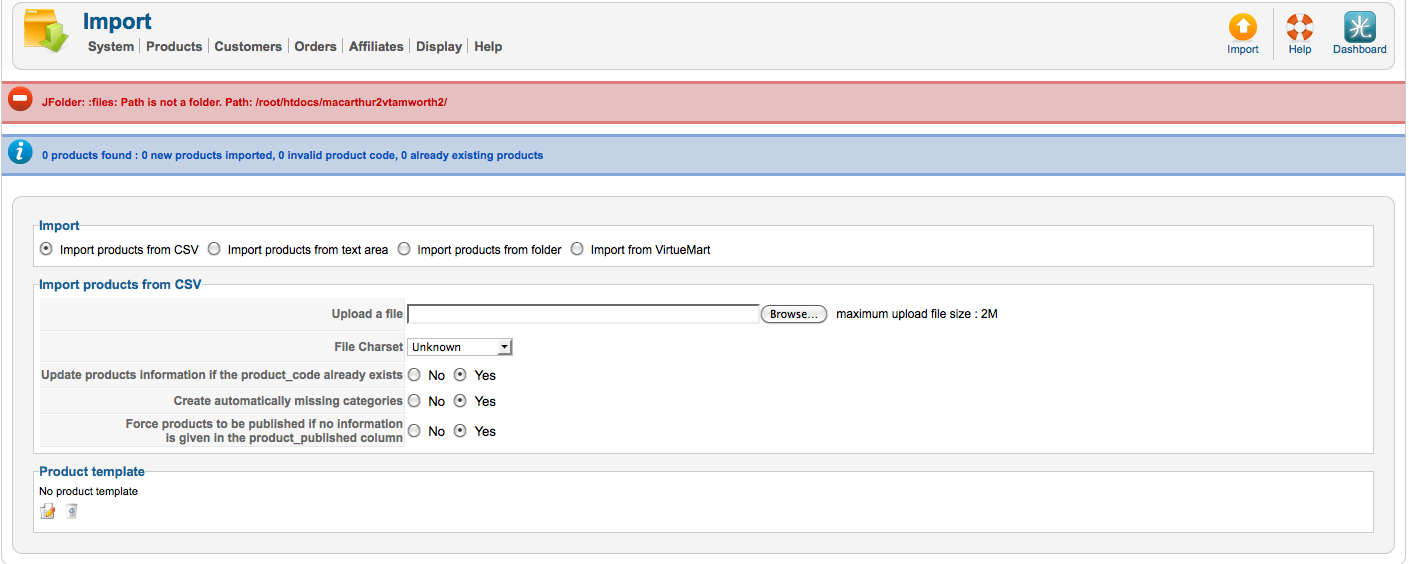
No that hasn't helped either. I now get the following. Is it possible for me to send the login details for you to take a look
Please Log in or Create an account to join the conversation.
14 years 3 months ago #55548
by nicolas
Replied by nicolas on topic Re: Importing Images
It worked actually... It let the system proceed to the next step.
Apparently, the path that you gave to the import is not correct.
Path is not a folder means that the path is not correct. That's probably why the system wouldn't be able to write in it.
Apparently, the path that you gave to the import is not correct.
Path is not a folder means that the path is not correct. That's probably why the system wouldn't be able to write in it.
Please Log in or Create an account to join the conversation.
14 years 3 months ago #55555
by kizza2
Replied by kizza2 on topic Re: Importing Images
Ok I have tried the following, can you please give an example of what i need to be entering
/root/htdocs/photos/dubbovgrafton2
root/htdocs/photos/dubbovgrafton2
/htdocs/images/dubbovgrafton2
/hermes/waloraweb098/b55/pow.vixpix/htdocs/dubbovgrafton2
/root/htdocs/dubbovgrafton2
/root/htdocs/photos/dubbovgrafton2
root/htdocs/photos/dubbovgrafton2
/htdocs/images/dubbovgrafton2
/hermes/waloraweb098/b55/pow.vixpix/htdocs/dubbovgrafton2
/root/htdocs/dubbovgrafton2
Please Log in or Create an account to join the conversation.
14 years 3 months ago #55557
by nicolas
Replied by nicolas on topic Re: Importing Images
You need to enter the absolute path of the folder.
I can't tell you what that is as I don't know your server's folder structure nor do I know how and where you uploaded your images.
I can't tell you what that is as I don't know your server's folder structure nor do I know how and where you uploaded your images.
Please Log in or Create an account to join the conversation.
14 years 3 months ago #55566
by kizza2
Replied by kizza2 on topic Re: Importing Images
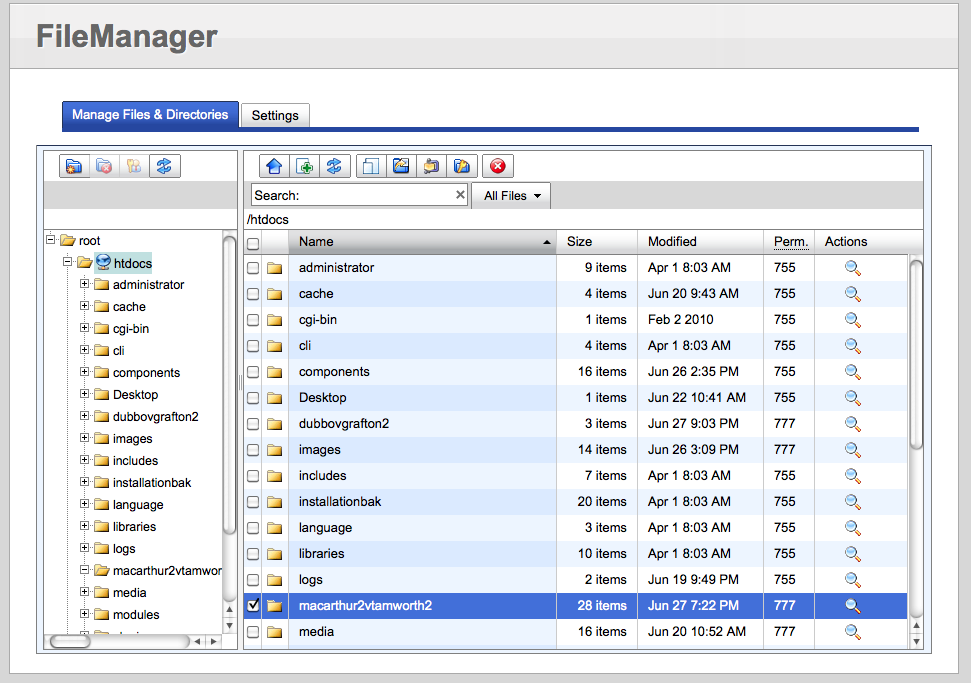
Hi. Sorry but we are still having trouble identifying our absolute path. Please find attached a snapshot of our file structure. It highlights the folder we wish to use - macarthur2vtamworth2. THe site url is vixpixphotography.com
Are you able to define the absolute path from this information.
THanks
Are you able to define the absolute path from this information.
THanks
Please Log in or Create an account to join the conversation.
14 years 3 months ago #55568
by nicolas
Replied by nicolas on topic Re: Importing Images
That's the structure of your website folder.
But that doesn't give any information on the folders in which the website is located on the server.
The simplest will be to enter the relative path of your folder from your website's root directory. So it should be just the name of your folder, without any slashes.
But that doesn't give any information on the folders in which the website is located on the server.
The simplest will be to enter the relative path of your folder from your website's root directory. So it should be just the name of your folder, without any slashes.
Please Log in or Create an account to join the conversation.
14 years 3 months ago #55569
by kizza2
Replied by kizza2 on topic Re: Importing Images
Ok. THanks for that. We seem to have gotten a little further by using the relative path of macarthur2vtamworth2. However we now get the following message.
Fatal error: Allowed memory size of 18874368 bytes exhausted (tried to allocate 9600 bytes) in /hermes/waloraweb098/b55/pow.vixpix/htdocs/administrator/components/com_hikashop/helpers/image.php on line 390
Any ideas?
Fatal error: Allowed memory size of 18874368 bytes exhausted (tried to allocate 9600 bytes) in /hermes/waloraweb098/b55/pow.vixpix/htdocs/administrator/components/com_hikashop/helpers/image.php on line 390
Any ideas?
Please Log in or Create an account to join the conversation.
14 years 3 months ago #55576
by nicolas
Replied by nicolas on topic Re: Importing Images
Remove the "image width/height" options that you set in the Files tab of the configuration.
It is apparently trying to resize all your images on the fly and the resources restrictions of your server are too low for that.
It is apparently trying to resize all your images on the fly and the resources restrictions of your server are too low for that.
The following user(s) said Thank You: loveawake.ru
Please Log in or Create an account to join the conversation.
14 years 3 months ago #55582
by kizza2
Replied by kizza2 on topic Re: Importing Images
we are still getting the error message after removing the widths and heights. Would we be better transfering away from this server, it seems to have alot of issues
Fatal error: Allowed memory size of 18874368 bytes exhausted (tried to allocate 9600 bytes) in /hermes/waloraweb098/b55/pow.vixpix/htdocs/administrator/components/com_hikashop/helpers/image.php on line 390
Fatal error: Allowed memory size of 18874368 bytes exhausted (tried to allocate 9600 bytes) in /hermes/waloraweb098/b55/pow.vixpix/htdocs/administrator/components/com_hikashop/helpers/image.php on line 390
Please Log in or Create an account to join the conversation.
14 years 3 months ago #55584
by nicolas
Replied by nicolas on topic Re: Importing Images
Try to do it several times. The images should be imported little by little.
But you could ask your hosting company to increase your memory_limit setting, at least temporarily.
But you could ask your hosting company to increase your memory_limit setting, at least temporarily.
Please Log in or Create an account to join the conversation.
14 years 3 months ago #55591
by kizza2
Replied by kizza2 on topic Re: Importing Images
Hi. Firstly I would just like to say thankyou for your patience and help. I have been doing a little bit of testing and it appears that the server is dodgy. I was wondering if it is possible to get a copy of hikashop business with a 24hr license on it to run on a new server to make sure it works, once again thanks for your help.
Please Log in or Create an account to join the conversation.
14 years 3 months ago #55665
by nicolas
Replied by nicolas on topic Re: Importing Images
You can use the package you have and change the URL temporarily in the Your account->Your subscriptions on our website.
Please Log in or Create an account to join the conversation.
Time to create page: 0.310 seconds