

- Posts: 12
- Thank you received: 0
Restrict overseas orders
14 years 2 months ago #58045
by chama
Restrict overseas orders was created by chama
Hi,
I would like to restrict users placing orders from overseas. Can you please advise what is the best way to achieve this, and if required, how to remove the restriction in future.
Thanks in advance.
I would like to restrict users placing orders from overseas. Can you please advise what is the best way to achieve this, and if required, how to remove the restriction in future.
Thanks in advance.
Please Log in or Create an account to join the conversation.

Less
More
- Posts: 12953
- Thank you received: 1778
14 years 2 months ago - 14 years 2 months ago #58055
by Mohamed Thelji
Replied by Mohamed Thelji on topic Re: Restrict overseas orders
Hello,
You should use Zone's restrictions then you'll be able to restrict overseas orders.
You'll just have to :
- Create a zone
- Go to your payments method
- Set the zone option to the zone that you created.
You should use Zone's restrictions then you'll be able to restrict overseas orders.
You'll just have to :
- Create a zone
- Go to your payments method
- Set the zone option to the zone that you created.
Last edit: 14 years 2 months ago by Mohamed Thelji.
The following user(s) said Thank You: chama
Please Log in or Create an account to join the conversation.
14 years 2 months ago #58406
by chama
Replied by chama on topic Re: Restrict overseas orders
Thanks Mohamed,
I followed the instructions and when the address is overseas, the user doesn't get the 'Payment Method' option, therefore, cannot proceed with the checkout. On the top of the website, a message appears as 'No payment methods found'.
Functionally this is fine, but is there way that I can do this more 'user friendlier' way. Such as a message on the page where the items are displayed. I have attached a screenshot with how the message is displayed by default.
Many thanks
Chama...
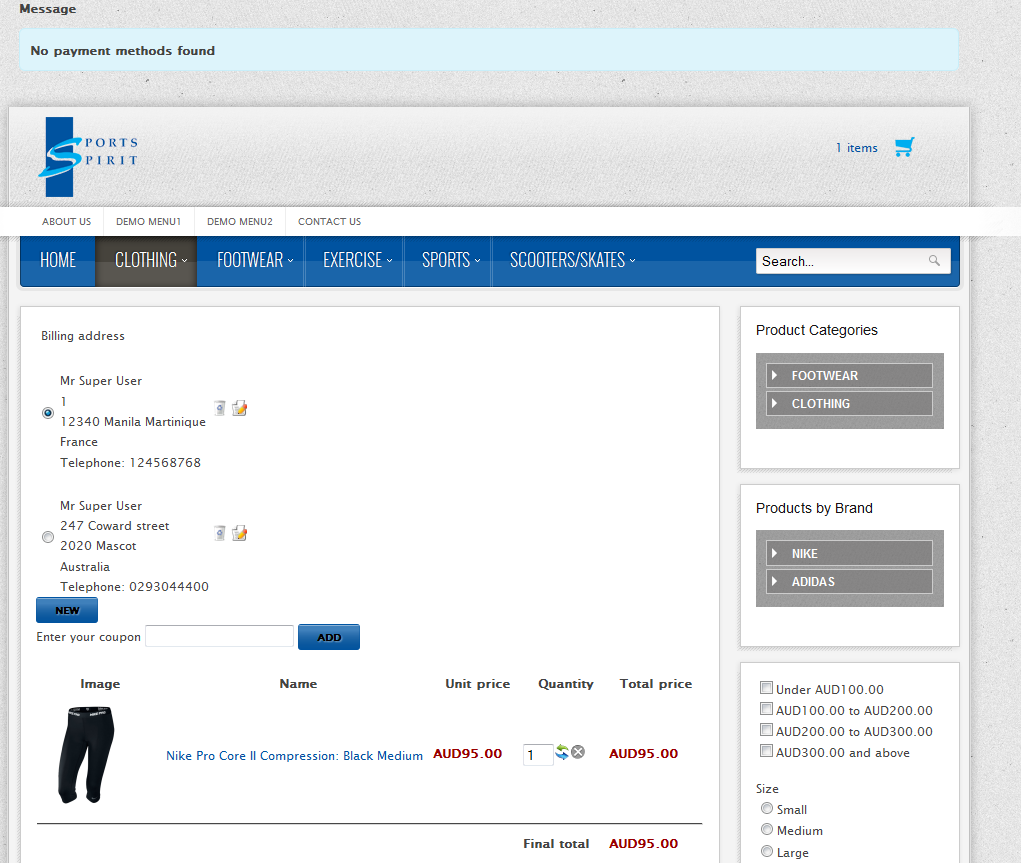
I followed the instructions and when the address is overseas, the user doesn't get the 'Payment Method' option, therefore, cannot proceed with the checkout. On the top of the website, a message appears as 'No payment methods found'.
Functionally this is fine, but is there way that I can do this more 'user friendlier' way. Such as a message on the page where the items are displayed. I have attached a screenshot with how the message is displayed by default.
Many thanks
Chama...
Please Log in or Create an account to join the conversation.
Less
More
- Posts: 12953
- Thank you received: 1778
14 years 2 months ago #58458
by Mohamed Thelji
Replied by Mohamed Thelji on topic Re: Restrict overseas orders
You can for example change the "no payments methods found" translation word by editing the English (United Kingdom) file in "Hikashop->System->Configuration->Language" and changing the line :
by :
.
Hope this will help you.
Code:
NO_PAYMENT_METHODS_FOUND="No payment methods found"
Code:
NO_PAYMENT_METHODS_FOUND="your translation"
Hope this will help you.
Please Log in or Create an account to join the conversation.
Time to create page: 0.241 seconds