

- Posts: 6
- Thank you received: 0
Re: can't configure payment method
14 years 3 months ago - 14 years 3 months ago #58524
by Dafna
can't configure payment method was created by Dafna
Hey
I am using paypal pro. I've inserted all the fields including all API fields. Yet i still get the message "Please configure your payment methods, No payment methods found" when trying to pay in my cart.
I've looked to see if it's zone related and made sure they all fit.
I made sure that this payment plugin is enables.
Also checked that i have shipping and all product details configured.
What am i missing? Is there anything else i need to configure?
Please Help.
Thank you
I am using paypal pro. I've inserted all the fields including all API fields. Yet i still get the message "Please configure your payment methods, No payment methods found" when trying to pay in my cart.
I've looked to see if it's zone related and made sure they all fit.
I made sure that this payment plugin is enables.
Also checked that i have shipping and all product details configured.
What am i missing? Is there anything else i need to configure?
Please Help.
Thank you
Last edit: 14 years 3 months ago by Dafna. Reason: added text
Please Log in or Create an account to join the conversation.

Less
More
- Posts: 12953
- Thank you received: 1778
14 years 3 months ago #58542
by Mohamed Thelji
Replied by Mohamed Thelji on topic Re: can't configure payment method
Hello,
Can you :
- put on the joomla debug mode
- go through the checkout
- tell me if it shows you an error message
Can you :
- put on the joomla debug mode
- go through the checkout
- tell me if it shows you an error message
Please Log in or Create an account to join the conversation.
14 years 3 months ago - 14 years 3 months ago #58572
by Dafna
Replied by Dafna on topic Re: can't configure payment method
I got
"Catchable fatal error: Object of class stdClass could not be converted to string in /home/sharon/public_html/plugins/system/debug/debug.php on line 283"
which is:
282 $html .= '<code>';
283 $html .= $sKey.' ⇒ '.$entries.'<br />';
284 $html .= '</code>';
but before i could turn the debug off the entire site went blank!
can't get the admin panel- just blank. on front end i get an error in my yootheme widgetkit files (widgetkit.php on line 129)
I have no idea what have i done. I clicked nothing else. went all through my ftp client log to see if maybe something there... the entire site... oh my...
please help
"Catchable fatal error: Object of class stdClass could not be converted to string in /home/sharon/public_html/plugins/system/debug/debug.php on line 283"
which is:
282 $html .= '<code>';
283 $html .= $sKey.' ⇒ '.$entries.'<br />';
284 $html .= '</code>';
but before i could turn the debug off the entire site went blank!
can't get the admin panel- just blank. on front end i get an error in my yootheme widgetkit files (widgetkit.php on line 129)
I have no idea what have i done. I clicked nothing else. went all through my ftp client log to see if maybe something there... the entire site... oh my...
please help
Last edit: 14 years 3 months ago by Dafna.
Please Log in or Create an account to join the conversation.

14 years 3 months ago #58586
by nicolas
Replied by nicolas on topic Re: can't configure payment method
Edit the configuration.php file of your website and change the value of the debug variable to 0 to turn it off.
This error is not related to HikaShop. So it doesn't give any information on the problem.
Could you please provide a screenshot of the options of your payment plugin so that we can see what you did ?
This error is not related to HikaShop. So it doesn't give any information on the problem.
Could you please provide a screenshot of the options of your payment plugin so that we can see what you did ?
Please Log in or Create an account to join the conversation.
14 years 3 months ago #58589
by Dafna
Replied by Dafna on topic Re: can't configure payment method
Please Log in or Create an account to join the conversation.
Less
More
- Posts: 12953
- Thank you received: 1778
14 years 3 months ago #58591
by Mohamed Thelji
Replied by Mohamed Thelji on topic Re: can't configure payment method
Hello,
Can you :
1. Edit the configuration.php file on your website and change the value of the error_reporting to 6135, this will show all the errors.
2. Rename your file "home/sharon/public_html/plugins/system/debug"
and tell me if it works/display an error message.
Can you :
1. Edit the configuration.php file on your website and change the value of the error_reporting to 6135, this will show all the errors.
2. Rename your file "home/sharon/public_html/plugins/system/debug"
and tell me if it works/display an error message.
Please Log in or Create an account to join the conversation.
14 years 3 months ago #58592
by Dafna
Replied by Dafna on topic Re: can't configure payment method
on the front end it shows:
Class 'slideshowWidgetkitHelper' not found in /home/sharon/public_html/administrator/components/com_widgetkit/classes/widgetkit.php on line 129
but that was before as well. I can't see why it's related when before the first debug this plugin worked fine.
maybe something between them contradicts each other?
on the back end there is nothing. blank page.
Class 'slideshowWidgetkitHelper' not found in /home/sharon/public_html/administrator/components/com_widgetkit/classes/widgetkit.php on line 129
but that was before as well. I can't see why it's related when before the first debug this plugin worked fine.
maybe something between them contradicts each other?
on the back end there is nothing. blank page.
Please Log in or Create an account to join the conversation.
Less
More
- Posts: 12953
- Thank you received: 1778
14 years 3 months ago #58646
by Mohamed Thelji
Replied by Mohamed Thelji on topic Re: can't configure payment method
Hello,
The problem is not comming from hikashop so you should maybe ask to the "widgetkit" developpers, but can you rename your "/home/sharon/public_html/administrator/components/com_widgetkit/" file and tell me if it works ?
The problem is not comming from hikashop so you should maybe ask to the "widgetkit" developpers, but can you rename your "/home/sharon/public_html/administrator/components/com_widgetkit/" file and tell me if it works ?
Please Log in or Create an account to join the conversation.
14 years 3 months ago - 14 years 3 months ago #58649
by Dafna
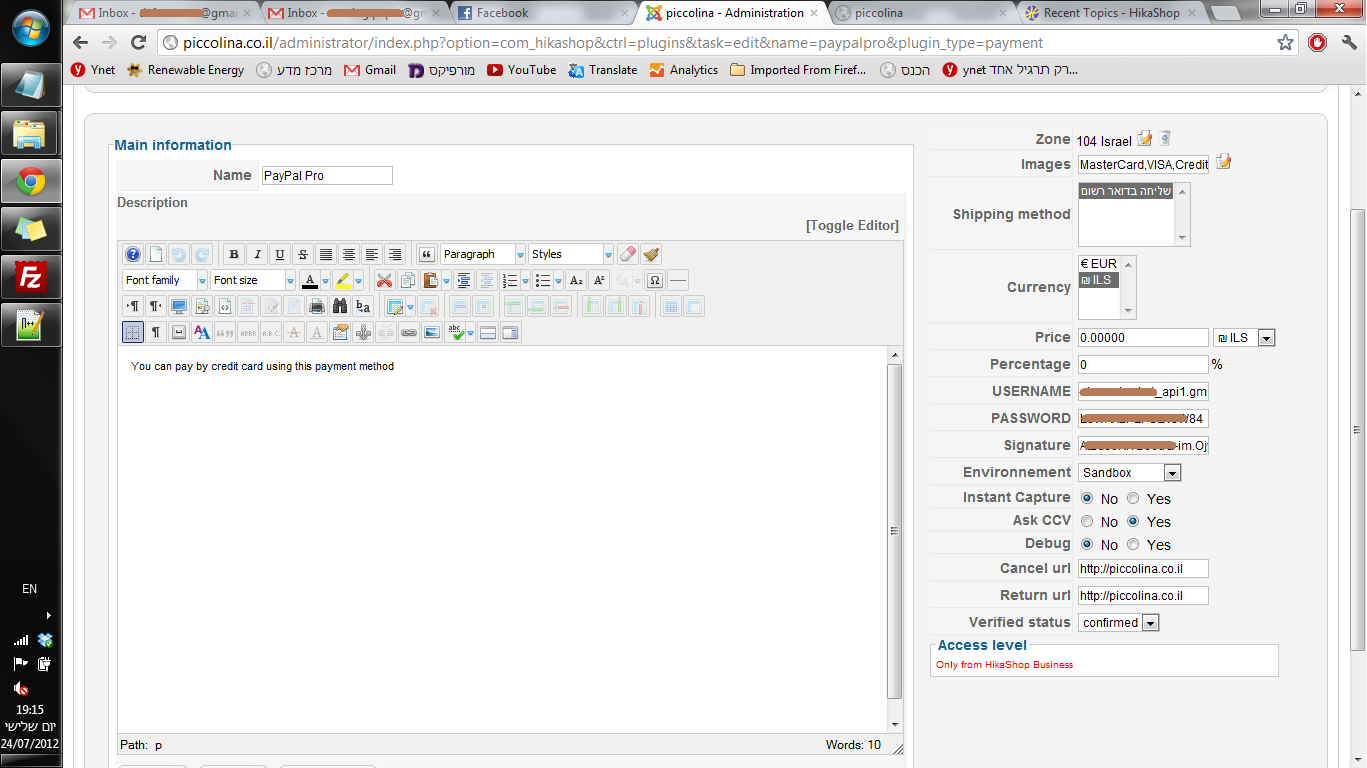
I solved the problem for the site being down. the debug on the php was 0 but in the SQL it was 1.
but then i still have my hikashop paypal not working... :S
attached a screen shot of the config in the paypal pro hikashop plugin.
Replied by Dafna on topic Re: can't configure payment method
I solved the problem for the site being down. the debug on the php was 0 but in the SQL it was 1.
but then i still have my hikashop paypal not working... :S
attached a screen shot of the config in the paypal pro hikashop plugin.
Last edit: 14 years 3 months ago by Dafna.
Please Log in or Create an account to join the conversation.
14 years 3 months ago #58702
by nicolas
Replied by nicolas on topic Re: can't configure payment method
Please remove the zone restriction and unselect the shipping method and the currency (press the CTRL key and click on the selection) in your payment plugin options and then it should hopefully display.
Please Log in or Create an account to join the conversation.
14 years 3 months ago #58951
by Dafna
Replied by Dafna on topic Re: can't configure payment method
Hey
thanks for all the help
I played with the zone and it did removed half of the error.
Now I only get "No payment methods found".
How could that be if i have the paypal advanced on enabled?
Again, thanks.
thanks for all the help
I played with the zone and it did removed half of the error.
Now I only get "No payment methods found".
How could that be if i have the paypal advanced on enabled?
Again, thanks.
Please Log in or Create an account to join the conversation.
14 years 3 months ago #58953
by nicolas
Replied by nicolas on topic Re: can't configure payment method
Oh I didn't saw that your were using PayPal Pro.
That's the problem.
PayPal Pro only supports Canada, USA and UK. So you can't use it if you're in Israel.
That's a limitation set in place by PayPal itself.
You will have to use another payment gateway like PayPal standard, Skrill, or AlertPay.
That's the problem.
PayPal Pro only supports Canada, USA and UK. So you can't use it if you're in Israel.
That's a limitation set in place by PayPal itself.
You will have to use another payment gateway like PayPal standard, Skrill, or AlertPay.
Please Log in or Create an account to join the conversation.
6 hours 26 minutes ago #100000698
by nicolas
Replied by nicolas on topic Re: can't configure payment method
Hi,
For anyone reading this: for card payments in Israel, there is now a Cardcom payment plugin for HikaShop.
The customer pays by credit card on Cardcom's secure payment page, in one payment or in installments (tashlumim), and the order is confirmed when Cardcom notifies your shop. Cardcom can also issue the tax invoice and receipt of the order at the same time.
It needs a Cardcom account.
For anyone reading this: for card payments in Israel, there is now a Cardcom payment plugin for HikaShop.
The customer pays by credit card on Cardcom's secure payment page, in one payment or in installments (tashlumim), and the order is confirmed when Cardcom notifies your shop. Cardcom can also issue the tax invoice and receipt of the order at the same time.
It needs a Cardcom account.
Please Log in or Create an account to join the conversation.
Time to create page: 0.104 seconds