
Problem with comment

14 years 1 month ago #62438
by Teto
Problem with comment was created by Teto
Hello
i installed the last release of hika 1.5.9
Today I found a problem with the comments and votes.
I selected the option to connect vote and comment.
I inserted a new comment, then i can see the stars but not the comment
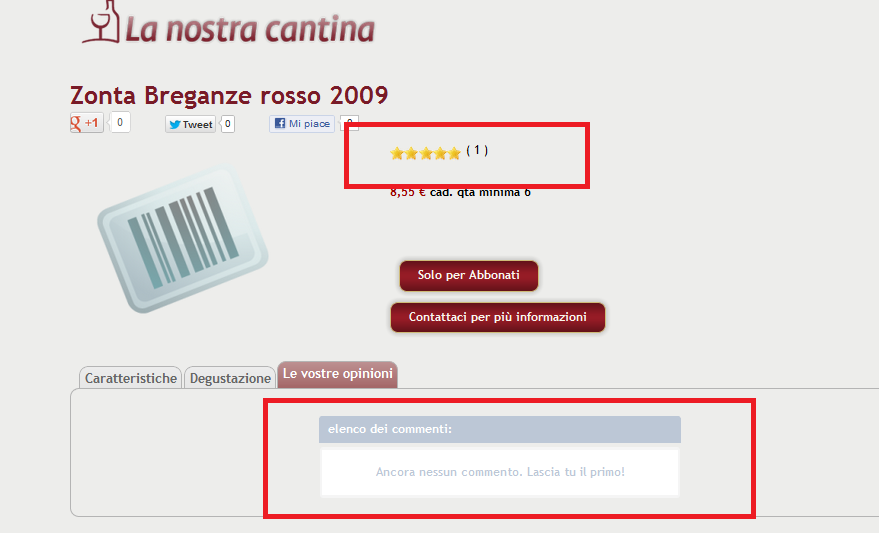
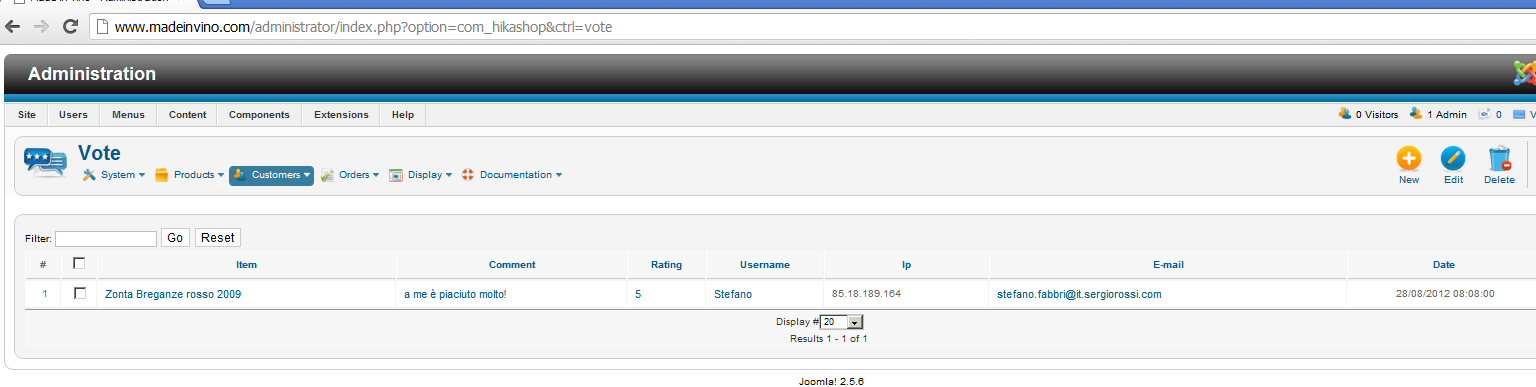
this is strange, until last week it was fine.
is it a problem of the new version or something else?
Thanks and regards.
i installed the last release of hika 1.5.9
Today I found a problem with the comments and votes.
I selected the option to connect vote and comment.
I inserted a new comment, then i can see the stars but not the comment
this is strange, until last week it was fine.
is it a problem of the new version or something else?
Thanks and regards.
Please Log in or Create an account to join the conversation.

14 years 1 month ago #62545
by Xavier
Replied by Xavier on topic Re: Problem with comment
Hi Teto,
I just tried the comments on my end with the last version of HikaShop, it's working fine.
You edited the view to display the products, don't you have mess a part of the content present in the page ?
In the show_tabular view of hikashop, the published comments are displayed in another tab, do you copy/paste this part in your tab view "Le vostre opinioni" ?
I just tried the comments on my end with the last version of HikaShop, it's working fine.
You edited the view to display the products, don't you have mess a part of the content present in the page ?
In the show_tabular view of hikashop, the published comments are displayed in another tab, do you copy/paste this part in your tab view "Le vostre opinioni" ?
Please Log in or Create an account to join the conversation.
14 years 1 month ago #62565
by Teto
Replied by Teto on topic Re: Problem with comment
Hello Xavier
to move the comments in another tab i used the Tabber v2.1.3 plug-in and i modified the view "product / Show default" and "product / show".
To do that i followed the instruncton of this post www.hikashop.com/en/forum/4-how-to/56993...on-product-page.html
Until last week everything was fine.
I didn't modify the view show_tabular
I didn't change nothing, on monday I installed the new versione 1.5.9 and yesterday i verified I cannot see the comments.
Do you have any ideas?
to move the comments in another tab i used the Tabber v2.1.3 plug-in and i modified the view "product / Show default" and "product / show".
To do that i followed the instruncton of this post www.hikashop.com/en/forum/4-how-to/56993...on-product-page.html
Until last week everything was fine.
I didn't modify the view show_tabular
I didn't change nothing, on monday I installed the new versione 1.5.9 and yesterday i verified I cannot see the comments.
Do you have any ideas?
Please Log in or Create an account to join the conversation.
14 years 1 month ago #62593
by Xavier
Replied by Xavier on topic Re: Problem with comment
For the moment I just think that a part of code is missing.
Can you chekc if you have these lines:
In you show_default view.
Can you chekc if you have these lines:
Code:
<div id="hikashop_product_vote_listing" class="hikashop_product_vote_listing">
<?php
if($this->params->get('show_vote_product')){
$js = '';
if(isset($this->element->main)){
$product_id = $this->element->main->product_id;
}else{
$product_id = $this->element->product_id;
}
$this->params->set('product_id',$product_id);
echo hikashop_getLayout('vote', 'listing', $this->params, $js);
?>
</div>
Please Log in or Create an account to join the conversation.
14 years 1 month ago - 14 years 1 month ago #62605
by Teto
Replied by Teto on topic Re: Problem with comment
Hello
i had this code
Did you modify this view from 1.5.8 to 1.5.9?
I didn't touch this part.
Anyway I substituted the existing code with the one you indicated me and now it works
Thank you very much!
i had this code
Code:
<div id="hikashop_product_vote_listing" class="hikashop_product_vote_listing">
<?php
if($this->params->get('show_vote_product')){
$js = '';
$params = null; //Params already existing in the previous getLayout('vote', ...)
echo hikashop_getLayout('vote', 'listing', $params, $js);
?>
</div>
Did you modify this view from 1.5.8 to 1.5.9?
I didn't touch this part.
Anyway I substituted the existing code with the one you indicated me and now it works
Thank you very much!
Last edit: 14 years 1 month ago by Teto.
Please Log in or Create an account to join the conversation.
14 years 1 month ago #62608
by Xavier
Replied by Xavier on topic Re: Problem with comment
I think that it has been changed between these two versions, can you try to change your code by my code please.
Please Log in or Create an account to join the conversation.
14 years 1 month ago #62612
by Teto
Replied by Teto on topic Re: Problem with comment
I did it, it works.
Thank you!!!
Thank you!!!
Please Log in or Create an account to join the conversation.
Time to create page: 0.196 seconds