
- Posts: 53
- Thank you received: 0
Upgrade from 1.55 to 1.60 Error with custom fields
- teleactive
-
 Topic Author
- Offline
Less
More
13 years 11 months ago #68140
by teleactive
Upgrade from 1.55 to 1.60 Error with custom fields was created by teleactive
Hi,
I got this error on the product display pages when I attempted to upgrade to the latest version. The error is related to custom fields created for the several categories of products.
Begin Rental Date
Warning: preg_split() [function.preg-split]: Compilation failed: range out of order in character class at offset 3 in /home/gmm466/public_html/administrator/components/com_hikashop/classes/field.php on line 1326
Warning: Invalid argument supplied for foreach() in /home/gmm466/public_html/administrator/components/com_hikashop/classes/field.php on line 1326
Ending Rental Date
Warning: preg_split() [function.preg-split]: Compilation failed: range out of order in character class at offset 3 in /home/gmm466/public_html/administrator/components/com_hikashop/classes/field.php on line 1326
Warning: Invalid argument supplied for foreach() in /home/gmm466/public_html/administrator/components/com_hikashop/classes/field.php on line 1326
I got this error on the product display pages when I attempted to upgrade to the latest version. The error is related to custom fields created for the several categories of products.
Begin Rental Date
Warning: preg_split() [function.preg-split]: Compilation failed: range out of order in character class at offset 3 in /home/gmm466/public_html/administrator/components/com_hikashop/classes/field.php on line 1326
Warning: Invalid argument supplied for foreach() in /home/gmm466/public_html/administrator/components/com_hikashop/classes/field.php on line 1326
Ending Rental Date
Warning: preg_split() [function.preg-split]: Compilation failed: range out of order in character class at offset 3 in /home/gmm466/public_html/administrator/components/com_hikashop/classes/field.php on line 1326
Warning: Invalid argument supplied for foreach() in /home/gmm466/public_html/administrator/components/com_hikashop/classes/field.php on line 1326
Please Log in or Create an account to join the conversation.

13 years 11 months ago #68156
by nicolas
Replied by nicolas on topic Re: Upgrade from 1.55 to 1.60 Error with custom fields
Hi,
That error comes from the format of the date of your custom fields.
What format are you using ?
That error comes from the format of the date of your custom fields.
What format are you using ?
Please Log in or Create an account to join the conversation.
- teleactive
-
Topic Author
- Offline
Less
More
- Posts: 53
- Thank you received: 0
13 years 11 months ago #68157
by teleactive
Replied by teleactive on topic Re: Upgrade from 1.55 to 1.60 Error with custom fields
Please see attached png for custom field.
Please Log in or Create an account to join the conversation.
13 years 11 months ago #68166
by nicolas
Replied by nicolas on topic Re: Upgrade from 1.55 to 1.60 Error with custom fields
The format of your custom field is not valid.
Please remove all the text after %Y and that should help avoid the problem.
Please remove all the text after %Y and that should help avoid the problem.
The following user(s) said Thank You: teleactive
Please Log in or Create an account to join the conversation.
- teleactive
-
Topic Author
- Offline
Less
More
- Posts: 53
- Thank you received: 0
13 years 11 months ago #68171
by teleactive
Replied by teleactive on topic Re: Upgrade from 1.55 to 1.60 Error with custom fields
That fixed it.
On another issue. I thought the language files would not be touched on the upgrade. It seems the language file is has been deleted with all my changes. Are there any options to restore it?
On another issue. I thought the language files would not be touched on the upgrade. It seems the language file is has been deleted with all my changes. Are there any options to restore it?
Please Log in or Create an account to join the conversation.
13 years 11 months ago #68179
by nicolas
Replied by nicolas on topic Re: Upgrade from 1.55 to 1.60 Error with custom fields
The language file is updated on each update.
However, if you change your translations with translation overrides as explained in our documentation you won't loose them as the changes will be located in the override file:
www.hikashop.com/en/download/languages.html#modify
If the changes were made in the main translation file, then the only solution to restore them would be to take them from a backup. Note that you should always do a backup of your website before updating something on your website.
However, if you change your translations with translation overrides as explained in our documentation you won't loose them as the changes will be located in the override file:
www.hikashop.com/en/download/languages.html#modify
If the changes were made in the main translation file, then the only solution to restore them would be to take them from a backup. Note that you should always do a backup of your website before updating something on your website.
Please Log in or Create an account to join the conversation.
- teleactive
-
Topic Author
- Offline
Less
More
- Posts: 53
- Thank you received: 0
13 years 11 months ago #68185
by teleactive
Replied by teleactive on topic Re: Upgrade from 1.55 to 1.60 Error with custom fields
hi, good advice, where exactly is that language file located? Is there new data. I guess I have to do a comparison of the two files and look for differences?
Please Log in or Create an account to join the conversation.
13 years 11 months ago #68187
by nicolas
Replied by nicolas on topic Re: Upgrade from 1.55 to 1.60 Error with custom fields
It's in the folder languages/en-GB for english.
All releases of HikaShop have new translations added at the end of the file.
All releases of HikaShop have new translations added at the end of the file.
Please Log in or Create an account to join the conversation.
- teleactive
-
Topic Author
- Offline
Less
More
- Posts: 53
- Thank you received: 0
13 years 11 months ago #68189
by teleactive
Replied by teleactive on topic Re: Upgrade from 1.55 to 1.60 Error with custom fields
hi, i'm doing a test transaction and I get this error message at checkout after entering cc#
Is this not the proper format for having a single order confirmation email sent to two owners of the web store?
Could not instantiate mail function.
Could not instantiate mail function.
Invalid address: daleg@gammie.com, paulg@gammie.comCould not instantiate mail function. Invalid address: daleg@gammie.com, paulg@gammie.comCould not instantiate mail function.
Is this not the proper format for having a single order confirmation email sent to two owners of the web store?
Could not instantiate mail function.
Could not instantiate mail function.
Invalid address: daleg@gammie.com, paulg@gammie.comCould not instantiate mail function. Invalid address: daleg@gammie.com, paulg@gammie.comCould not instantiate mail function.
Please Log in or Create an account to join the conversation.
13 years 11 months ago #68319
by nicolas
Replied by nicolas on topic Re: Upgrade from 1.55 to 1.60 Error with custom fields
Hi,
In the "From address" field, you should only have one email address.
In the "Order creation notifications email address" you can have several emails separated by commas.
If that's what you did, then it must be a problem of configuration of your joomla email settings in the joomla configuration.
In the "From address" field, you should only have one email address.
In the "Order creation notifications email address" you can have several emails separated by commas.
If that's what you did, then it must be a problem of configuration of your joomla email settings in the joomla configuration.
Please Log in or Create an account to join the conversation.
- teleactive
-
Topic Author
- Offline
Less
More
- Posts: 53
- Thank you received: 0
13 years 11 months ago #68323
by teleactive
Replied by teleactive on topic Re: Upgrade from 1.55 to 1.60 Error with custom fields
HI,
Attached is the current Mail Settings in Joomla. Maybe you could confirm that this is a valid configuration that won't be problematic.
Thanks,
Kevin
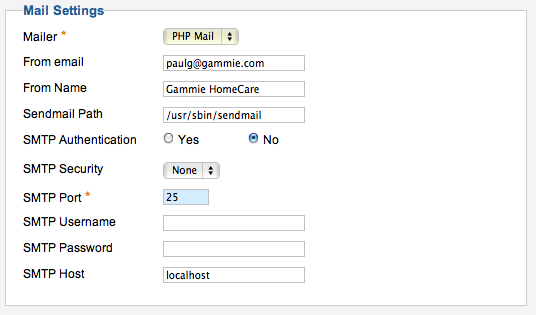
Attached is the current Mail Settings in Joomla. Maybe you could confirm that this is a valid configuration that won't be problematic.
Thanks,
Kevin
Please Log in or Create an account to join the conversation.
13 years 11 months ago #68324
by nicolas
Replied by nicolas on topic Re: Upgrade from 1.55 to 1.60 Error with custom fields
Hi,
You will have to ask your hosting company.
Sometimes, you have to use SMTP and not PHP Mail. But that depends on your hosting company's setup so I can't say if that's ok or not.
You will have to ask your hosting company.
Sometimes, you have to use SMTP and not PHP Mail. But that depends on your hosting company's setup so I can't say if that's ok or not.
Please Log in or Create an account to join the conversation.
Time to create page: 0.266 seconds