

- Posts: 155
- Thank you received: 4
View problem
13 years 2 months ago #116811
by Cattelan
View problem was created by Cattelan
-- url of the page with the problem -- :
www.ilmondodiwit.com/shop/artigianali/82...-naga-in-ottone.html
www.ilmondodiwit.com/shop/artigianali/81...a-sfera-zircone.html
-- HikaShop version -- : You have the latest stable version of HikaShop Business: 2.1.3
-- Joomla version -- : 2,5,13
-- PHP version -- : 5.3.10-1ubuntu3.7
-- Browser(s) name and version -- : Mozilla/5.0 (X11; Ubuntu; Linux x86_64; rv:22.0) Gecko/20100101 Firefox/22.0
-- Error-message(debug-mod must be tuned on) -- : No error
Hallo.
I'm using two templates for my website. one for the hikashop driven menus and one for the rest of the site.
Some products are shown with the right template like here :
www.ilmondodiwit.com/shop/artigianali/81...a-sfera-zircone.html
And some with the wrong template like here:
www.ilmondodiwit.com/shop/artigianali/82...-naga-in-ottone.html
Can you help me in any way to debug this problem?
Thanks.
(compliments for the new styling of your site !)
www.ilmondodiwit.com/shop/artigianali/81...a-sfera-zircone.html
-- HikaShop version -- : You have the latest stable version of HikaShop Business: 2.1.3
-- Joomla version -- : 2,5,13
-- PHP version -- : 5.3.10-1ubuntu3.7
-- Browser(s) name and version -- : Mozilla/5.0 (X11; Ubuntu; Linux x86_64; rv:22.0) Gecko/20100101 Firefox/22.0
-- Error-message(debug-mod must be tuned on) -- : No error
Hallo.
I'm using two templates for my website. one for the hikashop driven menus and one for the rest of the site.
Some products are shown with the right template like here :
www.ilmondodiwit.com/shop/artigianali/81...a-sfera-zircone.html
And some with the wrong template like here:
www.ilmondodiwit.com/shop/artigianali/82...-naga-in-ottone.html
Can you help me in any way to debug this problem?
Thanks.
(compliments for the new styling of your site !)
Please Log in or Create an account to join the conversation.

13 years 2 months ago #116824
by Eliot
Replied by Eliot on topic View problem
Hi there,
How do you end to the second page?
I think it comes from the page which redirect to this product.
Also, a screenshot of your templates configuration could be useful.
How do you end to the second page?
I think it comes from the page which redirect to this product.
Also, a screenshot of your templates configuration could be useful.
Please Log in or Create an account to join the conversation.
13 years 2 months ago - 13 years 2 months ago #116835
by Cattelan
Replied by Cattelan on topic View problem
Thanks for reply
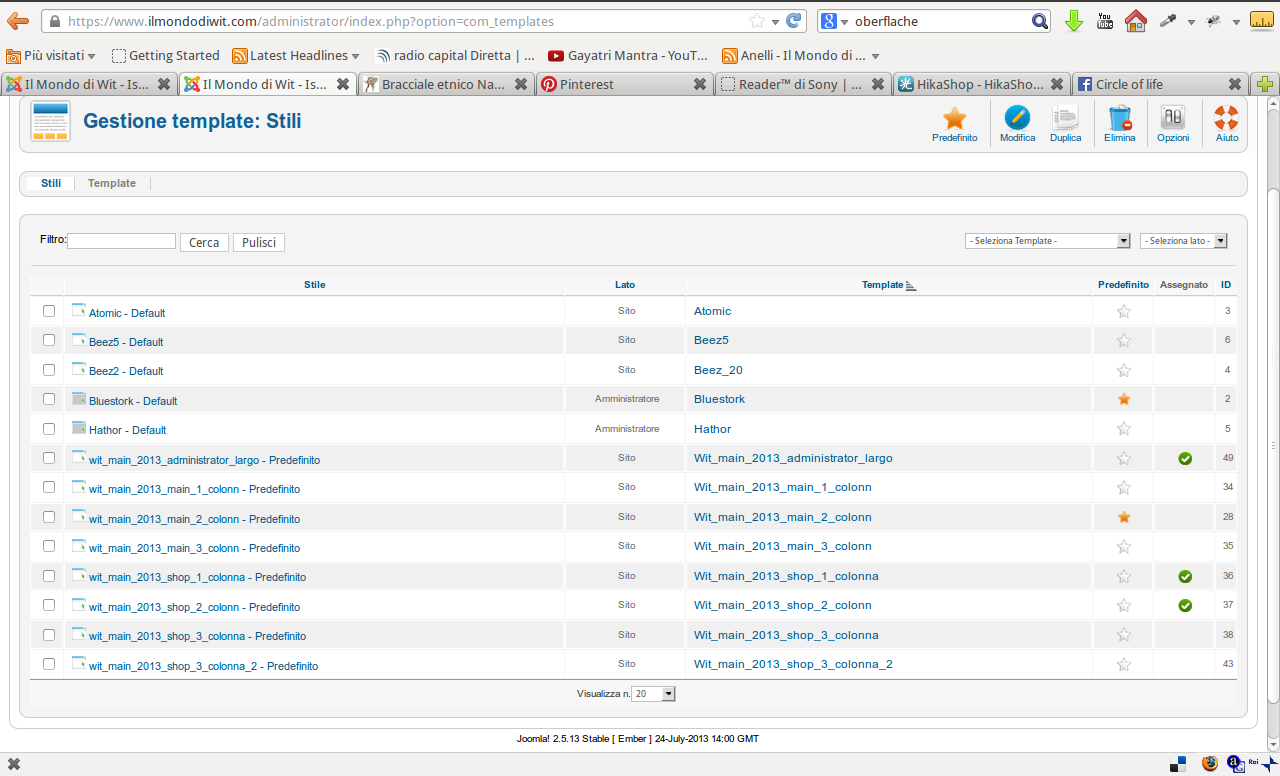
Is there somewhere some reference from the product to an menu or module which has references to the templates?
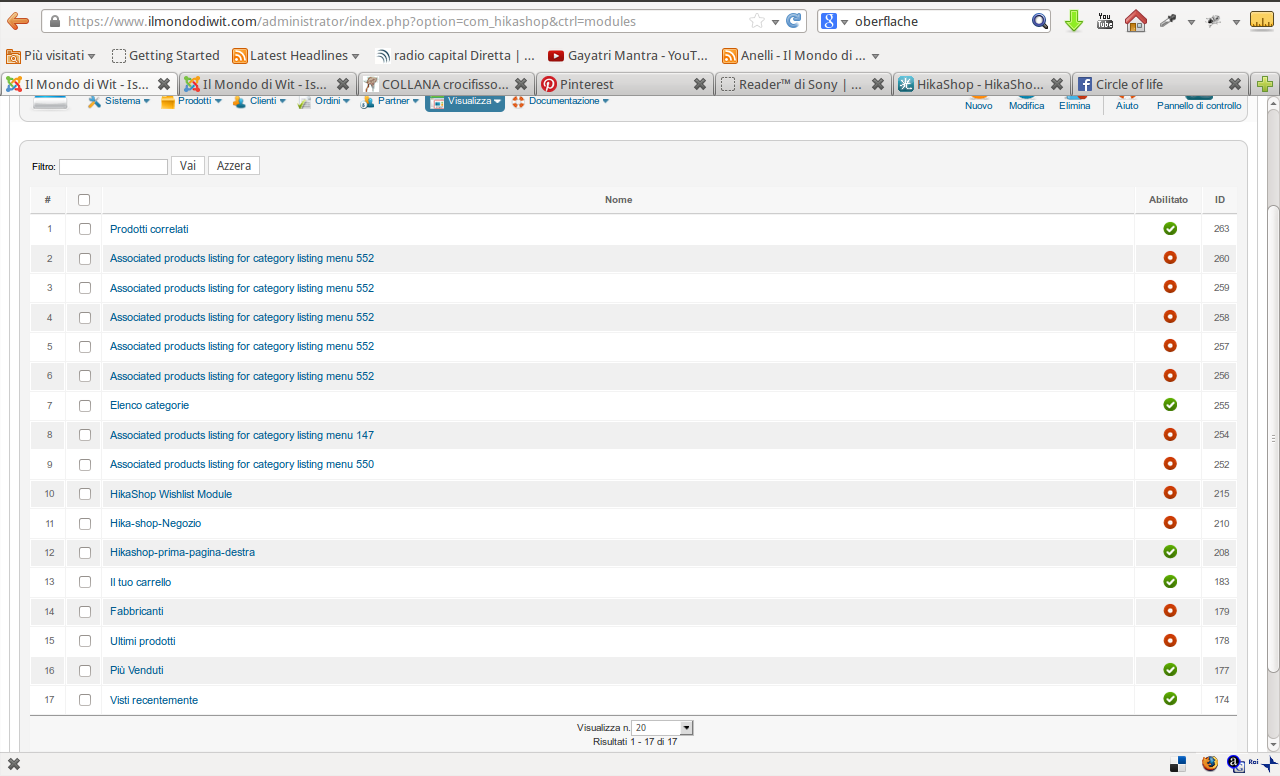
If i go browsing from one product to the other using the arrows or if i go from category browsing page. It doesn't matter where i come from. The issue shows on some products. Generally when i copy an older product to get a new one. The products i create new doesn't show that issue.Eliot wrote: How do you end to the second page?
Try to browse in this category from one product to another so you will see that some products are using different templates www.ilmondodiwit.com/shop/artigianali/82...-occhio-zircone.html (start browsing with the left arrow) there are 6 products turning to the wrong template.I think it comes from the page which redirect to this product.
here is the screenshotAlso, a screenshot of your templates configuration could be useful.
Is there somewhere some reference from the product to an menu or module which has references to the templates?
Last edit: 13 years 2 months ago by Cattelan.
Please Log in or Create an account to join the conversation.

13 years 2 months ago #116891
by Xavier
Replied by Xavier on topic View problem
Hi,
You products can have different templates because you have different templates set on your different menus.
When navigating through the arrows, it select the next product in the same category, the problem is when you have a product in many categories, the arrows switch you between categories and finally change the template.
Ex:
Product A > Category A > Template A
Product B > Category A > Template A
Product C > Category A & Category B > Template A
>>
Product D > Category B > Template B.
Here the product C can potentially redirect to the category B products because it's in two categories, and his main category is the B one.
So you have to change the template of the Category B (in my example), this probably come from a menu assignation.
Hope this will help you.
You products can have different templates because you have different templates set on your different menus.
When navigating through the arrows, it select the next product in the same category, the problem is when you have a product in many categories, the arrows switch you between categories and finally change the template.
Ex:
Product A > Category A > Template A
Product B > Category A > Template A
Product C > Category A & Category B > Template A
>>
Product D > Category B > Template B.
Here the product C can potentially redirect to the category B products because it's in two categories, and his main category is the B one.
So you have to change the template of the Category B (in my example), this probably come from a menu assignation.
Hope this will help you.
Please Log in or Create an account to join the conversation.
13 years 2 months ago #116967
by Cattelan
Replied by Cattelan on topic View problem
Thanks for your reply.
Where are the category templates setup? Because i have one template for all shop items assigned to the menu "Shop" !
regards
Where are the category templates setup? Because i have one template for all shop items assigned to the menu "Shop" !
regards
Please Log in or Create an account to join the conversation.
13 years 2 months ago #116970
by Cattelan
Replied by Cattelan on topic View problem
i checked my template settings. The default template i enabled all menus and i diasbled the shop menu.
in the shop template i enabled only the shop menu.
There are no hidden menus or menus assigned to any part or category of the shop !
now i try this product to make complete new (before i copied it from an old product) www.ilmondodiwit.com/shop/artigianali/81...-fatima-zircone.html and i attach the screenshot of the actual state.
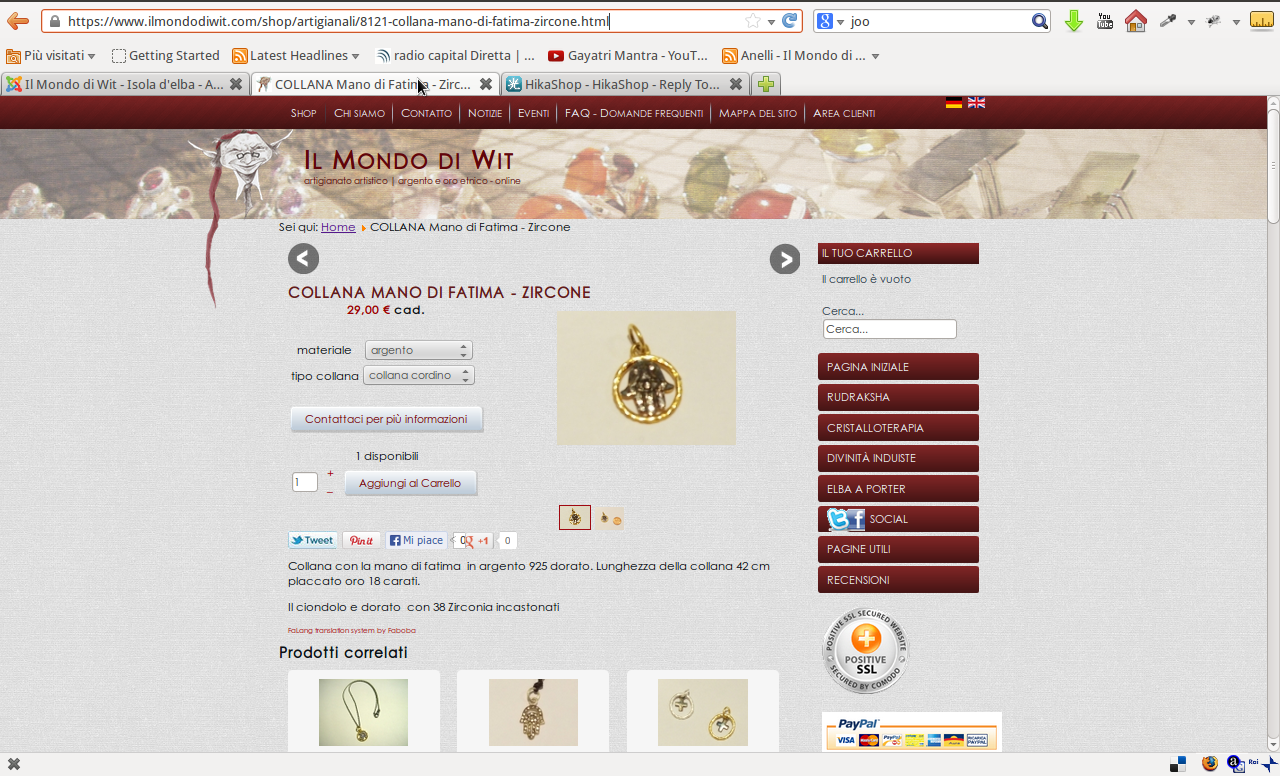
in the shop template i enabled only the shop menu.
There are no hidden menus or menus assigned to any part or category of the shop !
now i try this product to make complete new (before i copied it from an old product) www.ilmondodiwit.com/shop/artigianali/81...-fatima-zircone.html and i attach the screenshot of the actual state.
Please Log in or Create an account to join the conversation.
13 years 2 months ago #116976
by Cattelan
Replied by Cattelan on topic View problem
no i made this new from the scratch
www.ilmondodiwit.com/shop/artigianali/81...-fatima-zircone.html
and it also calls the wrong template and it is only in ONE category
and it also calls the wrong template and it is only in ONE category
Please Log in or Create an account to join the conversation.
13 years 2 months ago - 13 years 2 months ago #116978
by Cattelan
Replied by Cattelan on topic View problem
now i tried to add and product without giving it an category before the first saving and it is calling the right template
www.ilmondodiwit.com/shop/artigianali/8351-test.html
So my question: if it gets a wrong template assigning it an category when i create a new product where can i change it ?
i repeat i have no different templates assigned to different categories.
I also tried to cancel category of the affected product look here (after the categorys) www.ilmondodiwit.com/shop/gioielli.html but nothing happens. So somewhere it must be stored i think which template it has to get
Thanks for reply
So my question: if it gets a wrong template assigning it an category when i create a new product where can i change it ?
i repeat i have no different templates assigned to different categories.
I also tried to cancel category of the affected product look here (after the categorys) www.ilmondodiwit.com/shop/gioielli.html but nothing happens. So somewhere it must be stored i think which template it has to get
Thanks for reply
Last edit: 13 years 2 months ago by Cattelan.
Please Log in or Create an account to join the conversation.
13 years 1 month ago #117164
by Cattelan
Replied by Cattelan on topic View problem
Hallo again.
I wondered also another thing:
i have the HikaShop Content Module (list of categorys) associated to the shop menu (and only to this) and when the template is changing browsing the products also the module disappears. There is not only a template switch..
this is it how it should be (right template and right module on right position)
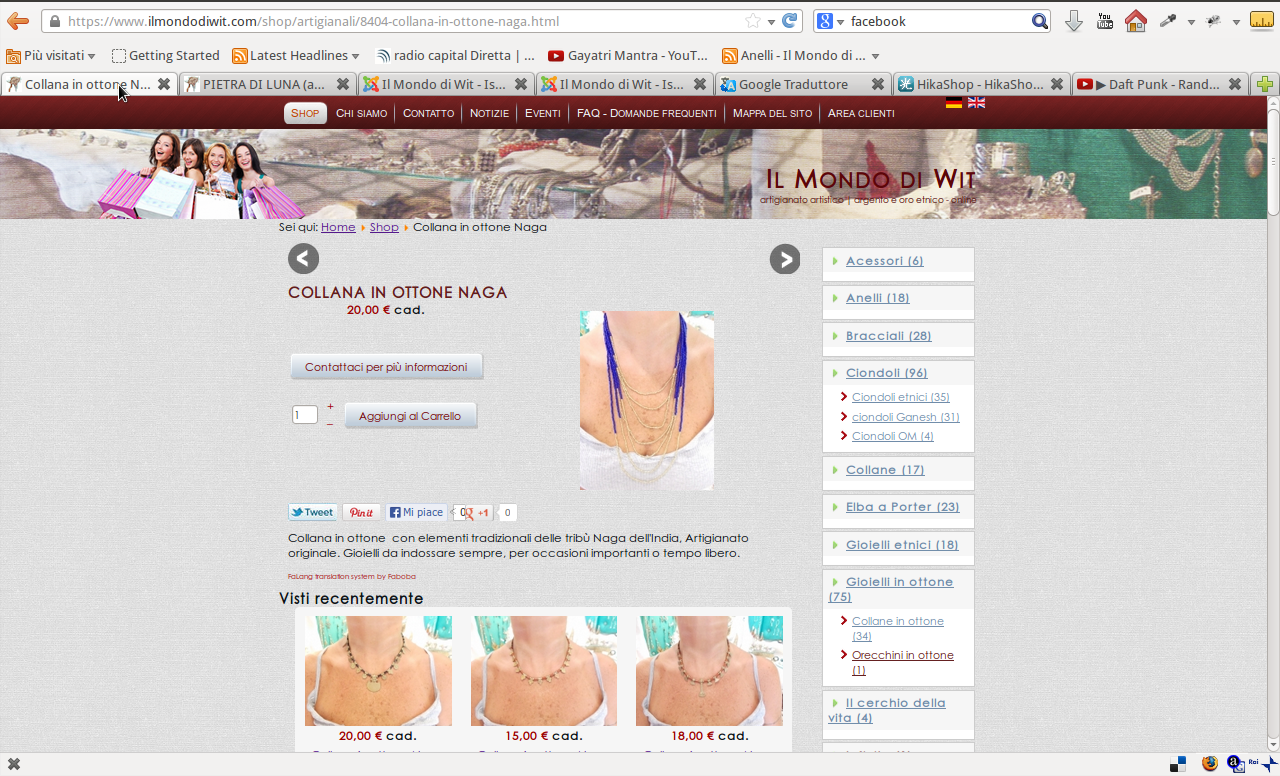
This is how it appears on some articles (module missing and wrong template) both template and module are assigned to the menu which is assigned to the hikashop component.
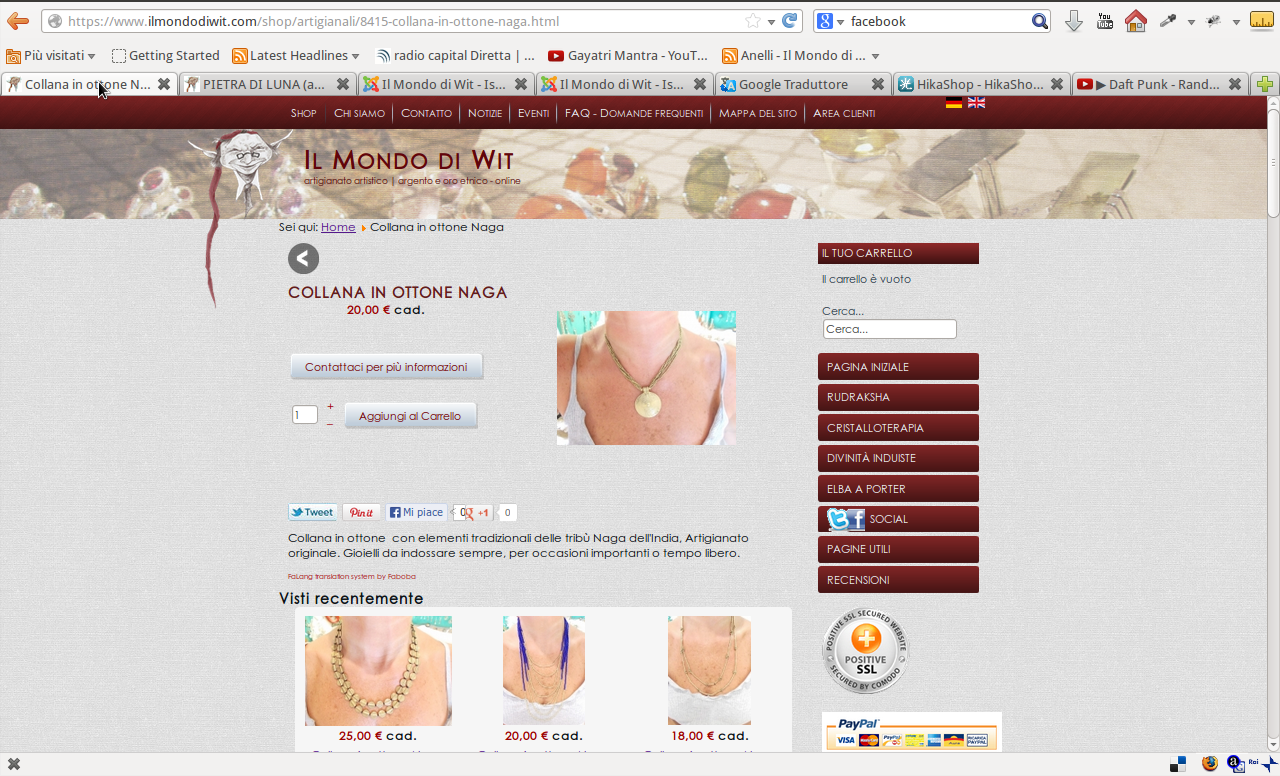
So i think that there is something wrong also with the association from menu an hikashop ??
thanks for your attention
I wondered also another thing:
i have the HikaShop Content Module (list of categorys) associated to the shop menu (and only to this) and when the template is changing browsing the products also the module disappears. There is not only a template switch..
this is it how it should be (right template and right module on right position)
This is how it appears on some articles (module missing and wrong template) both template and module are assigned to the menu which is assigned to the hikashop component.
So i think that there is something wrong also with the association from menu an hikashop ??
thanks for your attention
Please Log in or Create an account to join the conversation.
13 years 1 month ago #117310
by Xavier
Replied by Xavier on topic View problem
Hi,
It seems to be an assignation problem, the modules are maybe not set for the correct menu.
Be sure that the desired modules are set for the shop menu and not other and the other one only for non-shop menus.
It seems to be an assignation problem, the modules are maybe not set for the correct menu.
Be sure that the desired modules are set for the shop menu and not other and the other one only for non-shop menus.
Please Log in or Create an account to join the conversation.

13 years 1 month ago #117313
by nicolas
Replied by nicolas on topic View problem
Hi,
HikaShop does not handle the assignation of templates to menus nor the assignation of modules to menus.
If you get a module on some pages and not on others, it means that you disabled it on some menus via the "menu assignment" option of the module via the joomla module manager.
If you don't get the template you want on some menus, it means that you didn't assign the correct template to the menu in the template assignment option of the menu.
If you use the same menu for different categories, you won't be able to assign different templates to different categories since joomla can only differentiate the template based on the menu. It would require such extension which provides much more options to decide which template should be used on a given page: www.metamodpro.com/chameleon/chameleon
HikaShop does not handle the assignation of templates to menus nor the assignation of modules to menus.
If you get a module on some pages and not on others, it means that you disabled it on some menus via the "menu assignment" option of the module via the joomla module manager.
If you don't get the template you want on some menus, it means that you didn't assign the correct template to the menu in the template assignment option of the menu.
If you use the same menu for different categories, you won't be able to assign different templates to different categories since joomla can only differentiate the template based on the menu. It would require such extension which provides much more options to decide which template should be used on a given page: www.metamodpro.com/chameleon/chameleon
Please Log in or Create an account to join the conversation.
13 years 1 month ago #117655
by Cattelan
Replied by Cattelan on topic View problem
Hi.
Thanks both for reply.
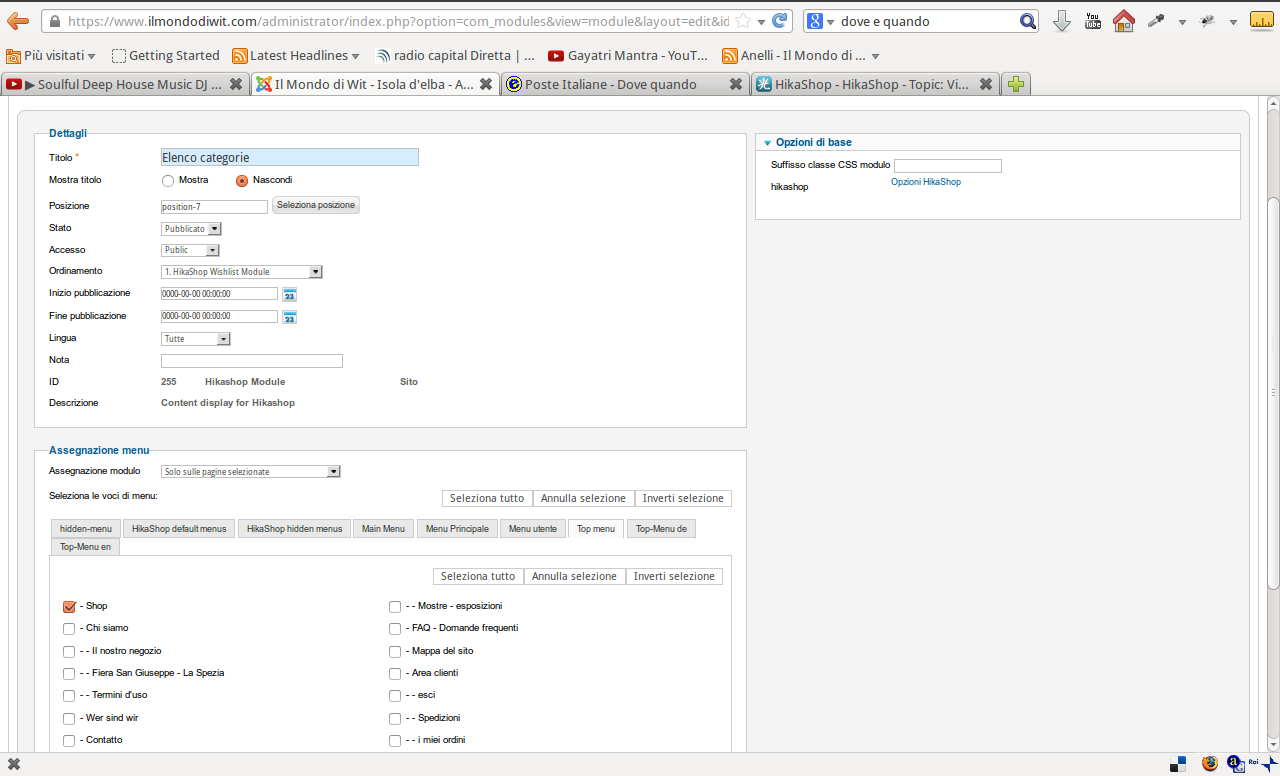
@Xavier this is the setting for the module which shows the categorys on the right side.
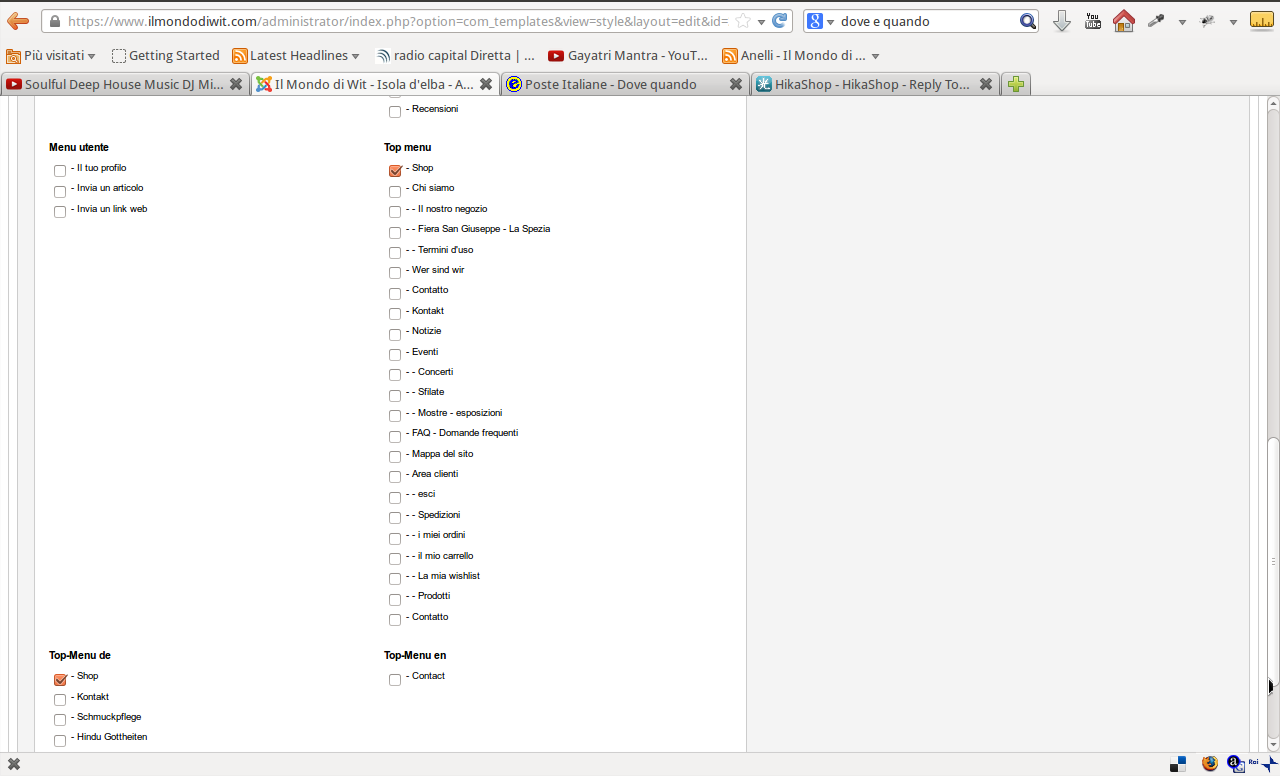
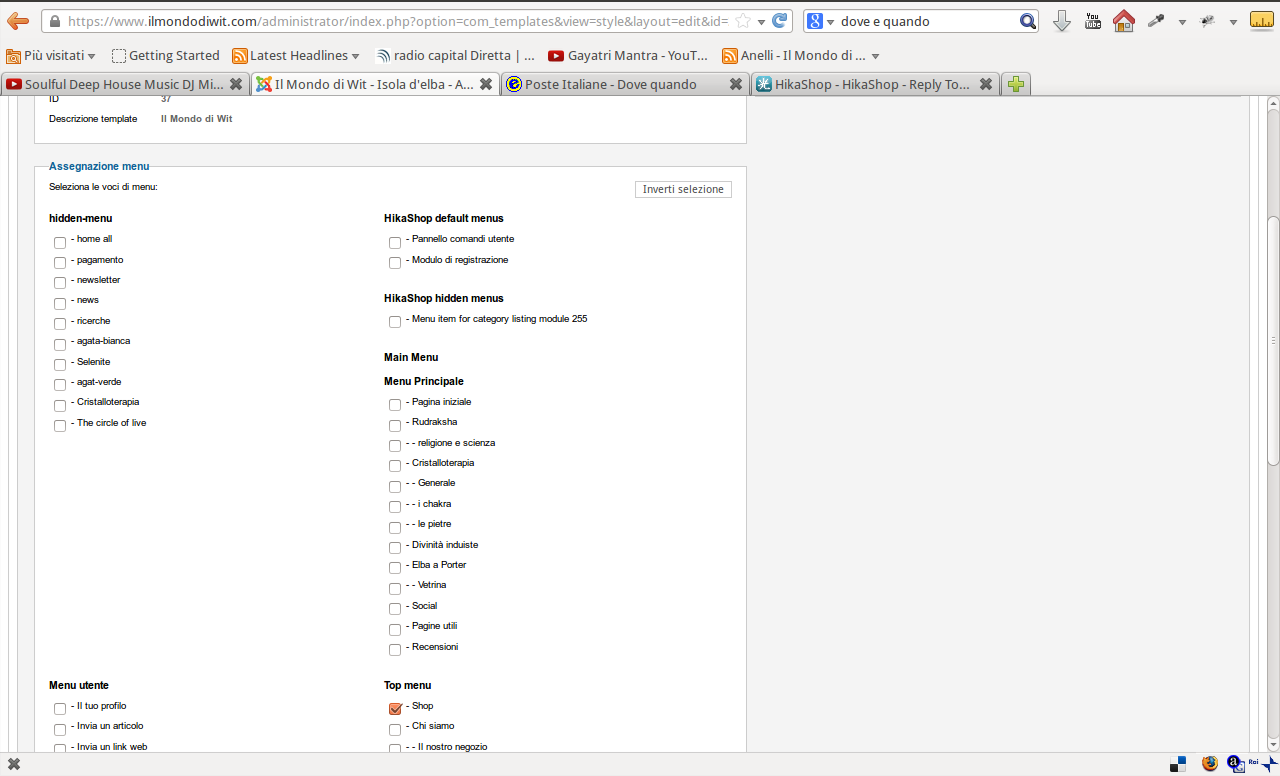
@Nicolas, this is the setting for the template which should be affect the shop-menu which is the only existing menu for the hikashop component.
Now what i'm wondering is that i inserted the products which you can find here after opening this topic. i paid attention on every step i made creating them . Some i made new, some i copied. And the result is that some are showing in one way and some in another.
here you can find them www.ilmondodiwit.com/shop/gioielli/87-collane-in-ottone.html
thanks and best regards
Thanks both for reply.
@Xavier this is the setting for the module which shows the categorys on the right side.
@Nicolas, this is the setting for the template which should be affect the shop-menu which is the only existing menu for the hikashop component.
Now what i'm wondering is that i inserted the products which you can find here after opening this topic. i paid attention on every step i made creating them . Some i made new, some i copied. And the result is that some are showing in one way and some in another.
here you can find them www.ilmondodiwit.com/shop/gioielli/87-collane-in-ottone.html
thanks and best regards
Please Log in or Create an account to join the conversation.
13 years 1 month ago #117886
by nicolas
Replied by nicolas on topic View problem
Hi,
I didn't find any difference. Can you give a link to two product pages with the different template so that we can analyze the differences ?
I didn't find any difference. Can you give a link to two product pages with the different template so that we can analyze the differences ?
Please Log in or Create an account to join the conversation.
13 years 1 month ago #119987
by Cattelan
Replied by Cattelan on topic View problem
Hallo. Sorry for late reply.
this is the right template:
www.ilmondodiwit.com/shop/artigianali/84...-in-ottone-naga.html
cliccing on the right arrow you come to:
www.ilmondodiwit.com/shop/artigianali/84...-in-ottone-naga.html
and i still cannot find why. i tryed to create the products new, copy, saving after first step eccc there is no sequence in creating products where i can say : "if i do this this and this then it happens"
Thanks for reply
this is the right template:
www.ilmondodiwit.com/shop/artigianali/84...-in-ottone-naga.html
cliccing on the right arrow you come to:
www.ilmondodiwit.com/shop/artigianali/84...-in-ottone-naga.html
and i still cannot find why. i tryed to create the products new, copy, saving after first step eccc there is no sequence in creating products where i can say : "if i do this this and this then it happens"
Thanks for reply
Please Log in or Create an account to join the conversation.
13 years 1 month ago #120005
by Eliot
Replied by Eliot on topic View problem
Hi there,
I really have few ideas about the origin of this issue.
Maybe you should try to move your products from one category to another (a new one) and see if it solves the problem.
Is there any other way to end up on the wrong template (except the arrows)?
I really have few ideas about the origin of this issue.
Maybe you should try to move your products from one category to another (a new one) and see if it solves the problem.
Is there any other way to end up on the wrong template (except the arrows)?
Please Log in or Create an account to join the conversation.
13 years 1 month ago #120177
by Cattelan
I really cannot imagine whats the problem ?? :S
Replied by Cattelan on topic View problem
I tried it but no change. it seems like once the pproduct created with this fault it gets it always.Eliot wrote: Maybe you should try to move your products from one category to another (a new one) and see if it solves the problem.
Yes, always when you go on the product page. If it comes from a search result, direct link, always it shows like this. It seems like joomla don't understands that the page of the affected products it renders a page which makes not part of hikashop which has assigned an menu which has assigned the template. Also the assigned module of the categorys on the right side doesn't show up because of this reason.Is there any other way to end up on the wrong template (except the arrows)?
I really cannot imagine whats the problem ?? :S
Please Log in or Create an account to join the conversation.
13 years 1 month ago #120375
by Cattelan
Replied by Cattelan on topic View problem
Hallo again. I have a new issue which maybe has the same oriigin.
I have changed the category of an article: from "Gioielli etnici" to "Japamala"
www.ilmondodiwit.com/shop/artigianali/51...rudraksha-10-mm.html
As you can see in the breadcrumb it still shows "Gioielli etnici" without out the arrows to switch to the other articles in this category.
when you go to category "Gioielli etnici" there you cannot find this product
www.ilmondodiwit.com/shop/gioielli/19-gioielli-etnici.html
You can find it in the new category "japamala"
www.ilmondodiwit.com/shop/gioielli/86-japa-mala.html
Where can i check in the database which category is written?? because in the backend it shows the right category.
For me its the same mystery like the original issue of this topic.
Thanks for reply
regards
I have changed the category of an article: from "Gioielli etnici" to "Japamala"
www.ilmondodiwit.com/shop/artigianali/51...rudraksha-10-mm.html
As you can see in the breadcrumb it still shows "Gioielli etnici" without out the arrows to switch to the other articles in this category.
when you go to category "Gioielli etnici" there you cannot find this product
www.ilmondodiwit.com/shop/gioielli/19-gioielli-etnici.html
You can find it in the new category "japamala"
www.ilmondodiwit.com/shop/gioielli/86-japa-mala.html
Where can i check in the database which category is written?? because in the backend it shows the right category.
For me its the same mystery like the original issue of this topic.
Thanks for reply
regards
Please Log in or Create an account to join the conversation.
13 years 1 month ago #120582
by nicolas
Replied by nicolas on topic View problem
Hi,
Regarding the URL of the product which doesn't change, that's typical from the SEF system you're using caching the URLs.
I would recommend flushing your SEF URLs cache on your website and that should fix that issue.
Regarding your previous problem, I don't see why that would be linked ot the SEF URLs cache, but it worth trying. Otherwise, I would recommend to turn off the SEF of your website and try again ? So you still have the same issue after that ? What are the URLs of the pages www.ilmondodiwit.com/shop/artigianali/84...-in-ottone-naga.html and www.ilmondodiwit.com/shop/artigianali/84...-in-ottone-naga.html that you provided previously with the SEF turned off ?
Regarding the URL of the product which doesn't change, that's typical from the SEF system you're using caching the URLs.
I would recommend flushing your SEF URLs cache on your website and that should fix that issue.
Regarding your previous problem, I don't see why that would be linked ot the SEF URLs cache, but it worth trying. Otherwise, I would recommend to turn off the SEF of your website and try again ? So you still have the same issue after that ? What are the URLs of the pages www.ilmondodiwit.com/shop/artigianali/84...-in-ottone-naga.html and www.ilmondodiwit.com/shop/artigianali/84...-in-ottone-naga.html that you provided previously with the SEF turned off ?
Please Log in or Create an account to join the conversation.
Time to create page: 0.343 seconds