
- Posts: 640
- Thank you received: 16
Change Add to Cart listing view
- PeterChain
-
 Topic Author
- Offline
Less
More
13 years 1 month ago #120769
by PeterChain
Change Add to Cart listing view was created by PeterChain
I'm using the "List" method for the Characteristics selection method Parameter in Configuration -> Main -> Product.
It works fine but want to make each row the slimmer the possible so I want to put the Add to Cart button and the Number of items in stock in the same row, not one over the other.
I've been digging inside many view files without success.
What file should I attack?
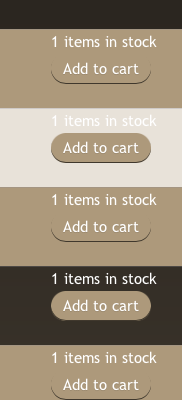
It works fine but want to make each row the slimmer the possible so I want to put the Add to Cart button and the Number of items in stock in the same row, not one over the other.
I've been digging inside many view files without success.
What file should I attack?
Please Log in or Create an account to join the conversation.

13 years 1 month ago #120793
by Eliot
Replied by Eliot on topic Change Add to Cart listing view
Hi there,
I think you can find what you're looking for in the view show_block_characteristics (Display>Views).
You should be able to edit the way characteristics are displayed here
I think you can find what you're looking for in the view show_block_characteristics (Display>Views).
You should be able to edit the way characteristics are displayed here
The following user(s) said Thank You: PeterChain
Please Log in or Create an account to join the conversation.
Time to create page: 0.172 seconds