
- Posts: 159
- Thank you received: 0
how to change the characteristics display
- Shafan Hameed
-
 Topic Author
- Offline
Less
More
13 years 2 weeks ago - 13 years 2 weeks ago #123325
by Shafan Hameed
how to change the characteristics display was created by Shafan Hameed
-- url of the page with the problem -- :
mywebsite.com/mypage
-- HikaShop version -- : x.x.x
-- Joomla version -- : x.x
-- PHP version -- : x.x.x
-- Browser(s) name and version -- : XXXXX x.x.x
-- Error-message(debug-mod must be tuned on) -- : Error_message
Hi, When we add characteristics in any product. It displays "Choose Options" instead of "Add To Cart".
how to disable "Choose Options" and let it display "Add To Cart" ?
-- HikaShop version -- : x.x.x
-- Joomla version -- : x.x
-- PHP version -- : x.x.x
-- Browser(s) name and version -- : XXXXX x.x.x
-- Error-message(debug-mod must be tuned on) -- : Error_message
Hi, When we add characteristics in any product. It displays "Choose Options" instead of "Add To Cart".
how to disable "Choose Options" and let it display "Add To Cart" ?
Last edit: 13 years 2 weeks ago by Shafan Hameed.
Please Log in or Create an account to join the conversation.

13 years 2 weeks ago #123334
by Jerome
Jerome - Obsidev.com
HikaMarket & HikaSerial developer / HikaShop core dev team.
Replied by Jerome on topic how to change the characteristics display
Hi,
For I understand, I think that you can change the translation of "CHOOSE_OPTIONS" in order to display the same text.
But the button will still redirect the user to the product page so he can choose the options for the product.
Regards,
For I understand, I think that you can change the translation of "CHOOSE_OPTIONS" in order to display the same text.
But the button will still redirect the user to the product page so he can choose the options for the product.
Regards,
Jerome - Obsidev.com
HikaMarket & HikaSerial developer / HikaShop core dev team.
Please Log in or Create an account to join the conversation.
- Shafan Hameed
-
Topic Author
- Offline
Less
More
- Posts: 159
- Thank you received: 0
13 years 2 weeks ago #123361
by Shafan Hameed
Replied by Shafan Hameed on topic how to change the characteristics display
Yes i agree it will redirect user to the product page. but the this i am saying is..
There are some products that their prices are not available and it shows Choose Options on them along with the products that prices are mentioned with if we add characteristics in them.
what i want is choose option label wont be displayed weather the price of a product is added or not. if the price is added it shows add to cart and if the price of product is not added it just shows the text Price not available that i have changed on the option and is showing currently
There are some products that their prices are not available and it shows Choose Options on them along with the products that prices are mentioned with if we add characteristics in them.
what i want is choose option label wont be displayed weather the price of a product is added or not. if the price is added it shows add to cart and if the price of product is not added it just shows the text Price not available that i have changed on the option and is showing currently
Please Log in or Create an account to join the conversation.

Less
More
- Posts: 12953
- Thank you received: 1778
13 years 2 weeks ago #123376
by Mohamed Thelji
Replied by Mohamed Thelji on topic how to change the characteristics display
Hi,
I think that you'll be able to do it by customizing the code of your "quantity" file of your "product" view, of your front-end template.
Also, even if your products have variants, you should be able to display their prices, did you set a price through the "price" tab of the main product pages ?
I think that you'll be able to do it by customizing the code of your "quantity" file of your "product" view, of your front-end template.
Also, even if your products have variants, you should be able to display their prices, did you set a price through the "price" tab of the main product pages ?
Please Log in or Create an account to join the conversation.
- Shafan Hameed
-
Topic Author
- Offline
Less
More
- Posts: 159
- Thank you received: 0
13 years 2 weeks ago #123428
by Shafan Hameed
Replied by Shafan Hameed on topic how to change the characteristics display
well no i didnt add some of the product`s prices but the products which i add prices in also shows choose options
Please Log in or Create an account to join the conversation.
13 years 2 weeks ago #123479
by Jerome
Jerome - Obsidev.com
HikaMarket & HikaSerial developer / HikaShop core dev team.
Replied by Jerome on topic how to change the characteristics display
Hi,
I don't understand.
We need some screenshots to understand of what's you are talking about.
Regards,
I don't understand.
We need some screenshots to understand of what's you are talking about.
Regards,
Jerome - Obsidev.com
HikaMarket & HikaSerial developer / HikaShop core dev team.
Please Log in or Create an account to join the conversation.
- Shafan Hameed
-
Topic Author
- Offline
Less
More
- Posts: 159
- Thank you received: 0
13 years 2 weeks ago #123517
by Shafan Hameed
Replied by Shafan Hameed on topic how to change the characteristics display
i got the screenshots but how to attach them ?? i cannot see any attachment link or button here :S
Please Log in or Create an account to join the conversation.
13 years 2 weeks ago #123539
by Jerome
Jerome - Obsidev.com
HikaMarket & HikaSerial developer / HikaShop core dev team.
Replied by Jerome on topic how to change the characteristics display
Hi,
Please use the "Reply topic" button, not the "quick reply" one.
You will have to complete interface which allow you to add attachments (and an editor with buttons, etc).
Regards,
Please use the "Reply topic" button, not the "quick reply" one.
You will have to complete interface which allow you to add attachments (and an editor with buttons, etc).
Regards,
Jerome - Obsidev.com
HikaMarket & HikaSerial developer / HikaShop core dev team.
Please Log in or Create an account to join the conversation.
- Shafan Hameed
-
Topic Author
- Offline
Less
More
- Posts: 159
- Thank you received: 0
13 years 2 weeks ago #123600
by Shafan Hameed
Replied by Shafan Hameed on topic how to change the characteristics display
in this pictures the prices are listed but still it is showing "Choose options". i want it to show "Add to Cart" here
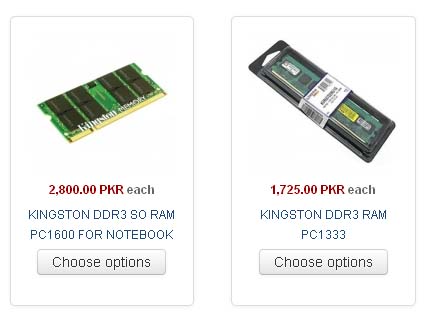
and here in this picture the prices are not listed and i dont want it to show any label. only the thing "Price Not Available" in the place of price and product name only.
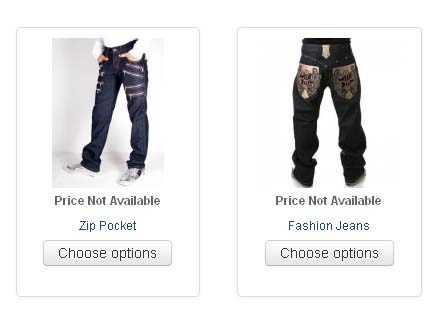
and here in this picture the prices are not listed and i dont want it to show any label. only the thing "Price Not Available" in the place of price and product name only.
Please Log in or Create an account to join the conversation.
- Shafan Hameed
-
Topic Author
- Offline
Less
More
- Posts: 159
- Thank you received: 0
13 years 2 weeks ago #123643
by Shafan Hameed
Replied by Shafan Hameed on topic how to change the characteristics display
Alive Anyone ?
Please Log in or Create an account to join the conversation.
13 years 2 weeks ago #123653
by Jerome
We will reply,we will.
But each time you make you a reply, you lost your position in the queue.
Jerome - Obsidev.com
HikaMarket & HikaSerial developer / HikaShop core dev team.
Replied by Jerome on topic how to change the characteristics display
Please note that it's Sunday.Shafan Hameed wrote: Alive Anyone ?
We will reply,we will.
But each time you make you a reply, you lost your position in the queue.
Jerome - Obsidev.com
HikaMarket & HikaSerial developer / HikaShop core dev team.
Please Log in or Create an account to join the conversation.
- Shafan Hameed
-
Topic Author
- Offline
Less
More
- Posts: 159
- Thank you received: 0
13 years 2 weeks ago #123665
by Shafan Hameed
Replied by Shafan Hameed on topic how to change the characteristics display
Ooh Sorry :$
Please Log in or Create an account to join the conversation.
- Shafan Hameed
-
Topic Author
- Offline
Less
More
- Posts: 159
- Thank you received: 0
13 years 2 weeks ago #123744
by Shafan Hameed
Replied by Shafan Hameed on topic how to change the characteristics display
Still waiting for the answer 
Please Log in or Create an account to join the conversation.

13 years 2 weeks ago #123748
by Xavier
Replied by Xavier on topic how to change the characteristics display
Hi,
You have to edit the view "product / listing_img_title" vie the menu Display > Views.
Then in this view, you have to customize the code by adding some if conditions.
For example, to hide the title if the price is not displayed, you can use:
around:
Here is some documentation about the layout customizations:
www.hikashop.com/support/documentation/1...ize-the-display.html
You have to edit the view "product / listing_img_title" vie the menu Display > Views.
Then in this view, you have to customize the code by adding some if conditions.
For example, to hide the title if the price is not displayed, you can use:
Code:
if($this->params->get('show_price')){
// ...
}
Code:
<!-- PRODUCT NAME -->
<span class="hikashop_product_name">
<?php if($this->params->get('link_to_product_page',1)){ ?>
<a href="<?php echo $link;?>">
<?php } ?>
<?php
echo $this->row->product_name;
?>
<?php if($this->params->get('link_to_product_page',1)){ ?>
</a>
<?php } ?>
</span>
<!-- EO PRODUCT NAME -->
Here is some documentation about the layout customizations:
www.hikashop.com/support/documentation/1...ize-the-display.html
Please Log in or Create an account to join the conversation.
- Shafan Hameed
-
Topic Author
- Offline
Less
More
- Posts: 159
- Thank you received: 0
13 years 2 weeks ago #123873
by Shafan Hameed
Replied by Shafan Hameed on topic how to change the characteristics display
Still didnt understand it :S
kindly also tell how to set Captcha in Hikashop Login, Registration Page
kindly also tell how to set Captcha in Hikashop Login, Registration Page
Please Log in or Create an account to join the conversation.
- Shafan Hameed
-
Topic Author
- Offline
Less
More
- Posts: 159
- Thank you received: 0
13 years 2 weeks ago #123880
by Shafan Hameed
Replied by Shafan Hameed on topic how to change the characteristics display
Well i tried it but its no use of it
Please Log in or Create an account to join the conversation.
13 years 2 weeks ago #123924
by Xavier
Replied by Xavier on topic how to change the characteristics display
Hi,
How do you set the text "Price Not Available" ? By overriding the "Free" translation ?
If it is, so you have to replace that if condition by another one checking if the price is equal to 0.
Regarding the Recaptcha, here is the documentation:
www.hikashop.com/support/documentation/7...-with-recaptcha.html
PS: "Still waiting for the answer" As Jerome said, when you are posting messages, the topic go back in the queue, so you lose your position and have to wait more time. Thanks to avoid that in order to have fastest answers.
How do you set the text "Price Not Available" ? By overriding the "Free" translation ?
If it is, so you have to replace that if condition by another one checking if the price is equal to 0.
Regarding the Recaptcha, here is the documentation:
www.hikashop.com/support/documentation/7...-with-recaptcha.html
PS: "Still waiting for the answer" As Jerome said, when you are posting messages, the topic go back in the queue, so you lose your position and have to wait more time. Thanks to avoid that in order to have fastest answers.
Please Log in or Create an account to join the conversation.
- Shafan Hameed
-
Topic Author
- Offline
Less
More
- Posts: 159
- Thank you received: 0
13 years 2 weeks ago #123938
by Shafan Hameed
Replied by Shafan Hameed on topic how to change the characteristics display
how to get the simple cart page shown here
www.hikashop.com/support/documentation/7...-with-recaptcha.html
its all aligned but to me everything is messy n mixed up.
www.hikashop.com/support/documentation/7...-with-recaptcha.html
its all aligned but to me everything is messy n mixed up.
Please Log in or Create an account to join the conversation.
13 years 2 weeks ago #123995
by Xavier
Replied by Xavier on topic how to change the characteristics display
Thanks to explain with more details what you need.
To change the position of the recaptcha there is options in the plugin configuration.
To add/remove fields in the form, you can do that from the menu Display > Custom fields.
To change the content of each checkout steps, you have to do that from Configuration > Checkout > Checkout tab.
Else any design changes can be made, here is some documentation about that:
www.hikashop.com/support/documentation/1...ize-the-display.html
To change the position of the recaptcha there is options in the plugin configuration.
To add/remove fields in the form, you can do that from the menu Display > Custom fields.
To change the content of each checkout steps, you have to do that from Configuration > Checkout > Checkout tab.
Else any design changes can be made, here is some documentation about that:
www.hikashop.com/support/documentation/1...ize-the-display.html
Please Log in or Create an account to join the conversation.
Time to create page: 0.341 seconds