
- Posts: 279
- Thank you received: 1
Select box on different line to label
- trogladyte
-
 Topic Author
- Offline
Less
More
13 years 1 week ago #124440
by trogladyte
Select box on different line to label was created by trogladyte
-- url of the page with the problem -- :
digitalguarddog.com/dd_dev/automobiles-t...yless-combos/product
-- HikaShop version -- : 2.2.1
-- Joomla version -- : 2.5.14
-- PHP version -- : 5.3.3
-- Browser(s) name and version -- : n/a
-- Error-message(debug-mod must be tuned on) -- : n/a
From the image, I need 2 things. Move the "Select a button ***" label to above the drop down selector. Second, close up the big gap between that and the base price (in dark red) above it.
I'm pretty sure the code I need to modify is in the option.php file (at least for moving the label above the select box), but I'm not so sure how to close that big gap up.
-- HikaShop version -- : 2.2.1
-- Joomla version -- : 2.5.14
-- PHP version -- : 5.3.3
-- Browser(s) name and version -- : n/a
-- Error-message(debug-mod must be tuned on) -- : n/a
From the image, I need 2 things. Move the "Select a button ***" label to above the drop down selector. Second, close up the big gap between that and the base price (in dark red) above it.
I'm pretty sure the code I need to modify is in the option.php file (at least for moving the label above the select box), but I'm not so sure how to close that big gap up.
Please Log in or Create an account to join the conversation.

13 years 1 week ago #124501
by Jerome
Jerome - Obsidev.com
HikaMarket & HikaSerial developer / HikaShop core dev team.
Replied by Jerome on topic Select box on different line to label
Hi,
You are right for the view "product | option" and the label/select position.
For your "gap", you have to edit the view "product | show_default". There are some "<br/>" inserted in the page after some blocks (dimensions, characteristics) that are not displayed in your case and which create this "gap".
Regards,
You are right for the view "product | option" and the label/select position.
For your "gap", you have to edit the view "product | show_default". There are some "<br/>" inserted in the page after some blocks (dimensions, characteristics) that are not displayed in your case and which create this "gap".
Regards,
Jerome - Obsidev.com
HikaMarket & HikaSerial developer / HikaShop core dev team.
Please Log in or Create an account to join the conversation.
- trogladyte
-
Topic Author
- Offline
Less
More
- Posts: 279
- Thank you received: 1
13 years 1 week ago #124513
by trogladyte
Replied by trogladyte on topic Select box on different line to label
Hi Jerome
Thanks for the reply. Gap now satisfactory.
What exactly do I edit, and how, to get the select box on 2 lines? I can see the code (I think), but can't make it 2 lines.
Thanks for the reply. Gap now satisfactory.
What exactly do I edit, and how, to get the select box on 2 lines? I can see the code (I think), but can't make it 2 lines.
Please Log in or Create an account to join the conversation.

13 years 1 week ago #124659
by Xavier
Replied by Xavier on topic Select box on different line to label
Hi,
You have to add "</tr><tr>" between the tags "</td>" and "<td>" to add a new line in the table.
You have to add "</tr><tr>" between the tags "</td>" and "<td>" to add a new line in the table.
Please Log in or Create an account to join the conversation.
- trogladyte
-
Topic Author
- Offline
Less
More
- Posts: 279
- Thank you received: 1
13 years 1 week ago - 13 years 1 week ago #124752
by trogladyte
Thanks Xavier - was trying all sorts of ways and it wasn't working.
Last thing...I'm seeing that certainly the HS product display is made up of a number of different PHP file - lising_price.php, option.php, etc. I have no doubt there's a good reason for this - maintenance I'm picking. However, it becomes confusing to a "coding tinkerer" like me who doesn't have the skills to follow it all through! :lol:
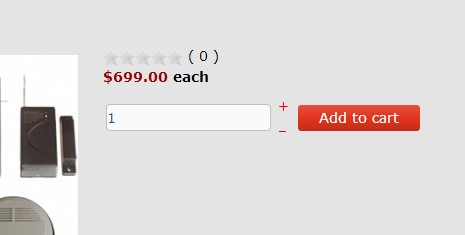
I want to add a line break between the star ratings (which come from listing_vote.php) and the price (which comes from listing_price.php). You'll see in the image that they're jammed up against each other. Now I know that \n is a line break in PHP, but I cannot figure out where this goes. I've tried a number of spots and it either has no effect or breaks the product listing entirely! :oops:
Can you tell me where to put this, or what I should do please? Thanks.
Replied by trogladyte on topic Select box on different line to label
Thanks Xavier - was trying all sorts of ways and it wasn't working.
Last thing...I'm seeing that certainly the HS product display is made up of a number of different PHP file - lising_price.php, option.php, etc. I have no doubt there's a good reason for this - maintenance I'm picking. However, it becomes confusing to a "coding tinkerer" like me who doesn't have the skills to follow it all through! :lol:
I want to add a line break between the star ratings (which come from listing_vote.php) and the price (which comes from listing_price.php). You'll see in the image that they're jammed up against each other. Now I know that \n is a line break in PHP, but I cannot figure out where this goes. I've tried a number of spots and it either has no effect or breaks the product listing entirely! :oops:
Can you tell me where to put this, or what I should do please? Thanks.
Last edit: 13 years 1 week ago by trogladyte.
Please Log in or Create an account to join the conversation.
13 years 1 week ago #124808
by Xavier
Replied by Xavier on topic Select box on different line to label
Hi,
I think that doing that via some css is not a bad thing
Here is some documentation:
www.hikashop.com/support/documentation/1...ize-the-display.html
I think that doing that via some css is not a bad thing
Here is some documentation:
www.hikashop.com/support/documentation/1...ize-the-display.html
Please Log in or Create an account to join the conversation.
- trogladyte
-
Topic Author
- Offline
Less
More
- Posts: 279
- Thank you received: 1
13 years 1 week ago #124934
by trogladyte
Replied by trogladyte on topic Select box on different line to label
Brilliant thank you!!
Please Log in or Create an account to join the conversation.
Time to create page: 0.207 seconds