

- Posts: 73
- Thank you received: 1
Problem with images display
13 years 1 week ago - 13 years 1 week ago #124890
by julian56
Problem with images display was created by julian56
Hi
Few weeks ago, I had problem with the images impossible to upload.
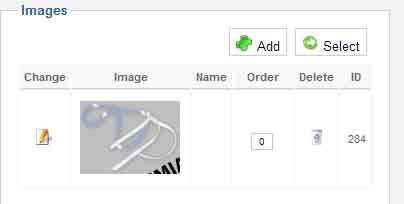
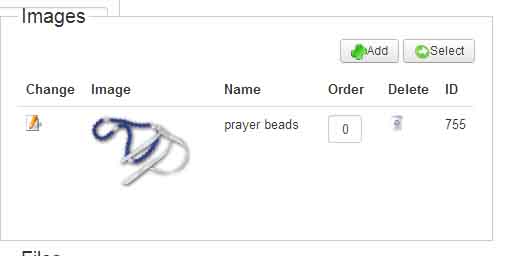
Now I can upload images but the system change the images I am trying to upload. The images appear blurred or even blurred with little modifications as you can see below.
What can I do?
This question of images is really frustrating
Actual image (any upload gives the same result):
Previous image:
Another issue I just noticed maybe related, the component Hikashop is running very slow on the administrator part of my website. It is impossible to access to the configuration. The other parts of the website are working very well.
Few weeks ago, I had problem with the images impossible to upload.
Now I can upload images but the system change the images I am trying to upload. The images appear blurred or even blurred with little modifications as you can see below.
What can I do?
This question of images is really frustrating
Actual image (any upload gives the same result):
Previous image:
Another issue I just noticed maybe related, the component Hikashop is running very slow on the administrator part of my website. It is impossible to access to the configuration. The other parts of the website are working very well.
Last edit: 13 years 1 week ago by julian56. Reason: add something
Please Log in or Create an account to join the conversation.

13 years 1 week ago #124921
by Xavier
Replied by Xavier on topic Problem with images display
Hi,
What can be done is import your images via ftp in the desired folders
"media/com_hikashop/upload" for the main images and "media/com_hikashop/upload/thumbnail_100x100" for the thumbnails (100x100 is the default value, you have to replace that with your parameters).
Then in the product edition page, select the image with the "select" button.
What can be done is import your images via ftp in the desired folders
"media/com_hikashop/upload" for the main images and "media/com_hikashop/upload/thumbnail_100x100" for the thumbnails (100x100 is the default value, you have to replace that with your parameters).
Then in the product edition page, select the image with the "select" button.
Please Log in or Create an account to join the conversation.
13 years 1 week ago #124939
by julian56
Replied by julian56 on topic Problem with images display
I will try to do that, but this is a strange solution when there is a direct option.
That means there is no solution for such problem? Do you know the reason of this modification of images being blurred?
That means there is no solution for such problem? Do you know the reason of this modification of images being blurred?
Please Log in or Create an account to join the conversation.
13 years 1 week ago #124941
by julian56
Replied by julian56 on topic Problem with images display
I understand how to proceed regarding the upload category, but I don't know how to proceed with the thumbnails?
As you can see in the screenshot I have several folder, so which one I have to choose and may I have to change the format of the picture?

As you can see in the screenshot I have several folder, so which one I have to choose and may I have to change the format of the picture?
Please Log in or Create an account to join the conversation.

13 years 1 week ago #124979
by Jerome
Jerome - Obsidev.com
HikaMarket & HikaSerial developer / HikaShop core dev team.
Replied by Jerome on topic Problem with images display
Hi,
Each folder contains thumbnails for a specific size.
The "old" way with the folders "thumbnail_..." and the new way with the subfolders in the folder "thumbnails".
Each time you put an image with a specific size, it will create a folder and put the images that you want to display into.
After that, I don't understand your question and what's your asking for.
Regards,
Each folder contains thumbnails for a specific size.
The "old" way with the folders "thumbnail_..." and the new way with the subfolders in the folder "thumbnails".
Each time you put an image with a specific size, it will create a folder and put the images that you want to display into.
After that, I don't understand your question and what's your asking for.
Regards,
Jerome - Obsidev.com
HikaMarket & HikaSerial developer / HikaShop core dev team.
Please Log in or Create an account to join the conversation.
Time to create page: 0.211 seconds