
Votes in the product page

-- Joomla version -- : Joomla! 3.1.5 Stable
-- PHP version -- : 5.3.10
-- Browser(s) name and version -- : Chrome
The product page shows the rating not aligned with the stars. Also a strange tooltip is show on the screen. See the screenshot attached.
The code is also really strange:
It looks like a bug in the code. I'm sorry but unable to find where islocated this part of the code. Any help will be welcomed.
Please Log in or Create an account to join the conversation.

With the tooltip system in Joomla 1.5 and 2.5 it is possible to put some HTML content in the content.
With my local Joomla 3.1.5 website, I don't have any kind of problem so I am thinking that your template might use the default tooltip system but maybe, have his own one (which does not support the HTML in the content).
Regards,
Jerome - Obsidev.com
HikaMarket & HikaSerial developer / HikaShop core dev team.
Please Log in or Create an account to join the conversation.
.hasTooltip {
display: inline;
}
Please Log in or Create an account to join the conversation.

I have exactly the same problem. I have HikaShop Essential: 2.2.3.
Could you please tell me where did you place that code? I can't seem to be able to find the right place to fix it.
Any help would be appreciated.
Regards
Please Log in or Create an account to join the conversation.

This css code can be placed in your template css file directly or in the frontend css file in HikaShop via the menu Configuration > Display > CSS.
Please Log in or Create an account to join the conversation.
Thank you for your reply.
Unfortunately that did not worked. is there a specific place that I have to place it in that CSS code?
The website is www.pramhandwarmers.co.uk/pram-pushchair.../category_pathway-14
Do you have any suggestions?
Regards
Karel
Please Log in or Create an account to join the conversation.

- Posts: 12953
- Thank you received: 1778
The problem is coming from the CSS code of the file "templates/meet_gavern/css/template.css" :
Please Log in or Create an account to join the conversation.
same template as you mentioned, and i was happy that hika starter and template is free but css is terrible.
Please help someone.
I open the css template and change to "Inline" but once i refresh page after i renamed IT COMES back like magic, I never saw that no where. The template has no option in admin and WHY WE CAN not rename !important? its open source and not protected so how it is possible it comes back?
Thansk for help.
Please Log in or Create an account to join the conversation.
I am sorry but I don't understand what you did.
Which file ? How ? Rename what ? Which template ? Not protected ?!
Please understand that the message of Mohamed was helping "karel" for his particular problem, in his website with his template.
If you have troubles, you can explain it, giving some useful information like you HikaShop version number, your Joomla version number, a link to your website, a screenshot of your problem, etc.
Otherwise, with the information we got. I can't say anything except that I don't understand anything. And it will not help you.
So please, help us to help you.
Regards,
Jerome - Obsidev.com
HikaMarket & HikaSerial developer / HikaShop core dev team.
Please Log in or Create an account to join the conversation.
joomla 3.3.1
template is latest 3.3.1 "templates/meet_gavern/css/template.css" :
SO when i disable or even delete the:
.hasTooltip {
display: block !important;
}
and refresh page on localhost i mean i work, it comes back, so i can nto make it work to 'inline'
thanks
Please Log in or Create an account to join the conversation.
The idea is to edit the file directly in your server (In Joomla 3, you can edit template CSS directly in the backend).
Regards,
Jerome - Obsidev.com
HikaMarket & HikaSerial developer / HikaShop core dev team.
Please Log in or Create an account to join the conversation.
:'( thats frustrated
I think I will report it to MeetGavern as this is not normal.
Any other ideas?
Please Log in or Create an account to join the conversation.
Its not normal, template should listen the man not doing alone what she want.
Should I hire for this stupid funny strange thing someone or hika will help me out?
I can nto wait few hours or 1 next day for answer pls help or i will choose another shopping cart, no prob.
Good I havent bought 59$ coz if i have this issue after i will scream like demon
:'(
Please Log in or Create an account to join the conversation.
I don't know this template, I don't know how it works or an url of your website.
So no, I don't have idea because I am currently blind.
Regards,
Jerome - Obsidev.com
HikaMarket & HikaSerial developer / HikaShop core dev team.
Please Log in or Create an account to join the conversation.
1. Go to in FTP or Localhost in this folder and get the file: ../templates/meet_gavern/less/override.less
2. Open blank file "override.less" with your text editor
3. Add this code a,nd save:
That's it!
 I found this help on Github post, that you CAN NOT overwrite .css files BUT add code to your "override.less" file for what you want to change. Then it will updates all css in the meet_gavern free joomla template.
Hope it helps!
PS: Posting here and explaining my issue just make me feel more frustrated as I was, the OWNER of this site and Hika should found better ADMINS for support.
To be admin means to have responsability and help ppl and not asking stupid question if all needed I said!
Please Log in or Create an account to join the conversation.
Also If you wish scrolling menu header and floating on that template; add this code to "Override.less" file:3bits wrote: -- HikaShop version -- : HikaShop Starter: 2.2.1
-- Joomla version -- : Joomla! 3.1.5 Stable
-- PHP version -- : 5.3.10
-- Browser(s) name and version -- : Chrome
The product page shows the rating not aligned with the stars. Also a strange tooltip is show on the screen. See the screenshot attached.
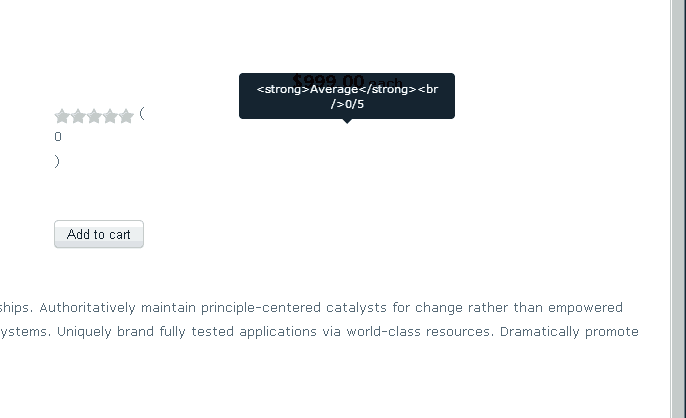
The code is also really strange:
Code:<span class="hasTooltip" title="" data-original-title="<strong>;Average<;/strong><;br />0/5" style="display: none;"> 0 </span>
It looks like a bug in the code. I'm sorry but unable to find where islocated this part of the code. Any help will be welcomed.

Please Log in or Create an account to join the conversation.

Thanks for the tips on the CSS for the template.
Please understand that this forum if for HikaShop support, not template CSS corrections. You should seek advice with your template provider if the template is not behaving properly. We're doing our best to answer questions, but we can't answer to things we don't know about.
Please Log in or Create an account to join the conversation.
Ok no prob I understand, BUT main problem was with Hika element votes stars what was not showing correct, so even if it was other template and not hika, I think generaly for joomal it should be in docs of your hika zip filenicolas wrote: Hi,
Thanks for the tips on the CSS for the template.
Please understand that this forum if for HikaShop support, not template CSS corrections. You should seek advice with your template provider if the template is not behaving properly. We're doing our best to answer questions, but we can't answer to things we don't know about.
as afetr what i saw 90% of bootstrap and responsive joomla templates has same issue.
Anyways no prob I'm happy i found answer alone, as i'm not a coder so i am a girl as well and new to CSS and php.
Have a nice day.
PS: Is there some coupon for business Hika btw? thx
Please Log in or Create an account to join the conversation.
We don't have any coupon campaign running at the moment.
Please Log in or Create an account to join the conversation.